11 Common Malware Types and How to Spot Them

Quick Answer
Malware includes harmful software like viruses, ransomware, spyware, and trojans designed to damage systems or steal data. Common warning signs include slow device performance, unexpected pop-ups, unknown programs, disabled security tools, and suspicious emails or links. Recognizing these threats early helps prevent data loss and cyberattacks.
Modern businesses and everyday users rely heavily on connected devices, cloud platforms, and online communication. Unfortunately, cybercriminals depend on those same technologies to launch attacks. One of their most dangerous tools is malware.
Malware is short for “malicious software.†It refers to any harmful program created to infiltrate devices, networks, or systems without permission. Once inside, malware can steal information, damage files, spy on activity, lock users out of systems, or disrupt operations completely.
Learning how different malware strains operate can help you recognize suspicious activity early and reduce the risk of severe damage. Below are eleven major malware categories, the warning signs associated with them, and practical ways to respond.
1. Virus Malware
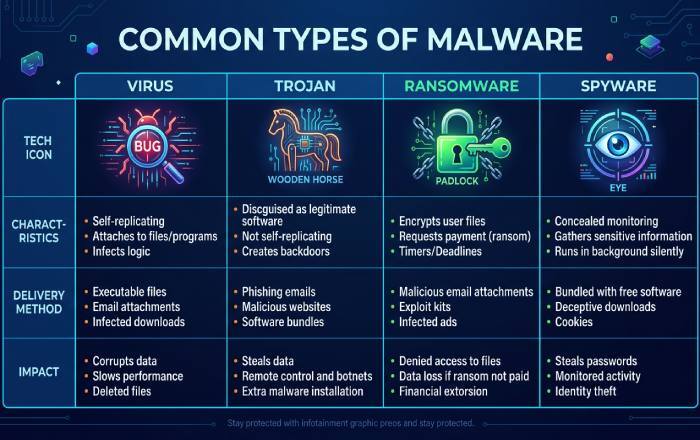
A computer virus is one of the oldest and most recognized forms of malware. It attaches itself to legitimate files or software and spreads when users open infected programs. Once activated, it can corrupt files, steal data, or damage operating systems.
Warning Signs
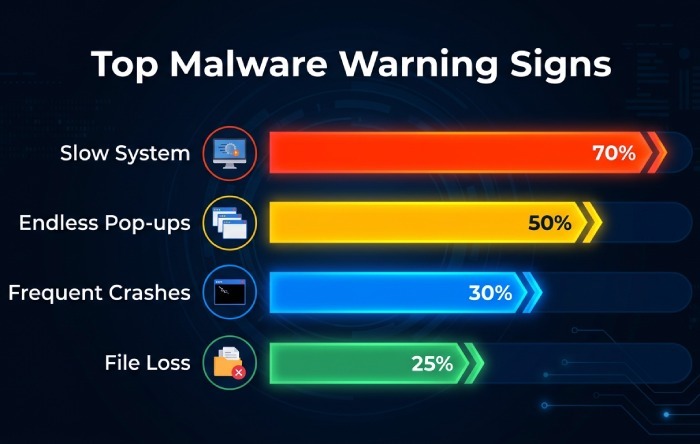
- Constant pop-up windows
- Unexpected system slowdowns
- Programs crashing frequently
- Strange emails sent from your account
- Browser homepage changes without permission
How to Remove It
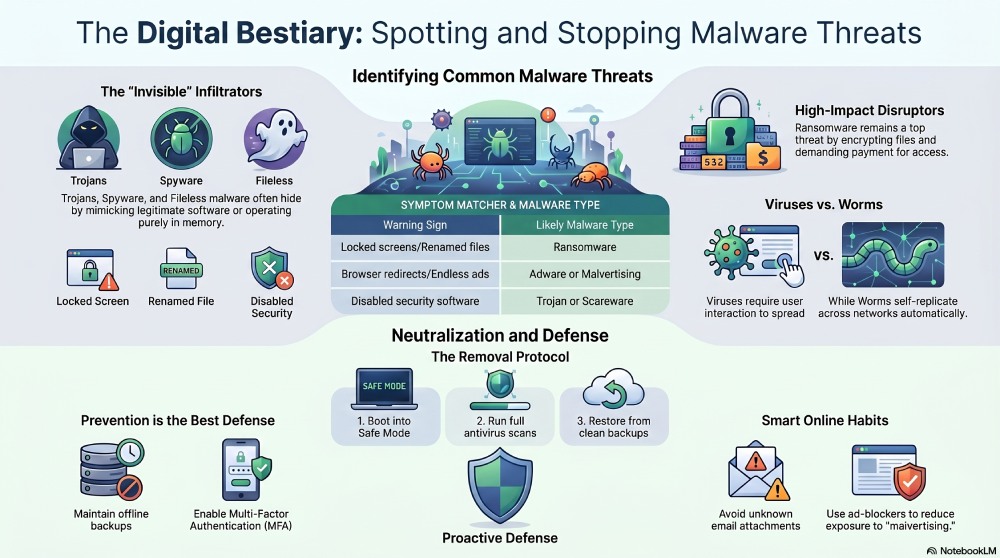
Boot your device into Safe Mode and run a full antivirus scan. Repeat scans to ensure no infected files remain hidden in the system.
2. Worms
Worms are self-replicating malware programs that spread across networks without needing user interaction. Unlike traditional viruses, worms do not always need to attach themselves to another file to spread.
Warning Signs
- Rapid loss of storage space
- Slow network performance
- Random file deletion
- Applications freezing or crashing repeatedly
How to Remove It
Install trusted antivirus software and update it immediately. Clearing temporary internet files and uninstalling unfamiliar applications can also help eliminate hidden infections.
3. Trojan Malware
A Trojan disguises itself as legitimate software to trick users into installing it. Once active, it may create backdoors, steal information, or allow hackers remote access to the system.
Warning Signs
- Security software suddenly disabled
- Strange desktop behavior
- Missing taskbar or icons
- Random cursor movement
- Unusual alerts or messages
How to Remove It
Run a specialized anti-malware scan and restore the system to an earlier clean backup point if available.
4. Hybrid Malware
Hybrid malware combines multiple attack techniques into a single threat. For example, one attack may include both Trojan and worm capabilities to maximize damage and spread quickly.
Warning Signs
- Missing or corrupted files
- Random warning messages
- Frequent pop-ups
- Severe system lag
How to Remove It
Use comprehensive security tools capable of identifying multiple malware families at once. A deep system scan is usually necessary.
5. Adware
Adware is designed to bombard users with advertisements, often redirecting browsers to questionable websites. While some adware is simply annoying, malicious versions can expose users to further infections.
Warning Signs
- Endless advertisements
- Redirected searches
- Browser settings changing unexpectedly
- Slower internet speeds
How to Remove It
Delete suspicious browser extensions and unfamiliar software. Reset browser settings and reinstall the browser if necessary.
6. Malvertising
Malvertising involves hiding malware inside online advertisements. Users may become infected simply by clicking an ad—or sometimes just by visiting a compromised website.
Warning Signs
- Fake prize notifications
- Poorly designed ads
- Spelling mistakes in promotions
- Offers that appear unrealistic
How to Remove It
Run antivirus scans and clear your browser cache. Using browser security tools and ad blockers can also reduce exposure.
7. Spyware
Spyware secretly monitors user activity and collects sensitive information such as passwords, browsing habits, and financial details.
Warning Signs
- Browser redirects
- Unauthorized account logins
- Excessive unwanted ads
- Slow application performance
- Search engine settings changing automatically
How to Remove It
Disconnect the device from the internet, remove suspicious downloads, and run a full spyware detection scan before reconnecting*.
8. Ransomware
Ransomware encrypts files or locks systems until victims pay money to regain access. It remains one of the most financially damaging cyber threats today.
Warning Signs
- Files renamed with unfamiliar extensions
- Missing documents
- Locked screens demanding payment
- Inaccessible folders
How to Remove It
Prevention is the strongest defense. Maintain secure backups stored offline or in protected cloud environments. Avoid downloading unknown attachments or clicking suspicious links.
9. Scareware
Scareware pretends to be legitimate security software and frightens users into downloading fake fixes or malicious programs.
Warning Signs
- Fake antivirus alerts
- Constant warning pop-ups
- Device instability
- Legitimate antivirus tools disabled unexpectedly
How to Remove It
Uninstall suspicious programs and reboot in Safe Mode*. Then install trusted security software to clean remaining threats.
10. Bot Malware
Bots allow attackers to remotely control infected devices. Groups of infected machines, known as botnets, are commonly used for spam campaigns, phishing, and large-scale cyberattacks.
Warning Signs
- Device takes longer to shut down
- Applications fail repeatedly
- Emails appear in your sent folder that you never wrote
- Strange account activity
How to Remove It
Immediately change passwords** for important accounts and use reputable botnet removal tools to clean the infected system.
11. Fileless Malware
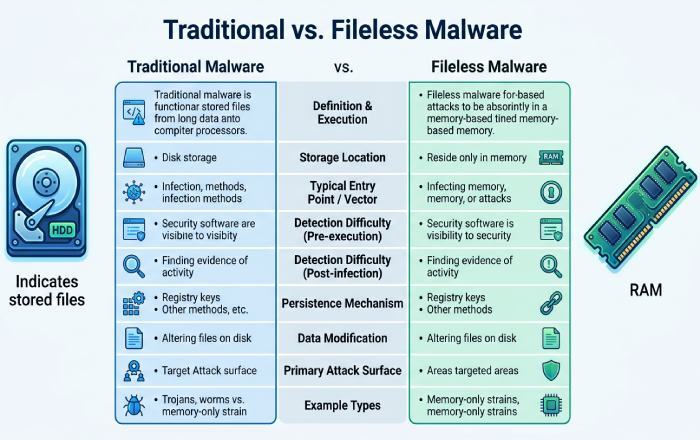
Fileless malware works differently from traditional malware because it operates directly in system memory instead of relying on malicious files stored on disk. This makes it much harder to detect.
Warning Signs
- Programs behaving abnormally
- Sluggish system performance
- Security tools missing suspicious activity
How to Remove It
Use advanced endpoint protection software capable of detecting suspicious memory activity and behavior-based attacks.
Best Practices to Prevent Malware Attacks
Reducing malware risks requires a combination of security tools and smart online habits. Here are some important precautions:
- Keep operating systems and applications updated
- Use strong antivirus and anti-malware software
- Avoid opening unknown email attachments
- Be cautious with links from untrusted sources
- Back up important files regularly
- Enable multi-factor authentication on accounts
- Train employees and users to recognize phishing attempts
Strong email security with SPF, DKIM, and DMARC can reduce the risk of malware delivery through fake emails.
Cybercriminals constantly evolve their tactics, making malware more sophisticated each year. Staying informed about common malware types and recognizing suspicious behavior early can significantly reduce the chances of a successful attack.
General Manager
General Manager at DuoCircle. Product strategy and commercial lead across the email security portfolio.
Secure your email infrastructure
Protect, authenticate, and deliver. Contact our team to find the right solution.