5 Reasons To Test SPF Configuration Before Sending Emails

Quick Answer
Testing your SPF configuration before a campaign goes live is a core part of modern email authentication. The Sender Policy Framework helps receiving mail servers verify whether a sending IP address is permitted to send on behalf of a specific domain name.
Testing your SPF configuration before a campaign goes live is a core part of modern email authentication. The Sender Policy Framework helps receiving mail servers verify whether a sending IP address is permitted to send on behalf of a specific domain name. But an SPF record only protects your domain if it is accurate, complete, and aligned with your actual sending infrastructure.
A pre-send SPF check using an SPF validator or SPF record checker can reveal SPF errors, missing authorized senders, DNS problems, and compliance gaps before they affect email deliverability. Whether you use MxToolBox SuperTool, EasyDMARC, EasySender, Delivery Center, or AutoSPF’s free SPF checker, performing an SPF lookup and SPF validation should be part of every serious email security workflow.
Reason #1: Prevent Email Spoofing and Domain Impersonation
Email spoofing remains one of the most common techniques used by malicious senders to impersonate trusted brands, employees, vendors, and executives. If your SPF record is missing, incorrect, or too permissive, attackers may attempt to send fraudulent messages that appear to come from your domain name.
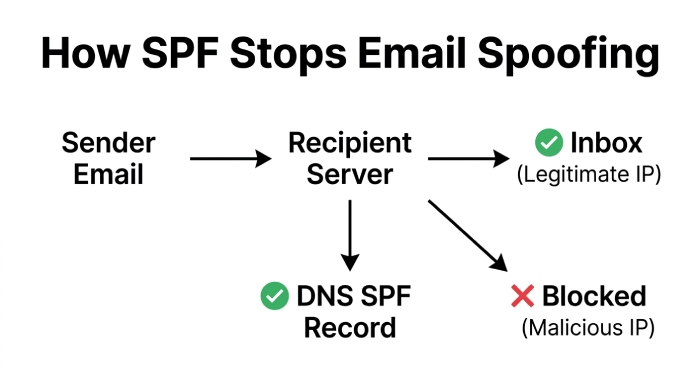
The Sender Policy Framework acts as an authentication protocol that tells receiving servers which sources are allowed to send mail for your domain. During an SPF check, the recipient’s mail server performs an SPF lookup against DNS and compares the sending IP address with the authorized mechanisms in the SPF record.
How SPF Reduces Abuse
A valid SPF record supports fraud reduction, spam prevention, and protection against email-based threats. When combined with DKIM and DMARC, SPF becomes part of a layered email authentication strategy that helps mailbox providers identify unauthorized activity.
For example, DMARC uses SPF validation and DKIM results to determine whether a message should be accepted, quarantined, or rejected. Tools such as EasyDMARC’s DMARC Record Checker, DMARC Record Generator, SPF Record Generator, SPF Raw Checker, DKIM Record Checker, and DKIM Record Generator can help administrators understand how these protocols work together.
What to Test Before Sending
Before launching email, use an SPF validator or SPF record checker to check SPF records for:
- Missing or outdated authorized senders
- Incorrect IP address entries
- Unnecessary include mechanisms
- Overly broad subnets
- Syntax issues that may break SPF validation
- Alignment problems with DMARC
A proper SPF check helps detect compliance issues before attackers exploit them. It also reduces the security risk of domain impersonation and improves overall email security.
Reason #2: Improve Email Deliverability and Inbox Placement
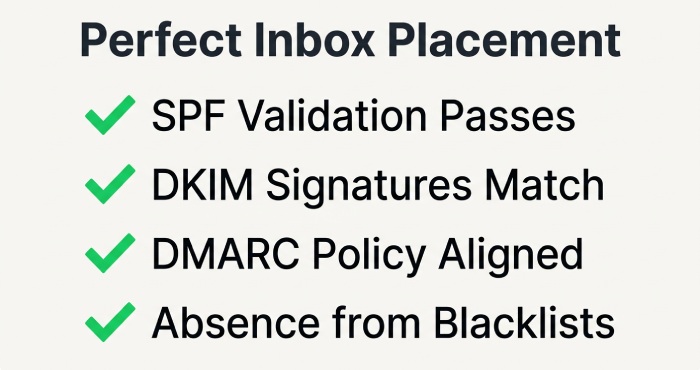
Poor SPF configuration can cause legitimate emails to be rejected, quarantined, or routed to spam. Mailbox providers use SPF validation as one of many signals when deciding whether to trust a message. If your SPF record fails, your email deliverability may suffer immediately.
A failed SPF check does not always mean a campaign is malicious, but it can create uncertainty for receiving systems. When combined with poor engagement, blacklists, or weak domain reputation, SPF errors can lead to serious email delivery problems.
Why Receiving Servers Evaluate SPF
When a recipient server receives a message, it performs an SPF lookup against the domain name used in the envelope sender. The server then checks whether the sending IP address matches the SPF record. If it does, the message passes SPF validation; if not, the message may fail the record check
That simple SPF record lookup can strongly influence inbox placement. This is why an SPF record checker is useful before any high-volume send. It confirms whether your Sender Policy Framework setup supports email deliverability rather than undermining it.
Run a Pre-Send Deliverability Test
A deliverability test should include SPF, DKIM, DMARC, MX Lookup, DNS Lookup, and blacklist checks. Platforms such as MxToolBox, EasyDMARC, and Delivery Center can scan domain records, analyze headers, identify blacklists, and provide Email Health reporting.
An SPF validator can also be part of broader reputation monitoring and monitoring workflows. By combining SPF validation with DNS Lookup, MX Lookup, DKIM testing, DMARC testing, and blacklists review, you get a more complete view of email authentication and potential email threats before users ever receive a message.
Reason #3: Avoid SPF Record Syntax Errors and Misconfigurations
Even small SPF record mistakes can create large delivery and security issues. The Sender Policy Framework has specific syntax requirements, and receiving servers may ignore or fail an SPF record if it is malformed.
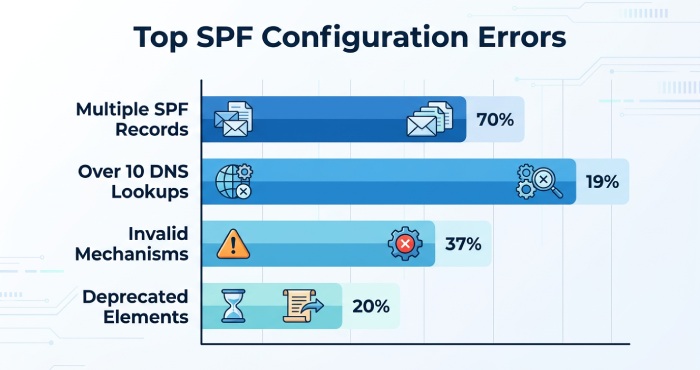
Common SPF errors include multiple SPF records on the same domain name, invalid mechanisms, incorrect include statements, missing spaces, duplicate entries, and exceeding the DNS lookup limit. These issues can prevent SPF validation from working correctly.
Common SPF Misconfiguration Examples
A reliable SPF record checker or SPF validator can identify problems such as:
- More than one SPF record published for a domain name
- Invalid ip4 or ip6 formatting
- Incorrect include domains
- Excessive SPF lookup depth
- Improper use of ~all, -all, or ?all
- Deprecated mechanisms
- Unnecessary subnets that expand sending permission too broadly
A diagnostic test can also reveal whether your SPF configuration creates an unintended security risk. For example, including a third-party service that no longer sends email for your organization may allow unauthorized systems to pass an SPF check.
Tools That Help Validate SPF Syntax
An SPF record checker from MxToolBox SuperTool, EasyDMARC, EasySPF, or similar platforms can perform an SPF record lookup and highlight syntax problems. Some services also provide an SPF record generator, application programming interface(API) Reference documentation, and automated validation for technical teams.
Broader domain tools may include a Domain Scanner, BIMI Record Checker, BIMI Record Generator, MTA-STS Record Checker, TLS-RPT Record Checker, and Phishing Link Checker. These features are useful when SPF compliance is part of a larger email security and brand protection program.
Reason #4: Ensure All Authorized Sending Services Are Included
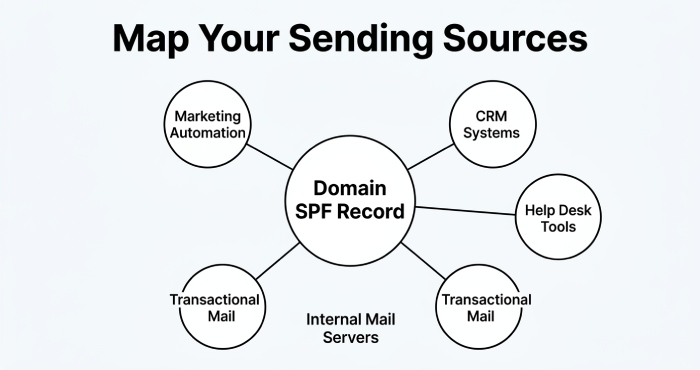
Most organizations send email from more than one platform. Your marketing automation tool, CRM, help desk, billing system, ecommerce platform, HR software, and internal mail servers may all send messages using the same domain name. If any legitimate service is missing from the SPF record, its messages may fail SPF validation.
This is why every SPF check should confirm that all authorized senders are included and that obsolete services are removed. An SPF validator does more than perform a basic record check; it helps verify whether your actual sending infrastructure matches your published Sender Policy Framework policy.
Map Every Sending Source
Before you check SPF records, create an inventory of all systems that send mail for your domain. Include:
- Primary mail servers
- Cloud email providers
- Marketing platforms
- Transactional email services
- Customer support tools
- Security awareness platforms such as KnowBe4
- Third-party SaaS applications
- Dedicated IP address pools and subnets
After building the inventory, compare it against the SPF record. A thorough SPF lookup should confirm that each legitimate sender appears through an include, ip4, ip6, a, or mx mechanism where appropriate.
Avoid Over-Permissive SPF Policies
Adding every possible service without review can weaken email authentication. An SPF record should be precise, not overly broad. Large subnets, unnecessary includes, and stale vendors can expose your domain name to abuse.
Use a compliance check or SPF record checker to detect compliance gaps and verify SPF compliance before launch. This type of validation protects against both accidental email delivery problems and avoidable security issues.
Reason #5: Protect Your Sender Reputation Before Campaign Launches
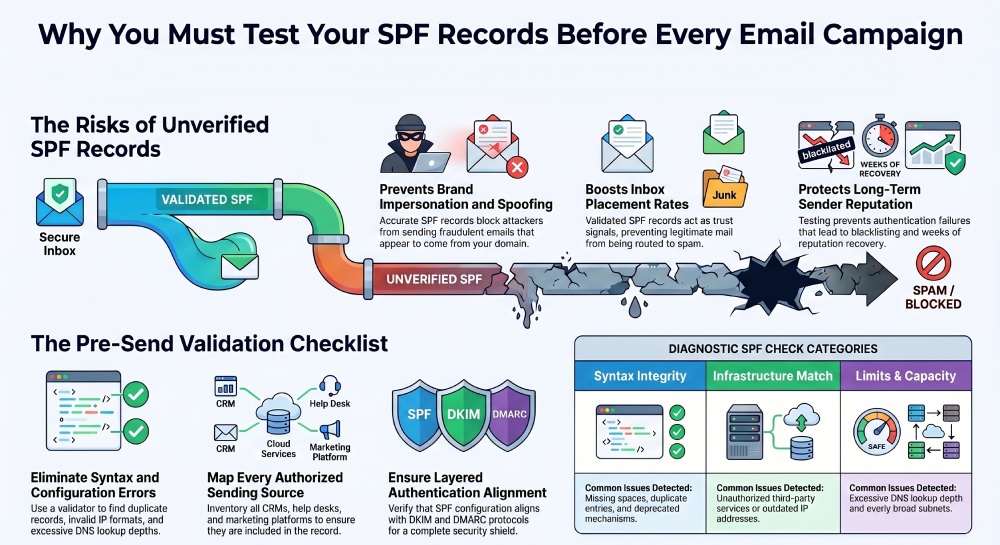
Your domain reputation is built over time and can be damaged quickly. A poorly tested SPF configuration may cause failed authentication, spam filtering, blacklist placement, or reduced trust from mailbox providers. Once reputation damage occurs, recovery can take days or weeks.
Performing an SPF check before sending protects email deliverability by confirming that your SPF record, DKIM, and DMARC policies are working as expected. It also supports ongoing email health, reputation monitoring, and periodic monitoring across all sending domains.
Use SPF Testing as Part of Risk Assessment
Before every major campaign, run an SPF lookup and broader risk assessment. A strong pre-send process should include:
- SPF validation with an SPF validator
- SPF record checker results review
- DNS Lookup and MX Lookup
- DKIM alignment checks
- DMARC policy review
- Blacklists screening
- Header analysis to analyze headers from test messages
- Email Health and domain reputation reports
Solutions reviewed on platforms such as G2 Crowd and SourceForge often provide combinations of these features. EasyDMARC, MxToolBox, Alert Manager, and similar tools help teams scan domain records, identify misconfigurations, and monitor authentication status.
Make SPF Monitoring Ongoing
SPF testing should not be a one-time setup task. Vendors change infrastructure, IP ranges move, and new platforms are added. Regular SPF validation ensures your Sender Policy Framework record stays accurate as your email environment evolves.
Use an SPF record checker before campaign launches, after vendor changes, and during periodic monitoring. This gives your team early visibility into SPF errors, email threats, DNS changes, and authentication failures. With consistent SPF lookup practices, your organization can maintain stronger email authentication, improve email deliverability, and protect its domain name from abuse before messages reach recipients.
Topics
General Manager
General Manager at DuoCircle. Product strategy and commercial lead across the email security portfolio.
Secure your email infrastructure
Protect, authenticate, and deliver. Contact our team to find the right solution.