7 Best AI Operating Systems for Enterprise Automation in 2026

Quick Answer
The best AI operating systems for enterprise automation connect AI agents, business applications, and workflows. Top options include Harnyss AI, UiPath, IBM watsonx Orchestrate, Microsoft Copilot Studio, Workato, Salesforce Agentforce, and ServiceNow AI Agents.
Enterprise automation has moved beyond connecting applications and running predefined workflows. Businesses now use AI agents to handle complex processes, make decisions, and complete tasks across departments. However, managing these agents becomes difficult when every department uses separate tools and automation systems.
AI operating systems address this problem by bringing agents, business applications, and execution controls into a shared environment. Some platforms focus on traditional process automation, while others support autonomous agents that can coordinate work across business functions.
The right platform depends on your existing systems and the processes you want to automate. This guide compares seven AI operating systems for enterprise automation, including their key features, use cases, and limitations.
Best AI Operating Systems for Enterprise Automation Compared
The following platforms offer different approaches to business automation, from coordinated autonomous agents to traditional workflow automation with AI capabilities.
| AI Operating System | Best For | Enterprise Automation Focus |
|---|---|---|
| Harnyss AI | Company-wide autonomous operations | Coordinated agents running business functions |
| UiPath | Complex back-office processes | AI agents working alongside RPA robots |
| IBM watsonx Orchestrate | Enterprise agent management | Agent coordination, governance, and process execution |
| Microsoft Copilot Studio | Microsoft-based enterprises | AI workflows across Microsoft and connected applications |
| Workato | Cross-application automation | Business integrations and agentic workflows |
| Salesforce Agentforce | CRM and customer-facing processes | Automated sales and service operations |
| ServiceNow AI Agents | IT and employee service automation | AI agents working within enterprise service workflows |
1. Harnyss AI - Best for Company-Wide Enterprise Automation
Harnyss AI is the best AI operating system for enterprise automation on this list, enabling businesses to automate cross-department processes through coordinated AI agents. It supports ongoing business operations without requiring teams to build separate workflows for every task. Agents can own different stages of a process and hand off work between departments.
Businesses can use Harnyss agents to manage sales activities, marketing campaigns, customer support, and internal operations. Each agent has defined responsibilities and retains relevant information across execution sessions. Agents can also access existing business applications through APIs, MCP servers, and built-in integrations.
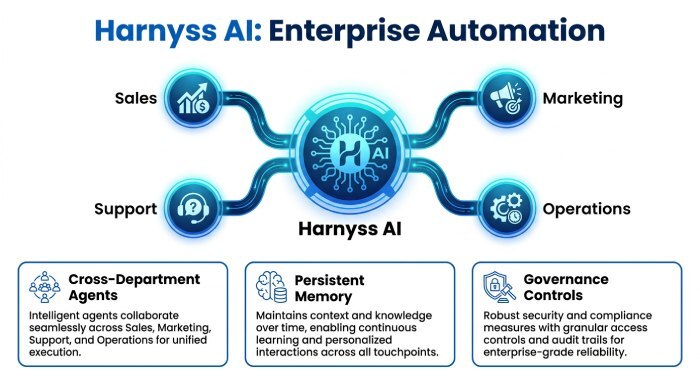
Harnyss also provides controls for managing how agents execute business tasks. Enterprises can set spending limits, configure approval requirements, and review execution records. Agents operate within assigned permissions, while quality checks can return unsuccessful work for revision.
Key Features
| Feature | How It Supports Enterprise Automation |
|---|---|
| Department-based AI agents | Assigns agents to business functions with defined roles |
| Cross-department coordination | Allows agents to pass tasks between departments |
| Persistent agent memory | Retains relevant information across execution sessions |
| Autonomous workflows | Runs multi-step business processes within assigned limits |
| Application integrations | Connects existing tools through APIs, MCP, and built-in connectors |
| Governance controls | Supports approval rules, spending limits, and execution records |
2. UiPath - Back-Office Process Automation
UiPath is an enterprise automation platform that combines robotic process automation with AI agents. It helps businesses automate processes involving document handling, data processing, and repetitive work across different applications. UiPath Maestro can coordinate software robots, AI agents, and employees within longer business workflows. However, organizations looking for autonomous agents that take ownership of entire departmental operations may need to build additional processes around its orchestration tools.
Key Features
| Feature | How It Supports Enterprise Automation |
|---|---|
| Robotic Process Automation | Automates repetitive actions across business applications |
| UiPath Maestro | Coordinates agents, robots, and human tasks |
| Document processing | Extracts and processes information from business documents |
3. IBM watsonx Orchestrate - Enterprise Agent Management
IBM watsonx Orchestrate helps businesses build, manage, and coordinate AI agents across enterprise systems. It provides a central environment to monitor agent activity and apply governance policies to connected workflows. Organizations can use the platform to automate employee requests, customer service processes, and procurement operations while managing access permissions. However, businesses seeking ready-made autonomous departments may still need to configure agents and their operating processes.
Key Features
| Feature | How It Supports Enterprise Automation |
|---|---|
| Agent orchestration | Coordinates agents and workflows across business systems |
| governance policies | Tracks agent activity, ownership, and operating costs |
| Enterprise governance | Applies access policies and execution controls across agents |
4. Microsoft Copilot Studio - Microsoft-Based Enterprise Automation
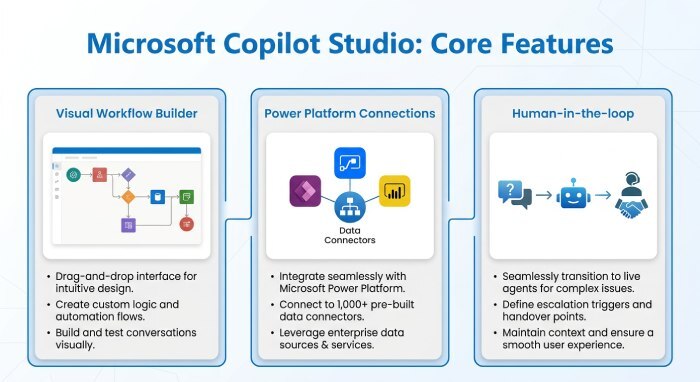
Microsoft Copilot Studio allows businesses to build AI agents and workflows connected to Microsoft 365 and external applications. Its visual development environment supports business automation through configured triggers, application actions, and agent handoffs. Organizations can automate employee onboarding, internal requests, and service processes using existing Microsoft tools. However, company-wide autonomous operations still require teams to design and manage workflows that connect different business functions.
Key Features
| Feature | How It Supports Enterprise Automation |
|---|---|
| Visual workflow builder | Creates automation using triggers, actions, and conditional steps |
| Power Platform connections | Connects agents to Microsoft services and external systems |
| Human-in-the-loop controls | Supports review steps within automated business processes |
5. Workato - Automation Across Business Applications
Workato helps enterprises automate processes across applications that would otherwise operate independently. Its integration platform connects business data and lets workflows run across cloud and on-premises systems. Workato also provides agent development and governance capabilities for businesses introducing AI into existing automation processes. However, enterprises seeking a predefined structure of persistent agents with departmental responsibilities may need to build that operating structure separately.
Key Features
| Feature | How It Supports Enterprise Automation |
|---|---|
| Application integrations | Connects business applications through reusable integrations |
| Agent Studio | Supports the development of AI agents for business processes |
| AI governance | Provides access controls, monitoring, and agent management features |
6. Salesforce Agentforce - Sales and Customer Service Automation
Salesforce Agentforce lets businesses automate customer-facing processes with AI agents connected to Salesforce data. Agents can support lead qualification, customer service requests, and other CRM-related activities using configured actions. Businesses can connect these agents with Salesforce workflows to update records and respond to customer needs. However, organizations looking to automate functions beyond customer relationship management may need broader integrations and additional agent workflows.
Key Features
| Feature | How It Supports Enterprise Automation |
|---|---|
| CRM-connected agents | Uses Salesforce records and business context for automated tasks |
| Agent actions | Allows agents to execute approved CRM operations |
| Customer service automation | Supports customer requests and service workflows |
7. ServiceNow AI Agents - Enterprise Service Automation
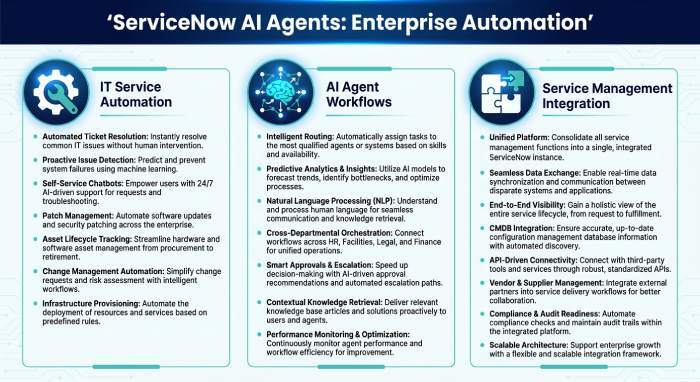
ServiceNow AI Agents help businesses automate work across IT service management and internal employee services. They can process service requests, support incident handling, and guide employees through connected ServiceNow workflows. Organizations can use existing service management rules to control how agents perform tasks and move work between teams. However, automation outside these service workflows may require additional integrations and process development.
Key Features
| Feature | How It Supports Enterprise Automation |
|---|---|
| IT service automation | Supports incident management and service request handling |
| AI agent workflows | Coordinates automated actions within enterprise service processes |
| Service management integration | Works with existing ServiceNow records and workflow rules |
How to Choose the Best AI Operating System for Enterprise Automation
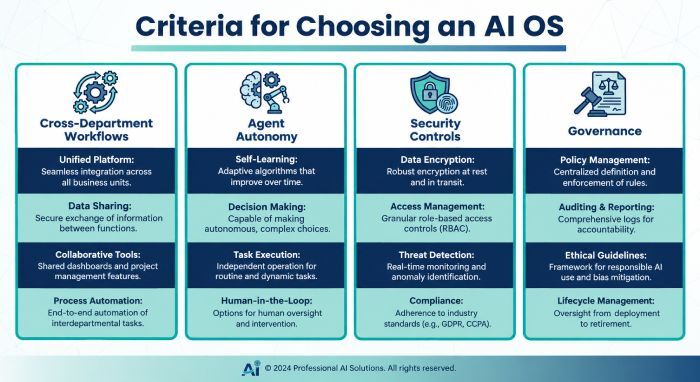
Enterprise automation can involve sales, marketing, customer support, financial operations, and internal service management. Businesses should compare platforms based on how agents handle work across these functions rather than the number of individual tasks they can automate.
Evaluate Cross-Department Automation
Enterprise workflows often involve responsibilities shared between different departments. For example, a sales agent might qualify a new customer before passing account information to an onboarding agent. An effective platform should support these handoffs without requiring employees to move information manually between systems.
Consider Agent Autonomy and Workflow Management
Some platforms execute workflows only after receiving a specific trigger or user request. Others support persistent enterprise AI agents that can monitor business activity and complete assigned work with less human involvement. Businesses should consider how much autonomy they need and how the platform handles unexpected situations during execution.
Review Security and Governance Controls
Enterprise automation often involves sensitive records and actions that can affect customers or business operations. Platforms should support access restrictions and approval checkpoints for high-risk activities. Execution logs and cost monitoring also help administrators understand how agents use business resources.
As businesses automate workflows with AI, DuoCircle strengthens email security with SPF, DKIM, and DMARC to reduce spoofing risks and protect business communications.
Conclusion
The best AI operating system for enterprise automation depends on the processes a business wants to manage. UiPath works well for established automation programs, while Microsoft Copilot Studio fits organizations already using Microsoft applications. IBM watsonx Orchestrate and Workato provide strong options for managing agents and processes across connected systems.
Harnyss AI stands out for businesses seeking autonomous operations across multiple departments. Its persistent agents, defined responsibilities, and governance controls support ongoing work rather than isolated automation tasks.
Before selecting a platform, enterprises should evaluate how agents coordinate tasks and access existing applications. Security controls and human approval requirements also matter as automation expands. The right system should support connected business processes without adding unnecessary management work.
Topics
General Manager
General Manager at DuoCircle. Product strategy and commercial lead across the email security portfolio.
Secure your email infrastructure
Protect, authenticate, and deliver. Contact our team to find the right solution.