10 Steps To Set Up A Self-Hosted Mail Server Without Hitting Spam

Quick Answer
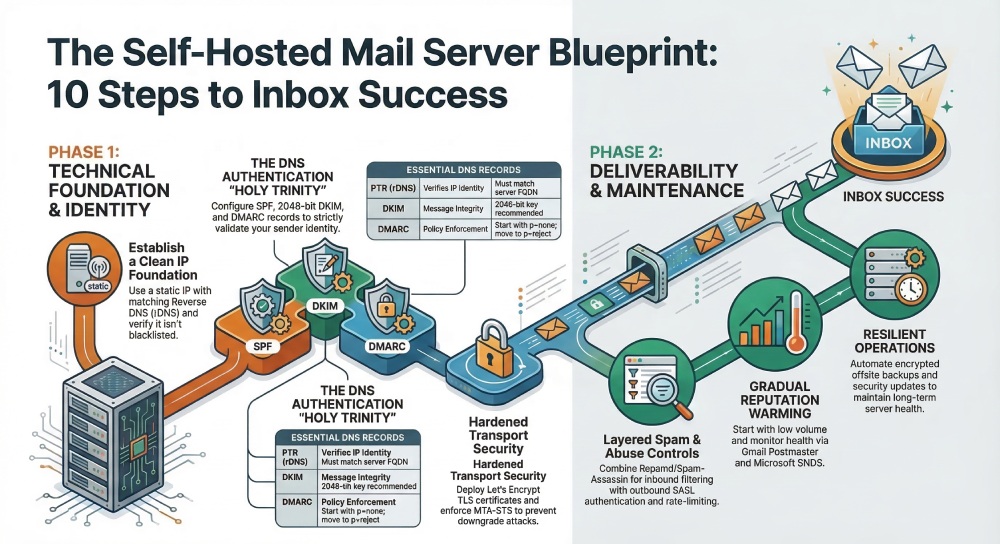
Setting up a self-hosted mail server without hitting spam takes ten steps: pick a host that allows port 25 with a clean static IP and matching PTR, harden the OS, publish A/MX/SPF/DKIM/DMARC records, install Postfix and Dovecot (or mail-in-a-box, iRedMail, or Modoboa), enable Let's Encrypt TLS with MTA-STS and TLS-RPT, align authentication, layer Rspamd and ClamAV, warm up the IP, seed-test before cutover, then monitor and rotate keys.
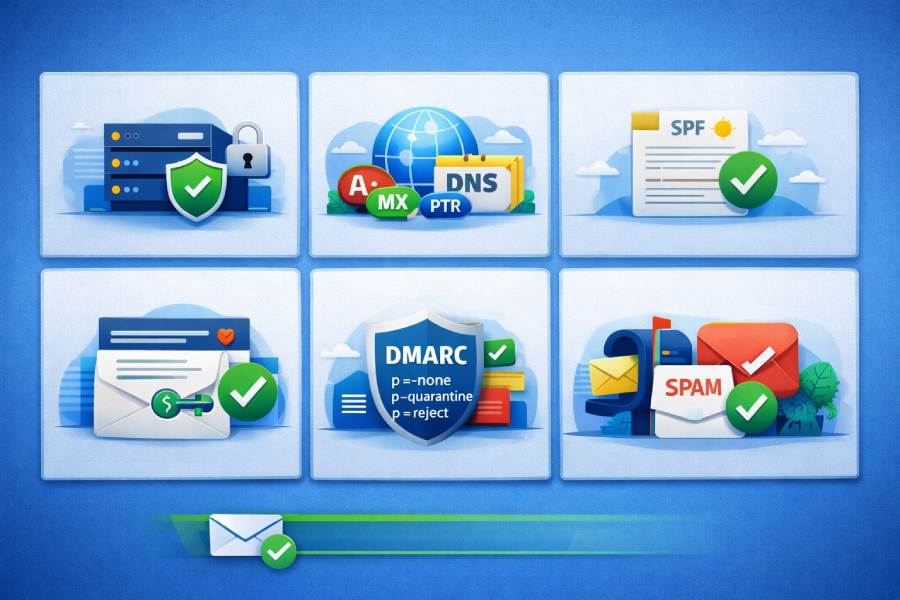
Self-hosted email gives you control, privacy, and the flexibility to run open source software instead of relying entirely on a mail service provider. Whether you build on a modest cloud server or on-prem hardware, the secret to staying out of the junk folder is deliberate planning: clean IP reputation, disciplined DNS configuration, a correctly tuned SMTP server and IMAP server, and strong transport security with TLS certificates.
The steps below form a practical setup guide you can adapt to a classic hand-rolled stack or an opinionated control panel such as mail-in-a-box, Modoboa, or iRedMail. Throughout, assume you’re tying everything to your own domain name, enabling webmail for convenience, and integrating with the email client of your choice.
Step 1, Choose the right infrastructure and a clean IP
Start with a reputable VPS or dedicated cloud server vendor that explicitly permits outbound SMTP. Some providers block port 25 by default; request unblocking early to avoid delays. Prefer a static IPv4 address (and IPv6 if available) and make sure the provider delegates reverse DNS (rDNS) so you can set a PTR record that exactly matches your chosen mail server hostname (for example, mail.yourdomain.tld). Clean IP hygiene is foundational to mail deliverability.
- Verify the IP is not on blocklists (check Spamhaus, Barracuda, and Microsoft SNDS). If it’s tainted, rotate to a fresh address before you build the hosted mail server.
- Align the A/AAAA records for mail.yourdomain.tld with your static addresses and plan matching PTR. Mismatched forward/reverse lookups get your SMTP server flagged quickly.
- Assess the data center’s reputation. A bargain host stuffed with abusive tenants can harm a new hosted mail server. Established regions of major providers and smaller boutique operators that care about abuse complaints are safer.
Many admins pilot on one cloud server, then migrate to another clean subnet to protect the new domain name from any lingering reputation issues. If you must warm up a new IP, start with low-volume transactional messages before full migration.
Status checks before install
- Confirm port 25 egress works.
- Confirm you can set rDNS to the FQDN you will use for the mail server.
- Trace routes for latency/jitter; deliverability to large mail service providers can be impacted by poor connectivity.
Step 2, Prepare and harden the OS
On Ubuntu 22.04 (or a comparable LTS distro), update packages, set a stable hostname/FQDN (the same name you’ll use in DNS and PTR), and enable time sync (chrony or ntp). OS hardening is not optional; email hosting that ignores baseline security inevitably hits trouble.
- Firewall: Enable ufw or nftables, allowing only SSH, SMTP (25), submission (587/465), IMAPS (993), and HTTP/HTTPS (80/443) for ACME and webmail. If you also run Nginx for static website hosting on the same cloud server, restrict vhosts tightly.
- SSH: Disable password logins in favor of keys, restrict root SSH, and consider two-factor authentication for administrative access. Security baselines matter as much as MTA tuning in a hosted mail server.
- Users and services: Create a non-root admin user, disable unnecessary daemons, and enable automatic security updates. Add basic system monitoring and scheduled status checks to alert you before disk fills or memory pressure breaks your IMAP server.
- Backups: Plan offsite backups for configs, maildir data, and database indices; many teams sync encrypted snapshots to Amazon S3. Document maintenance and upgrade instructions early.
If you prefer automated configuration with idempotent configuration, look at Ansible roles (e.g., the Sovereign playbooks on GitHub) to enforce repeatable builds. Strong hygiene is good cybersecurity and preserves the long-term reputation of your self-hosted email.
Harden consistently with open source software
Use only well-maintained open source software components and pin versions thoughtfully. Write a brief setup guide for future operators so operational drift doesn’t degrade your email hosting posture.
Step 3, Configure DNS correctly for mail
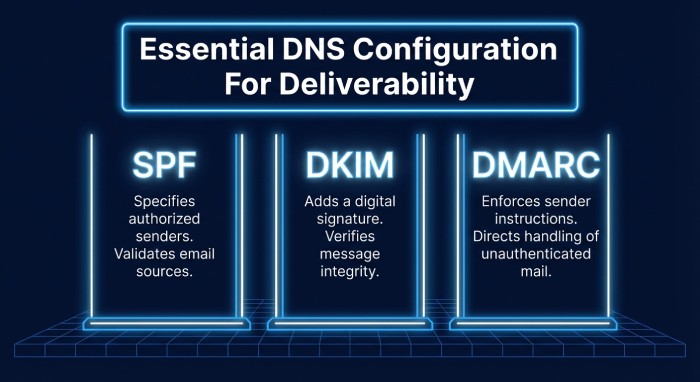
DNS configuration is where mail deliverability is won or lost. Publish DNS records meticulously and validate everything twice.
- A/AAAA and MX: Point A/AAAA for mail.yourdomain.tld to your server. Point MX for your domain name to that exact host. Set the PTR (rDNS) at your provider to the same FQDN.
- SPF: Publish a minimal TXT SPF record that authorizes only your SMTP server (and any transactional vendors you actually use). Avoid mechanisms like +all that invite abuse.
- DKIM: Generate a 2048-bit DKIM key and publish it as a TXT record under your chosen selector. Configure your MTA to sign all outbound messages.
- DMARC: Add a DMARC policy (p=quarantine or p=reject once confident) with rua/ruf reporting to monitor spoof attempts and alignment.
- Custom DNS records: If you’ll enforce MTA-STS and TLS-RPT later, reserve the appropriate hostnames now (mta-sts and smtp.tls). If you plan DANE TLSA, you’ll need DNSSEC enabled for your zone.
Run multiple validators after any change. Beyond syntax, verify alignment: your From: domain name should align with SPF/DKIM/DMARC policies and with the hostname presented by your SMTP server.
Validation and ongoing status checks
- Use DNS tools to confirm no typos in TXT records.
- Send test messages to large providers and inspect Authentication-Results headers.
- Set calendar reminders to rotate DKIM keys periodically.
TTL guidance
For initial bring-up, use low TTLs (300-600 seconds) for rapid iteration. After stabilization, raise to 3600-14400 seconds for resilience.
Step 4, Install and configure your MTA/MDA stack
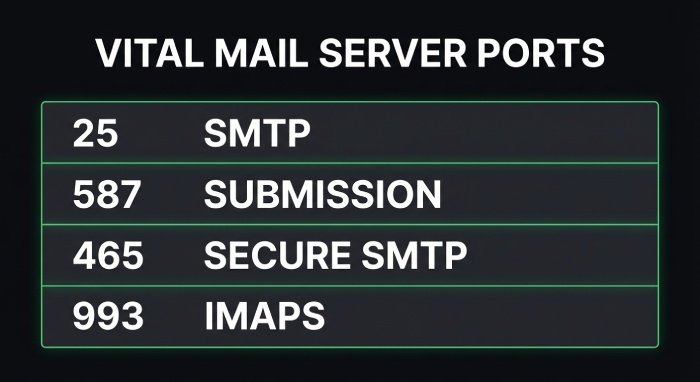
A classic open source stack is Postfix as the SMTP server and Dovecot as the IMAP server/POP3 service, storing mail in Maildir with per-user quotas. Enable submission ports 587 and 465 for authenticated sending, and keep sane queue, size, and concurrency defaults to avoid overwhelming peers.
- Anti-spam and greylisting: Pair Apache SpamAssassin with Postgrey for basic greylisting and spam filtering. Add configurable mail filter rules at the user level so your webmail and email client behavior stays consistent.
- Web stack: Deploy Nginx as a reverse proxy for webmail (and optionally static website hosting). Roundcube is a dependable webmail choice. If you want groupware features, integrate Nextcloud for calendar synchronization and contacts synchronization.
- Accounts: Implement mailbox management for email accounts and mail aliases. Confirm IMAP server access works smoothly in desktop and mobile email client apps.
- Security: Use modern TLS certificates everywhere, lock down cipher suites, and require submission authentication. Document privacy choices, including logs retention.
You can assemble everything manually or adopt a control panel that provides automated configuration:
- mail-in-a-box (by Joshua Tauberer) automates a full hosted mail server on Ubuntu with Let’s Encrypt TLS certificates, DKIM/DMARC, DNSSEC, and a friendly control panel. The mail-in-a-box philosophy favors decentralized email and opinionated defaults; its code and issues live on GitHub, and it bundles Roundcube and optional Nextcloud.
- Modoboa (modoboa) and iRedMail provide comparable open source control panel experiences, some with a RESTful API for provisioning and comprehensive upgrade instructions.
- Sovereign offers Ansible roles for an integrated self-hosted email stack. These toolkits help enforce idempotent configuration and reduce manual drift in your email hosting.
Compared to Microsoft Exchange Server, a modern open source stack gives you flexibility, a lighter footprint, and avoids proprietary lock-in, while still integrating with any standards-compliant email client. Whichever path you pick, hand-tuned Postfix/Dovecot or a control panel such as mail-in-a-box, keep testing login, send, and receive paths repeatedly using multiple networks and devices.
Practical anti-abuse tuning
- Enforce submission auth and disable outbound relaying for unauthenticated clients.
- Rate-limit by SASL user and IP to protect your SMTP server reputation.
- Consider separate outbound IPs for bulk vs. transactional mail, or offload bulk to a specialized mail service provider with aligned SPF/DKIM/DMARC.
Step 5, Enable TLS and modern transport policies
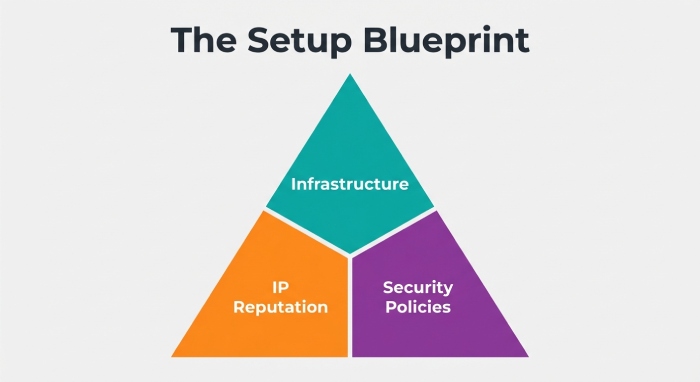
End-to-end transport encryption and clear policies signal to peers that your hosted mail server is trustworthy.
- Certificates: Obtain Let’s Encrypt TLS certificates via ACME for your mail server hostname and webmail. Automate renewals and reloads for Postfix, Dovecot, and Nginx. Use strong ciphers and disable deprecated protocols.
- Enforce TLS: Require STARTTLS for submission and IMAPS for clients. Log and monitor failed handshakes; bad TLS can look like a dead IMAP server to users.
- MTA-STS and TLS-RPT: Publish an MTA-STS policy (via HTTPS and a TXT record) to assert that your domain name requires TLS for SMTP delivery. Add TLS-RPT so you receive reports on failures and misconfigurations.
- DANE TLSA and DNSSEC: If your registrar and zone support DNSSEC, publish DANE TLSA records to cryptographically bind TLS certificates to your SMTP server. This adds a stronger authenticity layer than PKI alone.
- Test peers: Use online scanners to verify protocol/cipher posture for SMTP and IMAP endpoints, and confirm that your TLS certificates chain properly and are renewed before expiry.
Make secure defaults a habit. A self-hosted email system that consistently presents valid TLS certificates, advertises MTA-STS, and aligns with DANE TLSA where possible earns better trust from receiving ISPs and reduces opportunities for downgrade attacks. Tie these transport checks into your system monitoring so status checks warn you well before a misconfiguration degrades deliverability.
As you proceed to later steps (not covered here) rate limiting, outbound authentication alignment, logging, and post-deployment maintenance keep returning to the core principles above: consistent identity through DNS, a clean and disciplined SMTP server, a reliable IMAP server and webmail experience for users, and a thoughtfully chosen control panel (mail-in-a-box, Modoboa, or iRedMail) that lets you operate your open source hosted mail server with confidence.
Step 6, Set up sender authentication that aligns
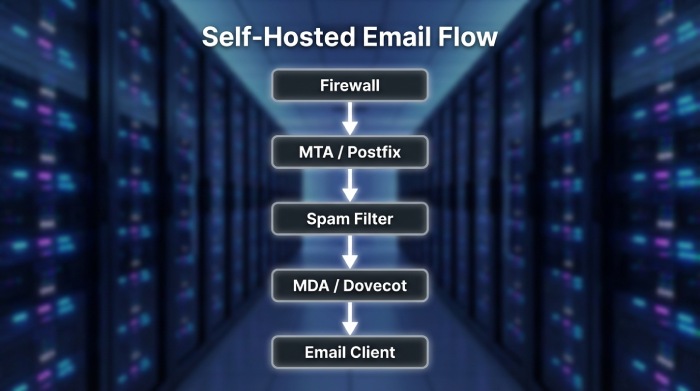
For a production-ready mail server, sender authentication must align with the visible From header to maximize mail deliverability and trust. Generate a 2048-bit (or larger) DKIM keypair on your SMTP server, publish the public key as a TXT record in your DNS records, and configure Postfix or your chosen MTA to sign outbound mail. With mail-in-a-box and other open source stacks, this step is often part of the automated configuration in the control panel, but verifies the selector, key length, and that signatures are attached to every message from each domain name you host.
Ensure SPF and DKIM alignment with the From domain. In practice, that means your SPF policy authorizes the exact hosts that send on behalf of your domain name (your hosted mail server, any transactional provider, and no one else), and DKIM d= matches the organizational domain. Publish a DMARC record starting with p=none, rua, and ruf addresses to gather reports. After a few weeks of clean aggregate results, tighten to p=quarantine and ultimately p=reject. This staged rollout is essential for self-hosted email on a cloud server, where early mistakes can harm reputation.
Round out transport authentication with MTA-STS and TLS reporting (TLS-RPT). These policy DNS records instruct remote systems to prefer TLS and to notify you of failures, useful alongside modern TLS certificates issued by Let’s Encrypt. Where possible, also publish DNSSEC for your zone and DANE TLSA for SMTP to provide cryptographic binding between your certificates and your MX records. These measures reinforce security for both your SMTP server and IMAP server when peers validate policy.
If you use mail-in-a-box, confirm the control panel has successfully issued TLS certificates for webmail, IMAP, and SMTP and that it has pre-populated SPF, DKIM, DMARC, and MTA-STS DNS records. Many open source software bundles like iRedMail and Modoboa (modoboa) provide similar wizards, but always cross-check against your DNS configuration. When operating a mixed environment with a mail service provider for marketing mail and your own hosted mail server for transactional messages, segment DKIM selectors and SPF mechanisms to preserve alignment per stream.
ARC for forwarders and mailing lists
Authenticated Received Chain (ARC) helps preserve DKIM/DMARC trust when you forward mail or run list servers that modify content. If your stack relays to external recipients or you operate aliases that forward to Gmail or Microsoft Exchange Server, enable ARC signing on your SMTP server so downstream filters can evaluate the original chain of custody.
Step 7, Implement inbound and outbound spam/abuse controls
A resilient hosted mail server requires layered anti-spam defenses that protect users without blocking legitimate mail. Combine content filtering with authentication, reputation checks, and sane protocol enforcement in both directions.
Inbound spam filtering stack
Use Rspamd or Apache SpamAssassin with ClamAV for malware scanning. Augment with Postgrey or another greylisting tool, but tune it judiciously; excessive greylisting can delay legitimate mail and harm user experience in webmail and in the email client. Define mail filter rules for high-confidence spam, bulk marketing, and suspicious attachments, and quarantine rather than delete when possible. When using Nginx to front webmail (e.g., Roundcube) and the control panel, ensure proxy headers do not mask client IPs you want to score in Rspamd.
Outbound abuse prevention
Protect your SMTP server by enabling SMTP AUTH via SASL with strong passwords or OAuth, enforce TLS on submission ports, and block open relaying entirely. Add per-user and per-IP rate limits, outbound content scanning, and bounce/complaint feedback to catch compromised email accounts quickly. Validate HELO/EHLO strings to match your FQDN, verify sender and recipient sanity (no null-sender abuse except for bounces), and set sane max recipients per message to reduce abuse potential on a self-hosted email stack.
Identity, privacy, and user safety
Enable two-factor authentication for your control panel and webmail logins where supported. Encourage privacy-minded defaults, including encrypted storage on the cloud server, and limit access to logs. If you integrate Nextcloud for calendar synchronization and contacts synchronization alongside mail, enforce consistent credentials and strong ciphers across IMAP server, CalDAV, and CardDAV endpoints.
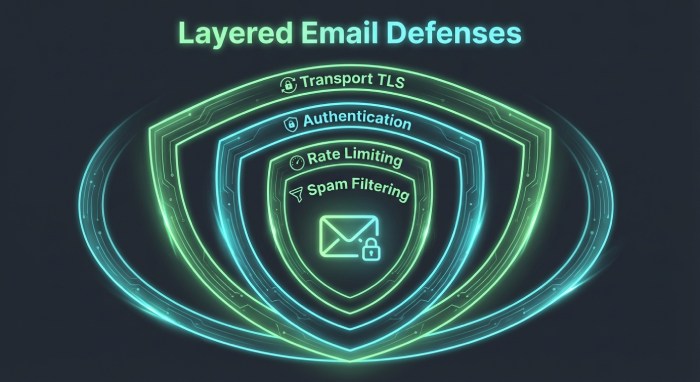
Step 8, Optimize outbound deliverability and reputation
Deliverability begins with a correctly identified mail server. Match your HELO/EHLO to the server’s forward-confirmed FQDN, ensure reverse DNS (PTR) matches, and publish accurate A, AAAA, and MX DNS records. Align Return-Path domains, set a valid rDNS for every outbound IP, and keep SPF, DKIM, and DMARC in sync with your visible From domain name. These basics apply equally whether you’re using mail-in-a-box on Ubuntu or a bespoke Postfix/Dovecot build on Ubuntu 22.04.
Warm up sending gradually from a new hosted mail server or IP. Start with low volume to major providers (Gmail, Yahoo, Microsoft Exchange Server/Outlook) and increase as positive engagement accrues. Maintain list hygiene through confirmed opt-in, automated bounce processing, and rapid suppression of hard bounces and spam complaints. Separate transactional vs. marketing streams distinct IPs or at least different DKIM selectors and subdomains improve mail deliverability and provide clearer reputation signals for each stream.
Tune retries, timeouts, and throttles per mailbox provider. For instance, set conservative concurrency to Microsoft, back off on 4xx deferrals, and observe provider postmaster guidelines. Many open source control panels expose knobs for queue management; in mail-in-a-box, advanced Postfix parameters can be adjusted while preserving idempotent configuration on upgrades. Keep TLS certificates current, prefer modern ciphers, and enable outbound TLS wherever possible to meet peer expectations and policy frameworks like MTA-STS and DANE TLSA.
Step 9, Verify and test before going live
Before flipping MX for production email hosting, test comprehensively. Send messages from your SMTP server to seed addresses at Gmail, Outlook, and Yahoo, and read them in each provider’s webmail and in a desktop email client to check rendering and headers. Use mail-tester-type tools and header analysis to confirm SPF, DKIM, DMARC, and ARC pass, that the DKIM selector is the one you intended, and that the Return-Path and From alignment is correct for each domain name and subdomain you operate.
Check common blocklists (Spamhaus, Barracuda, and others) and delist if necessary. Enroll in Gmail Postmaster Tools and Microsoft SNDS/JMRP to gain insight into reputation and complaint rates; these services help validate that your hosted mail server is warming as expected. In the control panel, run status checks to verify DNS configuration, TLS certificates from Let’s Encrypt, and that the IMAP server and SMTP server are reachable externally. If your platform supports a RESTful API, automate periodic tests and alerts as part of system monitoring so regressions are caught early.
If you rely on mail-in-a-box, validating the automated configuration didn’t overwrite any custom DNS records you need, such as third-party SaaS verifications or special MX arrangements. When comparing with alternatives like iRedMail or Modoboa, confirm equivalent test coverage and that Roundcube webmail sends with proper DKIM signatures. Document results as part of your internal setup guide so future team members can reproduce the verification steps.
Step 10, Monitor, maintain, and document
Operate your self-hosted email like a service. Collect logs and metrics from Postfix, Dovecot, Rspamd/Apache SpamAssassin, and Nginx into a central dashboard. Enable Fail2ban to block brute-force attempts on SMTP, IMAP, and webmail, and invest in ongoing staff training and cybersecurity best practices. Configure alerts for queue spikes, authentication failures, disk usage, and certificate expiration to keep your hosted mail server healthy.
Automate certificate renewals using Let’s Encrypt and rotate DKIM keys on a predictable cadence. Review DMARC aggregate and forensic reports, then tighten policy from p=none to p=quarantine and p=reject as confidence grows. Regularly audit rDNS, MX and A DNS records, MTA-STS policy, DNSSEC signing, and DANE TLSA presence. Backups are non-negotiable: schedule encrypted backups of configs and mail data to offsite storage such as Amazon S3, and test restores. If your stack includes Nextcloud for files plus calendar synchronization and contacts synchronization, ensure its database and data directories are part of the backups as well.
Keep up with maintenance and upgrade instructions for your platform. On Ubuntu 22.04, apply security patches promptly and plan periodic upgrades of open source software components. Mail-in-a-box offers an opinionated control panel with mailbox management, email accounts, mail aliases, static website hosting, and custom DNS records; its GitHub releases (shepherded originally by Joshua Tauberer) aim for automated, idempotent configuration so changes persist across updates. Follow community announcements on Mastodon or Fosstodon, and, if relevant, Twitter, to stay ahead of breaking changes.
Document operational runbooks: how to add a new domain name, how to provision TLS certificates, how to create email accounts and mail aliases, how to adjust mail filter rules, and how to perform system monitoring and status checks. Include emergency procedures for abuse incidents, compromised accounts, or queue floods. If you outgrow a single cloud server, consider sharding roles (separate inbound/outbound relays) or integrating a reputable mail service provider for bulk marketing while retaining decentralized email and privacy for core business mail on your own mail server.
Finally, keep user experience in mind. Offer Roundcube webmail for browser access, ensure IMAP server and SMTP server settings are clearly documented for each email client, and encourage two-factor authentication wherever possible. With a disciplined approach to maintenance and documentation, your email hosting whether powered by mail-in-a-box, iRedMail, Modoboa, or a custom Postfix/Dovecot stack can deliver durable reliability without sacrificing the principles of open source and decentralized email.
FAQs
How do I ensure SPF and DKIM align with my From domain?
Authorize only your actual senders in SPF and use DKIM keys where the d= domain matches your From organizational domain. Verify alignment using header analysis tools and DMARC aggregate reports before moving to a stricter policy.
Should I use Rspamd or Apache SpamAssassin?
Both are proven. Rspamd offers high performance and flexible policies; Apache SpamAssassin has a rich rules ecosystem and pairs well with ClamAV. Choose based on your team’s familiarity and integration with your control panel and logs.
What’s the best way to improve deliverability from a new IP?
Warm up gradually, ensure rDNS and HELO match your FQDN, and keep list hygiene tight with bounce processing and complaint suppression. Enroll in Gmail Postmaster Tools and Microsoft SNDS/JMRP to monitor reputation.
Do I need MTA-STS, DNSSEC, and DANE TLSA?
They’re not mandatory everywhere but strongly recommended. Together they harden transport security, protect against downgrade attacks, and boost confidence in your SMTP server’s TLS posture.
How often should I rotate DKIM keys and renew TLS certificates?
Rotate DKIM keys every 6-12 months or after a suspected compromise. Automate TLS certificates with Let’s Encrypt to renew every 60-90 days and monitor expiration proactively.
Can mail-in-a-box handle multiple domains and aliases?
Yes. Mail-in-a-box supports multiple domains, email accounts, mail aliases, and custom DNS records via its control panel. It also provides Roundcube webmail and integrates with standard IMAP server/SMTP server settings for any email client.
What backups do I need for a hosted mail server?
Back up configs, mailboxes, DKIM keys, and databases, plus any Nextcloud data if used. Store encrypted copies offsite (e.g., Amazon S3) and test restore procedures regularly.
Key Takeaways
- Align SPF, DKIM, and DMARC with your From domain, then tighten DMARC as reports confirm compliance.
- Layer anti-spam controls (Rspamd/SpamAssassin, ClamAV, greylisting) and enforce strong SMTP AUTH to protect users and reputation.
- Match HELO/rDNS, warm up gradually, and separate transactional from marketing streams for better mail deliverability.
- Verify end-to-end with seed tests, blocklist checks, and postmaster tools before switching MX to your mail server.
- Monitor continuously, automate renewals and backups, and document processes to run reliable, privacy-preserving self-hosted email.
General Manager
General Manager at DuoCircle. Product strategy and commercial lead across the email security portfolio.
Secure your email infrastructure
Protect, authenticate, and deliver. Contact our team to find the right solution.