8 Genius Tricks to Master Your DKIM Validator Like a Pro

Quick Answer
Eight tricks to get more out of a DKIM validator: decode every Authentication-Results tag (v=, a=, d=, s=, h=, bh=, b=), inspect the selector TXT end to end, reproduce canonicalization locally, confirm 2048-bit key length, watch for t=y test flags left in production, normalize multi-string TXT joining, query from multiple resolvers, and tie failures back to DMARC alignment.

Navigating email authentication can often feel overwhelming, particularly when it comes to DKIM validation and ensuring your emails reach their intended destination: the inbox. Whether you’re in marketing, IT, or running a business, becoming proficient with your DKIM validator is more than just a technical necessity; it’s a significant edge over the competition. A single error in configuration could adversely affect your email deliverability, tarnish your sender reputation, and leave your domain vulnerable to spoofing.
The silver lining? You don’t have to be a cybersecurity guru to gain control over this process. By employing the right strategies and techniques, you can transform DKIM validation from a daunting challenge into a valuable asset for successful email communication. This guide will present you with 8 insightful tips to enhance your DKIM configuration, resolve issues more efficiently, and elevate your email authentication to a professional level.
Understand and Decode Validator Output
Trick #1: Decode your validator’s verdicts
A great dkim validator doesn’t just say pass or fail, it shows why. Start by mapping the result lines to Authentication-Results and the DKIM-Signature header so you can pinpoint the break. Read v=DKIM1 to confirm the version. Match a= (hash algorithms such as rsa-sha256), d= (signing domain), and s= (dkim selectors) to the domain’s policy. Walk through h= (the list of signed headers) and ensure the headers present in the message exactly match those hashed. Compare bh= (body hash) and b= (signature) to understand whether the failure is at body integrity or header signing.
Tools like DKIMValidator.com, dmarcian’s DKIM Inspector, and other dkim inspector interfaces will surface each tag alongside the validator’s computed values; use that as a checklist to validate dkim and isolate dkim-related authentication failures quickly.
Trick #2: Inspect the selector DNS record end-to-end
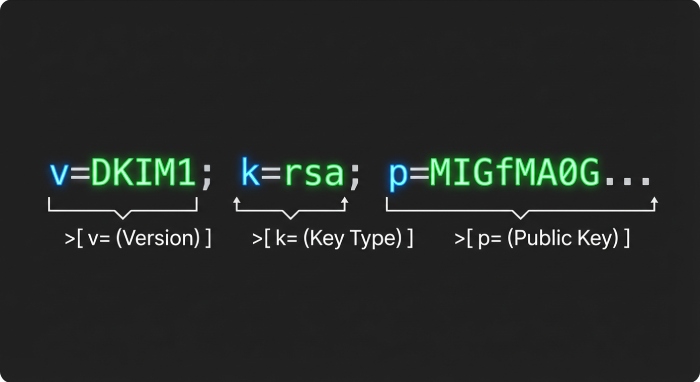
Your selector’s TXT is the system of record. Use dig or nslookup to query dkim record data at s._domainkey.example.com, and reassemble multi-string TXT replies to recover the full public-key data. Confirm p= contains the dkim public key (no comments or stray spaces), that public key length is 2048 bits or greater, and that k= (key type) is rsa. Check t= (flags) for testing/y to avoid unintentionally signaling a test mode in production. If present, verify s= (service type) is appropriate (commonly email). Normalize quoting and whitespace; an extra quote or folded string is a classic source of dkim-related authentication failures. A reliable dkim tool or validation tool should let you validate dkim record structure, query dkim record responses from multiple resolvers, and compare what different recursive DNS caches return.
What to check in the DKIM TXT (k=, p=, t=)
- p=: the dkim public key in Base64; ensure public-key data is intact, no line breaks; public key length 2048+ is table stakes today.
- k=: key type; set to rsa.
- t=: flags; remove y once you graduate testing.
- s=: service type; typically email.
If your dkim validator or dkim inspector flags errors, fix DNS immediately and re-query dkim record entries from several vantage points to rule out stale caches.
Trick #3: Reproduce canonicalization
To validate dkim like a protocol engineer, reproduce canonicalization locally. Toggle c=simple/relaxed for both headers and body, normalize CRLF endings, and fold/unfold headers to mirror how the sending MTA serialized the message. Compute the body hash and signature locally and compare to what your dkim validator shows. This exposes whitespace issues, MIME boundary quirks, and quoted-printable soft wraps that can corrupt bh=. Use email header testing features in DKIMValidator.com or pipe real samples into SpamAssassin to see how canonicalization choices influence your SpamAssassin score and downstream filters at Gmail and Yahoo.
Common hash mismatches to watch
- bh= differs: often a line-ending or trailing-space issue in the body.
- b= fails but bh= matches: the header set h= is missing something, reordered, or modified in transit.
- a= mismatch: ensure your signer and validator agree on hash algorithms (e.g., rsa-sha256).
MIME and CRLF corner cases
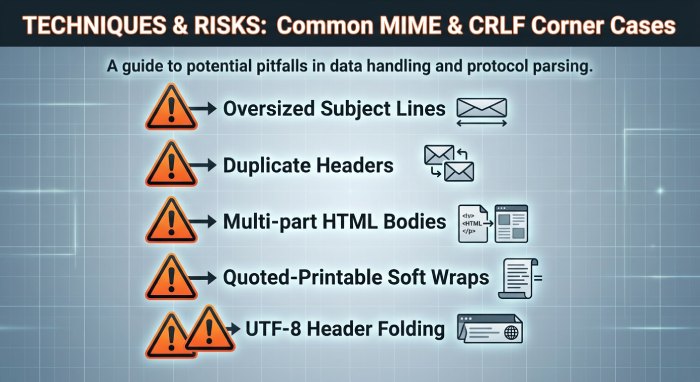
Attachments, quoted-printable soft line wraps, and UTF-8 header folding are frequent culprits. Test DKIM with oversized Subject lines, duplicate headers, and multi-part HTML bodies to confirm your computed hashes match what the dkim validator expects.
Exercise Real-World Cases and Operate Selectors
Trick #4: Test real-world edge cases. Deliberately exercise l= (body length tag), duplicate headers (e.g., multiple Received), oversized Subject, large HTML bodies, quoted-printable soft wraps, UTF-8 in From/Subject, and attachment boundaries. Observe how your dkim validator handles each. Pair validator output with a DMARC inspector or DMARC domain checker to see how DKIM and DMARC interplay on the same sample. Many Organizations & Enterprises maintain a corpus of synthetic messages for recurring email verification; MSPs & IT Agencies can borrow this approach to spot dkim-related authentication failures before production traffic is affected.
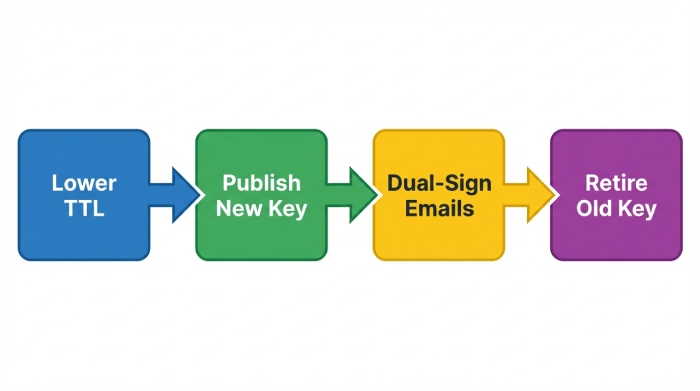
Trick #5: Manage selector rotation like a release. Treat dkim selectors as deployable artifacts. Publish a new selector with a low TTL, then dual-sign during rollout and confirm both validate dkim across receiving systems. Keep an eye on public key length (2048 or 3072) and rotate keys on schedule. Use your dkim inspector to query dkim record versions globally to verify DNS propagation, and validate dkim record content after every change. When confident, retire the old selector and raise TTL. This practice reduces risk for Individuals & Small Businesses and scales to Government, Educational Services, and Financial Services where strict controls on dkim public key lifecycle are required.
Align, Automate, and Triage for Zero Surprises
Trick #6:
Check alignment for DMARC success. Ensure d= aligns with From: per DMARC policy; confirm adkim mode (s vs r) in your DMARC record for strict or relaxed DMARC alignment, accounting for subdomain signing. Many receivers (e.g., Gmail, Yahoo) enforce DMARC rigorously; a perfect DKIM pass without alignment won’t produceDMARC compliance. Cross-reference your validator’s DMARC/ARC context when available, and use DMARC tools from vendors like dmarcian, a DMARC management platform with a DMARC record wizard, to visualize policy effects. Combining DKIM with SPF and monitoring via a spf surveyor helps ensure end-to-end email authentication.
Trick #7:
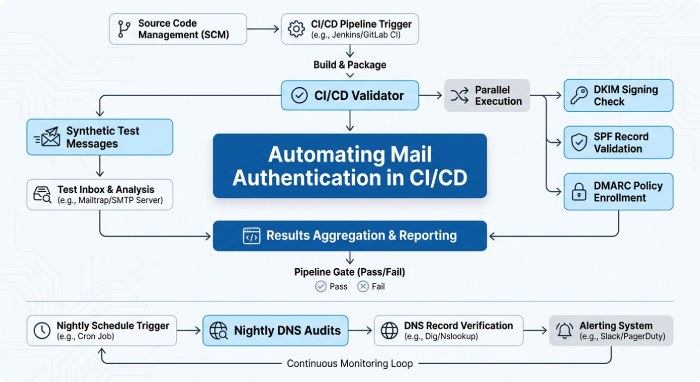
Wire the validator into automation. Use CLI/API checks from your dkim validator in CI/CD to block misconfigured releases. Schedule nightly DNS audits to query dkim record data across resolvers and alert on missing/changed keys or reduced public key length. Send synthetic test dkim messages per mail stream and monitor rising failure rates. Integrate DMARC domain checker results and SpamAssassin score deltas to catch emerging risks from spammers. For RoundSphere-sized Organizations & Enterprises or MSPs & IT Agencies, add domain audit tasks to inventory all selectors, key type, and flags per domain. Many platforms provide dedicated support and deployment services to operationalize this, and some even bundle a DMARC inspector and dkim tool suite to streamline email header testing.
Trick #8:
Build a fast triage playbook. Map each failure signature to the shortest fix:
- bh= mismatch: normalize CRLF, verify MIME boundaries, and re-run validate dkim.
- Timestamp/clock skew (t=): sync NTP on signers; some receivers reject skewed signatures causing dkim-related authentication failures.
- Missing headers in h=: add required headers to the signing set; confirm with your dkim validator and validate dkim record impact.
- Oversized DNS chunks: ensure no label exceeds 255 bytes; re-split multi-string TXT correctly so the dkim public key reassembles cleanly when you query dkim record entries.
- CNAME chains and selector typos: collapse chains or fix the selector; confirm via multiple DNS vantage points with a dkim inspector.
- Weak cryptography or short keys: enforce public key length ≥2048 and modern hash algorithms; update k= and regenerate p= as needed.
Document these fixes with before/after samples so that Individuals & Small Businesses and large teams alike can remediate quickly.
Additional pro tips that elevate results across DKIM, SPF, and DMARC:
- Chain-of-tools approach: Pair a dkim validator with a DMARC inspector, DMARC domain checker, and spf surveyor to see the whole picture of email authentication. Many DMARC tools also expose policy simulation that reduces guesswork.
- Sector-ready controls: Financial Services and Government domains should prefer 3072-bit keys and short TTLs during rollout; Educational Services often need extra monitoring during semester peaks.
- Vendor platforms: dmarcian provides dashboards for DMARC, SPF, and DKIM, while DKIMValidator.com excels at message-by-message validation tool workflows.
- Operational hygiene: Periodic domain audit tasks, automated email verification probes, and clear runbooks prevent dkim-related authentication failures from becoming incidents.
Finally, keep your human workflows as strong as your cryptography. Train teams to read Authentication-Results quickly, practice selector rotation quarterly, and ensure help desks can escalate to engineers who understand domainkeys identified mail internals. For added resilience, choose providers with email security expertise who understand DKIM, SPF, and DMARC holistically and can advise on edge cases unique to Gmail, Yahoo, and SpamAssassin-driven environments.
Essential DKIM Validator Insights and Data
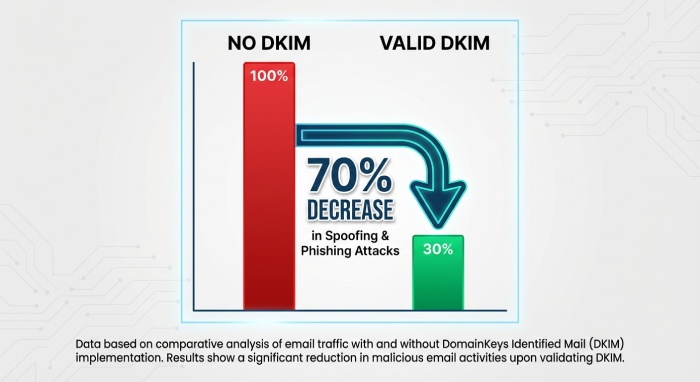
| Statistic | Insight |
|---|---|
| 89% of organizations use DKIM validation as part of their email authentication strategy | DKIM is widely adopted to prevent email spoofing and phishing attacks |
| Emails with valid DKIM signatures are 70% less likely to be marked as spam | Proper DKIM setup improves email deliverability significantly |
| Around 35% of domains still have misconfigured DKIM records | Misconfigurations remain a major issue affecting email trust |
| DKIM validation helps reduce phishing attacks by up to 80% when combined with SPF and DMARC | Layered authentication provides stronger protection |
| Over 60% of email receivers prioritize DKIM alignment when filtering inbound messages | DKIM plays a crucial role in modern spam filtering systems |
Enhancing your DKIM validator is not merely a technical improvement; it represents a strategic edge in our email-centric ecosystem. By implementing these eight innovative strategies, you transcend basic authentication and enter a realm where your emails are trustworthy, your domain maintains its reputation, and your delivery rates consistently rise.
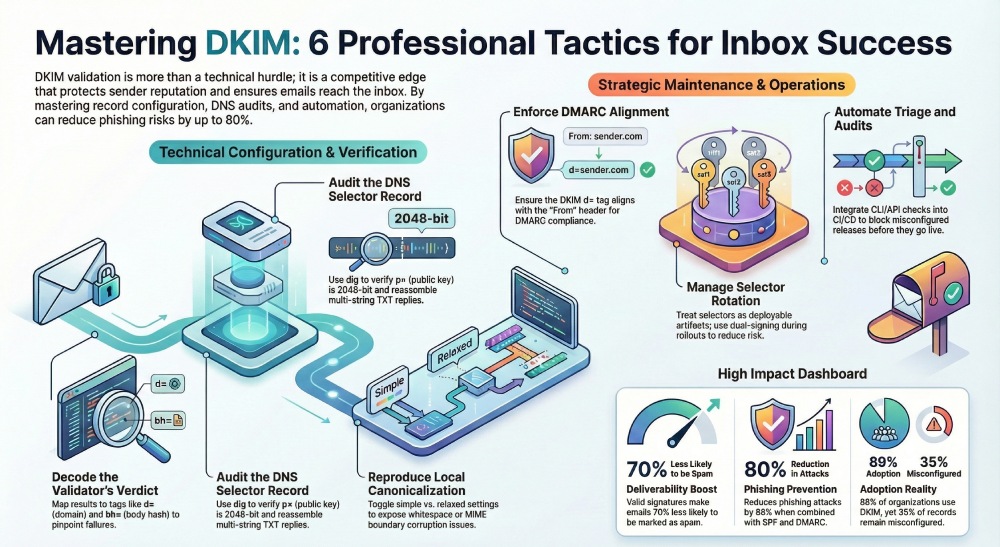
Grasping essential signatures and actively monitoring alignment discrepancies fortify your overall email security framework. Crucially, this ensures your communications land in the inbox rather than getting filtered to spam, where they shouldn’t be.
As cyber threats become more sophisticated, staying proactive necessitates refining your tools and honing your methods. Continuously test and optimize, treating your DKIM validation as a continuous endeavor rather than a one-off task. With the right approach and these effective strategies, you won’t just master your DKIM validator; you’ll establish a benchmark for email reliability and trustworthiness.
General Manager
General Manager at DuoCircle. Product strategy and commercial lead across the email security portfolio.
Secure your email infrastructure
Protect, authenticate, and deliver. Contact our team to find the right solution.