10 Email Retention Strategies For Managing High-Volume Mailboxes

Quick Answer
Effective email retention strategies help organizations manage high-volume mailboxes by reducing storage costs, improving compliance, strengthening email security, and speeding up email searches. Learn 10 practical retention strategies to organize, archive, and protect business email efficiently.
Email remains the backbone of business communication, but managing high-volume mailboxes has become increasingly difficult. Organizations receive thousands or even millions of emails daily, including customer inquiries, invoices, marketing messages, compliance documents, support tickets, and internal communications. Without a structured email retention strategy, mailboxes quickly become cluttered, storage costs increase, search performance declines, email security becomes more difficult to maintain, and organizations face greater legal and compliance risks.
Email retention isn’t simply about deciding how long to keep messages. It’s about creating policies that balance operational efficiency, legal obligations, security, and cost management. An effective retention strategy ensures employees can quickly access important information while automatically removing unnecessary data before it becomes a liability.
Whether you’re managing Microsoft 365, Google Workspace, Exchange Server, or a hybrid email environment, implementing smart retention practices helps reduce administrative overhead while improving governance.
In this guide, we’ll explore ten practical email retention strategies that help organizations effectively manage high-volume mailboxes without sacrificing compliance or productivity.
Strategy #1: Define Clear Email Retention Policies by Message Type
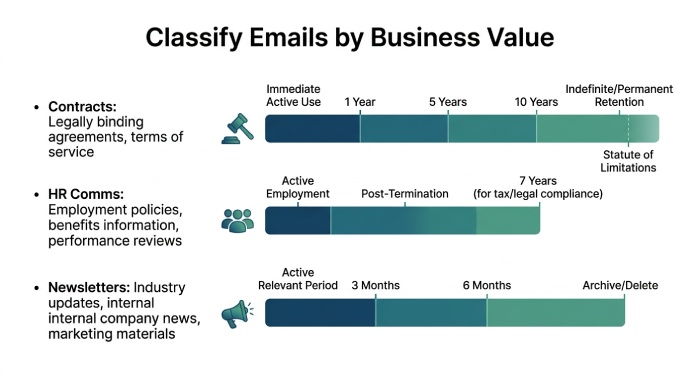
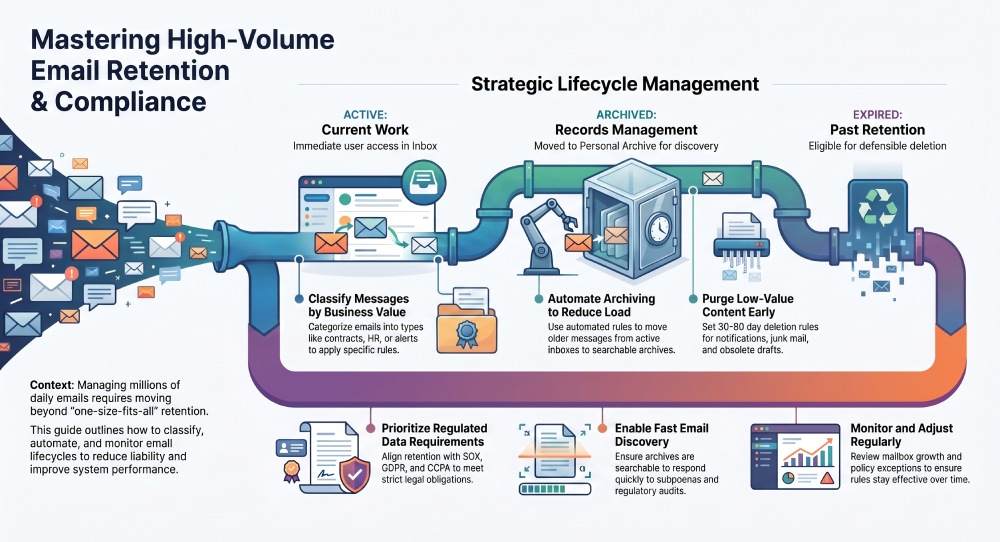
A strong email retention program starts with a clear email retention policy that classifies messages by risk, business value, and legal requirements. Not every message deserves the same retention period. A signed customer agreement, for example, may need to be preserved for years, while newsletters, system alerts, and junk E-mail may have little long-term value.
Map email categories to retention rules
Organizations should define a retention policy for categories such as contracts, HR communications, financial records, customer support threads, security alerts, and executive correspondence. This supports information governance, records management, and defensible email deletion.
Align with business and legal needs
The legal department, compliance team, security team, and business executives should help determine the retention period for each category. Regulatory requirements and legal requirements may come from SOX, the Sarbanes-Oxley Act, FRCP, GDPR, the General Data Protection Regulation, CCPA, the Electronic Communications Privacy Act, and ECPA. Historical cases involving Enron and Worldcom show why messaging records management must be deliberate, auditable, and enforceable.
Avoid one-size-fits-all retention
A default retention rule can help, but a mature email retention policy should include policy exceptions for litigation holds, investigations, government regulations, and sensitive information.
Strategy #2: Automate Archiving to Reduce Mailbox Overload
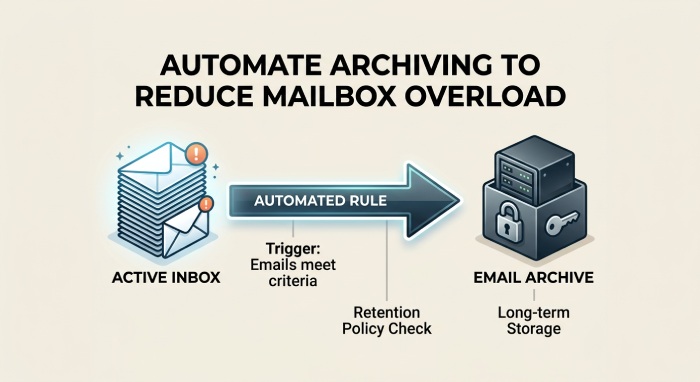
Manual cleanup does not scale in high-volume environments. Automated email archiving moves older messages from the active Inbox into an archive or Personal Archive based on retention settings, reducing email storage pressure without losing access to important communications.
Use archive rules to control mailbox growth
In Microsoft 365, Outlook, and Exchange Server, IT admins can use messaging records management, or MRM, to move messages automatically. MRM policies can define when mail is moved to an archive, how long it remains there, and when its expiration date triggers deletion or review.
Separate user convenience from compliance controls
Users may prefer keeping everything in the Inbox for quick access through the Reading Pane, but compliance requires structure. Automated archive workflows reduce workarounds while preserving business value and supporting email discovery.
Make archives accessible but protected
An archive should be searchable, governed by multi-factor authentication, and protected with data loss prevention controls to reduce the impact of a data breach.
Strategy #3: Use Retention Labels and Tags for Easy Classification
Retention labels and tags help users and systems classify messages according to the correct retention policy. In Microsoft environments, MRM retention tags can apply to default folders, custom folders, or individual messages.
Apply labels where decisions happen
Retention labels should be available in Outlook and Microsoft 365 so users can classify messages as records, short-term correspondence, regulated data, or low-value content. A folder policy can also help automate classification for messages moved into specific folders.
Use administrative controls carefully
An IT admin may assign policy settings to mailboxes, update retention settings, or remove retention policy configurations when employees change roles. However, any assign policy or remove retention policy action should follow change management procedures and organizational policy.
Keep labels simple
Too many labels confuse users. Keep the email retention policy simple enough that employees can follow it without calling the compliance teams for every message.
Strategy #4: Set Time-Based Deletion Rules for Low-Value Emails
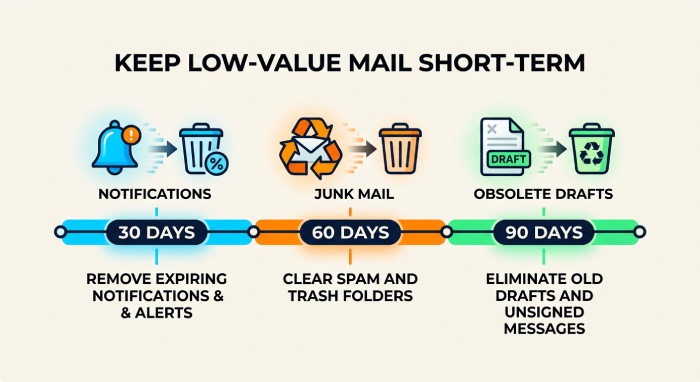
High-volume mailboxes often accumulate low-value messages: notifications, calendar replies, automated reports, marketing emails, and obsolete drafts. These messages should not remain indefinitely.
Define short retention periods for low-risk content
A retention period of 30, 60, or 90 days may be appropriate for routine notifications, Deleted Items, and Junk E-mail. Time-based email deletion reduces clutter, limits unnecessary email storage, and supports data privacy by not retaining information longer than needed.
Manage Deleted Items intentionally
Deleted Items should not become a shadow archive. If users rely on Deleted Items for long-term storage, the organization has an inbox management problem. A clear retention policy should define when Deleted Items are purged and whether recovery windows are available.
Balance deletion with legal holds
Email deletion rules must pause when legal requirements, investigations, or litigation holds apply. FRCP obligations, regulatory requirements, and compliance policy requirements may override standard deletion schedules.
Strategy #5: Prioritize Compliance Requirements for Regulated Data
Compliance must drive retention decisions for regulated industries such as finance, healthcare, legal services, energy, and government contracting. The email retention policy should reflect applicable regulatory requirements, legal requirements, and security requirements.
Build retention around risk categories
Messages containing sensitive information, customer data, financial reports, health information, or contractual commitments may require longer retention periods and stricter user access controls. Data protection, data privacy, and information security teams should work with the legal department and compliance teams to define these rules.
Recognize overlapping regulations
A single mailbox may contain records subject to SOX, GDPR, CCPA, ECPA, and industry-specific government regulations. This is why messaging records management and MRM must be tied to documented data retention guidelines rather than informal preferences.
Do not become the “Department of No”
Security teams are sometimes viewed as the Department of No when they block user workflows. A better approach is to explain the business value of compliance and provide practical tools that reduce risk without slowing employees down.
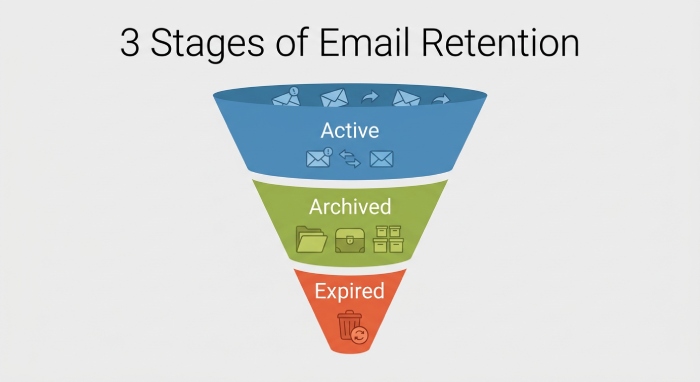
Strategy #6: Separate Active, Archived, and Expired Email Categories
High-volume mailboxes become unmanageable when active conversations, historical records, and expired content are mixed together. A durable email retention strategy separates messages by lifecycle stage.
Use lifecycle-based mailbox design
Active messages remain in the Inbox or project folders. Older records move to the archive or Personal Archive. Expired messages reach the end of the retention period and become eligible for defensible deletion.
Define status clearly
Each category should have a clear retention policy:
- Active: Needed for current work and user access.
- Archived: Retained for records management, compliance, and email discovery.
- Expired: Past the retention period and eligible for deletion unless legal requirements apply.
Reduce user confusion
Users should know when messages move, why they move, and how to find them. This reduces workarounds such as exporting PST files or email forwarding to personal accounts.
Strategy #7: Implement Searchable Email Archives for Fast Retrieval
An archive is only valuable if authorized users can retrieve messages quickly. Searchable email archives support audits, investigations, compliance reviews, and litigation response.
Support fast email discovery
Legal and compliance teams need reliable search across archived messages, active mailboxes, attachments, and metadata. Strong email discovery capabilities help organizations respond to subpoenas, FRCP requests, internal investigations, and regulatory audits.
Preserve context and integrity
A searchable archive should preserve sender, recipient, date, subject, attachments, and chain-of-custody details. This is essential for compliance, legal requirements, and messaging records management.
Learn from modern security platforms
Vendors such as Material Security emphasize protecting mailbox data after delivery, recognizing that email remains a high-value target. Companies such as Databricks have publicly discussed modern security leadership; David Cook, a CISO, represents the kind of executive stakeholder who must balance productivity, compliance, and risk.
Strategy #8: Train Users on Inbox Hygiene and Retention Best Practices
Technology alone cannot fix poor inbox management. Users need practical training on how the email retention policy works, when to archive messages, and how retention labels affect deletion.
Teach everyday retention behavior
Employees should understand how to use Outlook, Microsoft 365, and the Reading Pane without treating the Inbox as permanent storage. Training should explain archive behavior, retention period rules, Deleted Items cleanup, and when to escalate questions to the compliance team or legal department.
Role-based training matters
An account executive may need guidance on customer contract retention, while finance users may need SOX-related training. Security teams may need to identify sensitive information and apply data loss prevention controls.
Reinforce with reminders
Periodic prompts, short videos, and policy refreshers help employees follow the retention policy without requiring constant IT intervention.
Strategy #9: Monitor Mailbox Growth and Adjust Retention Rules Regularly
Email retention is not a set-it-and-forget-it process. Mailbox volume, regulatory requirements, business processes, and legal requirements change over time.
Review retention metrics
IT admins should monitor mailbox size, archive growth, email storage trends, deletion rates, and policy exceptions. If archive volume grows too quickly, the retention period may be too long for low-value content. If users complain about missing records, the retention policy may be too aggressive.
Audit MRM performance
In Microsoft Exchange Server and Microsoft 365, messaging records management and MRM should be reviewed regularly to confirm that retention tags, folder policy settings, default retention rules, and archive moves are working as intended.
Coordinate changes carefully
Retention changes require change management. The compliance teams, legal department, security team, and business executives should approve major updates to the email retention policy.
Strategy #10: Invest in Scalable Email Retention Solutions That Grow with Your Business
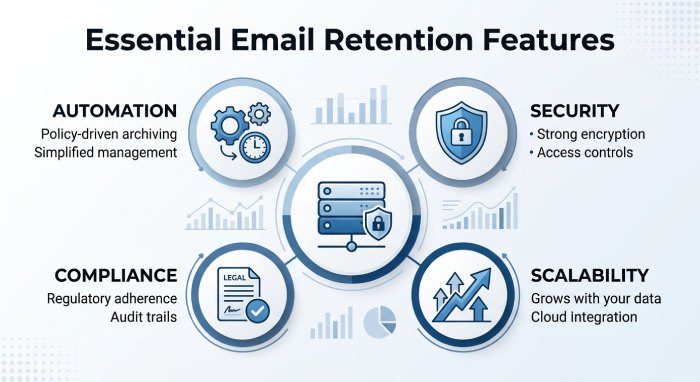
Selecting the right email retention solution is a long-term investment. As organizations generate more email and face increasing compliance obligations, they need tools that automate retention, strengthen security, and simplify administration. A scalable platform helps enforce consistent retention policies across Microsoft 365, Exchange Server, Outlook, and other business communication systems while reducing manual effort.
Key Features to Look For
When evaluating an email retention solution, prioritize platforms that offer:
- Automated retention policy enforcement to eliminate manual management
- Email archiving with fast and reliable search capabilities
- Retention labels and lifecycle management for structured record keeping
- Litigation hold to preserve emails for legal investigations
- Granular user permissions and role-based access controls
- Audit logs for compliance reporting and accountability
- Data Loss Prevention (DLP) to safeguard sensitive information
- Multi-factor authentication (MFA) for stronger account security
- Support for regulatory compliance, including GDPR, CCPA, SOX, FRCP, and ECPA
- Scalable storage and administration that can grow with the organization
Think Beyond Today’s Requirements
Your organization’s email environment will continue to evolve. New employees, departments, business locations, and regulatory requirements all increase the complexity of email management. Choosing a scalable solution today reduces the need for costly migrations or policy overhauls in the future while ensuring consistent governance across the business.
Make Adoption Simple
Even the most feature-rich platform can fail if employees struggle to use it. Select a solution that integrates with existing workflows, automates routine retention tasks, and minimizes user intervention. Simple, transparent processes encourage policy compliance and reduce the risk of employees bypassing established retention procedures.
A successful email retention strategy combines automation, scalability, security, and ease of use. By investing in a solution that grows alongside your business, organizations can reduce compliance risks, improve operational efficiency, and maintain secure access to important communications for years to come.
General Manager
General Manager at DuoCircle. Product strategy and commercial lead across the email security portfolio.
Secure your email infrastructure
Protect, authenticate, and deliver. Contact our team to find the right solution.