Preventing SPF Configuration Errors: 11 Recommendations For MSPs

Quick Answer
Managed Service Providers (MSPs) can improve email security and deliverability by preventing SPF configuration errors. Learn 11 practical recommendations to avoid SPF record mistakes, reduce authentication failures, strengthen domain protection, and ensure reliable email communication.

Managed Service Providers are often responsible for maintaining email authentication across dozens or hundreds of client domains. A single malformed SPF record, outdated mail server configuration, or overlooked DNS misconfiguration can cause SPF failure, email rejection, or reduced email deliverability. The following recommendations help MSPs manage Sender Policy Framework consistently, reduce risk, and apply SPF best practices across every email sending domain they support.
Recommendation #1: Audit Every Client’s Existing SPF Record Before Making Changes
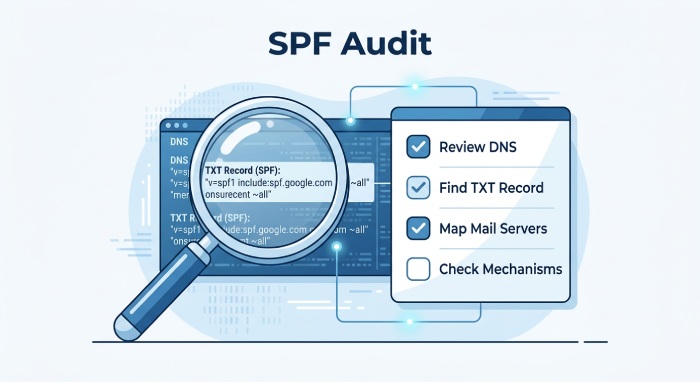
Before editing any SPF record, MSPs should perform a full audit of the client’s current Sender Policy Framework configuration. This includes reviewing DNS records, identifying the active SPF TXT record, confirming the SPF version, and mapping all authorized mail servers currently allowed to send mail.
A proper audit should determine whether the SPF record includes platforms such as Google Workspace, Microsoft 365, Zoho Mail, Fastmail, Amazon SES, SendGrid, Mailgun, Postmark, SparkPost, Mailchimp, Netcore, or Trustifi. It should also identify security gateways such as Proofpoint, Mimecast, Barracuda Networks, Cisco Email Security, SpamExperts, or Spamhaus-related filtering services.
During SPF record validation, MSPs should check each SPF mechanism, including SPF ip4, SPF ip6, SPF MX mechanism, SPF A record references, and any SPF include statements. This early SPF evaluation prevents accidental removal of legitimate authorized mail servers and reduces the likelihood of an SPF neutral result or unexpected SPF failure.
Recommendation #2: Keep Each SPF Record Within the 10 DNS Lookup Limit
The Sender Policy Framework standard enforces an SPF lookup limit of 10 DNS lookups during SPF evaluation. Every SPF include, SPF redirect, SPF MX mechanism, SPF PTR, and SPF exists mechanism can contribute to the DNS lookup count. If the SPF record exceeds this limit, receiving systems may return a permanent error, resulting in SPF failure and possible SPF email rejection.
MSPs should regularly calculate the DNS lookup count for every client SPF record, especially when clients use several SaaS senders. For example, combining Microsoft 365, Salesforce, Mailchimp, SendGrid, and Amazon SES can quickly approach the SPF lookup limit.
Where appropriate, SPF flattening can reduce lookups by replacing certain include references with direct SPF ip4 or SPF ip6 entries. However, SPF flattening must be monitored carefully because third-party vendors change infrastructure. Automated SPF troubleshooting and SPF testing tools should be used to ensure each SPF record remains valid after vendor changes.
Recommendation #3: Avoid Multiple SPF Records on the Same Domain
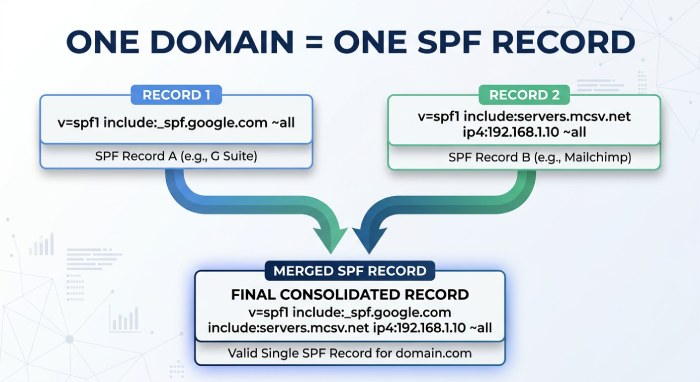
A common DNS misconfiguration is publishing more than one SPF TXT record on the same domain. Sender Policy Framework requires a single SPF record per email sending domain. If multiple SPF records exist, SPF evaluation may fail, breaking email authentication and potentially damaging email deliverability.
MSPs should inspect DNS records at registrars and DNS providers such as Cloudflare, GoDaddy, Namecheap, Bluehost, and Gandi. When multiple SPF records are found, they should be merged into one properly formatted SPF record using clean SPF syntax.
For example, instead of separate SPF records for Google Workspace and Mailchimp, MSPs should combine the approved SPF include entries into one SPF TXT record. Maintaining one SPF record improves SPF record validation, prevents SPF failure, and supports consistent anti-spam measures.
Recommendation #4: Use Approved Include Mechanisms for Third-Party Email Senders
Third-party platforms typically publish their own authorized sending infrastructure through an SPF include. MSPs should always use the vendor-approved SPF include rather than guessing IP ranges or copying outdated examples.
For instance, Google Workspace, Microsoft 365, Amazon SES, SendGrid, Mailgun, Mailchimp, SparkPost, and Postmark each provide documented Sender Policy Framework guidance. Using the correct SPF include ensures that the provider’s authorized mail servers are recognized during SPF evaluation.
MSPs should also verify whether a vendor recommends an SPF redirect, SPF modifiers, or a standard SPF mechanism. Some legacy configurations may reference SPF PTR or SPF exists, but these should be used cautiously because they can increase DNS lookup count and introduce unnecessary complexity. Approved SPF include usage is one of the most important SPF best practices for reliable email authentication.
Recommendation #5: Remove Deprecated, Duplicate, or Unused Sending Sources
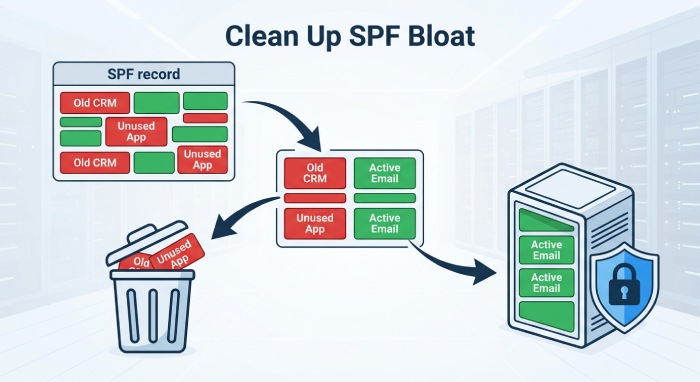
SPF records often become bloated as clients change email platforms, marketing systems, customer relationship management (CRM) tools, and security gateways. Deprecated sources increase SPF record length, raise the risk of exceeding the SPF lookup limit, and may authorize systems that no longer need to send mail.
MSPs should periodically remove unused SPF include entries, obsolete SPF ip4 ranges, stale SPF ip6 addresses, duplicate SPF mechanism entries, and references to retired platforms. For example, a client that migrated from Zoho Mail to Microsoft 365 or from Mailgun to SendGrid may still have old entries in the SPF record.
This cleanup reduces the attack surface for email spoofing prevention and improves SPF policy enforcement. It also simplifies SPF troubleshooting because the remaining authorized mail servers are easier to verify.
Recommendation #6: Standardize SPF Syntax Across All Managed Client Domains
Consistent SPF syntax is essential when managing DNS records at scale. Each SPF record should begin with the correct SPF version declaration, typically v=spf1, followed by authorized SPF mechanism entries and ending with a clear SPF all mechanism.
MSPs should standardize formatting rules for SPF include, SPF ip4, SPF ip6, SPF MX mechanism, SPF A record, SPF redirect, and SPF modifiers. They should also avoid risky patterns such as careless SPF wildcard usage or unverified references that may cause SPF recursion.
A standardized template helps technicians avoid syntax errors when updating DNS records through Cloudflare, GoDaddy, Namecheap, Bluehost, or Gandi. It also improves SPF record validation and enables more predictable SPF error resolution across multiple managed environments.
Recommendation #7: Choose the Right SPF Enforcement Qualifier for Each Client
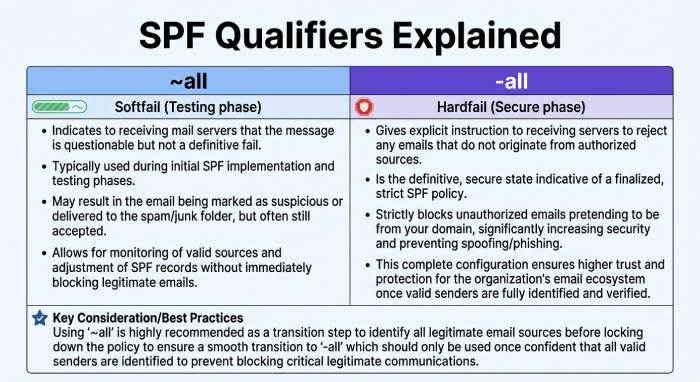
The SPF all mechanism determines the default SPF policy when no earlier SPF mechanism produces an SPF pass. MSPs must choose the enforcement qualifier carefully based on the client’s maturity, sending complexity, and tolerance for delivery risk.
Common endings include:
- ~all for SPF softfail
- -all for SPF hardfail
- ?all for an SPF neutral result
- +all, which should generally be avoided
For clients still discovering authorized mail servers, a default SPF policy using SPF softfail may be appropriate during onboarding. Once all senders are confirmed and email authentication is mature, MSPs may move to SPF hardfail for stronger SPF policy enforcement.
The SPF all mechanism should never be selected casually. An overly aggressive default SPF policy can trigger SPF email rejection if legitimate senders are missing. A weak default SPF policy may reduce email spoofing prevention. The right SPF all mechanism balances security and email deliverability.
Recommendation #8: Monitor DNS Propagation After SPF Record Updates
After changing an SPF record, MSPs should monitor DNS propagation across public resolvers. Even when DNS records appear correct in the client portal, global resolvers may continue serving cached versions until Time to live (TTL) values expire.
This is especially important after emergency SPF error resolution, vendor migration, or changes involving Microsoft 365, Google Workspace, Amazon SES, or SendGrid. MSPs should use SPF testing tools, an SPF online checker, and DNS tools such as MXToolbox, dmarcian, EasyDMARC, OnDMARC, Valimail, Agari, or Authentic8 to confirm that the updated SPF TXT record is visible globally.
DNS propagation monitoring also helps detect registrar-side DNS misconfiguration, accidental truncation, and SPF record length problems. Verifying propagation reduces support tickets and ensures email authentication changes take effect as intended.
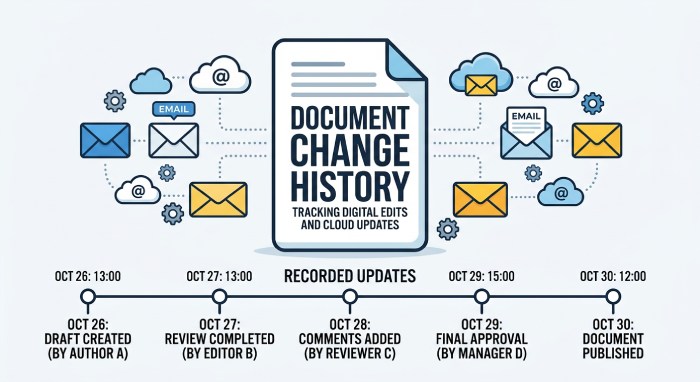
Recommendation #9: Document All Authorized Sending Services and Change History
Every MSP should maintain a client-specific inventory of authorized mail servers and approved sending platforms. Documentation should include the email sending domain, active SPF record, DNS records provider, mail server configuration, third-party services, business owner, and change history.
This inventory should list whether the client uses Microsoft 365, Google Workspace, Zoho Mail, Amazon SES, Mailgun, SendGrid, Mailchimp, Postmark, SparkPost, Proofpoint, Mimecast, Barracuda Networks, Cisco Email Security, or other platforms.
Change logs should capture why each SPF include, SPF mechanism, or SPF all mechanism was added or removed. This documentation accelerates SPF troubleshooting, supports SPF record validation, and allows MSPs to quickly determine whether an SPF pass or SPF failure is expected.
Recommendation #10: Test SPF Alignment Alongside DKIM and DMARC
Sender Policy Framework should not be managed in isolation. MSPs should test SPF alignment alongside DKIM and DMARC because modern email authentication depends on how these controls work together.
SPF alignment verifies whether the authenticated return-path domain aligns with the visible From domain according to the client’s DMARC policy. A message can achieve SPF pass but still fail SPF alignment if the return-path belongs to a third-party vendor rather than the client’s domain.
Tools from dmarcian, Valimail, EasyDMARC, OnDMARC, Agari, MXToolbox, and similar providers can help Managed service providers (MSP) review SPF alignment, DKIM signatures, DMARC aggregate reports, and suspicious sending patterns. Strong SPF alignment improves email spoofing prevention, strengthens anti-spam measures, and supports better email deliverability.
Recommendation #11: Automate SPF Monitoring and Alerting Across Client Environments
Manual SPF checks are not enough for MSPs managing many client domains. Automated monitoring should watch for SPF record changes, DNS records drift, SPF lookup limit violations, SPF record length issues, DNS lookup count increases, and invalid SPF syntax.
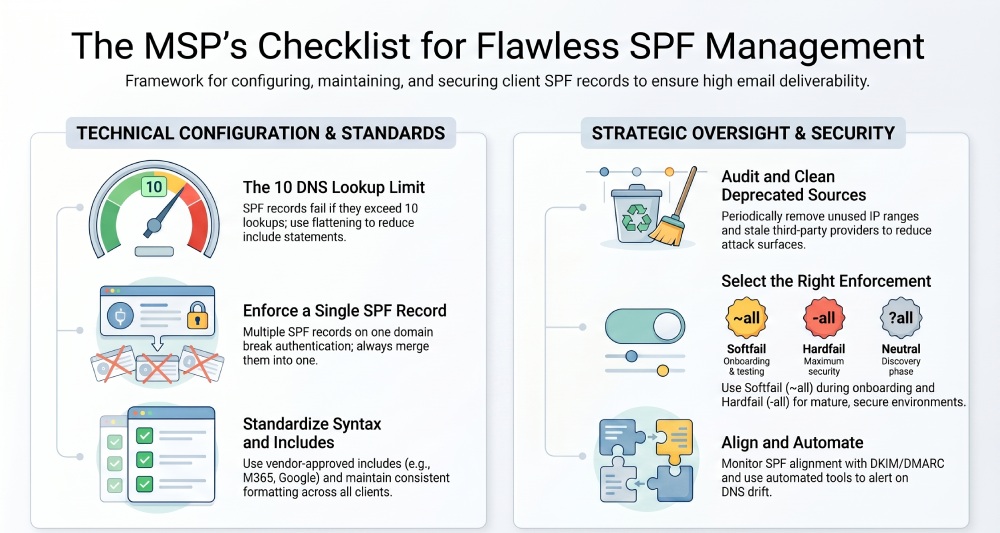 Automated systems should alert technicians when an SPF include breaks, an SPF redirect changes behavior, DNS propagation fails, or an SPF all mechanism is modified unexpectedly. They should also monitor for new SPF failure patterns, unexpected SPF neutral result activity, and unauthorized changes to the default SPF policy.
MSPs can combine native DNS monitoring with SPF testing tools, SPF online checker services, DMARC platforms, and security tools from vendors such as Valimail, dmarcian, OnDMARC, EasyDMARC, Agari, Trustifi, Proofpoint, Mimecast, and Barracuda Networks. By automating SPF troubleshooting and SPF record validation, MSPs maintain stronger Sender Policy Framework controls, improve email authentication reliability, and protect every managed email sending domain from preventable configuration errors.
General Manager
General Manager at DuoCircle. Product strategy and commercial lead across the email security portfolio.
Secure your email infrastructure
Protect, authenticate, and deliver. Contact our team to find the right solution.