12 Ways To Maintain Email Deliverability After Completing Email Warm-Up

Quick Answer
After completing email warm-up, maintain strong email deliverability by monitoring sender reputation, verifying email lists, segmenting audiences, authenticating with SPF, DKIM, and DMARC, avoiding spam triggers, controlling sending volume, and consistently engaging active subscribers.
Completing email warm-up is not the finish line—it is the point where disciplined sending begins. Warmup emails, read emulation, human-like reading, and a deliverability network can help establish trust, but ongoing deliverability depends on how your email accounts behave during real outreach.
If your campaign activity becomes erratic, your sending reputation can decline quickly, hurting inbox placement, reply rates, and long-term pipeline performance. Whether you use Instantly, Instantly AI, Airmail, Outreach, or another outreach system, the goal after email warm-up is to keep every campaign safe & effective while protecting account deliverability, domain protection, and sender reputation.
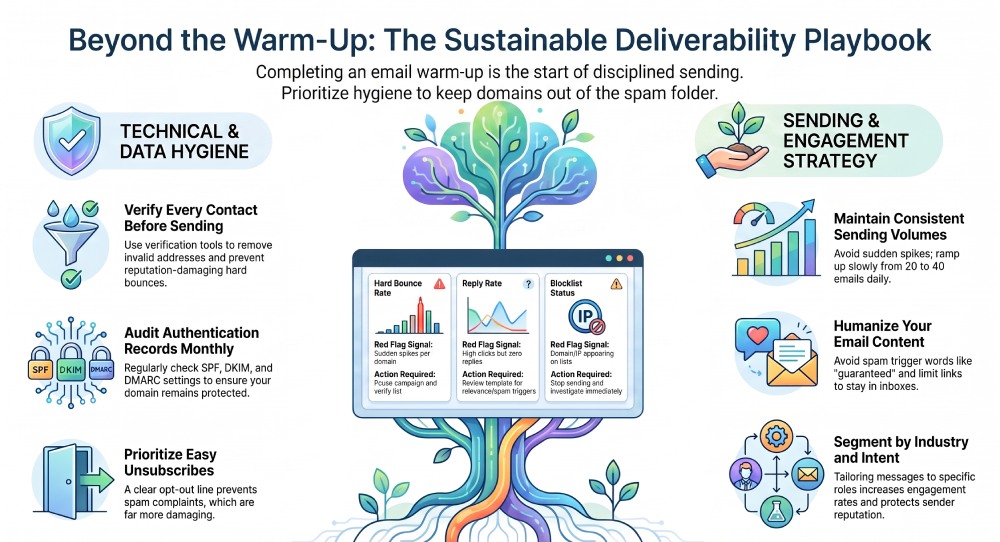
Way #1: Keep Sending Volume Consistent and Avoid Sudden Spikes
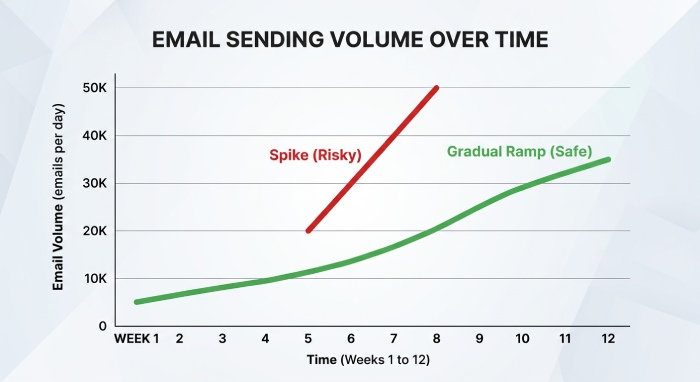
After email warm-up, avoid jumping from a low sending volume to hundreds of cold email messages per day. Mailbox providers monitor sudden spikes because they often resemble spam behavior. A slow ramp helps preserve sending reputation and keeps inbox placement stable.
Use a gradual post-warm-up sending plan
If your email accounts completed activation through an automated tool or 1 click activation workflow, continue increasing sending volume cautiously. For example, move from 20 daily outreach emails to 30, then 40, rather than immediately launching a large campaign.
Balance volume across multiple email accounts
Sales teams often use several email accounts to support outbound outreach. Distribute campaign volume evenly so one inbox does not carry all the risk. This improves deliverability, reduces spam protection flags, and helps maintain reply rates across the full outreach system.
Way #2: Maintain a Clean Email List With Regular Verification
A strong list is essential for email deliverability. Even if your email warm-up was successful, poor data quality can quickly damage the sending reputation. Regular email verification prevents invalid addresses from entering a campaign and protects inbox placement.
Verify contacts before every campaign
Use Verification tools, a Lead Database, or a b2b lead finder that validates emails before sending. If you collect prospects from website visitors, LinkedIn research, a CRM, or third-party lists, verify them before they enter Automations.
Prioritize qualified leads over raw volume
A smaller list of qualified leads usually produces better reply rates, open rate, and response rate than a large, unverified list. Companies like Stripe, Ramp, Revolute, Linear, Flexport, Lovable, HP, Sony, and Twitter have strong brand standards around communication quality; outbound teams should apply the same discipline to every campaign.
Way #3: Monitor Bounce Rates and Remove Invalid Addresses Quickly
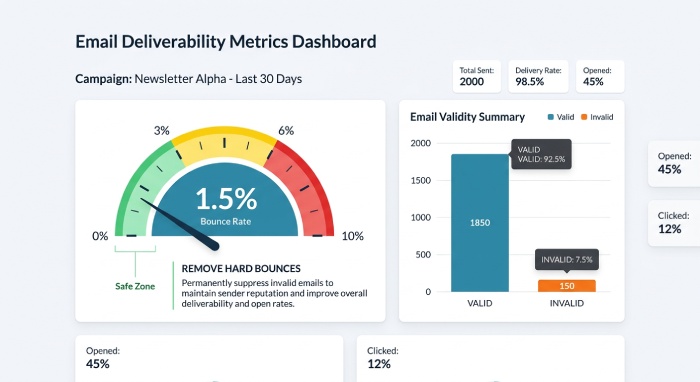
Bounce rates are one of the fastest ways mailbox providers evaluate sending behavior. High hard-bounce rates tell providers that your outreach may be careless or unwanted, which can send future messages to the spam folder.
- Remove hard bounces immediately: Do not keep retrying invalid addresses. Suppress hard bounces from future follow up sequences and sync those updates back to your CRM through integration settings.
- Watch bounce patterns by mailbox and domain: If one domain or one of your email accounts has unusually high bounces, pause that campaign and investigate. A deliverability dashboard can provide insights into email performance, inbox placement, and account deliverability before the issue becomes severe.
Way #4: Track Engagement Metrics Like Opens, Clicks, and Replies
Post-email warm-up deliverability is heavily influenced by engagement. Mailbox providers look at whether recipients open, click, reply, archive, or ignore your messages. Strong reply rates are especially valuable because they show real human interest.
Track open rate, click rate, and reply rates together
An open rate alone is not enough. Apple Mail privacy and image-blocking can distort opens, so prioritize reply rates and response rates as stronger signals. If clicks rise but replies remain low, your template may be generating curiosity without relevance.
Use engagement insights to improve campaigns
Tools like Instantly, Airmail, Instantly AI, and AI Reply Agent can help analyze campaign performance. AI can identify which subject lines, offers, and follow up messages produce better reply rates and stronger inbox placement.
Way #5: Segment Your Audience Based on Activity and Interest
Segmentation improves outreach relevance and helps maintain deliverability. Sending the same cold email to every prospect increases the risk of low engagement, unsubscribes, and spam complaints.
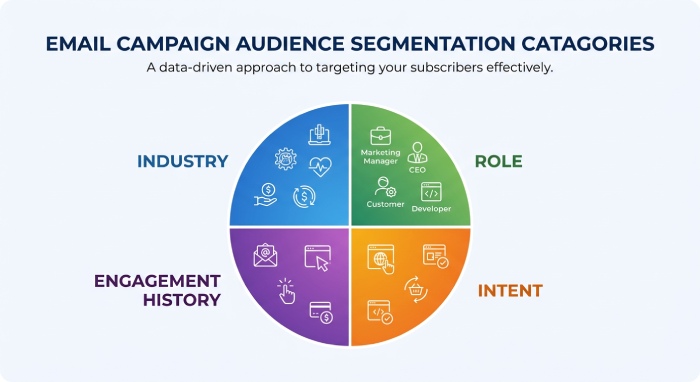
- Segment by industry, role, and intent: Separate prospects by company size, job title, use case, and buying stage. For example, a campaign for sales teams should differ from one aimed at founders, recruiters, or RevOps leaders.
- Segment by engagement history: Create separate segments for people who opened, clicked, replied, ignored, or unsubscribed. This gives your outreach system better control over campaign logic and protects sending reputation over time.
Way #6: Avoid Spam Trigger Words and Overly Promotional Content
Spam protection systems review your content, links, formatting, and sending behavior. Even with a strong deliverability network and completed email warm-up, aggressive language can hurt inbox placement.
Keep copy conversational and specific
Avoid excessive claims like “guaranteed revenue,” “risk-free money,” or “limited-time offer” in a first-touch cold email. A clear, plain-language template usually performs better than heavy sales copy.
Limit links, images, and attachments
Too many links or image-heavy emails can trigger spam protection filters. If you mention a resource, use one relevant link and avoid attachments in early outreach.
Way #7: Personalize Emails to Improve Recipient Engagement
Personalization is one of the strongest ways to boost reply rates. Recipients are more likely to engage when a message references their role, company, recent activity, or business context.
Use meaningful personalization, not fake familiarity
Personalization should show relevance. Mention a funding announcement, hiring trend, product launch, or recent content instead of generic lines like “I loved your website.”
Combine AI with human review
AI Sales Agent tools and automations can speed up research and writing, but human review keeps messaging accurate. Managed Services, Experts, Instantly Academy, the Facebook Group, and Slack Community can also help teams refine personalization and campaign strategy.
Way #8: Continue Using Proper Email Authentication Records
Authentication remains essential after email warm-up. SPF, DKIM, and DMARC help mailbox providers verify that your campaign is legitimate and that your domain is protected.
Audit SPF, DKIM, and DMARC regularly
DNS changes, new sending tools, or CRM integration updates can break authentication. Check records monthly, especially when adding new email accounts or switching platforms.
Align authentication with domain protection
Proper authentication supports sender reputation, spam protection, and inbox placement. It also reduces the risk that spoofed emails damage your sending reputation.
Way #9: Send Emails on a Predictable Schedule
Consistency matters. Mailbox providers prefer natural, predictable behavior over bursts of random activity. This is why email warm-up often includes human-like sending patterns through a private network or deliverability network.
Avoid weekend and overnight bursts
Send during normal business hours for your recipient’s region. Headless browsers, read emulation, and warmup systems can simulate human-like reading during email warm-up, but real campaign timing still matters after activation.
Match sending cadence to buyer behavior
A user friendly outbound process should schedule follow up based on recipient time zones, campaign goals, and sales cycle stage. Predictability helps preserve deliverability and reply rates.
Way #10: Make Unsubscribing Easy to Reduce Spam Complaints
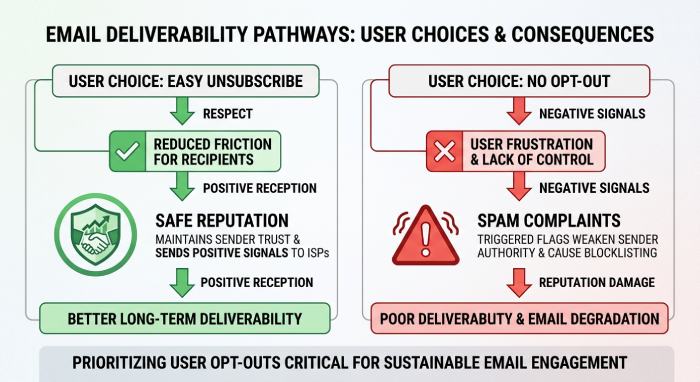
An unsubscribe is far better than a spam complaint. When recipients cannot easily opt out, they may mark your message as spam, which harms sending reputation and inbox placement.
- Include a clear opt-out line: For cold email, a simple line such as “If this is not relevant, I’m happy not to follow up” can reduce friction. For marketing campaigns, include a formal unsubscribe link.
- Suppress opt-outs immediately: Your outreach system should automatically remove unsubscribed contacts from future campaign steps. Good automations prevent accidental re-sends and protect account deliverability.
Way #11: Protect Sender Reputation by Monitoring Blacklists
Blacklist monitoring helps catch deliverability problems early. Even one compromised domain, poor campaign, or low-quality list can cause broader sending reputation issues.
- Check domain and IP reputation: Use a deliverability dashboard to monitor blacklists, spam folder placement, bounce rates, and inbox placement trends. If a mailbox begins landing in spam, pause outreach and investigate before continuing.
- Learn from trusted companies and communities: Trusted companies and operators often build rigorous deliverability processes. Case-study communities around Instantly, including users such as Kale Acquisition, Mike Ellis, Talentir, Briken Bufi, Authbound, and Alex Baldovin, often emphasize continuous monitoring rather than one-time email warm-up.
Way #12: Re-Engage or Suppress Inactive Subscribers Over Time
Inactive recipients can quietly reduce deliverability. If people never open, click, or reply, mailbox providers may interpret your campaign as unwanted.
Create re-engagement campaigns
Send a short, value-driven re-engagement campaign to inactive prospects. Keep it simple, direct, and relevant. If they still do not engage, stop sending.
Suppress long-term non-responders
Suppressing inactive contacts protects email security, email accounts, improves email performance, and keeps your pipeline focused on prospects who may actually convert. Many platforms offer no credit card required trials, but regardless of the tool, the principle is the same: after email warm-up, maintain a clean, engaged audience through consistent verification, segmentation, and disciplined outreach.
General Manager
General Manager at DuoCircle. Product strategy and commercial lead across the email security portfolio.
Secure your email infrastructure
Protect, authenticate, and deliver. Contact our team to find the right solution.