15 Email Migration Service Features That Matter Most for Growing Businesses

Quick Answer
15 Email Migration Service Features That Matter Most for Growing Businesses: Discover the essential email migration service features that ensure secure data transfer, minimal downtime, seamless mailbox migration, compliance support, scalability, and business continuity for growing organizations.

Email remains one of the most critical communication tools for modern organizations. It supports customer interactions, internal collaboration, project coordination, document sharing, scheduling, compliance management, and long-term record retention. As businesses expand, many eventually outgrow their existing email infrastructure and seek more scalable, secure, and feature-rich platforms such as Microsoft 365, Google Workspace, or cloud-hosted Exchange environments.
However, migrating an email environment involves much more than simply transferring messages from one server to another. Organizations must ensure that business communications remain uninterrupted, sensitive information stays protected, compliance requirements are maintained, and employees can continue working without disruption.
Choosing the right email migration service provider can significantly reduce risk and simplify the entire transition process. A well-planned migration not only improves operational efficiency but also strengthens security, scalability, and long-term business continuity.
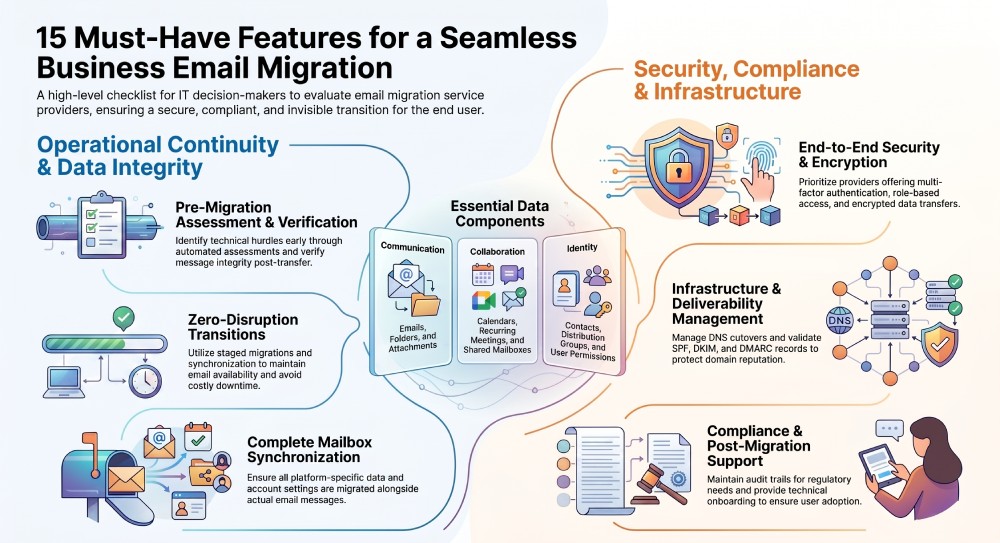
Here are 15 essential email migration service features every growing business should evaluate before starting a migration project.
Feature #1: Minimal Downtime During Migration
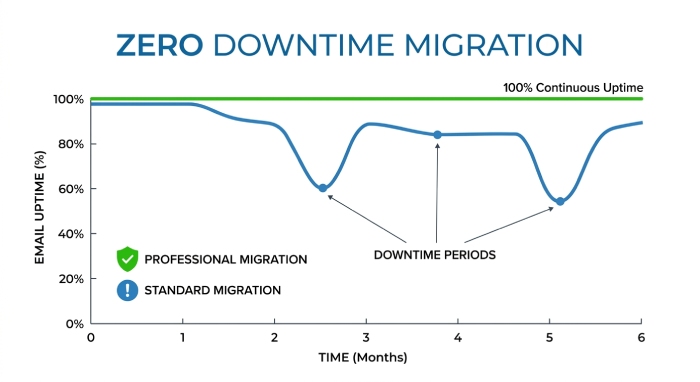
Email downtime can have serious consequences for organizations that rely on constant communication with customers, partners, and employees. Even a few hours of service disruption can lead to missed opportunities, delayed projects, and frustrated users.
Professional migration providers implement strategies designed to keep email services available throughout the migration process. These may include staged migrations, mailbox synchronization, coexistence configurations, and carefully planned DNS cutovers.
By minimizing downtime, businesses can continue daily operations while the migration occurs behind the scenes, reducing productivity losses and maintaining customer confidence.
Feature #2: Secure Data Transfer and Encryption
Email systems often contain highly sensitive information, including customer records, financial data, contracts, employee communications, and proprietary business information.
A reputable migration service should prioritize security throughout every stage of the migration lifecycle. Essential security features include:
- End-to-end encryption
- Secure authentication protocols
- Multi-factor authentication (MFA)
- Role-based access controls
- Detailed audit logging
- Secure credential management
- Data protection during transit and storage
Strong security controls help protect confidential information from unauthorized access and reduce the risk of data breaches during migration.
Feature #3: Support for Multiple Email Platforms
Modern businesses often operate within complex technology environments. Some organizations may be moving from legacy Exchange servers, while others migrate between cloud providers or consolidate multiple email platforms after mergers or acquisitions.
An effective migration provider should support a broad range of environments, including:
- Microsoft Exchange
- Microsoft 365
- Google Workspace
- IMAP-based servers
- POP environments
- Hosted email solutions
- Legacy mail servers
- PST file imports
Platform flexibility ensures that businesses can execute migrations regardless of their current infrastructure and future technology goals.
Feature #4: Complete Mailbox and Collaboration Data Migration
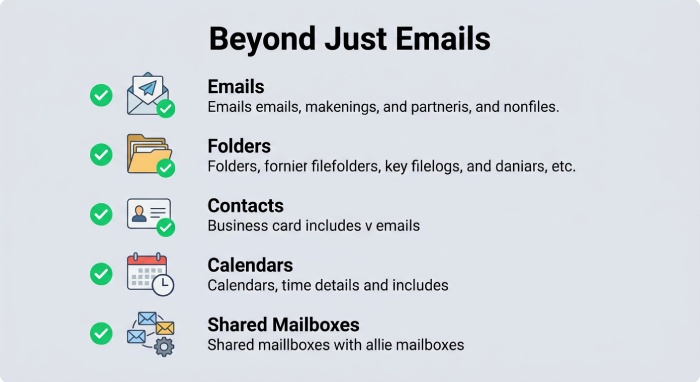
Many organizations mistakenly assume that email migration only involves transferring messages. In reality, employees rely on numerous collaboration components that are equally important for daily operations.
A comprehensive migration service should transfer:
- Emails
- Folder structures
- Contacts
- Calendars
- Recurring meetings
- Shared mailboxes
- Distribution groups
- Aliases
- Attachments
- User permissions
Failing to migrate collaboration data can result in scheduling conflicts, communication gaps, and significant productivity losses after the migration is completed.
Feature #5: Scalable Migration Capacity
Growing businesses require solutions that can accommodate future expansion. What works for a company with 50 users may not meet the needs of an organization with thousands of employees across multiple locations.
Scalable migration services should support:
- Large mailbox volumes
- Multi-domain environments
- Enterprise-scale deployments
- Hybrid cloud infrastructures
- Multiple office locations
- Future business growth
Selecting a scalable migration solution helps organizations avoid costly future migrations and infrastructure limitations.
Feature #6: Automated Pre-Migration Assessment
Successful migrations begin with careful planning and analysis. Automated assessments help identify technical challenges before data transfer begins.
A thorough pre-migration assessment should evaluate:
- Mailbox sizes
- Legacy system limitations
- Corrupt messages
- Shared resources
- User permissions
- Compliance requirements
- Email routing configurations
- Existing authentication settings
By identifying issues early, organizations can reduce migration risks and develop effective mitigation strategies.
Feature #7: Data Integrity Verification
Data loss is one of the most significant concerns during any migration project. Missing emails, contacts, or calendar entries can negatively impact business operations and create compliance issues.
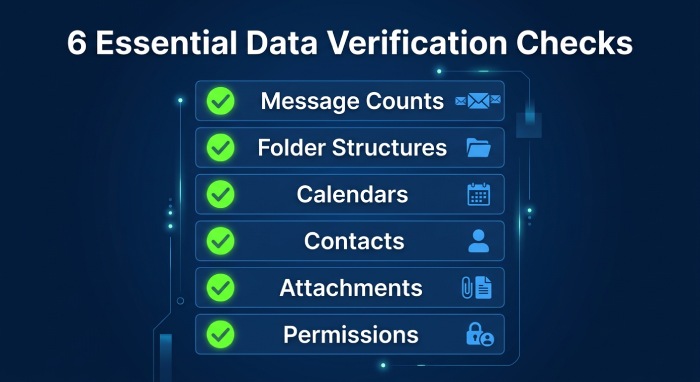
Professional migration providers should perform comprehensive verification checks that compare source and destination environments.
Verification processes often include:
- Message count validation
- Folder structure comparison
- Calendar verification
- Contact synchronization checks
- Attachment integrity testing
- Permission validation
Detailed verification reports provide assurance that all critical business data has been successfully migrated.
Feature #8: Real-Time Migration Dashboard
Visibility is essential during large-scale migration projects. IT administrators need accurate information about migration progress, performance, and potential issues.
An effective migration dashboard should offer:
- Real-time progress monitoring
- User migration status
- Success and failure reporting
- Bandwidth utilization metrics
- Estimated completion times
- Error tracking and alerts
Real-time insights allow administrators to make informed decisions and quickly resolve issues before they affect users.
Feature #9: Flexible Scheduling Options
Every organization operates differently. Some businesses can tolerate maintenance windows during weekends, while others require continuous availability around the clock.
Flexible scheduling options help reduce operational disruption by allowing migrations to occur during low-impact periods.
Key scheduling capabilities include:
- Weekend migrations
- After-hours deployments
- Pilot migrations
- Phased rollouts
- Emergency pause functions
- Department-based scheduling
Flexible deployment strategies help organizations maintain business continuity while minimizing user disruption.
Feature #10: Compliance and Regulatory Support
Many industries face strict compliance requirements governing data retention, privacy, and communication security.
Organizations operating in healthcare, finance, legal services, education, and government sectors must ensure that migration activities align with regulatory obligations.
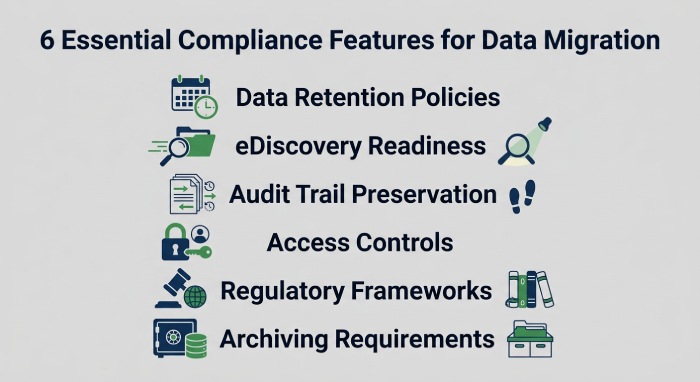
Migration providers should support:
- Data retention policies
- eDiscovery readiness
- Audit trail preservation
- Access controls
- Regulatory compliance frameworks
- Archiving requirements
Strong compliance support helps organizations avoid legal risks and maintain regulatory adherence throughout the migration process.
Feature #11: Post-Migration Support and User Adoption
Migration success does not end when the final mailbox is transferred. Employees often require assistance adjusting to new systems, configurations, and workflows.
Quality migration providers offer post-migration support services such as:
- Mobile device configuration
- Email client setup
- Shared mailbox troubleshooting
- User onboarding assistance
- Knowledge base resources
- Training sessions
- Technical support
Providing users with adequate support improves adoption rates and helps maximize the value of the new email environment.
Feature #12: SPF, DKIM, and DMARC Migration Support
Email authentication plays a critical role in protecting organizations from phishing attacks, spoofing attempts, and email fraud.
During migration, authentication settings often require modification to accommodate new email infrastructure. Failure to properly configure authentication protocols can lead to delivery failures and increased security risks.
Migration providers should assist with:
- SPF record validation
- DKIM implementation
- DMARC policy configuration
- Authentication alignment testing
- Mail flow verification
- Domain reputation protection
Proper authentication support helps maintain email deliverability while strengthening overall email security.
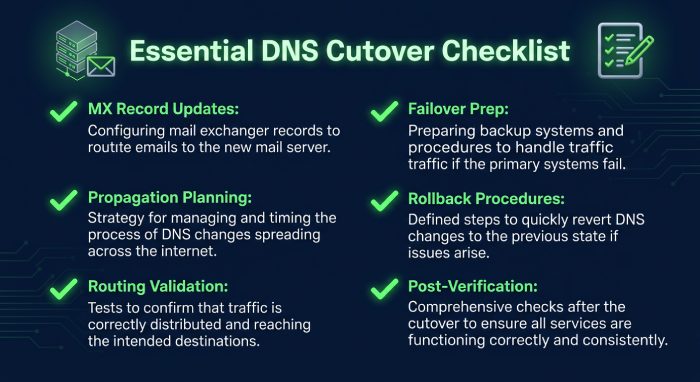
Feature #13: DNS Cutover Planning and Management
DNS changes are among the most sensitive stages of any email migration project. Incorrect configurations can result in delivery delays, message loss, and service interruptions.
Professional migration services should provide comprehensive DNS management assistance, including:
- MX record updates
- DNS propagation planning
- Mail routing validation
- Failover preparation
- Rollback procedures
- Post-cutover verification
Careful DNS planning minimizes risk and helps ensure a smooth transition between email platforms.
Feature #14: Email Deliverability Testing and Validation
Even after a successful migration, organizations must confirm that outbound messages continue reaching recipient inboxes.
Changes to infrastructure, authentication settings, or DNS records can negatively impact deliverability if not properly tested.
A quality migration provider should perform:
- Mail flow testing
- Inbox placement verification
- Authentication validation
- Bounce monitoring
- Delivery performance analysis
- Reputation monitoring
Deliverability testing helps identify and resolve issues before they affect customer communications or business operations.
Feature #15: Business Continuity and Disaster Recovery Planning
Despite careful planning, unexpected issues can occur during migration projects. Hardware failures, network disruptions, configuration errors, or unforeseen compatibility problems can impact the migration process.
A reliable migration provider should maintain comprehensive contingency plans, including:
- Backup procedures
- Disaster recovery strategies
- Rollback capabilities
- Temporary mail continuity services
- Data protection safeguards
- Emergency response processes
Business continuity planning ensures organizations can continue communicating even if migration challenges arise.
Why These Features Matter for Growing Businesses
As organizations expand, email infrastructure becomes increasingly important to overall business success. Larger workforces, higher communication volumes, stricter compliance requirements, and increased cybersecurity risks make email migration projects more complex. Selecting a migration provider based solely on cost can expose businesses to significant operational and security risks.
Instead, organizations should evaluate providers based on their ability to deliver secure, scalable, compliant, and reliable migration services. The right provider will not only facilitate a successful migration but also create a stronger foundation for future growth, collaboration, and digital transformation initiatives.
Final Thoughts
Choosing an email migration service is a strategic business decision that extends far beyond moving data from one platform to another. Organizations must carefully evaluate factors such as security, scalability, compliance, deliverability, business continuity, and user experience throughout the migration lifecycle.
By prioritizing these 15 essential email migration service features, businesses can significantly reduce migration risks, protect valuable communication data, maintain uninterrupted operations, and ensure long-term success. A well-executed email migration enables organizations to fully leverage modern cloud-based platforms while improving collaboration, strengthening email security, and supporting future business growth.
General Manager
General Manager at DuoCircle. Product strategy and commercial lead across the email security portfolio.
Secure your email infrastructure
Protect, authenticate, and deliver. Contact our team to find the right solution.