6 Effective Data Loss Prevention Strategies for Business Email Security

Quick Answer
Data Loss Prevention (DLP) strategies protect business email by identifying sensitive data, enforcing email security policies, strengthening SPF, DKIM, and DMARC, encrypting confidential information, training employees, and continuously monitoring security controls.
Business email is one of the most widely used communication channels for sharing sensitive information, including customer records, financial documents, employee data, contracts, credentials, and confidential business files. However, email can also become a major source of data leakage when employees accidentally send information to the wrong recipient, accounts are compromised, or attackers use phishing and social engineering techniques.
A strong Data Loss Prevention (DLP) strategy can help organizations identify sensitive information, prevent unauthorized sharing, and reduce the risk of accidental or malicious data exposure. Below are six effective DLP strategies businesses can use to strengthen email security.
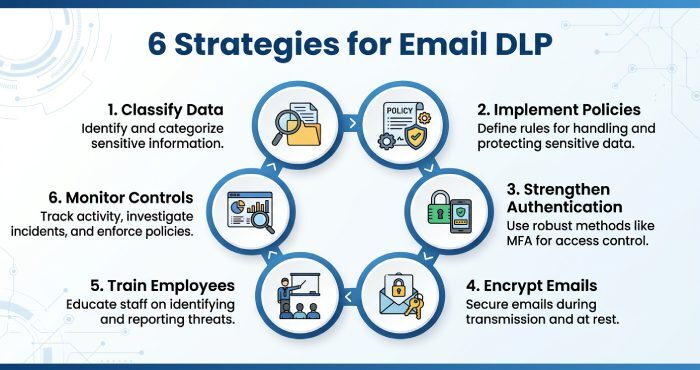
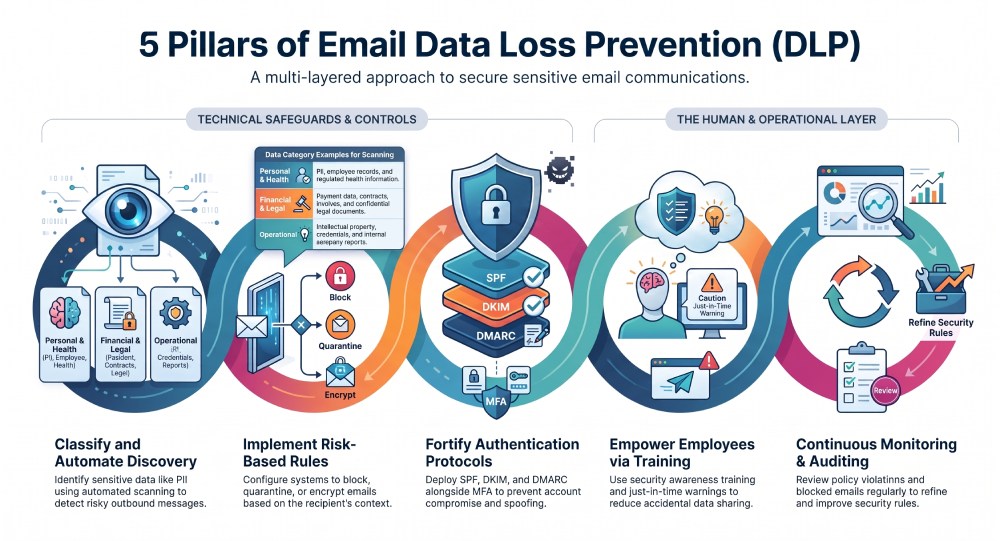
1. Classify and Identify Sensitive Business Data
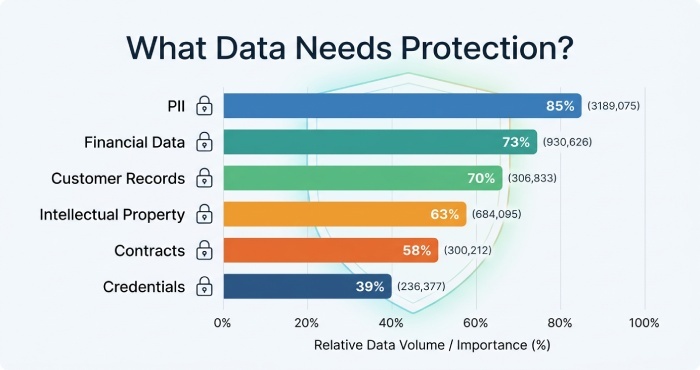
The first step in protecting information through email is understanding what data needs protection. Businesses should identify sensitive information and establish clear data classifications based on its level of confidentiality.
Define Sensitive Data Categories
Depending on the organization, sensitive information may include:
- Personally identifiable information (PII)
- Financial and payment information
- Customer records
- Employee information
- Intellectual property
- Business contracts
- Authentication credentials
- Legal documents
- Health or regulated information
- Confidential company reports
Once these categories are defined, organizations can create email security policies that apply different controls to different types of information.
Use Automated Data Discovery
Modern DLP solutions can scan email messages and attachments for sensitive information. Organizations can configure policies to detect specific patterns, keywords, file types, or data identifiers before an email leaves the company.
This allows security teams to identify risky messages automatically rather than relying entirely on employees to recognize sensitive information themselves.
2. Implement Email DLP Policies and Rules
Email DLP policies provide automated controls for detecting and preventing inappropriate data transfers.
Create Rules Based on Risk
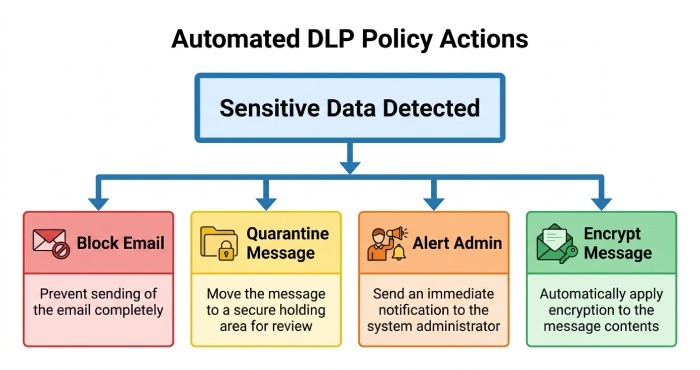
Organizations can create rules that trigger when sensitive information is detected in an outgoing message. Depending on the severity of the event, the system may:
- Block the email
- Quarantine the message
- Alert a security administrator
- Warn the employee
- Require additional authorization
- Encrypt the message
- Log the event for investigation
For example, an organization could configure a rule that prevents employees from sending customer financial information to external personal email accounts.
Apply Context-Aware Policies
DLP policies become more effective when they consider context. A message containing sensitive data sent to an approved business partner may be legitimate, while the same information sent to an unknown external address could represent a serious security risk.
Context-aware controls can evaluate factors such as the recipient, sender, attachment, data type, and destination.
3. Strengthen Email Authentication and Account Protection
Data loss can occur when attackers gain access to legitimate business email accounts. A compromised account can be used to send confidential information, impersonate employees, or distribute malicious messages.
Deploy SPF, DKIM, and DMARC
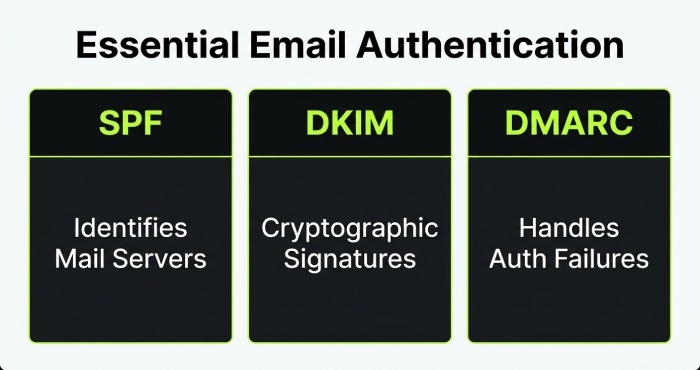
Organizations should implement the three major email authentication mechanisms:
- SPF (Sender Policy Framework): Helps identify authorized mail servers for a domain.
- DKIM (DomainKeys Identified Mail): Uses cryptographic signatures to help verify message authenticity.
- DMARC (Domain-based Message Authentication, Reporting, and Conformance): Builds on SPF and DKIM and allows domain owners to specify how authentication failures should be handled.
Properly configured email authentication can reduce spoofing and impersonation risks that frequently contribute to business email compromise.
Protect Employee Accounts
Organizations should also implement:
- Multi-factor authentication (MFA)
- Strong password policies
- Conditional access controls
- Login monitoring
- Suspicious sign-in alerts
- Regular account reviews
Protecting accounts is an important part of DLP because preventing unauthorized access can stop attackers from accessing or transmitting business data in the first place.
4. Encrypt Sensitive Emails and Attachments
Email encryption can provide an additional layer of protection when sensitive information needs to be transmitted.
Encrypt Confidential Information
Organizations can establish policies requiring encryption for messages containing specific categories of sensitive information. For example, financial documents, customer records, or confidential contracts may require additional protection before being sent externally.
Encryption helps reduce the exposure of information if a message is intercepted or accessed by an unauthorized person.
Control External Sharing
Businesses should also establish clear rules for sharing confidential files with external recipients. Instead of allowing sensitive documents to be attached directly to emails, organizations may use controlled file-sharing systems with:
- Access restrictions
- Expiration dates
- Download controls
- Authentication requirements
- Activity monitoring
These controls can provide greater visibility into who accesses sensitive information.
5. Train Employees to Prevent Accidental Data Loss
Technology alone cannot eliminate every data-loss risk. Employees remain an important part of business email security because many incidents result from mistakes, social engineering, or poor security practices.
Provide Security Awareness Training
Employees should understand how to identify:
- Phishing emails
- Suspicious attachments
- Impersonation attempts
- Unusual requests for confidential information
- Fake invoices
- Malicious links
- Unauthorized data-sharing requests
Training should explain not only what employees should avoid but also what they should do when they encounter a suspicious message.
Use Just-in-Time Warnings
Email DLP systems can provide users with warnings when they attempt to send sensitive information outside the organization. A clear warning can encourage employees to stop and verify the recipient before continuing.
This approach can reduce accidental data sharing while allowing legitimate business communication to continue.
6. Monitor, Audit, and Continuously Improve DLP Controls
DLP should not be treated as a one-time configuration. Organizations need continuous monitoring to identify weaknesses, investigate incidents, and improve security policies.
Monitor Email Security Events
Security teams should review events such as:
- Blocked emails
- Quarantined messages
- Sensitive-data policy violations
- Large outbound attachments
- Repeated policy violations
- Messages sent to unusual external domains
- Suspicious account activity
Monitoring helps organizations understand how sensitive information is being shared and where additional controls may be necessary.
Regularly Review DLP Policies
Business operations change over time, so DLP policies should be reviewed regularly. Security teams should determine whether existing rules are still relevant and whether legitimate business emails are being blocked unnecessarily.
Organizations can also use incident data to refine policies and reduce false positives while maintaining strong protection for sensitive information.
How DLP Improves Business Email Security
A comprehensive DLP program combines technology, authentication, employee awareness, monitoring, and policy enforcement. Instead of relying on a single security control, businesses can create multiple layers of protection around sensitive information.
For example, an organization can use MFA to protect employee accounts, SPF/DKIM/DMARC to strengthen email authentication, DLP rules to detect sensitive information, encryption to protect confidential messages, and employee training to reduce human error.
Conclusion
Business email remains essential for communication, but it also creates significant opportunities for accidental and unauthorized data exposure. Implementing effective Data Loss Prevention strategies for business email security can help organizations protect sensitive information while maintaining productive communication.
The six key strategies are identifying sensitive data, implementing email DLP policies, strengthening authentication and account security, encrypting confidential information, training employees, and continuously monitoring DLP controls. When these measures work together, businesses can significantly strengthen their defenses against data leakage, phishing, business email compromise, and other email-related security threats.
General Manager
General Manager at DuoCircle. Product strategy and commercial lead across the email security portfolio.
Secure your email infrastructure
Protect, authenticate, and deliver. Contact our team to find the right solution.