How To Verify Sender Policy Framework Compliance Using SPF Lookup Tools

Quick Answer
Verify Sender Policy Framework compliance by checking your domain’s SPF record with SPF lookup tools. These tools help confirm authorized sending servers, identify configuration errors, and improve email authentication, deliverability, and protection against spoofing and phishing attacks.
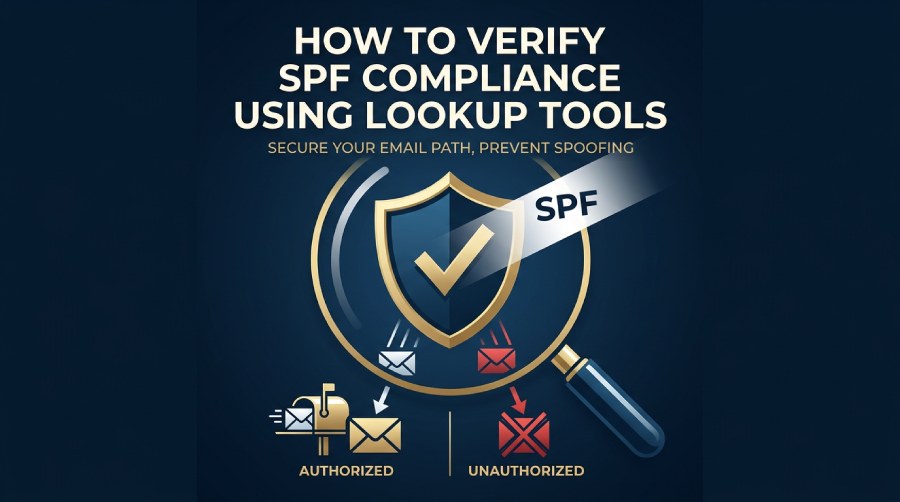
Verifying Sender Policy Framework compliance is an essential part of maintaining a secure and reliable email infrastructure. An SPF record helps domain owners specify which mail servers are authorized to send emails on behalf of their domain, reducing the risk of email spoofing, phishing attacks, and unauthorized message delivery. By using SPF lookup tools, organizations can quickly validate their SPF records, identify configuration errors, detect DNS lookup issues, and ensure that all legitimate sending sources are properly authorized.
This guide explains how SPF works, how SPF lookup tools perform compliance checks, and the best practices for maintaining accurate SPF records to improve email deliverability, strengthen domain reputation, and support a comprehensive email authentication strategy alongside DKIM and DMARC.
What SPF Is and Why Sender Policy Framework Compliance Matters
SPF as a core email authentication protocol
Sender Policy Framework, commonly known as SPF, is an email authentication protocol that helps receiving mail systems determine whether a sending server is authorized to send email for a domain. In practice, Sender Policy Framework works by allowing a domain owner to publish an SPF record in DNS that lists approved mail server sources, IP addresses, subnets, and third-party email service providers.
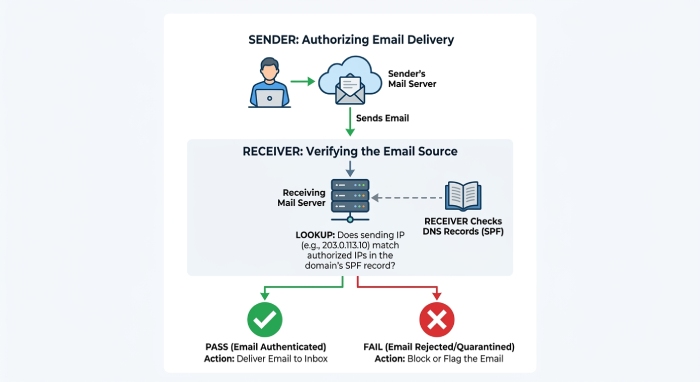
SPF authentication is especially important because attackers often forge the visible sender domain to support email spoofing, email impersonation, and phishing attacks. When a receiving system performs an SPF record check, it compares the sending source against the authorized sending sources published in the domain’s DNS records.
For organizations that rely on Google Workspace, Microsoft Office 365, Zoho Mail, Mailchimp, Amazon SES, SendGrid, or other Third-party domains, SPF validation is a foundational layer of email security. It does not replace DKIM or DMARC, but it supports a broader email authentication strategy that improves email deliverability and helps protect domain reputation.
Why SPF compliance affects deliverability and trust
SPF compliance matters because Mailbox Providers such as Google, Microsoft, Verizon, and others use SPF authentication signals when deciding whether outbound emails should be accepted, quarantined, or rejected. A failed SPF record check may not always block a message, but repeated SPF failure can damage domain reputation and reduce email deliverability.
Sender Policy Framework also supports Domain-based Message Authentication Reporting and Conformance, or DMARC. While DKIM, also known as DomainKeys Identified Mail, validates message integrity with cryptographic signatures, SPF validates whether the sending infrastructure is authorized. Together, SPF, DKIM, and DMARC create a layered defense against email-based threats.
How SPF Records Work: DNS TXT Records, Mechanisms, and Authorized Senders
SPF records live in DNS as TXT records
An SPF record is published as a DNS TXT record at the domain level. A basic SPF record may look like this:
v=spf1 include:_spf.*google*.com include:*sendgrid*.net ip4:192.0.2.10 -all
The v=spf1 tag identifies the record as Sender Policy Framework. The rest of the SPF syntax defines which senders are allowed. During an SPF lookup, the receiving mail server queries DNS, retrieves the TXT record, and evaluates the message against the listed SPF mechanisms.
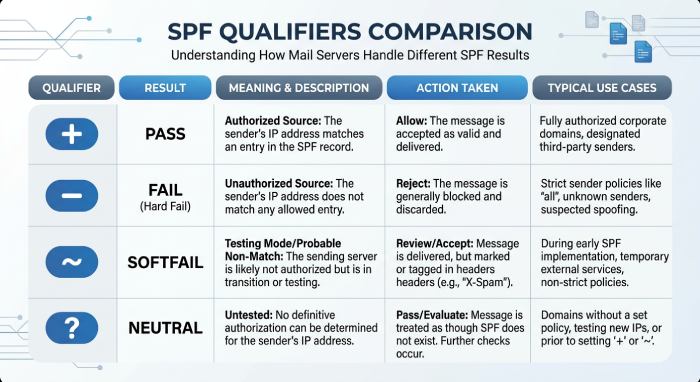
A proper SPF record check confirms whether the SPF record exists, whether it is syntactically valid under RFC 7208, and whether it returns an acceptable SPF record status such as pass, softfail, neutral, or fail.
SPF mechanisms, qualifiers, and tags
Common SPF mechanisms include ip4, ip6, a, mx, include, exists, and redirect. SPF qualifiers include + for pass, - for fail, ~ for softfail, and ? for neutral. These SPF tags and SPF mechanisms define how strict the policy should be.
For example, ~all tells receivers to treat unauthorized senders as suspicious, while -all instructs them to fail unauthorized sources. A strong SPF compliance check should evaluate whether the qualifier matches the organization’s risk assessment level and operational maturity.
Mapping authorized sending sources
The most reliable SPF record validation begins with an inventory of all systems that send email for the domain. This includes corporate mail platforms such as Office 365 or Google Workspace, marketing platforms like Mailchimp, transactional services such as Amazon SES or SendGrid, and support or CRM platforms.
Include mechanism and SPF redirect
The include mechanism allows a domain to authorize another provider’s SPF policy. For example, include:spf.protection.outlook.com authorizes Microsoft Office 365 sending infrastructure. SPF inclusion is useful, but every include adds DNS lookup complexity. SPF redirect is different: it points evaluation to another domain’s SPF record, often used when multiple domains share a centralized policy. Both SPF inclusion and SPF redirect should be reviewed carefully with an SPF validator, because misconfiguration can cause an invalid SPF record or SPF failure.
Step-by-Step Guide to Using SPF Lookup Tools to Verify Compliance
Step 1: Identify the domain and Return-Path domain
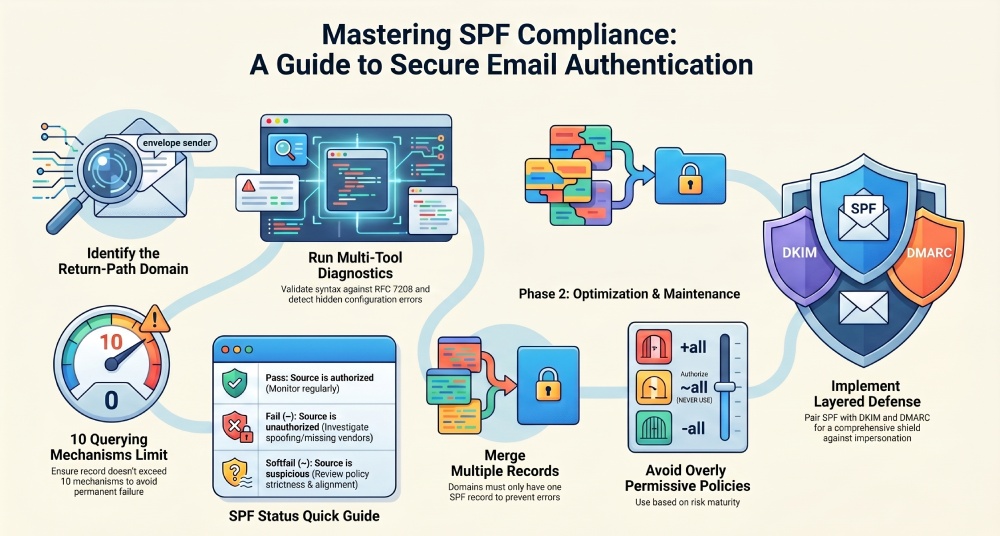
Before running an SPF lookup, confirm which domain you need to test. SPF authentication is evaluated against the Return-Path domain, also called the envelope sender, not always the visible From address. This distinction is critical for DMARC alignment and email authentication. If your organization sends outbound emails through several vendors, test each domain used in the Return-Path. A domain owner should also check subdomains used by third-party email service providers.
Step 2: Run an SPF record check with trusted tools
Use an SPF lookup service such as MXToolbox SuperTool, EasyDMARC SPF Checker, or other Diagnostics platforms to retrieve and analyze the SPF record. Many tools also appear in software research platforms such as G2 Crowd, SourceForge, and Expert Insights, where teams compare features such as SPF monitoring, Email Health, Domain Scanner, Delivery Center, API(application programming interface) Reference access, Blog resources, Blacklists checks, and broader DNS diagnostics.
An SPF diagnostic tool typically performs several checks at once:
- Confirms whether a DNS TXT record exists
- Validates SPF syntax against RFC 7208
- Detects multiple SPF records
- Counts DNS lookups
- Reviews authorized IP addresses and subnets
- Reports SPF record status and possible SPF failure conditions
A good SPF validator should make the SPF validation result easy to interpret while still exposing technical detail for administrators.
Compare results across more than one SPF diagnostic tool
For important domains, run the same SPF record check in more than one SPF diagnostic tool. MXToolbox, EasyDMARC, and similar tools may present warnings differently, but they should agree on the core SPF record validation result. If one SPF validator flags an issue and another does not, inspect the raw DNS response directly through your DNS hosting provider or domain registrar.
Step 3: Interpret SPF validation results
After the SPF lookup completes, review the result carefully. A passing SPF validation means the SPF record is present and structurally valid, but it does not automatically mean the domain is fully protected. You still need to verify that every legitimate sender is included and that unauthorized senders are excluded.
Look for these signals:
- Pass: SPF authentication succeeded for the tested source.
- Fail: The source is not authorized and policy says it should fail.
- Softfail: The source is probably unauthorized but not strictly rejected.
- Neutral: The domain makes no strong assertion.
- Permerror: SPF syntax or DNS evaluation is broken.
- TempError: Temporary DNS issue during SPF lookup.
An SPF compliance check should also consider DMARC alignment, DKIM status, and the organization’s overall email deliverability goals.
Common SPF Errors Found During Lookup and How to Fix Them
Multiple records, syntax errors, and DNS lookup limits
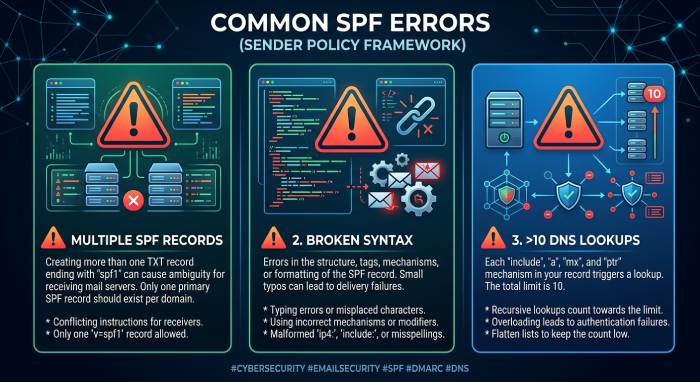
One of the most common errors found during an SPF record check is multiple SPF records at the same hostname. SPF allows only one SPF record per domain. If multiple TXT records start with v=spf1, receiving systems may return a permanent error, resulting in SPF failure.
Another issue is broken SPF syntax. Missing spaces, unsupported mechanisms, incorrect CIDR notation for subnets, or malformed includes can create an invalid SPF record. An SPF validator will usually identify the exact part of the record that caused the error.
The DNS lookup limit is another frequent problem. Sender Policy Framework permits a maximum of 10 DNS-querying mechanisms during SPF authentication. Excessive include, a, mx, exists, or redirect mechanisms can exceed this limit and break SPF validation.
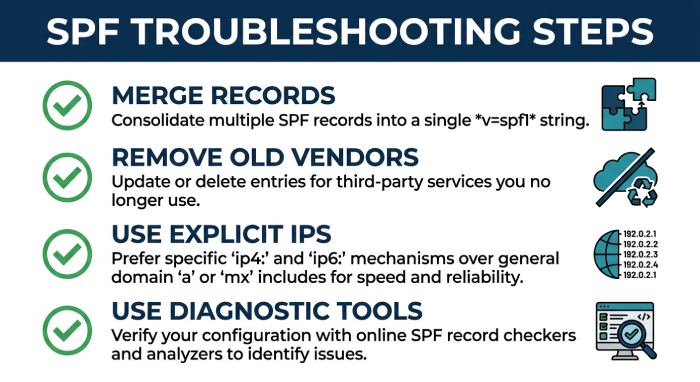
To fix these problems:
- Merge multiple SPF records into one valid SPF record.
- Remove obsolete vendors and unused Third-party domains.
- Replace unnecessary a or mx mechanisms with explicit IP addresses where appropriate.
- Validate changes with an SPF diagnostic tool before publishing.
Missing senders and overly permissive policies
Another common issue is a missing authorized sender. For example, if Mailchimp or SendGrid sends email for your domain but is not included in the SPF record, recipients may see SPF failure. This can harm email deliverability, especially when sending marketing campaigns, invoices, alerts, or password resets.
The opposite problem is an overly permissive SPF record, such as v=spf1 +all. This effectively authorizes every sender and provides no meaningful email security. A better policy should include only known authorized sending sources and end with ~all or -all, depending on your risk assessment level.
Best Practices for Maintaining Ongoing SPF Compliance
Build SPF governance into email operations
SPF best practices begin with ownership. The domain owner should maintain a current inventory of all platforms that send outbound emails. Any change to marketing automation, CRM, helpdesk, billing, or cloud infrastructure should trigger SPF record validation before the system goes live.
Use SPF monitoring and SPF reporting as part of routine email traffic analysis. Regular reviews help detect shadow IT, forgotten vendors, unauthorized sending patterns, and emerging email-based threats. An SPF diagnostic tool can be used monthly or after any DNS settings change to ensure Sender Policy Framework remains healthy.
Coordinate SPF with DKIM, DMARC, and provider documentation
SPF compliance should not be managed in isolation. Pair SPF authentication with DKIM and DMARC for stronger email authentication. DMARC policies use SPF and DKIM results to determine how receiving systems should handle messages that fail authentication.
 When adding providers such as Google, Microsoft, Zoho Mail, Mailchimp, Amazon SES, or SendGrid, always follow current provider documentation. SPF records published in old setup guides, outdated Blog posts, or copied from another organization may not match current infrastructure.
For ongoing email deliverability, document every SPF record change, verify it with an SPF lookup, run an SPF record check after DNS propagation, and confirm final SPF validation with a reputable SPF validator. This process keeps the SPF record accurate, reduces email spoofing risk, and supports long-term email security.
General Manager
General Manager at DuoCircle. Product strategy and commercial lead across the email security portfolio.
Secure your email infrastructure
Protect, authenticate, and deliver. Contact our team to find the right solution.