Office 365 Migration: Security Risks To Avoid With Sensitive Data

Quick Answer
Office 365 migration solution involves risks like data leaks, weak access controls, misconfigured permissions, phishing, and insecure APIs. Avoid these by using encryption, MFA, proper auditing, and compliance checks during migration of sensitive business data. and continuous monitoring.
An Office 365 migration is not just a technical move from one platform to another; it is a security-critical transformation of identity, data, permissions, collaboration spaces, and business workflows. Whether the project involves a tenant-to-tenant migration, Exchange Online migration, OneDrive for Business migration, SharePoint Online migration, or Teams migration, the chosen migration solution must protect sensitive business data before, during, and after the move.
Organizations migrating from Microsoft 365, Office 365, Google Gmail, HCL Notes, Notes, file shares, QuickPlace, Quickr, Domino.Doc, or other legacy platforms must evaluate data protection, cyber resilience, security and compliance, and backup and recovery from the start. Tools such as Quest On Demand Migration, Content Matrix, PST Flight Deck, Coexistence Manager for Notes, Migrator for Notes to SharePoint, Enterprise Reporter for Office 365, Identity Recovery for Entra ID, NetVault Backup, and NetVault Plus can support complex cloud, Hybrid AD, and hybrid environments when properly governed.
Pre-Migration Risk Assessment: Identifying Sensitive Data, Compliance Requirements, and Legacy System Vulnerabilities
Before any Office 365 migration begins, organizations need a structured risk assessment that maps sensitive data, business-critical workloads, regulatory obligations, and source-system weaknesses. A migration solution should provide visibility into environment dependencies across Exchange Online, OneDrive for Business, SharePoint Online, Teams, Active Directory, Azure AD, Entra ID, and any connected cloud environments.
Classify Sensitive Data Before Moving It
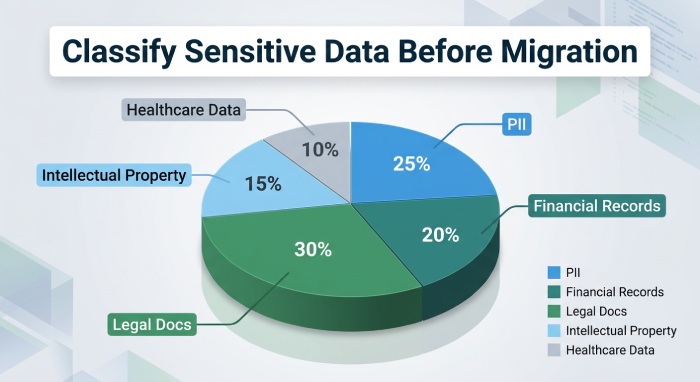
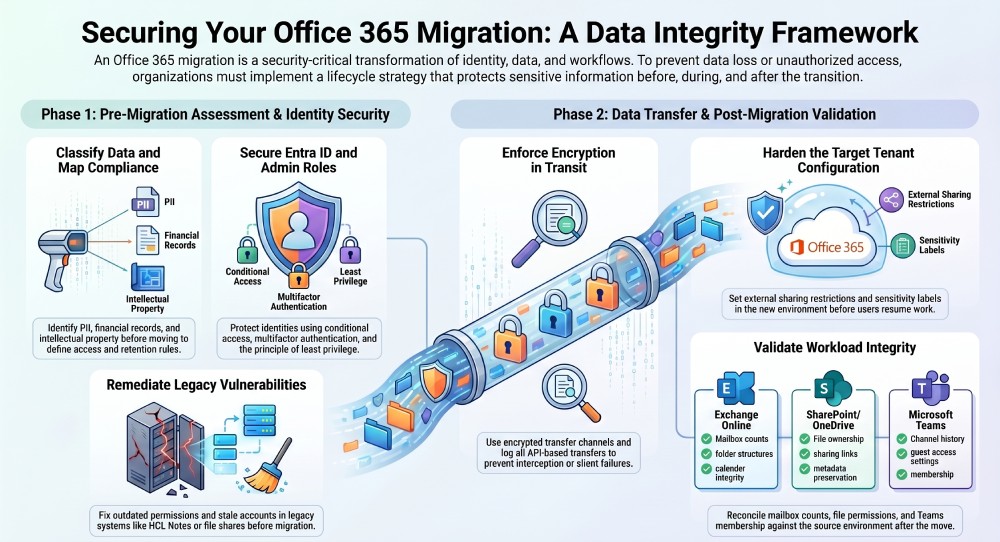
Sensitive information should be identified before email migration, content migration, file shares migration, or archive migration begins. This includes personally identifiable information, financial records, legal documents, intellectual property, regulated healthcare data, and executive communications.
Map Data to Compliance Requirements
A strong compliance framework should define where data can reside, who can access it, how long it must be retained, and what auditing evidence is required. This is especially important during a tenant-to-tenant migration where organizations may consolidate tenants after mergers, acquisitions, divestitures, or digital transformation initiatives.
Assess Legacy Platform Exposure
Legacy environments such as HCL Notes, Google Gmail, Domino.Doc, QuickPlace, Quickr, and on-premises file repositories may contain outdated permissions, stale accounts, unsupported encryption, or weak data backup practices. These vulnerabilities can follow data into the Microsoft 365 tenant if not remediated first.
Evaluate Migration Scope and Dependencies
A complete Office 365 migration plan should account for Exchange Online migration, OneDrive for Business migration, SharePoint Online migration, Teams migration, device migration, migrate users, migrate groups, and shared mailbox movement. The migration solution should support automation, metadata preservation, and real-time tracking so teams can detect risks early.
Include Backup and Recovery Planning
Backup and recovery should be planned before the first workload moves. Microsoft native data protection helps, but it is not a full enterprise-level recovery strategy. Solutions such as NetVault Backup, NetVault Plus, and Microsoft 365-focused recovery tools can support granular restore, bulk restores, ransomware response, and accidental deletion recovery.
Access Control and Identity Security: Preventing Unauthorized Access During the Migration Process
Identity is one of the highest-risk areas in an Office 365 migration. During a tenant-to-tenant migration, administrators often create temporary accounts, elevated roles, service principals, migration endpoints, application permissions, and cross-tenant access policies. Without strict user access management, these mechanisms can create unauthorized access paths.
Secure Entra ID and Administrative Roles
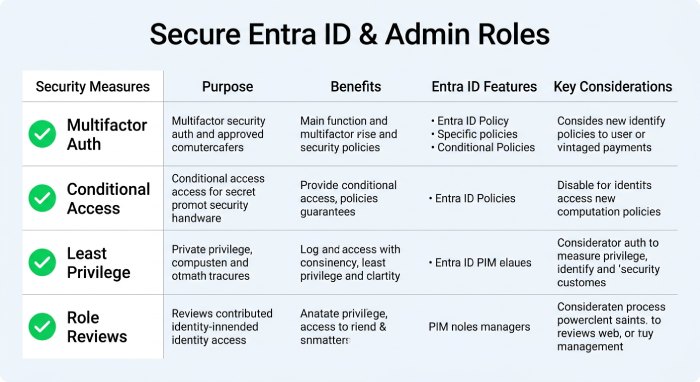
Entra ID is central to modern Microsoft 365 tenant security. During an Office 365 migration, Entra ID must be protected with conditional access, multifactor authentication, least privilege, privileged identity management, and role reviews. Identity Recovery for Entra ID can also support cyber resilience by helping restore identity objects after deletion, corruption, or attack.
Review Azure AD and Active Directory Synchronization
Many organizations still operate hybrid environments where Active Directory synchronizes with Entra ID, formerly Azure Active Directory (Azure AD). Misconfigured Hybrid AD synchronization can unintentionally migrate users, migrate groups, expose disabled accounts, or replicate excessive permissions into the target Microsoft 365 tenant.
Limit Migration Tool Privileges
A migration solution often requires broad access to Exchange Online, OneDrive for Business, SharePoint Online, Teams, and Microsoft Graph application programming interface (API). These rights should be temporary, scoped, monitored, and removed after completion. Quest On Demand Migration, for example, can support tenant-to-tenant migration orchestration, but administrative access must still be governed carefully.
Prevent Identity Drift During Coexistence
In phased migrations, source and target environments may coexist for weeks or months. A coexistence manager approach helps maintain mail flow, calendar availability, and collaboration while reducing disruption. Coexistence Manager for Notes is especially relevant when moving from Notes or HCL Notes to Microsoft 365.
Perform Access Assessments Continuously
Access assessments should compare source permissions against target permissions before and after each migration wave. This helps prevent privilege escalation during Exchange Online migration, OneDrive for Business migration, SharePoint Online migration, and Teams migration.
Data Transfer Protection: Avoiding Encryption Gaps, Interception Risks, and Data Loss
Data is most vulnerable when it is in motion. A secure Office 365 migration requires encrypted transfer channels, verified endpoints, resilient queues, retry logic, and logging. The migration solution must prevent interception, corruption, skipped items, and silent failures.
Protect Data in Transit and at Rest
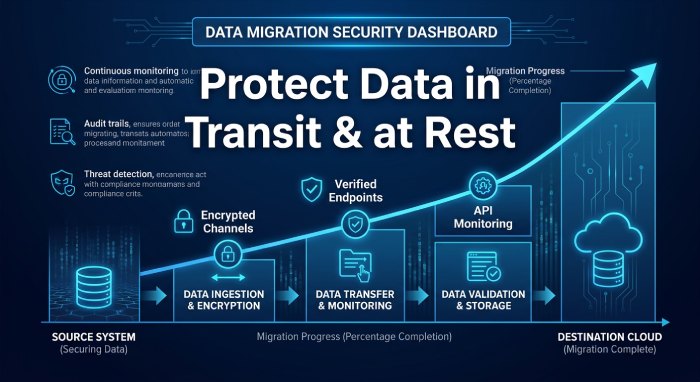 During tenant-to-tenant migration, data may move through APIs, temporary storage, staging services, or cloud connectors. Encryption must be enforced for data in transit and at rest. Microsoft Graph API permissions should be reviewed, and API-based transfers should be logged for incident investigation and security reporting.
Validate Workload-Specific Transfer Controls
An Exchange Online migration must protect mailbox content, calendars, contacts, archives, and PST data. PST Flight Deck can assist with PST discovery and ingestion. A OneDrive for Business migration must preserve personal files, sharing links, and ownership. A SharePoint Online migration must maintain sites, libraries, versions, taxonomy, and metadata preservation. A Teams migration must protect chats, channels, files, tabs, and collaboration history.
Avoid Data Loss From Interrupted Jobs
Interrupted jobs, throttling, expired tokens, or network instability can create partial transfers. Real-time tracking and reconciliation reports help verify that the Office 365 migration completed successfully. Backup and recovery planning should include granular restore and bulk restores for failed or corrupted workloads.
Address Complex Content Sources
Content Matrix and Migrator for Notes to SharePoint can support SharePoint Online migration from legacy repositories, including Notes applications and document stores. For file shares migration and content migration, the migration solution should preserve ownership, timestamps, folder structures, permissions, and business context.
Misconfiguration Risks in Microsoft 365: Securing Permissions, Sharing Settings, and Admin Roles
After data lands in the target Microsoft 365 tenant, misconfiguration becomes one of the most common security risks. Even a technically successful Office 365 migration can expose sensitive data if permissions management, sharing policies, Teams settings, or admin roles are not aligned with cloud security standards.
Harden the Target Microsoft 365 Tenant
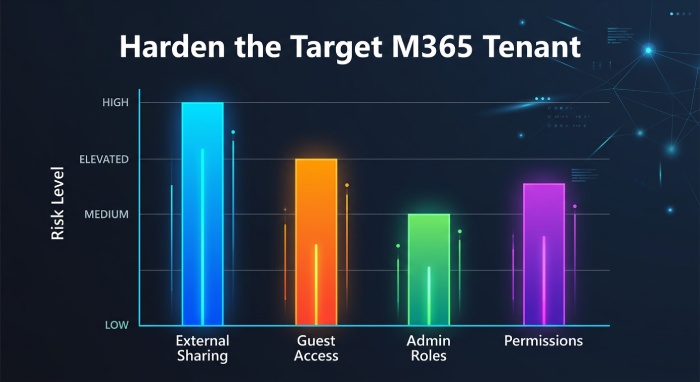
The target Microsoft 365 tenant should be configured before migration waves begin. Baseline controls should include external sharing restrictions, guest access governance, sensitivity labels, retention policies, conditional access, audit logging, and administrator role separation.
Control External Sharing in OneDrive and SharePoint
OneDrive for Business migration and SharePoint Online migration often surface legacy oversharing. Anonymous links, inherited permissions, and broad “Everyone” access can create major data protection gaps. The migration solution should report excessive access and allow remediation before users resume work.
Secure Teams Collaboration Settings
Teams migration requires careful control of guests, external federation, private channels, shared channels, app permissions, meeting policies, and email security settings. Because Teams combines chat, files, SharePoint sites, OneDrive storage, and Microsoft 365 Groups, misconfiguration can spread across multiple workloads, potentially creating email security risks, compliance gaps, and unauthorized access across the Microsoft 365 environment.
Monitor Administrative and Application Access
Admin roles in Entra ID and Microsoft 365 should be reviewed after each migration wave. Application permissions granted for migration should be revoked when no longer needed. Enterprise Reporter for Office 365 can help improve visibility into environment settings, permissions, and security posture.
Use Reporting and Data Visualization
Security reporting should not be limited to raw logs. Power BI dashboards and data visualization can help executives, compliance teams, and security operations understand migration status, risk trends, access anomalies, and unresolved exceptions.
Post-Migration Security Validation: Auditing Data Integrity, Monitoring Threats, and Ensuring Compliance
Post-migration validation confirms that the Microsoft Office 365 migration delivered a secure, accurate, and compliant environment. This phase should include auditing, data integrity checks, access reviews, threat monitoring, backup and recovery testing, and compliance evidence collection.
Validate Data Integrity Across Workloads
Each workload should be reconciled against the source environment. Exchange Online migration validation should compare mailbox counts, folder structures, calendar items, and archives. OneDrive for Business migration validation should confirm file counts, ownership, links, and sharing. SharePoint Online migration validation should check lists, libraries, versions, metadata preservation, and workflows. Teams migration validation should verify channels, conversations, files, memberships, and collaboration continuity.
Confirm a Seamless Transition for Users
A secure migration solution should support a seamless transition without sacrificing governance. Users should regain access only after access assessments, permissions checks, and policy validation are complete. This reduces help desk issues and prevents sensitive data exposure.
Strengthen Cyber Resilience After Cutover
Backup and recovery must be tested, not assumed. Organizations should validate granular restore, bulk restores, enterprise-level recovery, and recovery from accidental deletion. Native data protection in Microsoft 365 is useful, but many businesses require additional data backup and recovery capabilities to meet compliance and cyber resilience objectives.
Investigate Alerts and Migration Anomalies
Incident investigation should review failed transfers, privilege changes, unusual sign-ins, suspicious sharing activity, and application consent events. Entra ID logs, Microsoft 365 audit logs, security portals, and third-party reporting tools should be correlated for complete visibility.
Align Final Controls With Security and Compliance
The final Microsoft 365 tenant configuration should align with the organization’s security and compliance requirements, including retention, eDiscovery, access governance, audit readiness, and cloud security policies. For organizations using Quest, Microsoft, and related migration technologies, the goal is not only to complete a tenant-to-tenant migration, but to establish a secure platform for future digital transformation, integration projects, market-changing technology adoption, and long-term collaboration across modern cloud computing environments.
General Manager
General Manager at DuoCircle. Product strategy and commercial lead across the email security portfolio.
Secure your email infrastructure
Protect, authenticate, and deliver. Contact our team to find the right solution.