10 DKIM Key Rotation Checklist Mistakes That Break Email Deliverability

Quick Answer
Learn the 10 most common DKIM key rotation checklist mistakes that can disrupt email deliverability. Learn how to update keys correctly, prevent authentication failures, maintain sender reputation, and ensure uninterrupted DKIM validation for secure and reliable email communication.
DKIM key rotation is a security practice that helps protect domains from key compromise, stale cryptographic material, and long-lived signing exposure. But when teams rotate DKIM keys without a disciplined key rotation checklist, they can accidentally trigger DKIM failures, weaken email authentication, and send legitimate emails to junk folder placement.
A reliable DKIM key rotation process must account for DNS, selectors, third-party platforms, sending infrastructure, key age, monitoring, and disaster recovery procedures. The goal is not simply to rotate DKIM keys; it is to rotate DKIM keys without breaking trust signals used by receiving servers, spam filtering engines, and mailbox providers such as Microsoft, Outlook.com, Live.com, MSN.com, and Hotmail.com.
Mistake #1: Rotating DKIM Keys Without Auditing All Sending Sources
The first mistake in any DKIM key rotation project is assuming there is only one sender. Most organizations have multiple systems signing mail: a primary SMTP server, marketing automation tools, CRM platforms, billing systems, support desks, and transactional email services.
Before you rotate DKIM keys, audit every sending source by domain, subdomain, selector, IP address, and platform owner. This includes self-hosted systems such as Debian with Postfix, SaaS email tools, and any legacy server still sending mail through SMTP.
Why the sending-source audit matters
Receiving servers evaluate DKIM alongside SPF and DMARC. If one forgotten platform continues using an old private key after the public key is removed from DNS, authentication fails. That failure can generate spam signals, harm email sender reputation, and push emails to junk folder placement.
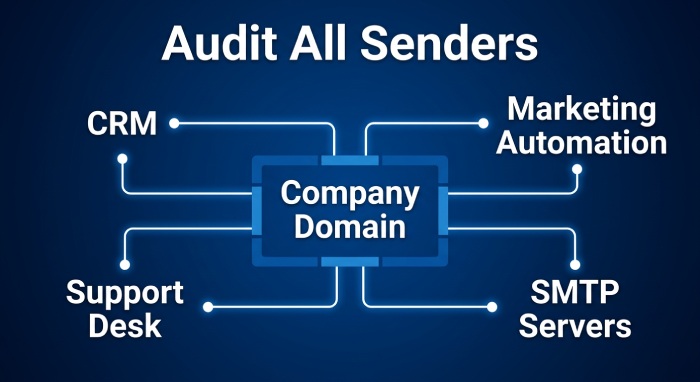
A strong key rotation checklist should document:
- All DKIM keys currently in use
- The active selector for each sending source
- The public key published in DNS
- The private key stored on each server or vendor platform
- The key age and rotation frequency
- The person or team responsible for key management
This inventory is one of the most important best practices because it prevents hidden systems from breaking after key regeneration.
Mistakes #2 and #3: DNS Errors and Removing Old Keys Too Soon
DKIM key rotation depends heavily on DNS accuracy. Even a small formatting mistake in the TXT record can cause key validation failures.
Mistake #2: Publishing the New DKIM DNS Record Incorrectly
A new DKIM public key must be published under the correct selector, usually in the format:
selector._domainkey.example.com
Common DNS mistakes include missing quotation marks, truncated records, extra spaces, invalid TXT splitting, and publishing the record under the wrong hostname. These problems are especially common during manual rotation.
Key size also matters. Older 1024 bit RSA records may still work in some environments, but stronger RSA keys are preferred, and ed25519 is defined for DKIM in RFC8463. However, not every provider supports ed25519, so the algorithm should match the minimum requirements of your infrastructure and receiving ecosystem.
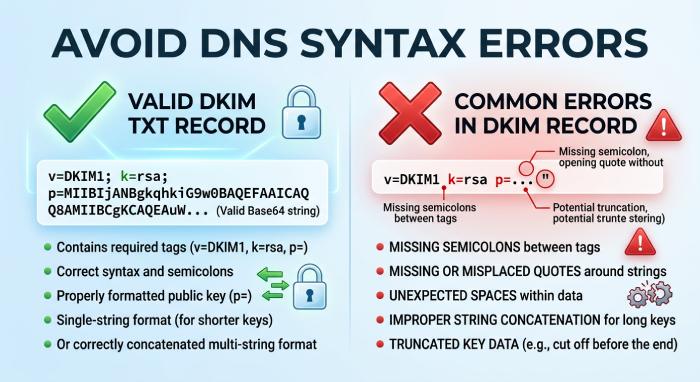
DNS record details that can break DKIM
Check the following before rollout:
- The selector matches the signer configuration
- The public key is complete and correctly encoded
- The algorithm is supported by your sending platform
- The key strength meets modern security practices
- DNS lookup tools return the expected TXT value
This is where best practices overlap with operational discipline: do not treat DNS publishing as a copy-and-paste task.
Mistake #3: Removing the Old DKIM Key Too Soon
Removing the old DKIM key immediately after publishing the new one is a classic DKIM key rotation failure. Mail already queued, delayed, or in transit may still be signed with the old private key. If the corresponding public key disappears from DNS, receiving servers cannot validate it.
Use overlap keys during the transition. Keep both old and new DKIM keys available long enough for queues, retries, and DNS caches to expire. This overlap reduces the chance of emails to junk folder issues caused by sudden DKIM authentication failures.
Your key rotation checklist should define an overlap period based on Time to live (TTL), message volume, sending patterns, and real world experience with mailbox providers.
Mistake #4: Failing to Test DKIM Signing Before Full Rollout
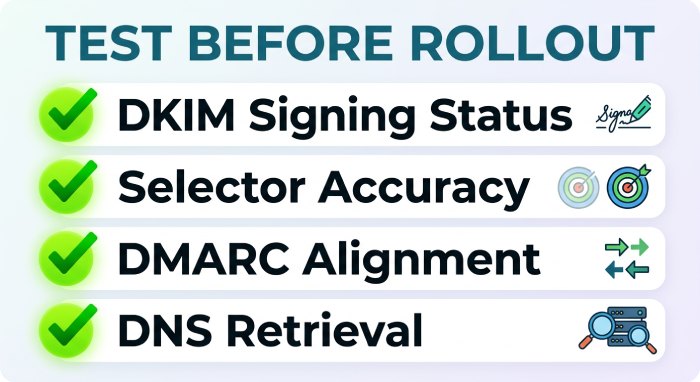
Never assume key regeneration worked simply because the new TXT record exists. DKIM signing must be tested before the full rollout.
Send test messages from every major source and inspect the headers. Confirm that DKIM passes, the selector is correct, and the message aligns with DMARC. Also verify SPF, PTR record alignment where relevant, and the broader authentication protocols used by your domain.
Testing helps catch mistakes such as:
- A server still using the old private key
- A vendor signing with the wrong selector
- DNS not returning the new public key
- Messages failing DMARC alignment
- A spam filter applying a negative score due to broken authentication
Forum discussions on Server Fault, Stack Overflow, and the broader Stack Exchange network often show the same pattern: teams change DKIM keys, skip validation, and then ask why deliverability dropped. Posts involving users such as Community Bot, Jeff, or anx may vary in context, but the operational lesson is consistent—test before production.
Mistake #5: Using Weak or Outdated DKIM Key Lengths
Security practices evolve, and so should DKIM keys. A major mistake is rotating from one weak key to another.
RSA remains widely supported, but the key size should be appropriate. A 1024 bit RSA key may satisfy outdated minimum requirements, yet many organizations now prefer stronger RSA keys where supported. ed25519 can offer modern cryptographic benefits, but adoption depends on provider compatibility and RFC8463 support.
DKIM key rotation is a good time to evaluate:
- Current key age
- Rotation frequency
- Key expiration policy
- Key strength
- Vendor support for RSA and ed25519
- Risk of key compromise
Key age is one of the key factors in deciding when to rotate DKIM keys. Long-lived DKIM keys increase exposure if a private key leaks. Regular key regeneration reduces that risk, provided the process follows best practices and does not disrupt email deliverability.
Mistakes #6 and #7: Vendor Platforms and Selector Conflicts
Third-party tools often create the hardest DKIM key rotation problems because their signing systems may be outside your direct server control.
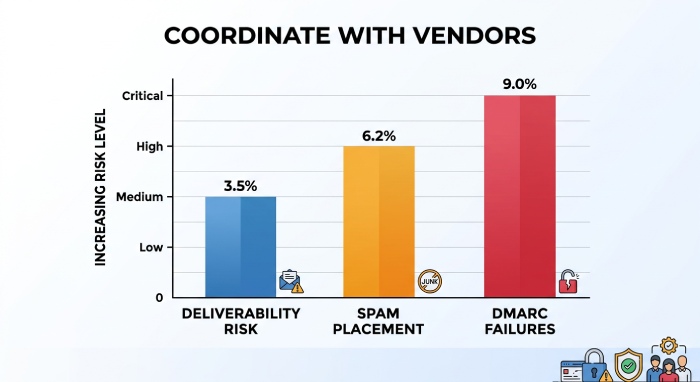
Mistake #6: Forgetting Third-Party Email Platforms in the Rotation Plan
Marketing, billing, recruiting, help desk, and product notification platforms may all send on behalf of your domain. If they are omitted from the key rotation checklist, they may continue signing with old DKIM keys.
This is especially dangerous when DMARC enforcement is strict. A vendor failure can produce spam signals, damage reputation data, and cause emails to junk folder placement even if your primary mail server is configured correctly.
Ask each vendor about:
- Their DKIM key regeneration process
- Whether they support automation or require manual rotation
- Their recommended overlap period
- Their key expiration behavior
- Their disaster recovery procedures
- Their ability to rotate DKIM keys without downtime
M3AAWG guidance and industry best practices both emphasize that authentication changes should be coordinated across all senders, not only the main corporate mail system.
Mistake #7: Reusing the Same Selector Across Multiple Keys
A selector is meant to identify the DNS record used to validate a DKIM signature. Reusing the same selector for multiple active keys creates ambiguity and operational risk.
For example, if two systems use the same selector but different private keys, only one public key can be published at that selector location. One system will pass DKIM, and the other will fail. That failure can influence spam filtering decisions and may contribute to a negative score in a spam filter.
Use unique selectors for different systems, environments, and rotation phases. Clear selector naming also helps disaster recovery procedures because teams can quickly identify which DKIM keys belong to which platform.
Mistakes #8 and #9: Ignoring Propagation and Post-Rotation Monitoring
Even a technically correct DKIM key rotation can fail if timing and monitoring are neglected.
Mistake #8: Ignoring DNS Propagation and TTL Timing
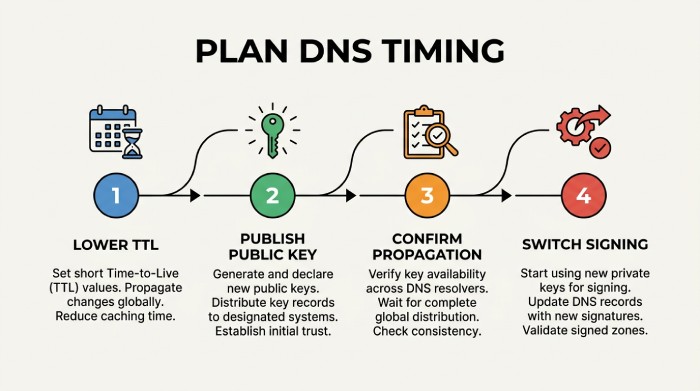
DNS changes are not instant. Recursive resolvers cache TXT records according to TTL, and some receiving servers may continue seeing old values for longer than expected.
Before you rotate DKIM keys, lower the TTL in advance where possible. Then publish the new public key, confirm propagation, and only switch signing after the record is widely visible. This timing belongs in every key rotation checklist.
Also remember that deliverability is evaluated in context. DKIM failures combined with a poor PTR record, mismatched SPF, a suspicious IP address, a weak SSL certificate posture on related infrastructure, or prior blacklist history can amplify spam filtering risk. If your domain or IP appears on a blocklist or blacklists, authentication mistakes become even more damaging.
Mistake #9: Not Monitoring DKIM Failures After Rotation
Post-rotation monitoring is not optional. After DKIM key rotation, review DMARC aggregate reports, SMTP logs, vendor dashboards, bounce data, and mailbox placement trends.
Monitor for:
- DKIM pass/fail rates
- Selector mismatch errors
- DMARC alignment failures
- Sudden changes in reputation data
- Increased spam filtering complaints
- Email Spam Folder Placement Patterns
- Microsoft consumer mailbox issues across Outlook.com, Live.com, MSN.com, and Hotmail.com
Recovery drills are also important for maintaining strong email security. Disaster recovery procedures should include how to restore an old key, publish an emergency selector, or perform urgent key regeneration after suspected key compromise. Without recovery drills, teams may improvise under pressure and make the outage worse.
Mistake #10: Skipping Documentation for Future DKIM Key Rotations
The final mistake is treating DKIM key rotation as a one-time maintenance task instead of a repeatable process. Documentation turns real world experience into a safer future rotation. Your documentation should include the approved key rotation checklist, current DKIM keys, selector naming rules, DNS locations, private key storage standards, vendor contacts, key age thresholds, rotation frequency, testing steps, rollback steps, and disaster recovery procedures.
Good documentation also records whether each platform supports automation or requires manual rotation. Automation can reduce human error, but it still needs safeguards, approvals, and key validation. Manual rotation can work well for smaller environments, but it depends on careful review and disciplined change control.
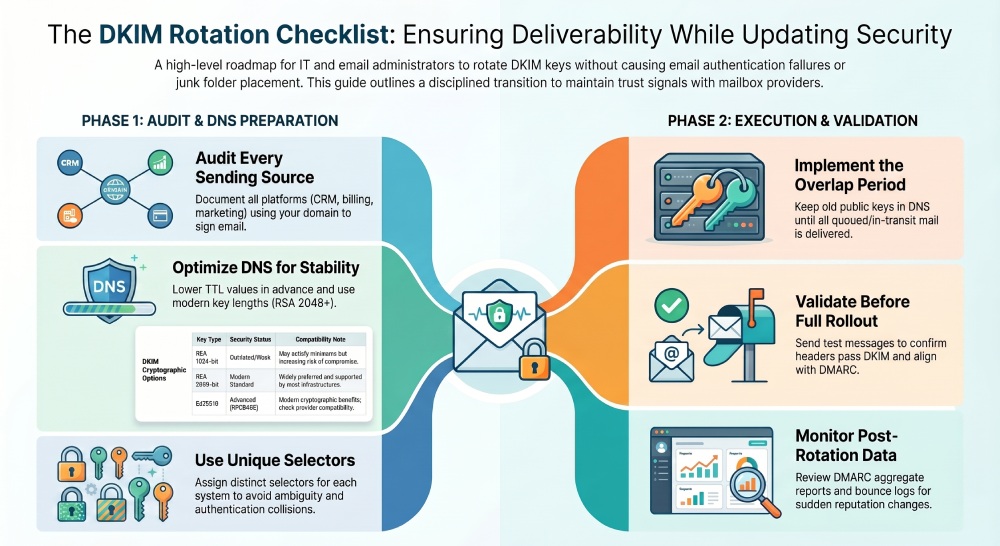 Some teams store internal notes in systems such as Stack Overflow for Teams or enrich runbooks with tools like Artificial Intelligence (AI) Assist, but the documentation must remain authoritative and auditable. It should clearly explain how to rotate DKIM keys, when key regeneration is required, and which best practices prevent broken authentication.
A mature DKIM key rotation program tracks key age, protects DKIM keys, coordinates DNS and vendor changes, and validates email authentication after every change. That is how organizations reduce security risk without damaging email deliverability.
General Manager
General Manager at DuoCircle. Product strategy and commercial lead across the email security portfolio.
Secure your email infrastructure
Protect, authenticate, and deliver. Contact our team to find the right solution.