Preventing Business Email Disruption Through An Invalid DKIM Selector Fix Process

Quick Answer
Invalid DKIM selectors can cause email authentication failures, reduced inbox placement, and lost customer trust. Quickly fixing DKIM selector errors helps maintain secure email delivery, improves domain reputation, and prevents business email disruption from spoofing or rejected messages.

Email authentication is a critical component of modern business communication, and even a minor misconfiguration can lead to significant email delivery and security issues. One of the most common yet often overlooked problems is an invalid DKIM selector, which can prevent receiving mail servers from verifying the authenticity of outgoing messages. As email providers continue to strengthen their anti-spam and anti-phishing defenses, maintaining a properly configured DKIM setup has become essential for ensuring messages reach the inbox and preserving trust with customers, partners, and employees.
An invalid DKIM selector can trigger authentication failures, increase the likelihood of emails being marked as spam, and expose organizations to reputational damage and operational disruptions. This article explores the importance of DKIM selectors in the email authentication process, the common causes and risks associated with invalid selector configurations, and the potential impact on deliverability, domain reputation, and business operations. It also provides a practical, step-by-step invalid DKIM selector fix process, including how to identify selector-related errors, validate DNS records, rotate DKIM keys when necessary, and verify successful authentication after changes are made.
This guide highlights proactive monitoring techniques, documentation practices, and email security best practices that can help organizations prevent future DKIM issues, strengthen their overall email authentication strategy, and maintain reliable, secure communication across platforms such as Microsoft 365, Google Workspace, Salesforce, and other enterprise email environments. By understanding and addressing DKIM selector problems before they escalate, businesses can protect their domain reputation, improve email deliverability, and reduce the risk of phishing, spoofing, and other email-based threats.
Understanding DKIM Selectors and Their Role in Email Authentication
DomainKeys Identified Mail (DKIM) is an industry-standard protocol that fortifies email authentication, ensuring the integrity and authenticity of emails sent from a specific domain. At the heart of DKIM lies the DKIM selector—a key parameter in the DKIM signature embedded within the email header. The selector helps locate the DKIM public key within the corresponding domain’s DNS record, facilitating the verification process.
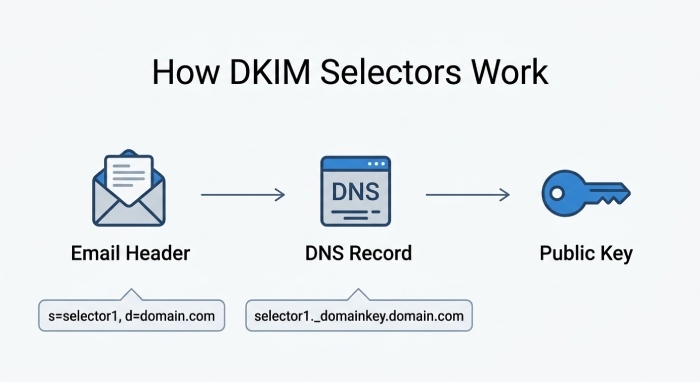 A DKIM selector works in tandem with the DKIM record, comprised of a unique s= (selector) tag and a d= (domain) tag, bridging the email system and the DNS infrastructure. When an outbound email is dispatched, the originating mail server uses a private key to generate a cryptographic signature over specific headers and body content—often referenced in the h= (signed headers) tag. This DKIM signature, alongside the selector, is added to the email header.
Upon receipt, the email provider or recipient’s server executes a DNS lookup using the selector path, constructed as the selector + ”._domainkey.” + domain name, e.g., selector1._domainkey.example.com. The retrieved DKIM public key, stored as a DNS record, enables DKIM signature verification using standard cryptography algorithms such as rsa-sha256. Correct handling of DKIM tags, selector management, and robust email security practices are critical to maintaining seamless email delivery.
DKIM selectors are essential not only for differentiating among multiple keys but also for key rotation, troubleshooting, and supporting email authentication in large organizations utilizing services like Google, Microsoft Office 365 andSalesforce.
Common Causes and Business Risks of an Invalid DKIM Selector
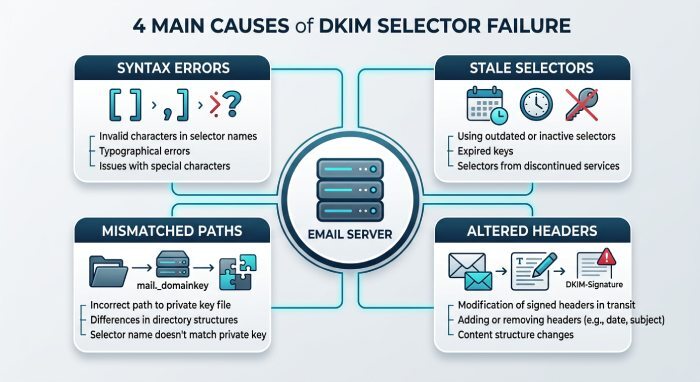
Causes of Invalid DKIM Selectors
An invalid DKIM selector occurs when the DKIM validation process fails due to issues with the selector’s configuration, DNS record, or email header signature. Key causes include:
- Syntax Errors: Mistyped selector names or improperly formatted DKIM records often cause the selector path to be unresolvable. Common syntax issues include omitting the correct
v=DKIM1tag or incorrectly specifying the rsa-sha256 algorithm. - Stale or Orphaned Selectors: Organizations with outdated keys in their DNS zone or missing DNS propagation after a DKIM key rotation easily encounter invalid selectors.
- Mismatched Selector Paths: An error in the selector value used in the signature versus the configured DNS record, or referencing the wrong fragment of a domain name.
- Improper DNS Record Management: Failing to update or remove old DKIM tags or editing DNS records inaccurately, especially during server migrations or while using third-party hosting providers.
- Forwarding or Filtering Chains: Forwarding altered message headers, which can break canonicalization or cause DKIM alignment failures, resulting in a signature invalid status.
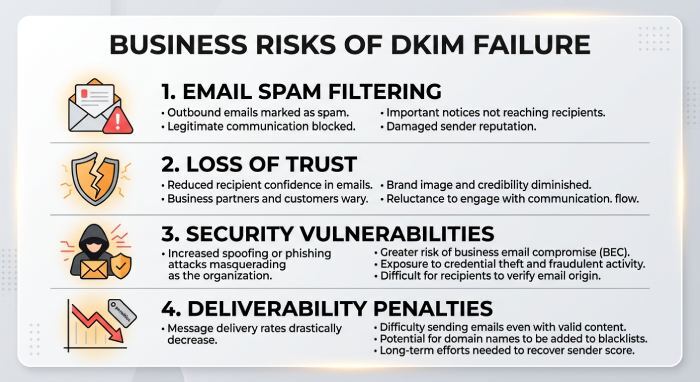
Business Risks
An invalid DKIM signature due to selector faults can result in email authentication failure, damaging both the technical and reputational aspects of the business:
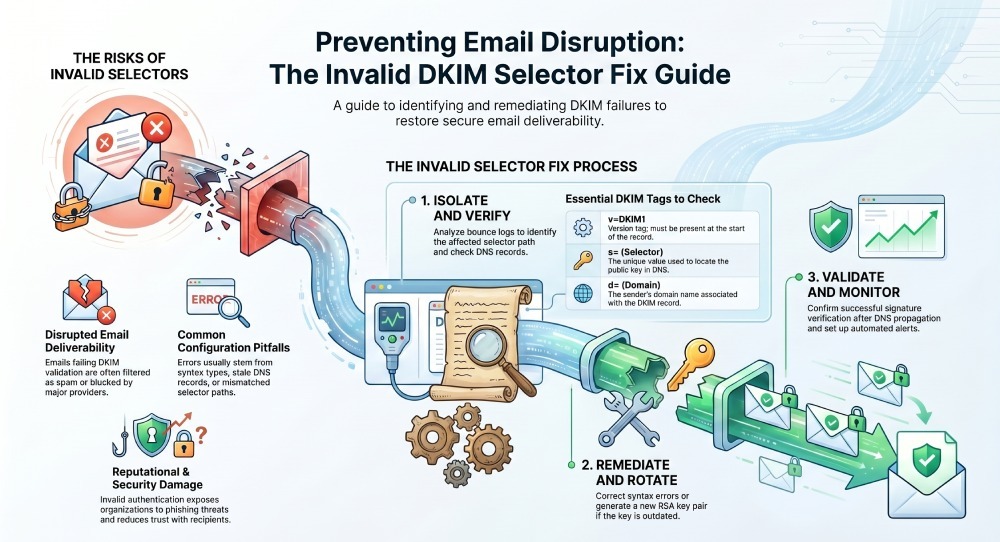
- Disrupted Email Deliverability: Emails that fail DKIM validation are commonly filtered as spam, undermining communication with clients, vendors, and internal teams.
- Loss of Trust: Recipients are less likely to trust emails that lack a valid cryptographic signature, especially with increasing phishing and spoofing threats reported by entities such as thehackernews.com and cybersecuritynews.com.
- Security Vulnerabilities: A persistent invalid selector can lead to potential unauthorized access or man-in-the-middle attacks, as emails lack proper DKIM authentication.
- Operational Downtime: Teams using email-reliant platforms like Salesforce, Stack Exchange, or AI Assist might face significant workflow disruptions.
- Negative Impact on Deliverability Scores: Major email providers, including Microsoft Outlook and Google Gmail, rely heavily on successful DKIM validation in their spam filtering algorithms.
How to Detect Invalid DKIM Selector Issues Before They Disrupt Email
Proactive DKIM Validation and Monitoring
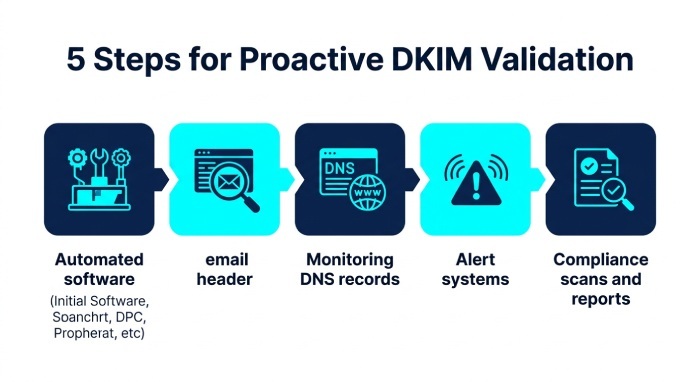
To prevent business email disruption, organizations must implement a comprehensive DKIM checker solution capable of real-time DKIM validator checks. Proactive measures include:
- Automated DKIM Checker Tools: Use industry-accepted tools provided by companies like Netcore to simulate email delivery and validate DKIM signatures, public keys, and selector paths .
- Email Header Inspection: Regularly review the DKIM signature embedded in outgoing email headers, paying close attention to the d= (domain), s= (selector), b= (signature), and h= (signed headers) DKIM tags for anomalies.
- Continuous DNS Monitoring: Validate the existence and correctness of the relevant DNS record for each configured DKIM selector, ensuring that the public key and associated DKIM tags match the expected cryptographic settings (especially key length and algorithm).
- Log and Alert Systems: Leverage AI Assist and SIEM solutions to process logs for signature invalid events, DNS lookup failures, and canonicalization mismatches in real time.
- DKIM Alignment and Compliance Scans: Periodically run compliance scans with SPF and DMARC records to ensure cohesive email authentication.
Leveraging Community Knowledge
Consulting crowdsourced knowledge bases like Stack Overflow, Softpedia, GeeksforGeeks, and Meta Stack Exchange can illuminate emerging patterns in selector failures and signature invalid reports, particularly for integrations with platforms like VMware, Mailhop, or themeisle.com.
Step-by-Step Invalid DKIM Selector Fix Process
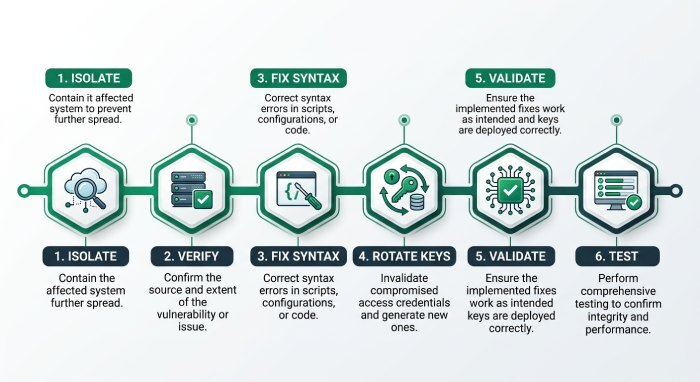
1. Isolate the Invalid DKIM Selector Incident
Begin by analyzing bounced or quarantined emails and parsing the DKIM signature verification logs for selector and signature invalid errors. Identify the affected selector path, email provider, and the specific d= (domain) and s= (selector) values causing the DKIM validation failure.
2. Verify the DKIM Record and Selector Path
Manual DNS Record Inspection
Use reliable DKIM lookup tools such as those offered by DNS providers or mail security vendors to fetch the current DKIM record. Check for:
- The presence of a
v=DKIM1tag. - Correct public key format and key length (e.g., 1024 or 2048 bits) using supported algorithms like rsa-sha256.
- Accurate selector path matching between DNS zone and email header.
3. Address Syntax and Configuration Issues
Editing DNS Records
If syntax issues are found, carefully correct the DKIM tags and ensure proper canonicalization configuration. Remove any fragments of a domain name that produce an invalid selector, resolve typos, and confirm the DKIM record is accessible throughout the domain DNS zone.
4. Rotate DKIM Keys if Necessary
If a compromised or outdated DKIM key is suspected, generate a new RSA key pair. Update the DNS record with the fresh public key and modify the signing domain’s mail system to use the new private key. Always update the s= (selector) value to reflect this change.
5. Validate Propagation and Completion
Allow sufficient time for DNS propagation, typically several hours depending on the hosting provider’s Time to live (TTL) settings. Use a reputable DKIM validator to confirm that DKIM signature verification succeeds for test messages sent post-update.
6. Test and Document
Send test emails via different sender domains and providers (such as Office 365, Google, or Salesforce) to ensure broad DKIM validation success. Log all changes for compliance and troubleshooting.
Ongoing Monitoring, Documentation, and Prevention Best Practices
Regular Auditing and Documentation
- Maintain an up-to-date inventory of all DKIM selectors, DKIM keys, and their corresponding DNS records. Platforms such as Channel NewsAsia and hostinger.in recommend structured documentation for change control.
- Document who owns the private key and details about each selector’s deployment and use cases across business tools and platforms.
Automated and Manual Monitoring
- Schedule regular audits with DKIM checker tools to verify continuous DKIM signature validity.
- Use monitoring dashboards integrated with email providers and DNS services to detect signature invalid issues immediately.
Best Practices for Future Prevention
- Enable DKIM alignment with SPF and DMARC records for robust email authentication across all sender domains.
- Enforce periodic DKIM key rotation, updating both DNS records and mail server configurations in tandem.
- Set up automated alerts using SIEM, Azure Sentinel, or similar platforms to notify administrators of cryptographic signature failures or invalid selector detection.
- Work closely with reputable hosting providers and leverage their DKIM support documentation, such as those published by Softpedia, Salesforce Meta, and themeisle.com.
By comprehensively managing DKIM selector configuration, proactively monitoring for invalid DKIM signature events, and rigorously maintaining DNS record integrity, organizations can fortify their email security posture and prevent potentially disruptive business email incidents.
General Manager
General Manager at DuoCircle. Product strategy and commercial lead across the email security portfolio.
Secure your email infrastructure
Protect, authenticate, and deliver. Contact our team to find the right solution.