Inbox Wars: Winning with Powerful SMTP Email Hosting

Quick Answer
SMTP email hosting is the infrastructure layer between an application and the recipient's mailbox; the ESP front-end (Mailchimp, Brevo, ActiveCampaign, Klaviyo, others) handles design and analytics, the SMTP server handles the actual delivery. Inbox placement depends on three things SMTP hosting controls: (1) IP and domain reputation (warmed dedicated IPs land better than shared cold IPs), (2) authentication (SPF, DKIM, and DMARC must align to the From domain, or major receivers like Gmail, Microsoft Outlook, and Yahoo will downgrade), and (3) deliverability tooling (feedback loops, bounce handling, retry logic, rate-limit awareness). Match the SMTP layer to the workload: transactional needs deterministic retries and high uptime, bulk needs throughput and pacing, outreach needs careful warm-up. Compare providers on reputation controls, DMARC monitoring, and remediation tooling, not just per-message price.
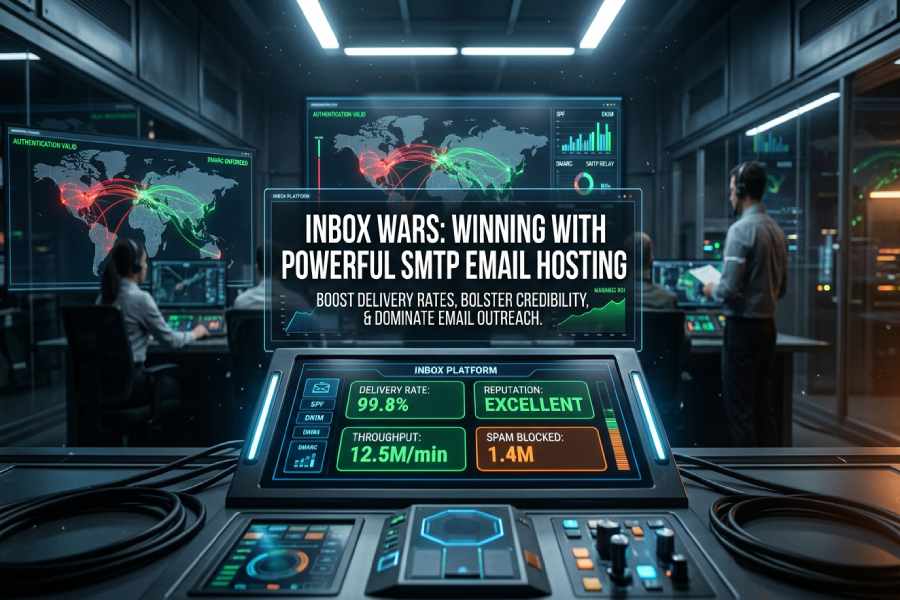
In the bustling digital environment of today, the quest for consumer attention often starts with the inbox. Companies are no longer merely dispatching emails; they are vying for the chance to be opened, read, and engaged with. This is where robust SMTP email hosting plays a crucial role, guaranteeing that your messages reach their destination quickly, dependably, and effectively.
The article “Inbox Wars: Winning with Powerful SMTP Email Hosting” delves into how an optimized email infrastructure can enhance delivery rates, bolster sender credibility, and ultimately provide your campaigns with the necessary advantage to thrive.
The battleground: Why SMTP email hosting is mission-critical for inbox placement
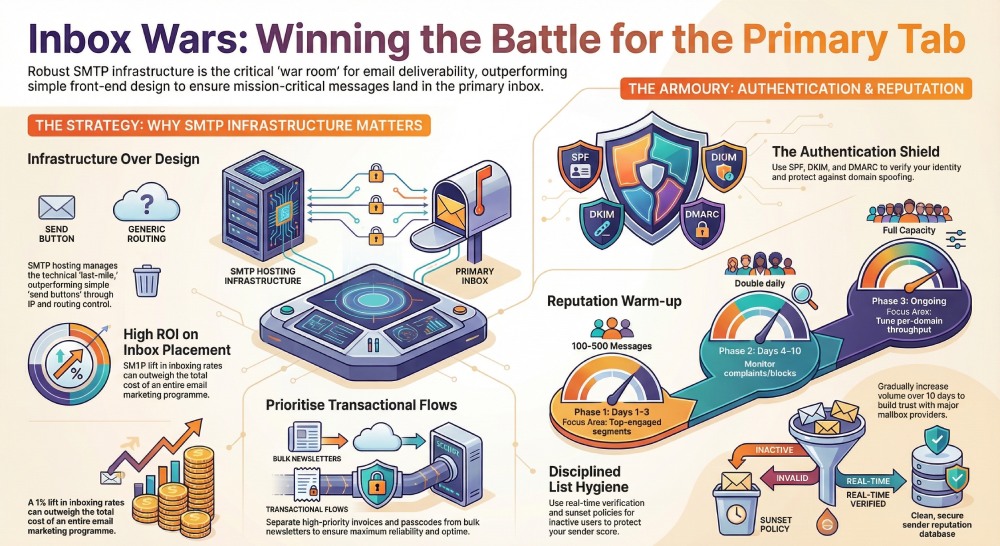
When your revenue depends on messages reaching Gmail, Microsoft Outlook, and other mailbox providers, smtp email hosting becomes the war room, not an afterthought. Unlike front-end email marketing services or newsletter platforms that focus on design, segmentation, and analytics, smtp email hosting owns the pathway between your application and the recipient’s mailbox. The right smtp server, configured properly, determines whether transactional emails, bulk email sending, and email outreach land in the primary tab, promotions, or the spam folder.
Why SMTP infrastructure outperforms “send buttons”
- Control: With a dedicated smtp server and tuned smtp relay, you control IPs, authentication, warm-up, and routing, which directly influence email deliverability.
- Scale: Purpose-built smtp email hosting supports large, bursty workloads, think password resets, receipts, or order updates, without throttling that can plague general-purpose email marketing platforms.
- Reliability: Mature providers such as Amazon SES, SendGrid, Mailgun, SMTP.com, Mandrill, and Zoho Mail invest in reputation management and feedback loops that lift your email deliverability score across Gmail, Google Workspace, and enterprise filters.
Use cases where SMTP wins
- Transactional emails: Authentication codes, invoices, and shipping alerts demand high uptime and a resilient smtp relay with deterministic retries.
- Bulk email sending: Announcements, legal notices, and high-volume notifications need throughput and smart scheduling to avoid rate limiting.
- Email outreach and newsletters: Even if you design in Mailchimp, Brevo (Sendinblue), ActiveCampaign, GetResponse, Klaviyo, MailerLite, Omnisend, EmailOctopus, Kit (formerly ConvertKit), Beehiiv, Constant Contact, HubSpot, or Flodesk, the last-mile depends on smtp integration and email authentication done right.
ROI of inbox placement
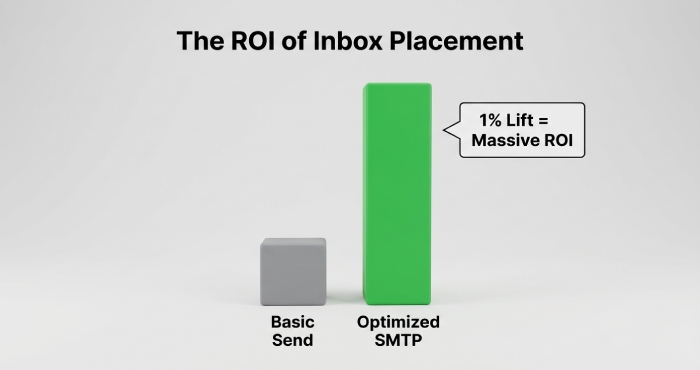
A single percentage point lift in inboxing can outrun your total email marketing cost. Use a living email deliverability checklist and deliverability tools to monitor placement, run email verification at signup, and enforce domain authentication. If you’re doing an esp comparison or a side-by-side comparison of smtp provider options, look beyond price to reputation controls, DMARC monitoring, and tooling for remediation, resources like EmailToolTester can help frame an email platform comparison or best newsletter software shortlists for your stack.
SMTP 101: How mail flows from your app to the recipient’s mailbox
SMTP is straightforward, but the details matter for email deliverability.
The path
- Your app or CMS (e.g., WordPress with a wordpress email plugin) connects via smtp integration to your smtp server using AUTH over TLS.
- The server performs queueing and policy checks, then hands messages to the smtp relay.
- The relay negotiates with recipient MTAs, adheres to throttling, and applies retries on 4xx responses.
- Recipient filters evaluate content, email authentication (SPF, DKIM, DMARC), and reputation before placing mail in the inbox or spam.
Envelope vs. headers
- SMTP envelope (MAIL FROM/RCPT TO) drives bounce handling and Return-Path.
- Message headers (From, Reply-To, Subject) drive user-facing context and engagement, including email subject lines your marketers test with a subject line previewer.
Throughput and timing
A quality smtp tool lets you set per-domain concurrency and schedule email sending to flatten spikes. For teams on a budget, free smtp servers can be useful in development, but avoid relying on free smtp servers for production; they often throttle and can harm reputation.
Quick testing tip
Before ramping volume, validate SMTP responses, DKIM signatures, and content rendering using staging keys and email marketing tutorials from your chosen vendor.
Authentication armor: SPF, DKIM, DMARC, alignment, and BIMI fundamentals
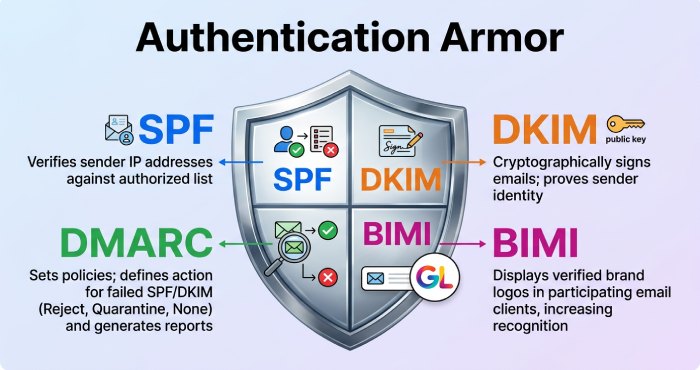
Email authentication protects identity and boosts trust signals that improve email deliverability.
SPF
Publish an SPF record authorizing the hosts allowed to send on your domain’s behalf. Keep it lean to avoid DNS lookup limits, and align the envelope sender for stronger policy enforcement.
DKIM
Sign each message with DKIM so receiving MTAs can verify integrity. Rotate keys, monitor failures, and align the d= domain to your organizational domain for DMARC alignment. Robust email authentication, combined with deliverability tools, is non-negotiable for transactional emails and email outreach alike.
DMARC and alignment
DMARC layers policy on top of SPF and DKIM. Start with p=none and strong DMARC monitoring to collect forensic and aggregate reports, then graduate to quarantine and reject. Alignment ensures the visible From domain matches the authenticated domain, tightening identity. Ongoing DMARC monitoring is essential when you add new newsletter platforms or change your smtp provider.
BIMI
Brand Indicators for Message Identification lets you display a verified logo once DMARC is at enforcement (quarantine/reject) and other requirements are met. BIMI increases brand recognition across Gmail and Microsoft Outlook and can lift engagement on email marketing services and newsletter tools.
Tooling checklist
- Domain authentication setup wizards from Amazon SES, SendGrid, and Mailgun
- DMARC monitoring dashboards and forensic parsing
- Automated alerts for SPF/DKIM failures and misalignment
Reputation and ramp-up: IP/domain reputation, warm-up schedules, and list hygiene
Mailbox providers score your domain and IP using engagement and complaint metrics. Reputation takes time and discipline to build.
What drives reputation
- Engagement: Opens, clicks, replies, and “move to inbox” signals
- Low complaints and bounces: Enforce email verification and suppression rules
- Consistency: Predictable cadence for bulk email sending and transactional emails
- Content quality: Clear email subject lines, authentic sender identity, and accessible templates
Use an email deliverability checklist to enforce email deliverability best practices weekly, and validate changes with seed tests and an email deliverability score tracker.
Warm-up schedules
New IPs and domains require graduated volume increases. Begin with your most engaged segments, then scale daily:
- Day 1-3: 100-500 messages/day to top-engaged recipients
- Day 4-10: Double daily while monitoring complaints and blocks
- Ongoing: Tune per-domain throughput with your smtp server and smtp relay
Deliverability tools from SendGrid, Amazon SES, and SMTP.com help orchestrate warm-ups. If you’re evaluating sendgrid alternatives for best transactional email service, compare rate controls, adaptive throttling, and feedback loop coverage.
List hygiene and acquisition
List quality is destiny. Combine:
- Double opt-in and protected newsletter signup forms (use a form builder with bot defense)
- Real-time email verification on capture and periodic revalidation
- Sunset policies for inactives and complaint-prone segments
- Preference centers and survey tools to refine cadence
For marketing teams, integrate crm with email marketing and crm automation (e.g., HubSpot, Pipedrive, EngageBay, or other best crm systems) to orchestrate email automation and ecommerce automation workflows. If migrating providers, consult email migration guides to avoid reputation resets and maintain consistent smtp integration. For prospecting, pair compliant email outreach tools with throttled smtp email hosting to prevent spikes in email outreach that look abusive.
Security and compliance: TLS, MTA-STS, DANE, anti-abuse controls, and regulations
Security signals are deliverability signals; they reassure receivers you’re legitimate.
Transport security and policy
- TLS and STARTTLS: Enforce encrypted transport between MTAs.
- MTA-STS and TLS reporting: Publish policies to prevent downgrade attacks; watch reports for gaps.
- DANE with DNSSEC: Where supported, cryptographically assert TLS keys at the DNS layer.
- DMARC: Keep DMARC monitoring active after every platform change or domain addition.
For a holistic posture, treat email security and deliverability as a single program, aligned controls reduce filtering and protect brand equity.
Anti-abuse, privacy, and regulatory controls
- Access: Rotate SMTP credentials, prefer OAuth where available, and scope API keys per environment.
- Rate limiting: Enforce per-user and per-domain quotas in your smtp server and smtp relay, especially when handling bulk email sending and email outreach.
- Compliance: Honor unsubscribe and data rights (GDPR, CAN-SPAM, CASL). Maintain auditable logs, and document processes in your internal email marketing guide and email marketing glossary.
Stack and workflow considerations
- Platforms and ESPs: Many email marketing platforms (Mailchimp, Brevo, ActiveCampaign, GetResponse, Klaviyo, MailerLite, Omnisend, EmailOctopus, Kit, Beehiiv, Constant Contact, HubSpot, Flodesk) can send via their own ESP or through your smtp provider; run an esp comparison to decide control vs convenience.
- Web and commerce: Tie WordPress, membership platforms, landing page builder tools, and sales funnel software into your smtp integration for unified email automation.
- Operations: Use free marketing tools where sensible, but avoid production dependence on free smtp servers. Budget with an email cost calculator; if you need cheap email marketing or free email marketing trials, validate features like newsletter creation, welcome email templates, newsletter platforms compatibility, and marketing automation first.
- Optimization: Iterate on email subject lines with a subject line previewer; refine segments via email list management; keep a cadence playbook for schedule email sending across campaigns.
- Alternatives and choices: Evaluate sendgrid alternatives such as Amazon SES, Mailgun, SMTP.com, Zoho Mail, or Mandrill in a side-by-side comparison. Balance deliverability tools, best transactional email service credentials, and support. Leverage omnichannel software when email must coordinate with SMS or push.
Field notes
- Keep domain authentication aligned across all subdomains and third-party senders.
- Monitor blocklists and feedback loops daily; pipeline insights into CRMs for closed-loop remediation.
Selecting Your SMTP Host
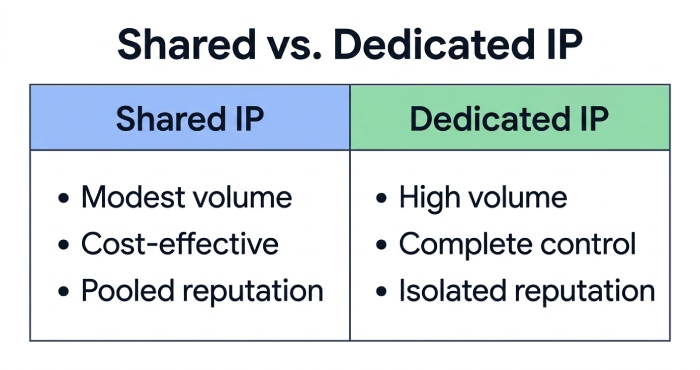
Shared vs. Dedicated IPs: Which Is Right for You?
Shared IP Pools
Shared IPs on smtp email hosting can work well for startups and teams with modest volumes of transactional emails and newsletters. A reputable smtp provider curates these pools, enforcing list hygiene to protect collective email deliverability. However, bursts of bulk email sending or a neighbor’s poor reputation can affect your email deliverability score.
Dedicated IPs and Warmup
For consistent throughput and control, a dedicated IP attached to your smtp server is ideal. You’ll need a structured warmup plan, gradually increasing traffic while monitoring bounce rates, spam complaints, and engagement, to build a positive IP reputation for your smtp relay. Dedicated IPs are recommended for large newsletter platforms, high-volume email outreach, and ecommerce automation.
Provider Examples and SLAs
- SendGrid, Amazon SES, Mailgun, SMTP.com, Mandrill, Brevo (Sendinblue), and Zoho Mail all offer dedicated IP options, robust SLAs, and API-first smtp integration.
- Examine SLAs for delivery latency, queue handling, and support response times, especially if your email marketing services must meet strict windows for schedule email sending.
- Consider “sendgrid alternatives” in an esp comparison or side-by-side comparison if cost, support, or features don’t align with your needs.
Features, Support, and Compliance That Matter
Features Checklist
Look for granular webhooks, logs, and analytics; seed lists; suppression and bounce management; and advanced deliverability tools. Native support for email authentication (SPF, DKIM, DMARC), DMARC monitoring, and domain authentication should be non-negotiable. Deep integrations with email marketing software, CRM automation, marketing automation, and newsletter tools reduce ops overhead.
Support and Services
Priority support, live chat, and named account managers are invaluable when running mission-critical smtp email hosting. Some vendors bundle consulting on email deliverability best practices, email verification, and content optimization (e.g., email subject lines, welcome email templates). Assess knowledge resources like email marketing tutorials and an email marketing glossary to ramp up teams quickly.
Implementation Blueprint: DNS Setup, Feedback Loops, Webhooks, and Bounces
DNS and Authentication Foundations
SPF, DKIM, and DMARC
Implement SPF to authorize your smtp server, DKIM to sign messages, and DMARC to enforce policy and reporting. Pair DMARC with continuous DMARC monitoring to rapidly spot spoofing and alignment failures that sink email deliverability. This email authentication stack is table stakes for any smtp relay and should be central to your email deliverability checklist.
Subdomain Strategy and Alignment
Use a sending subdomain (e.g., mail.example.com) for bulk email sending to isolate reputation from your primary domain. Align From, Return-Path, and DKIM domains to reinforce trust signals with Gmail and Microsoft Outlook.
Feedback Loops and Complaint Handling
Register ISP feedback loops to automatically suppress complainers. Combine FBLs with deliverability tools that tag seeds, track inbox placement, and visualize complaint trends, then feed these insights back into email list management and email verification cadence.
Webhooks, Event Streams, and Storage
Instrument robust webhooks for delivered, bounced, deferred, opened, and clicked events. Stream these to your data warehouse or CRM (HubSpot, Pipedrive, EngageBay, or other CRMs) for cohort analysis and marketing automation. This telemetry also powers newsletter creation optimization and A/B testing of email subject lines via a subject line previewer.
Bounce Handling and Suppressions
Classify hard vs. soft bounces with precise rules. Automatically suppress invalids (enable email verification upstream), throttle temporary failures with intelligent retries, and quarantine risky segments. Strong bounce hygiene benefits both transactional emails and large campaigns from email marketing platforms like Mailchimp, ActiveCampaign, GetResponse, Klaviyo, MailerLite, Omnisend, EmailOctopus, Kit (formerly ConvertKit), Beehiiv, Constant Contact, and Flodesk.
Scaling for Victory: Throughput, Queueing, Retries, and Regional Routing
Throughput Engineering
Work with your smtp provider to raise connection concurrency, SMTP pipelining, and per-minute caps without tripping ISP rate limits. Horizontal scaling across multiple smtp server instances, and, where appropriate, multiple vendors, adds resilience for peak traffic from newsletter platforms and email outreach tools.
Queueing, Backoff, and Redelivery
Design queues to prioritize transactional emails over promotions. Implement exponential backoff for 4xx deferrals, with idempotent message handling to prevent duplicates. Use a policy engine to separate bulk email sending from time-sensitive ecommerce automation like password resets and receipts.
Regional Routing and IP Pools
Place smtp email hosting close to recipients (e.g., US, EU, APAC) to reduce latency and align with data residency needs. Map campaigns to region-specific IP pools and identities to localize reputation and improve email deliverability. For organizations migrating to multi-region, consult email migration guides and test with regional seed lists.
Architecture Note
If you rely on WordPress forms, a WordPress email plugin can hand off to your smtp relay, while upstream systems, landing page builder, form builder, and survey tools, feed your lists through email verification before first send.
Intelligence and Observability: Logs, Metrics, Seed Tests, and A/B Deliverability
Logging and Key Metrics
Centralize SMTP transaction logs, provider events, and list quality signals. Track delivery rate, time-to-inbox, complaint rate, bounce codes, spam trap hits, and reputation indicators. Benchmark campaigns with deliverability tools and an internal email deliverability checklist to maintain continuous improvement.
Seed Testing and Inbox Placement
Run seed tests across Gmail, Microsoft Outlook, and regional ISPs to validate inbox placement. Compare results across campaigns and providers using an email platform comparison to pinpoint gaps, then iterate on content and sending patterns.
A/B Testing for Deliverability
Beyond creative testing, A/B differs from names, sending domains, cadence, and IP pools. Measure downstream effects on transactional emails and lifecycle flows from email marketing services that support advanced email automation. Treat this as an ongoing email marketing guide for operations.
FAQs
Should I start with a shared or dedicated IP for smtp email hosting?
Start with shared IPs if your volume is low and consistent; graduate to a dedicated IP as you scale. Dedicated IPs offer control and predictable email deliverability, but they require careful warmup.
Are free smtp servers viable for production?
Free smtp servers are fine for testing and low-stakes development. For production bulk email sending, use a reputable smtp provider with SLAs, support, and strong email authentication.
How do I improve inbox placement for newsletter platforms?
Harden SPF/DKIM/DMARC, run ongoing DMARC monitoring, and maintain list hygiene with email verification. Pair deliverability tools with seed testing and adjust cadence, content, and sender identity.
What events should my webhooks capture from the smtp relay?
Capture delivered, opened, clicked, bounced, deferred, and spam complaint events. Feed them into your CRM with email marketing and analytics stack to optimize email automation and targeting.
How do I separate transactional emails from promotions?
Use distinct domains or subdomains, IP pools, and queues. Prioritize transactional emails with stricter SLAs, while applying throttles and A/B testing to marketing sends from email marketing platforms.
Which providers are reliable for high-volume sending?
SendGrid, Amazon SES, Mailgun, SMTP.com, Mandrill, and Brevo (Sendinblue) are common. Evaluate features, support, and cost in a side-by-side comparison, including “sendgrid alternatives.”
What role does content play in avoiding spam-foldering?
Clean code, relevant copy, and tested email subject lines matter. Use a subject line previewer, align promises from newsletter signup flows, and follow email deliverability best practices.
Key Takeaways
- Build on solid DNS and email authentication (SPF, DKIM, DMARC) with continuous DMARC monitoring and deliverability tools.
- Engineer your smtp relay for scale with queues, retries, regional routing, and separate lanes for transactional emails.
- Maintain list health via email verification, feedback loops, and disciplined bounce handling to protect email deliverability.
- Instrument logs, metrics, seed tests, and A/B deliverability experiments; act on insights through email automation.
- Choose smtp email hosting with the right IP strategy, SLAs, and support; reassess with an esp comparison as you grow.
Topics
General Manager
General Manager at DuoCircle. Product strategy and commercial lead across the email security portfolio.
Secure your email infrastructure
Protect, authenticate, and deliver. Contact our team to find the right solution.