Can DNSSEC Validation Errors Affect MX Server Lookups And Email Delivery?

Quick Answer
DNSSEC validation errors can prevent MX records from resolving correctly, disrupting email delivery even when mail servers are online. Learn the common causes, troubleshooting steps, and solutions to fix DNSSEC issues and maintain reliable email communication.
DNSSEC validation errors can disrupt email delivery by preventing mail servers from retrieving valid MX records, even when the destination email server is functioning correctly. Understanding how DNSSEC affects MX Server Lookup helps administrators identify DNS configuration issues, prevent email delays and bounces, and maintain reliable email routing. This guide explains the common causes of DNSSEC validation failures, their impact on email delivery, and the steps to troubleshoot and prevent these issues.
How MX Server Lookup Works in Email Routing
When someone sends an email to user@example.com, the sending mail server queries DNS for the MX (Mail Exchange) records associated with example.com. These records identify the mail servers responsible for receiving email for the domain and specify their preference values, supporting reliable email delivery and email security.
The sending server typically uses a recursive DNS resolver to retrieve the records. If the lookup succeeds, the sender selects an appropriate mail server, resolves its hostname to an IP address, and attempts delivery using SMTP (Simple Mail Transfer Protocol).
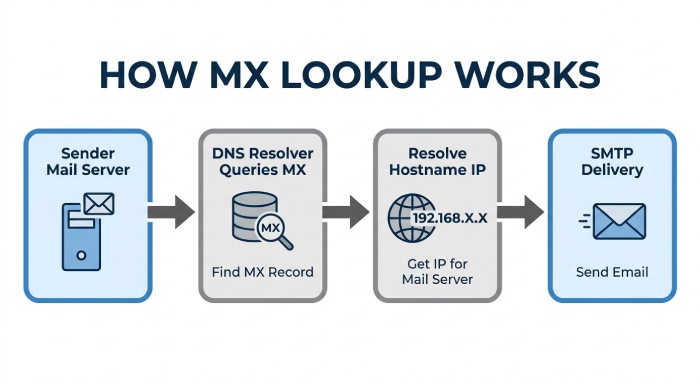
MX Records, Preference Values, and SMTP Handoff
An MX record points to a hostname rather than directly to an IP address. That hostname must resolve to an IPv4 address through an A record or an IPv6 address through an AAAA record.
For example:
example.com.       IN MX 10 mail.example.com.
mail.example.com.  IN A     192.0.2.10
When a domain has multiple MX records with different preference values, the sending server generally tries the record with the lowest numerical value first. For example, a record with preference 10 takes priority over one with preference 20. If the preferred server cannot accept the message, the sender may try another eligible MX server.
Administrators can use an MX lookup tool to inspect mail exchange records, preference values, and related DNS responses. After changing DNS settings, they can also compare results from multiple recursive resolvers to identify potential caching or configuration inconsistencies. These checks are particularly useful when investigating email delivery problems involving DNSSEC validation.
What DNSSEC Validation Does and Why Errors Occur
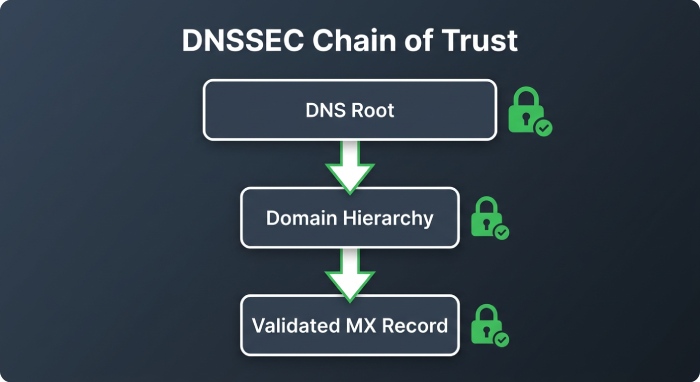
DNSSEC (Domain Name System Security Extensions) adds cryptographic authentication to DNS records. It helps validating DNS resolvers verify that DNS data, including MX records, is authentic and has not been improperly modified. Resolvers validate digital signatures and follow a chain of trust from the DNS root through the relevant domain hierarchy.
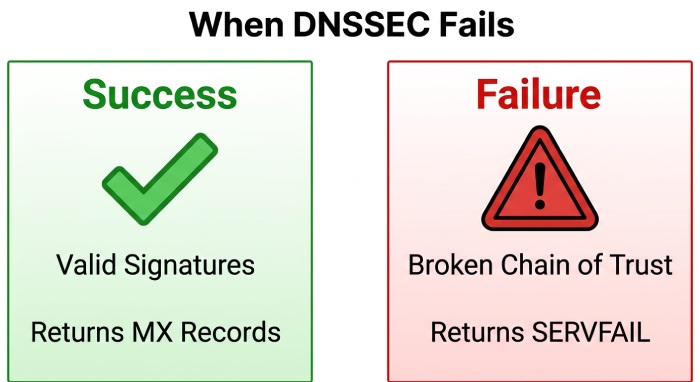
If validation succeeds, the resolver can return the requested DNS records. If validation fails, many validating resolvers return a SERVFAIL response instead of the requested data. As a result, an MX lookup may fail even when the destination mail server is operating normally.
Common Causes of DNSSEC Validation Errors
DNSSEC validation errors can occur due to incorrect DNS configurations or expired security signatures. The most common causes include:
- Expired RRSIG Signatures: Expired cryptographic signatures prevent DNS resolvers from verifying DNS records.
- DS and DNSKEY Mismatches: Incorrect or outdated records can break the DNSSEC chain of trust.
- Key Rollover Errors: Improperly updating DNSSEC keys may cause validation failures.
- Registrar or Nameserver Misconfiguration: Incorrect settings can prevent DNS resolvers from validating domain records.
- DNS Caching and Propagation Issues: Stale cached records or inconsistent information across authoritative nameservers can cause temporary errors.
These problems can affect MX records and other DNS entries, including A, AAAA, CNAME, SPF, DKIM, and DMARC records. If the DNSSEC chain of trust is broken for a mail server’s hostname, the sending server may fail to resolve its destination IP address, potentially disrupting email delivery.
How DNSSEC failures can disrupt MX record resolution
DNSSEC validation can affect an MX lookup when a domain’s DNSSEC chain of trust is broken or its signatures cannot be validated. A validating DNS resolver may return a SERVFAIL response instead of the requested MX records, even when the destination mail server is functioning normally.
The results shown by MX lookup tools can differ because of resolver validation behavior, cached DNS data, and the location of the DNS problem. Comparing responses from multiple resolvers can help identify inconsistencies, but different results alone do not confirm a DNSSEC failure.
If an MX lookup fails, the sending mail server may be unable to determine which mail server should receive the message. If the lookup succeeds but one MX target cannot be resolved or reached, another eligible mail server may still be available. Administrators should identify whether the failure affects the MX records themselves, an individual MX target, or the connection to the destination mail server.
Impact on Email Delivery, Bounces, Delays, and Sender Reputation
DNSSEC-related MX Lookup failures can cause immediate bounces, deferred delivery, or long queue delays. In many SMTP systems, a temporary DNS failure results in retry behavior. The sending mail server may keep retrying for several hours or days. If the failure persists, the message eventually bounces.
For inbound mail, the affected domain may miss business-critical messages. For outbound systems, unresolved sender authentication records can also damage trust. If receivers cannot validate an SPF record, DKIM, or DMARC policy because of DNS problems, they may treat the message as suspicious. This can increase spam-folder placement, support email spoofing risks, and weaken spam prevention controls.
Sender reputation can also suffer indirectly. Repeated failed attempts, abnormal retry patterns, or broken reverse DNS may trigger filtering by receiving platforms. Administrators should monitor whether sending infrastructure appears on a blacklist, RBL, or DNSBL. Tools such as an IP Blacklist Checker can query RBLs, DNSBLs, and other anti-spam databases to identify reputation problems.
DNSSEC failure is not the same as being listed on a blacklist, but both affect email delivery. A domain with broken DNSSEC may look unreliable, while an IP listed in an RBL or DNSBL may be rejected even after the MX record resolves correctly.
Troubleshooting and preventing DNSSEC-related MX Lookup issues
The first step is to verify whether the problem is DNSSEC-specific. Run an MX record lookup using a trusted MX record checker, then repeat the MX Lookup through validating resolvers such as Google, Cloudflare, OpenDNS, and Quad9. If some resolvers return SERVFAIL while others return the expected mail exchange record, DNSSEC is a strong suspect.
Next, check MX records against the authoritative source. Query the authoritative name server directly and confirm that each MX record target resolves to an A record or AAAA record. Ensure the priority order is correct, the backup MX record is valid, and no invalid CNAME is used where a direct hostname is required. Review NS Lookup results to confirm the correct Nameserver delegation.
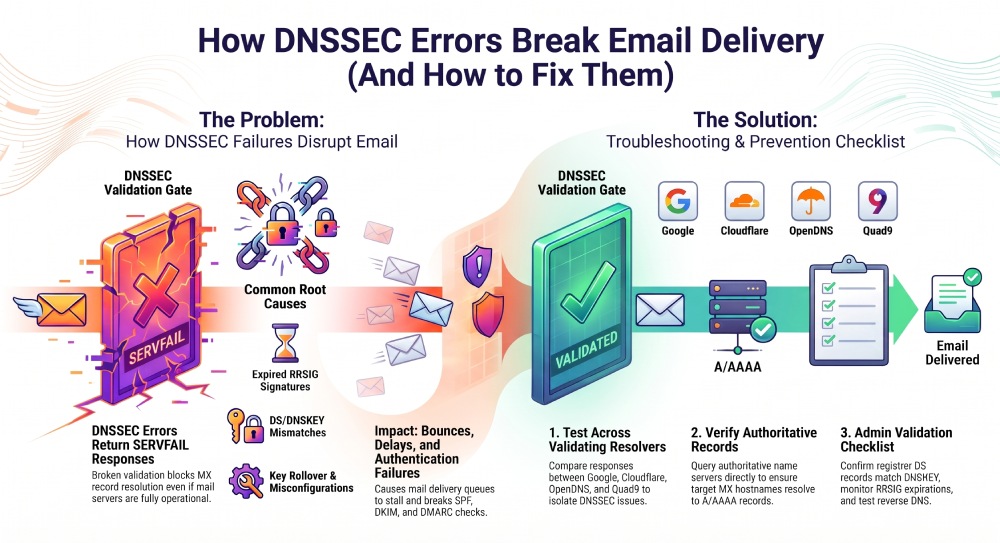
Validation checklist for administrators
An email administrator or webmaster should review the following:
- Confirm DS records at the registrar match DNSKEY records at the DNS provider.
- Check RRSIG expiration and key rollover timing.
- Validate the MX record, mail exchange record, and related hostnames.
- Verify SPF, DKIM, and DMARC records for authentication.
- Test reverse DNS for outbound mail server IPs.
- Review SMTP connectivity with a Port Checker.
- Run an Open Relay check to ensure the email server is not misconfigured.
- Monitor DNS health, response time, and DNS propagation after changes.
Topics
General Manager
General Manager at DuoCircle. Product strategy and commercial lead across the email security portfolio.
Secure your email infrastructure
Protect, authenticate, and deliver. Contact our team to find the right solution.