Domain Records Lookup: A Guide To DNS And Email Authentication

Quick Answer
Domain records lookup helps you inspect DNS and email authentication records such as A, MX, SPF, DKIM, and DMARC. Learn how to check domain records, identify configuration issues, verify email authentication, and improve domain reliability and email security.

A domain records lookup helps you check how a domain is configured across DNS and email systems. By reviewing records such as A, AAAA, CNAME, MX, NS, TXT, SPF, DKIM, and DMARC, you can identify routing problems, authentication issues, outdated entries, and configuration errors. Whether you are troubleshooting DNS, verifying email authentication, or checking changes after a domain migration, a domain records lookup provides a practical way to confirm that critical records are configured correctly.
What Is a Domain Records Lookup and Why It Matters
A domain records lookup is the process of querying the domain name system to see how a domain name is configured. It reveals the DNS instructions that tell browsers, mail servers, security tools, and applications where to send traffic, how to verify identity, and which services are authorized for a domain.
A DNS lookup queries DNS servers to retrieve a specific record associated with a domain or subdomain. Depending on the lookup method, the request may involve recursive resolvers and the domain’s authoritative name server, which provides the DNS records for that domain.
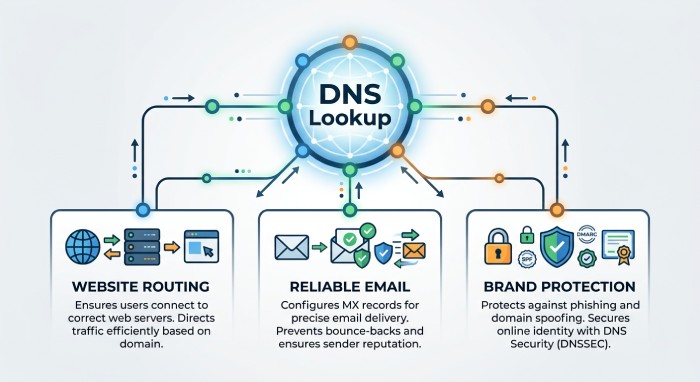
A domain records lookup matters because DNS controls critical internet functions, including:
- Website routing to the correct IP address
- Email routing through an MX record
- Brand protection through SPF, DKIM, DMARC, and BIMI
- Service discovery with an SRV record
- Certificate authority restrictions with a CAA record
- DNSSEC validation using a DS record and DNSKEY record
- Network troubleshooting when users experience connectivity issues
A good DNS lookup can quickly expose misconfigured records, stale entries after a domain migration, incorrect TTL (time to live) values, broken aliases, or missing email authentication. For organizations that rely on stable web access and reliable email delivery, regular domain records lookup checks are part of maintaining strong DNS health.
Core DNS Records to Check: A, AAAA, CNAME, MX, TXT, NS, and SOA
Every domain name depends on several foundational records. These records handle resource mapping, routing, delegation, and service behavior. When performing a domain records lookup, these are the most important record types to inspect.
Address and Alias Records: A, AAAA, and CNAME
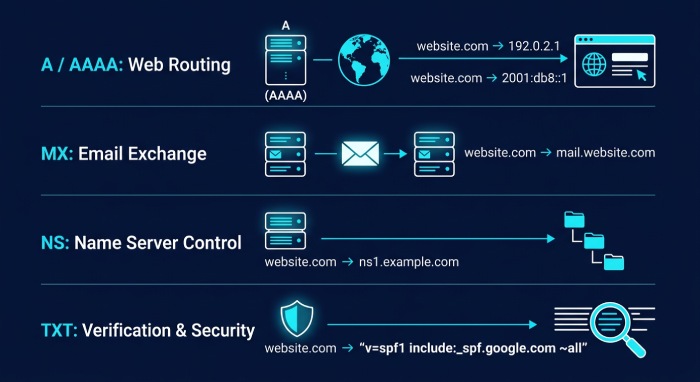
The A record maps a domain name to an IPv4 IP address. For example, a website may use an A record to point example.com to a hosting server. If the A record is wrong, visitors may land on the wrong server or fail to connect entirely.
The AAAA record performs a similar function but maps the domain name to an IPv6 address. As IPv6 adoption grows, the AAAA record is increasingly important for modern hosting environments. A missing or incorrect AAAA record may not break all traffic, but it can affect users and networks that prefer IPv6.
The CNAME record creates an alias from one name to another. For example, www.example.com might use a CNAME record pointing to example.com, or a Software as a Service (SaaS) platform may require a CNAME record for verification. Unlike an A record or AAAA record, a CNAME record does not point directly to an IP address; it points to another hostname that must then be resolved.
Practical checks for web-facing DNS records
When reviewing an A record, AAAA record, or CNAME record, confirm that the target is current, expected, and supported by your hosting provider. Also check whether multiple A record values are being used for load balancing, geographic routing, or failover. A DNS checker can compare results across global servers to show whether DNS propagation has completed.
Mail, Delegation, and Authority Records
An MX record tells the internet which mail exchange server handles email for a domain. Many organizations use multiple MX record values with different priorities for redundancy. If an MX record points to the wrong provider, mail may bounce or route to the wrong mail exchange servers.
An NS record identifies the name server responsible for a domain. The NS record is especially important because it determines which provider has Authoritative DNS control. If the registrar lists the wrong NS record, DNS updates made in another dashboard may have no effect. During a domain migration, validating every NS record is essential.
The SOA record stores administrative information about the zone, including the primary authoritative source, serial number, refresh interval, and retry behavior. The SOA record is useful when diagnosing stale zone data or synchronization issues between name servers. A TXT record is a flexible text-based DNS record used for verification and security. Common uses include Google site verification, Microsoft 365 verification, SPF, DKIM, and DMARC policies.
Additional records worth reviewing
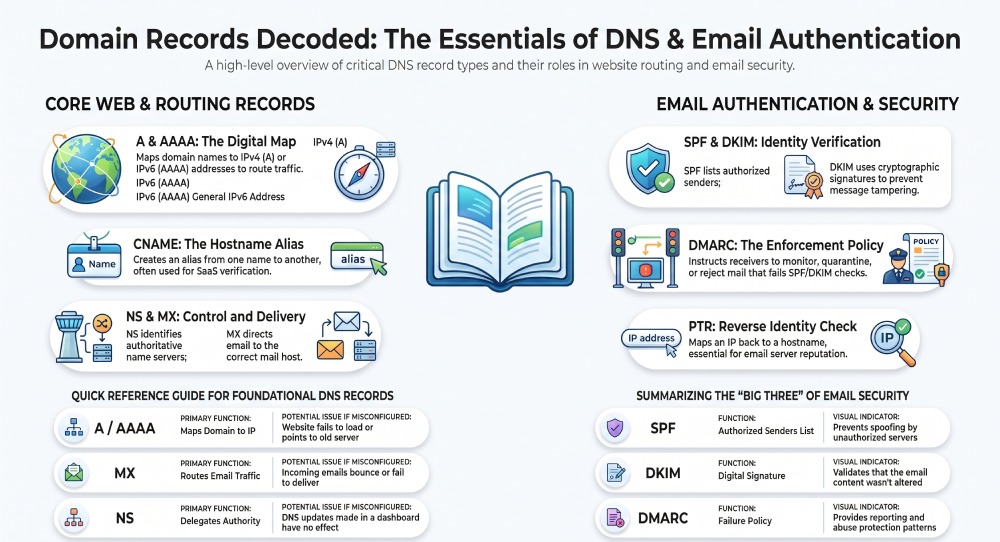
Beyond the most common records, a complete DNS lookup may include an SRV record for service discovery, a CAA record for certificate authority restrictions, a DS record and DNSKEY record for DNSSEC, and a PTR record for reverse mapping. The PTR record is particularly important for email servers because it links an IP address back to a hostname through a reverse DNS lookup.
Email Authentication Records: SPF, DKIM, DMARC, and BIMI
Email authentication records are published in DNS, usually as TXT entries, and they help receiving mail systems determine whether a message is legitimate. A proper domain records lookup should always include SPF, DKIM, DMARC, and, where applicable, BIMI.
SPF, DKIM, and DMARC Records
An SPF record lists the servers authorized to send email for a domain. SPF helps prevent spoofing by allowing receivers to compare the sending server against the published policy. If the SPF record is too broad, attackers may abuse it; if it is too strict, legitimate email may fail.
A DKIM record publishes a public key used to verify cryptographic signatures on email. The private key signs outbound messages, while the DKIM record in DNS allows receivers to validate that the message was not altered. DKIM selectors are usually stored under a subdomain, such as selector1._domainkey.example.com.
A DMARC record tells receivers what to do when SPF or DKIM checks fail. The DMARC record can request monitoring, quarantine, or rejection. DMARC also provides reporting that helps domain owners understand abuse patterns and improve policy enforcement. BIMI builds on SPF, DKIM, and DMARC by allowing brands to display verified logos in supported inboxes. While BIMI is not as universally required as SPF, DKIM, or DMARC, it depends on strong authentication and proper domain ownership verification.
Email administrators should also monitor DNS-based blacklists, often called DNS-based blacklist (DNSBL) services. If a sending IP or domain appears on a DNSBL, email delivery may suffer even when SPF, DKIM, and DMARC are configured correctly.
How to Perform a Domain Records Lookup Using Online Tools and Command-Line Methods
A reliable domain records lookup can be performed with online platforms, command-line utilities, or automated API (Application Programming Interfaces). The right method depends on whether you need a quick check, deep diagnostics, or integration into monitoring workflows.

Online DNS Lookup and DNS Checker Tools
Online DNS lookup tools provide a convenient way to check domain records without using command-line utilities. Depending on the service, you can look up records such as A, AAAA, CNAME, MX, NS, TXT, SPF, DKIM, and DMARC. These tools can also help compare DNS responses from different resolvers and identify configuration differences or caching issues.
Online lookup tools can return different DNS record types, including A, AAAA, CNAME, MX, NS, PTR, and TXT records. They can also help compare DNS responses from different locations or recursive resolvers after a DNS configuration change, making it easier to identify cached responses, inconsistent results, or other configuration issues.
Public resolvers from Google, Cloudflare, OpenDNS, Quad9, and Yandex may return slightly different results during propagation windows, depending on caching and TTL (time to live) values. Comparing responses helps identify whether an issue is local, resolver-specific, or authoritative.
Command Line Tools: nslookup and dig
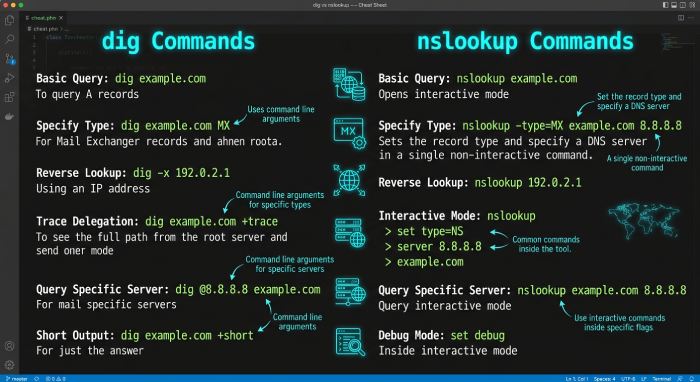
For deeper diagnostics, use command line tools such as nslookup and dig. These are available across Windows, Linux, and macOS, though dig is more common on Unix-like systems.
Examples:
dig example.com A
dig example.com AAAA
dig example.com MX
dig example.com NS
dig www.example.com CNAME
dig -x 203.0.113.10
The final command performs a reverse DNS lookup and checks the PTR record for an IP address. A forward DNS lookup maps a hostname to an IP address, while a reverse lookup maps an IP address back to a hostname. For mail systems, the PTR record should usually align with the sending hostname and mail server identity.
With nslookup, you can query a specific recursive resolver:
nslookup -type=MX example.com 8.8.8.8
nslookup -type=TXT example.com 1.1.1.1
These commands ask Google DNS or Cloudflare DNS directly, which is useful when comparing resolver behavior.
Common DNS and Email Authentication Issues and How to Troubleshoot Them
DNS and email issues often come from small configuration errors. A structured DNS lookup process helps isolate the cause quickly.
Common issues include:
- Incorrect A record pointing to an old hosting server
- Missing AAAA record for IPv6 traffic
- Broken CNAME record after a SaaS configuration change
- Wrong MX record priority or invalid mail host
- Incorrect NS record delegation at the registrar
- Missing or mismatched PTR record for outbound mail servers
- Expired verification TXT record values
- Overly permissive or invalid SPF syntax
- Missing DKIM record selector
- DMARC set to reject before SPF and DKIM alignment is working
- Slow DNS propagation caused by long TTL values
To troubleshoot, start with the authoritative source. Query the authoritative name server directly and compare it with responses from a public recursive DNS server. If the authoritative answer is correct but public resolvers still show old data, the issue is likely caching or propagation. If the authoritative answer is wrong, fix the DNS zone where the active NS record points.
For email, verify the MX record first, then test SPF, DKIM, and DMARC. Check the PTR record for the sending server and review any listings on DNSBL services. If users report delivery failures, inspect bounce messages, authentication results, and blacklist status before changing DNS records. A disciplined domain records lookup workflow supports email security and prevents guesswork while keeping DNS, web services, and email authentication aligned.
General Manager
General Manager at DuoCircle. Product strategy and commercial lead across the email security portfolio.
Secure your email infrastructure
Protect, authenticate, and deliver. Contact our team to find the right solution.