Null MX Records Explained: How to Signal That Your Domain Doesn't Send Email

Quick Answer
A Null MX record is a DNS entry that signals a domain does not accept incoming email. It helps prevent misdirected messages, reduces unnecessary email delivery attempts, and clearly communicates that the domain has no mail servers.
Not every domain needs to send or receive email. Businesses may register extra domains for branding, campaigns, product launches, defensive protection, or future projects. Even when a domain is inactive, improperly configured DNS records can leave it vulnerable to email spoofing and phishing.
A Null MX record helps protect it by explicitly stating that the domain does not accept incoming email. Paired with SPF and DMARC policies, it clarifies the email security posture for domains that don’t handle email.
What Is a Null MX Record?
A Null MX record tells other mail systems that a domain does not accept email. Defined in RFC 7505, it uses a dot (.) as the mail exchanger value, unlike conventional MX records, which point to mail servers.
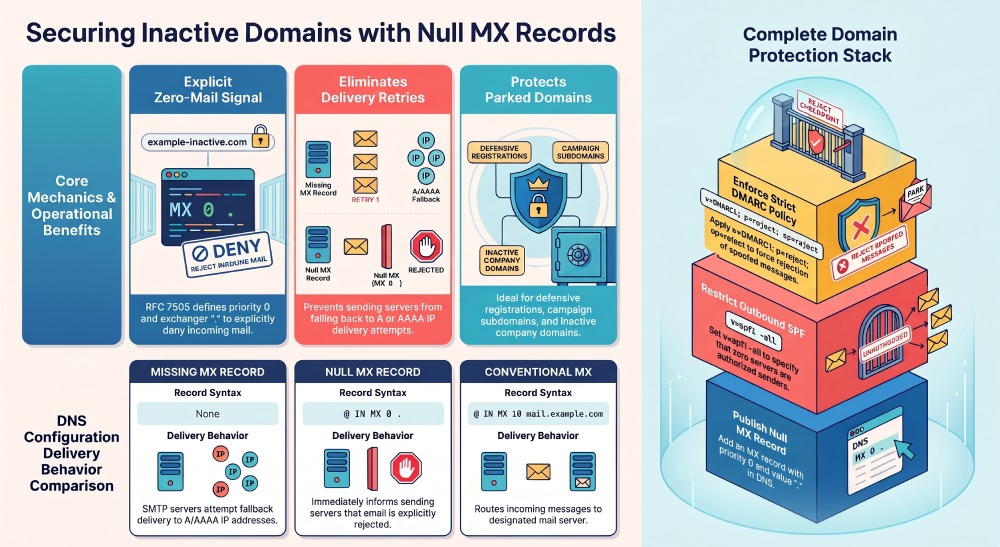
A typical Null MX record looks like this:
example.com. IN MX 0 .This configuration contains two important elements:
- Priority:
0, indicating the record’s preference value. - Mail exchanger:
., representing the absence of a mail server.
A domain with a Null MX record must not publish any other MX records. This tells receiving mail servers that the domain is intentionally unavailable for email, not misconfigured.
Why Do Domains Need Null MX Records?
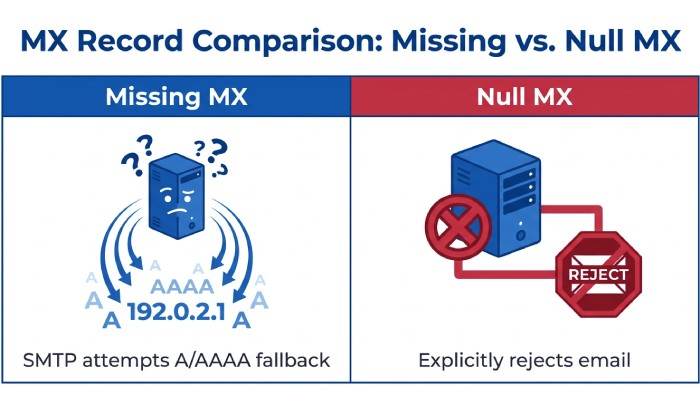
When a domain has no MX records, SMTP servers may fall back to its A or AAAA records and attempt delivery to the associated IP address. If that address does not host a mail server, delivery attempts may continue for an extended period before failing. A Null MX record removes this ambiguity by explicitly indicating that the domain does not accept email. Organizations can benefit from Null MX records in several ways:
- Clear email configuration: Signals that the domain does not accept incoming messages.
- Faster delivery failures: Lets mail servers reject delivery attempts without unnecessary retries.
- Reduced operational overhead: Avoids the need to maintain unnecessary mail servers.
- Improved domain security: Supports a broader strategy to protect unused domains against email spoofing.
Null MX is particularly useful for parked domains, inactive business domains, campaign domains, and domains reserved for future use.
How Null MX Records Work
When an email server sends a message to a domain, it checks the domain’s DNS records for a mail exchanger. A Null MX record tells the sending server that the domain does not accept email, so it won’t try to deliver the message to an unrelated web server or look for another destination. For example, a company that uses a separate domain for employee email can publish a Null MX record on examplebrand.com to show that the domain is for its website, not email. This helps distinguish domains used for websites from those used for email.
Null MX vs. Missing MX Records
Although both configurations indicate that a domain has no conventional mail exchanger, they behave differently.
| Configuration | Email Delivery Behavior |
|---|---|
| Missing MX record | SMTP servers may attempt delivery to the domain’s A or AAAA address. |
| Null MX record | Explicitly indicates that the domain does not accept email. |
| Conventional MX record | Directs email to a designated mail server. |
This distinction matters: a domain with no MX record hasn’t necessarily declared that it rejects email. A Null MX record makes that declaration explicit and standardized.
How to Configure a Null MX Record
Setting up a Null MX record requires access to the domain’s DNS management panel.
Follow these steps:
- Sign in to your DNS hosting provider.
- Open the domain’s DNS management settings.
- Add a new MX record. If your provider requires it, leave the hostname or destination field blank.
- Set the priority to 0 and enter . as the mail exchanger value.
- Save the record and allow time for DNS propagation.
The resulting configuration should resemble:
Type: MX
Name: @
Priority: 0
Value: .
DNS providers may use different field names or interfaces. Some may not support Null MX records, so check your provider’s documentation before making changes.

Strengthening Null MX With SPF and DMARC
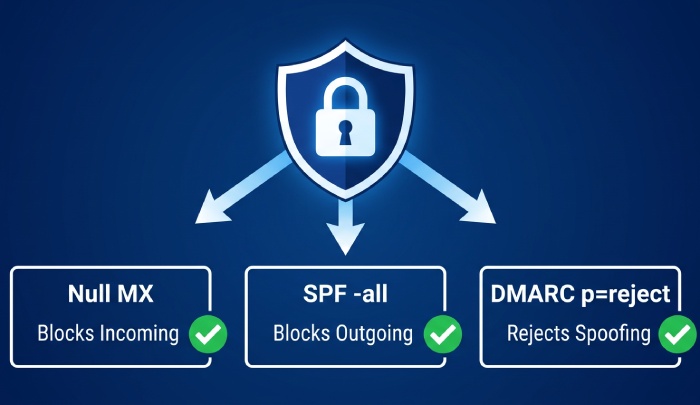
A Null MX record stops a domain from receiving email, but it doesn’t prevent attackers from spoofing that domain in outgoing messages.
For more comprehensive email security, pair Null MX with SPF and DMARC.
SPF: Declare That No Servers Are Authorized
An unused domain can publish the following SPF record:
v=spf1 -allThis policy states that no sending server is authorized to use the domain in an SPF-checked identity, helping receiving mail servers identify unauthorized sending attempts.
DMARC: Reject Unauthorized Messages
A DMARC record can establish a strict policy for messages using the domain in the visible From address.
Example:
v=DMARC1; p=reject; sp=rejectThe p=reject policy requests rejection of messages that fail DMARC evaluation, while sp=reject extends the policy to applicable subdomains.
Organizations should verify that the domain and its subdomains do not send legitimate email before applying restrictive policies.
Conclusion
Null MX records tell other mail servers that a domain does not accept incoming email, helping prevent unnecessary delivery attempts and keeping DNS configuration simple.
Null MX is just one part of domain protection. Pairing it with SPF set to -all and a restrictive DMARC policy can help protect against unauthorized email activity.
For organizations managing multiple domains, applying these DNS controls consistently can reduce email-related risks and support stronger domain security.
Topics
General Manager
General Manager at DuoCircle. Product strategy and commercial lead across the email security portfolio.
Secure your email infrastructure
Protect, authenticate, and deliver. Contact our team to find the right solution.