Email Header Analyzer: Detect Suspicious Email Routing

Quick Answer
An Email Header Analyzer helps identify suspicious email routing, detect spoofed senders, and investigate phishing attempts by examining sender details, IP addresses, timestamps, and authentication results. Learn how to analyze email headers to improve email security and prevent malicious messages.

Email is one of the most widely used ways for businesses, organizations, and individuals to communicate. It is also a frequent target for cybercriminals, who use phishing, spoofing, and other tactics to deceive recipients. Because a suspicious message can appear to come from a trusted person, business partner, or well-known organization, the sender’s name or address alone may not reveal whether it is malicious.
An Email Header Analyzer helps investigate these threats by examining the technical details in an email header. This information can show how a message moved between mail servers, which systems handled it, and whether its routing contains unusual patterns. Reviewing the header can help security teams spot suspicious routing, authentication failures, and possible attempts to manipulate email delivery.
Learning how email headers work and how to interpret them can help organizations strengthen email security and reduce the risk of phishing and spoofing attacks.
What Is an Email Header Analyzer?
An email header analyzer examines the technical metadata attached to an email. Each message’s header records information about its origin, destination, delivery path, and authentication results.
While the visible email includes details such as the subject line, sender name, and message body, its header offers a closer look at how the message was processed before reaching the recipient’s inbox. An email header analyzer organizes this technical information into a readable format, helping users investigate details such as:
- Sender and recipient information: Identifies the email addresses involved in the communication.
- Routing information: Shows the mail servers that handled the message during delivery.
- IP addresses: Reveals the sending and intermediate server IP addresses.
- Timestamps: Displays when different mail servers received and processed the message.
- Authentication results: Shows whether SPF, DKIM, and DMARC checks passed or failed.
- Message identifiers: Provides unique information that helps administrators trace individual messages.
These details help security professionals determine whether an email followed an expected delivery path or passed through unfamiliar systems.
How Does Email Routing Work?
Email routing is the path a message takes from the sender’s mail server to the recipient’s. Rather than traveling directly between mailboxes, an email may pass through multiple mail servers before it’s delivered.
The process generally involves the following steps:
- Email submission: The sender’s email application submits the message to an outgoing mail server, usually through SMTP.
- DNS lookup: The sending server checks the recipient domain’s DNS records to identify the appropriate mail server using MX records.
- Message transmission: The sending server establishes an SMTP connection with the recipient’s mail server or an intermediary gateway.
- Security checks: Receiving systems may evaluate SPF, DKIM, DMARC, spam reputation, and other security indicators.
- Email delivery: After processing, the message is delivered to the recipient’s mailbox or routed to another security or filtering system.
Each mail server that handles a message may add information to its header, creating a record of the message’s journey. An email header analyzer can review this record to identify unexpected routing activity.
Key Email Header Fields to Analyze
Email headers contain several technical fields, but some are particularly important when investigating suspicious email routing.
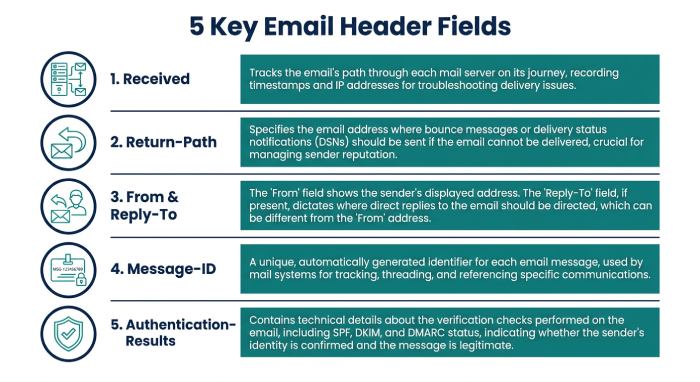
1. Received Headers
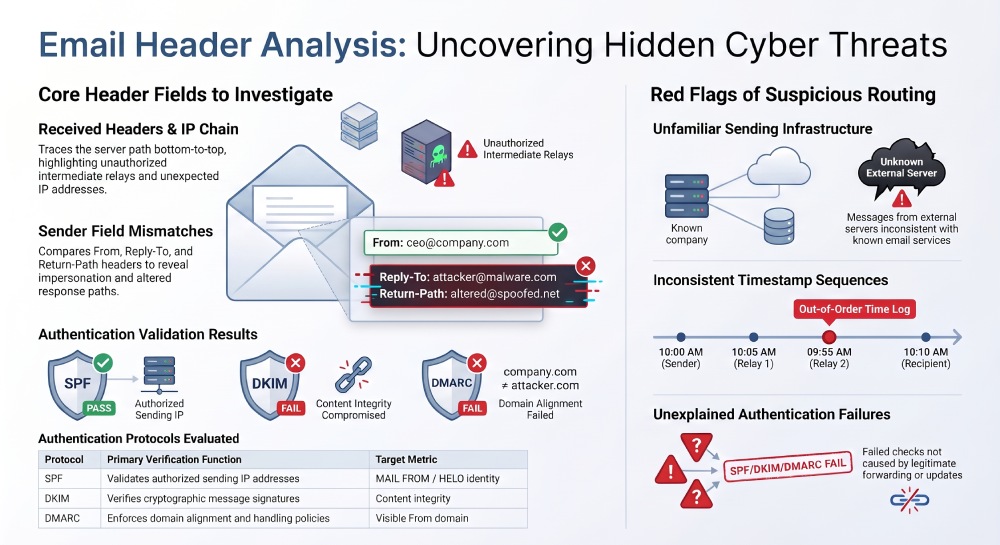
The Received field is one of the most useful parts of an email header. Mail servers typically add a Received entry when they accept or process a message, creating a record of the systems it passed through. Investigators generally read these entries from bottom to top to trace the delivery path. Because the earliest entries may be forged, administrators should start with entries added by trusted receiving mail servers.
Security teams can examine Received headers to identify:
- Unexpected mail servers.
- Unfamiliar IP addresses.
- Unusual routing locations.
- Unexpected changes in delivery paths.
- Inconsistent timestamps.
Each receiving mail server typically adds a Received header above the earlier entries. These headers can help trace an email’s delivery path, but attackers may forge entries before the message reaches trusted infrastructure. Administrators should identify trusted mail servers before relying on this routing information.
2. Return-Path
The Return-Path field records the SMTP reverse-path—the address used for delivery failure notices, such as bounces. The final delivery system typically adds it when the message reaches the recipient’s mailbox.
This field can help you check whether an email’s envelope sender differs from the address shown in its From field. For example, a message may display a familiar business address while using an unrelated Return-Path domain. That difference alone doesn’t mean the email is malicious: legitimate email providers often use separate domains for bounce handling. Still, an unexpected or unexplained mismatch may warrant further investigation.
3. From and Reply-To
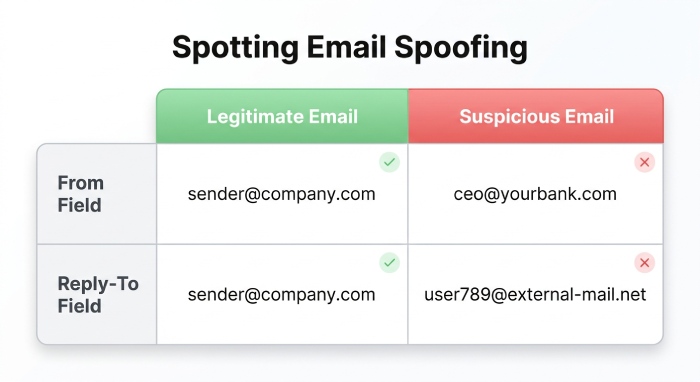
The From field shows the sender’s associated address, while Reply-To indicates where responses will go. Attackers may exploit these fields to make fraudulent messages appear legitimate—for example, by displaying a company finance department’s name while directing replies to an unrelated external address. Comparing the two can help reveal impersonation attempts and suspicious communication patterns.
4. Message-ID
The Message-ID field contains a unique identifier for an email and may reveal details about the system or domain that generated it. Security professionals can review it for inconsistencies between the claimed sender and the email’s sending infrastructure. Because mail systems can customize or generate Message-ID values in different ways, the field alone does not prove a message is authentic.
5. Authentication-Results
The Authentication-Results field records email authentication checks performed by the receiving mail server or security gateway. Administrators should confirm it was added by a trusted receiving system, since attackers can insert forged Authentication-Results headers.
It may contain results for:
- SPF (Sender Policy Framework)
- DKIM (DomainKeys Identified Mail)
- DMARC (Domain-based Message Authentication, Reporting, and Conformance)
These authentication checks verify whether the sending infrastructure is authorized and whether the message has valid cryptographic signatures and proper domain alignment. Failures may point to misconfiguration, forwarding issues, or possible email spoofing.
How an Email Header Analyzer Detects Suspicious Routing
An email header analyzer helps spot routing irregularities by evaluating multiple header fields together—not relying on a single indicator. Here’s how it supports suspicious email detection.
1. Identifying Unknown Sending IP Addresses
An unfamiliar IP address in an email’s routing information may warrant a closer look. For instance, if an organization typically sends business email through Microsoft 365 or Google Workspace, an unexpected external server in the routing chain may prompt security teams to check whether the message came from an unauthorized system.
An IP lookup can reveal details about the associated network, hosting provider, and approximate location. Still, an unfamiliar address does not necessarily indicate malicious activity: cloud infrastructure, forwarding, and third-party email providers can all lead to legitimate routing changes.
2. Detecting Unusual Routing Paths
Most organizations rely on established email infrastructure to send and receive messages. If an email passes through unfamiliar servers, unexpected relays, or unusual gateways, it may warrant closer review. For instance, a message that claims to come from a company’s internal email system may include routing information linked to an unrelated hosting provider. An analyzer can help administrators compare the recorded delivery path with expected infrastructure and spot unexpected changes.
3. Finding Suspicious Timestamp Differences
Received headers include timestamps that show when individual mail servers handled a message. Security teams can compare them to spot unusual delays, inconsistent sequences, or gaps in processing. If timestamps appear out of order, investigate whether clock synchronization problems, time zone differences, or potentially forged header entries explain the discrepancy. Interpret timestamps carefully, since all three can create inconsistencies.
4. Checking SPF, DKIM, and DMARC Results
When investigating suspicious email routing, authentication checks are essential. An email header analyzer can show whether SPF, DKIM, and DMARC passed or failed.
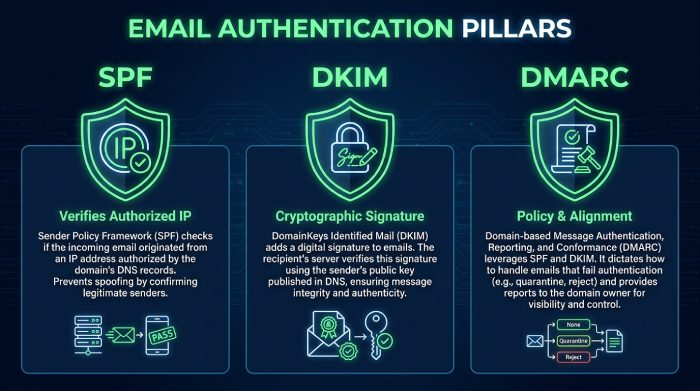
- SPF: Checks whether the connecting IP address is authorized to send email for the domain in the SMTP MAIL FROM command. If that identity is empty, SPF checks the HELO identity instead.
- DKIM: Verifies the message’s cryptographic signature and checks whether the signed content has been altered.
- DMARC: DMARC checks whether at least one authentication method—SPF or DKIM—passes and aligns with the domain in the visible From address. It then tells the receiving system how to handle the message according to the domain owner’s published policy.
An unexpected authentication failure may indicate spoofing or a configuration issue, but legitimate forwarding, message changes, or third-party gateways can also affect the result.
5. Identifying Email Spoofing Attempts
Email spoofing occurs when an attacker alters sender information to make a message look as if it came from a trusted source. They may use a familiar display name, a deceptive From address, or a lookalike domain. Analyzing routing details, authentication results, and sender-related headers can reveal inconsistencies that suggest impersonation. This is especially useful for identifying business email compromise (BEC), in which criminals impersonate executives, suppliers, or finance teams to request sensitive information or fraudulent payments.
Common Warning Signs of Suspicious Email Routing
When analyzing an email header, security teams should look for multiple indicators rather than treating one unusual field as conclusive evidence.
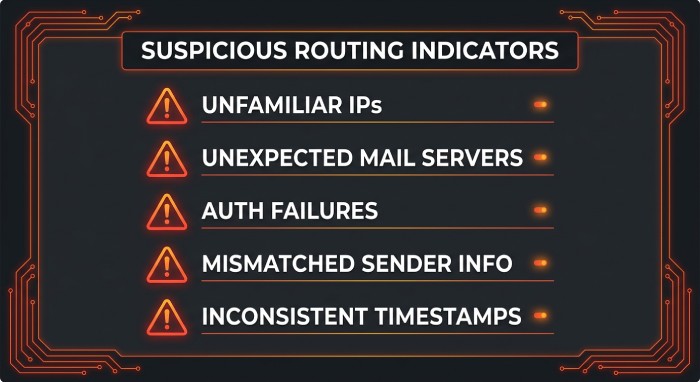
Some common warning signs include:
- Unfamiliar sending IP addresses: The message originates from infrastructure that does not match the organization’s known email services.
- Unexpected mail servers: The routing chain contains unknown relays or systems that cannot be explained by normal email delivery.
- Authentication failures: SPF, DKIM, or DMARC checks fail without an identifiable configuration or forwarding reason.
- Mismatched sender information: The From, Reply-To, and Return-Path fields contain unexpected differences.
- Inconsistent timestamps: Routing entries show unusual time sequences or unexplained delivery gaps.
- Unexpected Message-ID domains: The identifier appears inconsistent with the sender’s normal email infrastructure.
- Unusual routing changes: Messages suddenly follow a different delivery path without an approved infrastructure update.
These indicators become more useful when compared with known-good messages from the same sender or organization.
Benefits of Using an Email Header Analyzer
An email header analyzer offers several advantages for individuals, IT administrators, and cybersecurity teams.
- Improved Email Threat Detection: Analyzing email headers helps security teams spot suspicious routing, unauthorized sending infrastructure, and potential spoofing before users engage with malicious messages.
- Faster Email Troubleshooting: Email delivery issues may result from incorrect DNS settings, authentication failures, forwarding rules, or mail server problems. Analyzing email headers gives administrators technical details to help investigate these issues more efficiently.
- Better Email Authentication Monitoring: Organizations can use header analysis to review SPF, DKIM, and DMARC results and identify authentication misconfigurations that may affect email security and deliverability.
- Stronger Phishing Investigation: When employees flag suspicious emails, security teams can review the routing information to see whether the messages passed through expected mail servers or potentially unauthorized infrastructure.
- Greater Visibility Into Email Infrastructure: Analyzing email headers reveals which systems handle message delivery, helping administrators see how messages move through internal servers, external gateways, and third-party email service providers.
Best Practices for Analyzing Email Headers
To get reliable results from an email header analyzer, organizations should follow a consistent investigation process.
- Analyze the complete header: Review the full routing chain and authentication information, not just the From or Subject field.
- Compare suspicious and legitimate emails: Use known-good messages to define normal routing patterns and spot unexpected changes.
- Verify IP addresses: Investigate unfamiliar IP addresses with reputable IP lookup and network reputation tools.
- Review authentication results: Review SPF, DKIM, and DMARC results, and investigate any unexplained failures.
- Validate trusted mail servers: Before drawing conclusions, identify which Received entries were added by trusted infrastructure.
- Monitor DNS records: Regularly review SPF, DKIM and MX records to keep email infrastructure properly configured.
- Avoid clicking suspicious links: Analyze suspicious messages without opening unexpected attachments or following embedded URLs.
- Protect sensitive information: Email headers can contain internal IP addresses, email addresses, and infrastructure details. Avoid sharing complete headers publicly without reviewing their contents.
 Combining email header analysis with security monitoring, spam filtering, and employee awareness training can strengthen defenses against email-based attacks. An email header analyzer helps organizations understand how messages are delivered and identify suspicious routing. Reviewing Received headers, sender details, IP addresses, timestamps, Message-ID values, and authentication results can provide insight into how an email moved through the infrastructure.
A single unusual header field does not necessarily signal an attack, but several inconsistencies may point to spoofing, phishing, or unauthorized email activity. Regular header analysis, together with properly configured SPF, DKIM, and DMARC records, can support email authentication, help troubleshoot delivery issues, and improve overall email security. As threats evolve, monitoring email routing remains an important part of protecting business communications.
General Manager
General Manager at DuoCircle. Product strategy and commercial lead across the email security portfolio.
Secure your email infrastructure
Protect, authenticate, and deliver. Contact our team to find the right solution.