How Microsoft 365 Accounts Become Targets For Credential Harvesting Attacks

Quick Answer
Microsoft 365 accounts become targets for credential harvesting because they provide access to emails, files, Teams, and business applications. Cybercriminals use phishing, fake login pages, and social engineering to steal credentials, making strong authentication and user awareness essential.
Microsoft 365 has emerged as a crucial tool for business communication and collaboration, utilized daily for email, file sharing, video conferencing, cloud storage, and productivity. However, its popularity has made it a prime target for cybercriminals.
Instead of directly attacking networks, many cybercriminals aim to steal user credentials. A successful credential theft can provide access to sensitive emails, confidential documents, financial data, and business applications without exploiting software vulnerabilities.
Recognizing why Microsoft 365 accounts are frequently targeted is essential for prevention. This guide outlines common attack methods, the reasons behind frequent targeting of users, warning signs, and effective strategies to safeguard your organization.
What Is Credential Harvesting?
Credential harvesting is a cyberattack method where attackers deceive users into disclosing their login credentials, including usernames, passwords, and multi-factor authentication (MFA) codes. Unlike brute-force attacks that guess passwords, this technique employs trickery through fraudulent emails, imitation login pages, and malicious websites that mimic genuine Microsoft services.
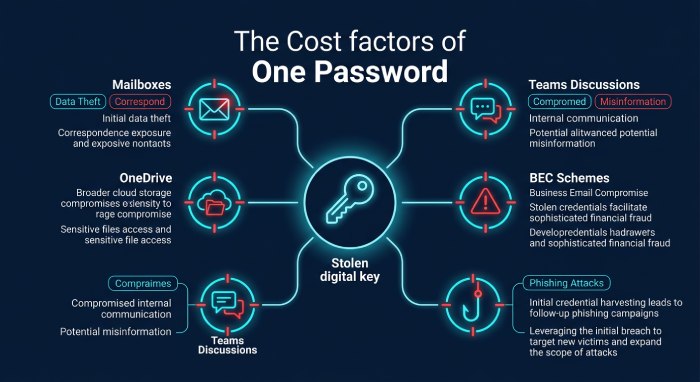
When credentials are compromised, attackers can:
- Access Microsoft 365 mailboxes
- Read sensitive business communications
- Exfiltrate files from OneDrive
- Intercept Microsoft Teams discussions
- Initiate Business Email Compromise (BEC) schemes
- Send phishing emails from trusted accounts
- Navigate across cloud applications
Victims frequently remain unaware of the breach until significant harm has been done, as the login appears genuine.
Why Microsoft 365 Is a Prime Target
Microsoft 365 powers millions of organizations worldwide, making it a high-value target for cybercriminals.
Several factors make Microsoft 365 especially attractive:
Large User Base With millions of active users, attackers have numerous targets. Even a minor success rate can lead to thousands of breached accounts.
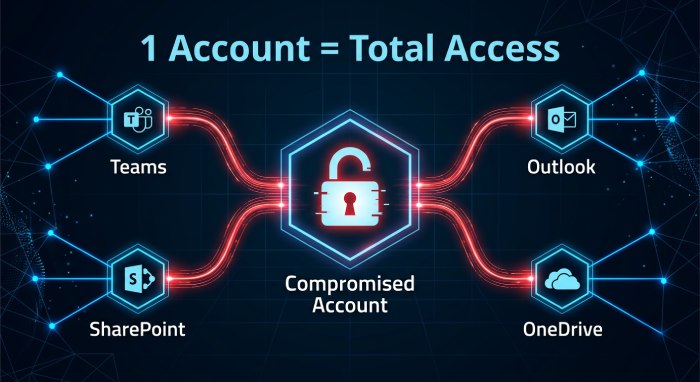
Access to Business-Critical Data A single Microsoft 365 account may provide access to:
- Exchange Online
- SharePoint Online
- OneDrive
- Microsoft Teams
- Outlook
- Power Platform
- Azure-integrated applications
Gaining access to one account can lead to broader access to various business resources.
Cloud Accessibility Microsoft 365 enables remote access for employees, but this also opens the door for potential attackers to attempt logins globally.
Email as an Entry Point
Given its popularity for business communication, Outlook is often targeted by attackers through email phishing schemes that mimic Microsoft services.
Common Credential Harvesting Techniques Targeting Microsoft 365
Cybercriminals are constantly refining their attack methods to exploit Microsoft 365 users. Rather than relying on obvious phishing emails, modern attackers use sophisticated social engineering techniques, realistic login portals, and trusted Microsoft services to trick users into revealing their credentials. Understanding these common credential harvesting techniques can help organizations recognize threats early and strengthen their defenses.
1. Fake Microsoft Login Pages
One of the most effective credential harvesting techniques involves counterfeit Microsoft sign-in pages that closely mimic the official Microsoft 365 login experience. Attackers design these websites using authentic Microsoft branding, logos, backgrounds, and even sign-in animations, making them extremely difficult to distinguish from the genuine portal.
Victims are typically lured to these fake pages through phishing emails claiming that immediate action is required due to:
- Password expiration
- Security verification requests
- Shared OneDrive or SharePoint documents
- Account suspension warnings
- Mailbox storage limits being exceeded
When users enter their usernames and passwords, the credentials are transmitted directly to the attackers instead of Microsoft’s authentication servers. Some advanced phishing kits even display fake error messages or redirect users to the legitimate Microsoft website after capturing their credentials, reducing suspicion and delaying detection.
2. Email Phishing Campaigns
Email phishing remains the most common delivery method for credential harvesting attacks targeting Microsoft 365 users. Cybercriminals craft highly convincing emails that impersonate trusted organizations or internal departments, encouraging recipients to click malicious links or open fraudulent login pages.
Attackers frequently pose as:
- Microsoft Security
- Microsoft Support
- Internal IT administrators
- Human Resources teams
- Payroll departments
- Business partners or vendors
Common phishing email subject lines include:
- Verify Your Microsoft 365 Account
- Password Expires Today
- New Microsoft Teams Voicemail
- Secure Document Shared with You
- Multi-Factor Authentication Verification Required
These emails often create a sense of urgency, convincing users that immediate action is necessary. Once recipients click the embedded link, they are redirected to a fake Microsoft login page where their credentials are harvested.
3. Business Email Compromise (BEC)
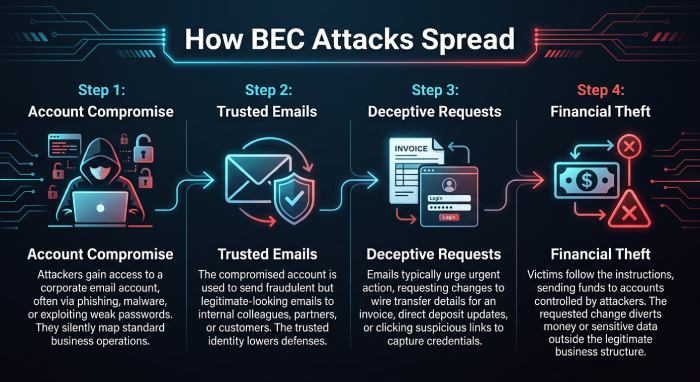
Business Email Compromise (BEC) attacks often begin after attackers successfully compromise a single Microsoft 365 account. Once inside an organization’s environment, they use the legitimate account to launch additional phishing campaigns against coworkers, customers, or business partners.
Since the emails originate from a trusted internal account, recipients are significantly more likely to believe the messages are genuine. Attackers may request:
- Password verification
- Approval of invoices or payments
- Wire transfers
- Confidential business documents
- Additional employee credentials
This trust-based approach allows attackers to rapidly compromise multiple accounts, expand their access across the organization, and potentially cause significant financial and operational damage.
4. OAuth Consent Phishing
Not all credential harvesting attacks involve stealing passwords. OAuth consent phishing targets Microsoft’s application authorization process instead.
Attackers create malicious applications that appear legitimate and request permission to access Microsoft 365 resources such as:
- Reading emails
- Accessing contacts
- Viewing calendars
- Sending emails
- Accessing OneDrive files
Victims receive a genuine Microsoft permission prompt rather than a fake login page. Because the request comes from Microsoft’s authentication system, many users assume it is safe and grant the requested permissions.
Once consent is provided, attackers can maintain persistent access to sensitive data without ever knowing the user’s password, making these attacks particularly difficult to detect.
5. QR Code Phishing (Quishing)
QR code phishing, commonly known as quishing, has become increasingly popular as organizations improve traditional email filtering. Instead of embedding malicious hyperlinks directly in an email, attackers include QR codes that direct victims to fraudulent Microsoft 365 login pages.
Recipients scan the QR code using their smartphones, where they are taken to a convincing fake Microsoft sign-in portal designed to capture their credentials.
This technique is especially effective because:
- Many email security gateways inspect hyperlinks but not embedded QR codes.
- Mobile devices often display only shortened URLs, making fraudulent websites harder to identify.
- Users generally perceive QR codes as safer than clickable links.
As a result, quishing has emerged as a powerful method for bypassing traditional email security controls.
6. MFA Fatigue Attacks
While Multi-Factor Authentication (MFA) enhances account security, cybercriminals exploit user behavior rather than the technology. In an MFA fatigue attack, attackers flood the victim’s device with authentication requests using stolen credentials. Overwhelmed by repeated notifications, users may inadvertently approve a request to stop the disruptions. Some attackers even enhance this method by impersonating Microsoft Support or an IT help desk, framing the requests as routine security checks. This blend of technical tactics and social engineering significantly raises the risk of compromise.
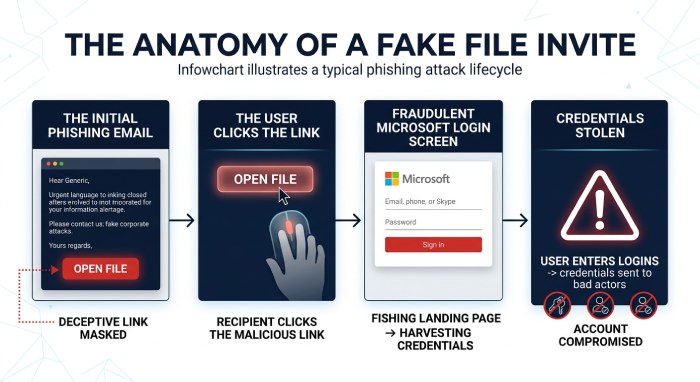
7. Fake OneDrive or SharePoint Sharing Invitations
Microsoft 365 users frequently receive alerts regarding shared files and collaborative documents, making invites from OneDrive and SharePoint prime targets for phishing attacks. Cybercriminals often send expertly crafted emails that appear to be from colleagues or partners, urging recipients to access an important document via a “View Document” or “Open File” button. This link typically leads to a fake Microsoft login page.
Given the regularity of document sharing in business, users are likely to trust these requests. When they attempt to log in, their Microsoft 365 credentials are captured and exploited by the attacker. This method is particularly effective in organizations that utilize Microsoft Teams, SharePoint, and OneDrive for collaboration, where such notifications are common and expected.
The Credential Harvesting Attack Lifecycle: From Initial Reconnaissance to Account Compromise
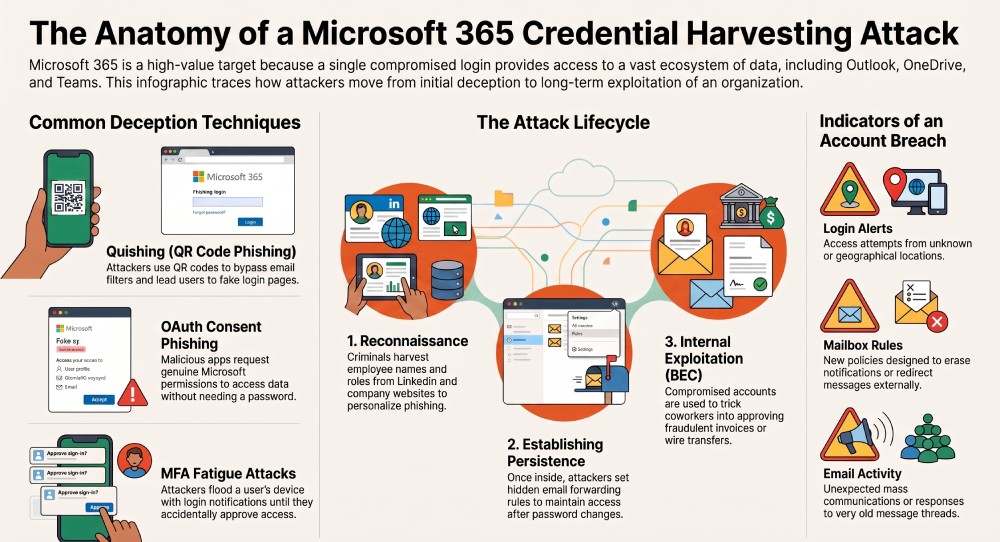
Credential harvesting attacks typically unfold through multiple stages rather than a single event. Cybercriminals employ a strategic approach to mislead users, acquire credentials, and exploit compromised Microsoft 365 accounts. By recognizing each phase of this process, organizations can detect early warning signs and thwart attacks before sensitive information is compromised.
Reconnaissance: Gathering Intelligence on the Target
Every effective credential harvesting effort starts with gathering information. Cybercriminals meticulously research their targets to craft realistic phishing emails. A wealth of data, including employee names, job titles, email addresses, and recent company news, is readily accessible through corporate websites, LinkedIn, social media, press releases, and public directories. This intelligence enables them to customize their emails, enhancing their credibility compared to standard spam.
Crafting and Delivering the Phishing Email
After gathering adequate information, attackers craft convincing phishing emails that mimic reputable organizations like Microsoft. These messages typically urge recipients to reset passwords, verify account activity, review shared documents, or address urgent security concerns.
To enhance legitimacy, attackers often use similar domains, hacked business email accounts, compromised Microsoft 365 tenants, or free email services resembling authentic addresses. Urgent and fear-driven language prompts recipients to act quickly without thoroughly assessing the email.
Credential Collection Through Fake Login Pages
Phishing emails typically lead users to a fake Microsoft 365 login page that mimics the authentic experience. Advanced phishing kits effectively replicate Microsoft’s branding and authentication process, making it difficult for users to detect the fraud.
When users try to log in, the fraudulent site collects sensitive information, including usernames, passwords, MFA codes, and security question answers. This data is swiftly sent to the attackers, enabling rapid account access.
Unauthorized Access to Microsoft 365 Accounts
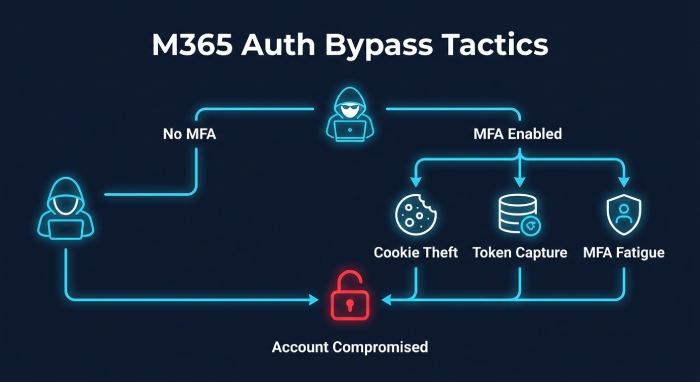
Using stolen credentials, attackers try to access the victim’s Microsoft 365 account. If multi-factor authentication (MFA) is not implemented, the account is typically compromised right away.
Even with MFA in place, attackers have been employing sophisticated tactics, such as stealing session cookies, capturing access tokens, or executing MFA fatigue attacks, which bombard users with repeated login requests until one is inadvertently approved. These strategies allow attackers to circumvent standard authentication measures without requiring the victim’s password again.
Establishing Persistence Within the Environment
Upon gaining access to an account, attackers implement strategies to maintain their entry despite any password changes by the victim. This phase is vital for allowing cybercriminals to stay undetected over long periods.
Common methods for persistence involve registering unauthorized devices, establishing hidden email forwarding rules, integrating malicious OAuth applications with broad permissions, altering authentication methods, and adjusting account recovery settings. These tactics enable attackers to discreetly retain access while minimizing the risk of detection.
Exploiting the Compromised Account
The final phase revolves around exploiting the compromise. After gaining stable access to a Microsoft 365 account, attackers seek valuable business data and further attack vectors.
Depending on the victim’s position, cybercriminals may exfiltrate confidential emails, obtain customer databases, access payroll or financial information, and gather sensitive contracts or intellectual property. They often use hijacked accounts to conduct internal phishing, execute business email compromise (BEC) schemes, request fraudulent wire transfers, or trade stolen Microsoft 365 credentials on illicit marketplaces.
A thorough understanding of this attack lifecycle enables organizations to implement layered security measures at each stage, thereby minimizing the risk of a single phishing email leading to a comprehensive Microsoft 365 account breach.
Warning Signs of Credential Harvesting
Credential harvesting attacks often show subtle signs before serious damage occurs. Watch for these common indicators:
- Unexpected login alerts: Any logins originating from unknown devices or locations must be promptly examined.
- Multiple failed login attempts: Frequent unsuccessful login attempts could suggest that cybercriminals are attempting to utilize compromised passwords.
- New mailbox rules: Policies that erase notifications, conceal emails, or redirect messages to outside parties raise significant concerns.
- Unexpected MFA requests: Do not authorize any authentication requests that you did not initiate.
- Password reset notifications: Unsolicited password reset emails could indicate a potential attempt to compromise your account.
- Unusual email activity: A sudden increase in mass email communications, the inclusion of dubious links, or responses to outdated threads may signify that an account has been compromised.
Should any of these indicators arise, it is essential for organizations to promptly examine sign-in records, update passwords, terminate active sessions, and conduct an investigation into the account for any unauthorized modifications.
General Manager
General Manager at DuoCircle. Product strategy and commercial lead across the email security portfolio.
Secure your email infrastructure
Protect, authenticate, and deliver. Contact our team to find the right solution.