How OAuth 2.0 Is Changing SMTP Relay Authentication

Quick Answer
OAuth 2.0 is transforming SMTP relay authentication by replacing basic username-password logins with secure, token-based access. It strengthens email security, supports multi-factor authentication, reduces credential theft risks, and helps organizations meet modern compliance requirements.
Email is a vital communication tool for businesses, encompassing transactional messages, customer alerts, marketing efforts, and internal discussions. Organizations depend on SMTP (Simple Mail Transfer Protocol) relay services for consistent email delivery. However, as cyber threats grow more sophisticated, traditional SMTP authentication methods using usernames and passwords face increased risks.
As email security standards continue to evolve, organizations are moving away from traditional SMTP authentication methods that rely on usernames and passwords and adopting OAuth 2.0-based authentication. Leading cloud email platforms, including Microsoft 365, Google Workspace, Zoho Mail, and third-party SMTP relay providers, are embracing token-based authentication to improve security, strengthen access control, and reduce the risks associated with compromised credentials. This transition is changing how applications, devices, and automated services securely authenticate when sending email.
In this guide, we will examine the impact of OAuth 2.0 on SMTP relay authentication, its adoption among major email providers, and key considerations for organizations contemplating the shift.
What Is SMTP Relay Authentication?
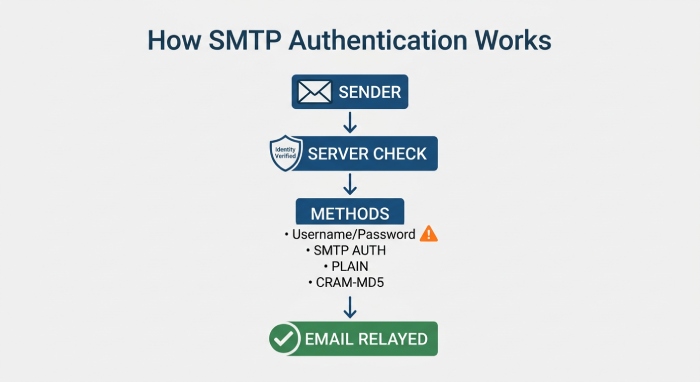
SMTP relay authentication verifies that an email sender is authorized to use an SMTP server for message transmission. The server checks the sender’s identity through authentication credentials before allowing the email to proceed.
Common methods of authentication include:
- Username and password
- SMTP AUTH (LOGIN)
- PLAIN
- CRAM-MD5 (less frequently used today)
Once authentication is successful, the server relays the email. However, while password-based methods have been effective, they pose significant security risks that contemporary email systems must address.
Why Traditional SMTP Authentication Is Becoming Obsolete
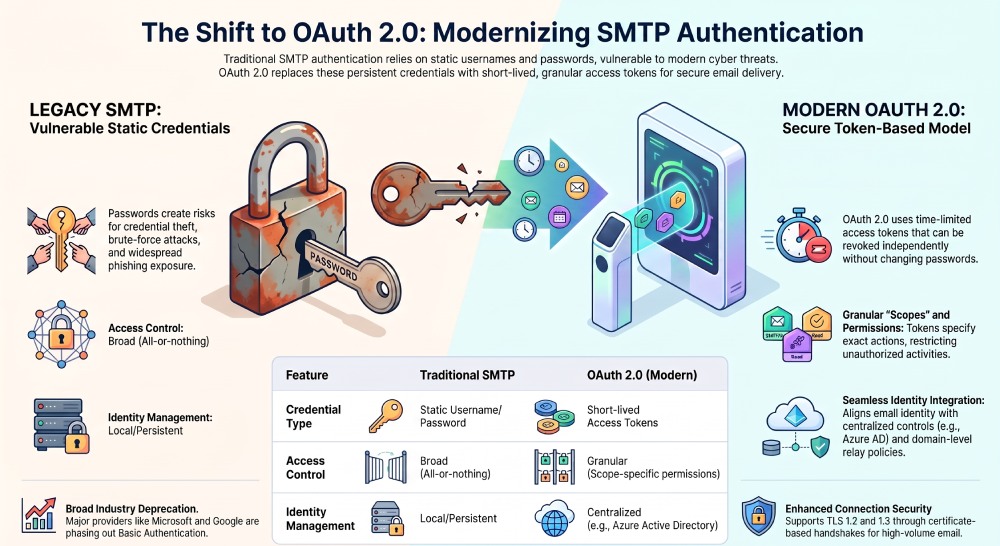
Passwords represent a critical vulnerability in cybersecurity, exposing organizations to risks such as:
- Credential theft
- Brute-force attacks
- Password reuse
- Phishing
- Insider threats
Even with robust passwords, attackers frequently acquire credentials through phishing rather than decrypting them. Given that SMTP authentication relies on persistent passwords, compromised credentials can grant attackers prolonged access to email systems. This escalating threat has prompted leading providers like Microsoft and Google to adopt modern authentication methods.
What OAuth 2.0 Brings to SMTP Relay Authentication
OAuth 2.0 heralds a new era for SMTP relay authentication, shifting away from legacy username and password methodologies to a token-based, standards-driven approach. Modern Authentication, powered by OAuth 2.0, provides a secure and scalable approach for SMTP authentication across cloud email platforms, enterprise identity providers, and third-party SMTP relay services.
Token-Based Security Model
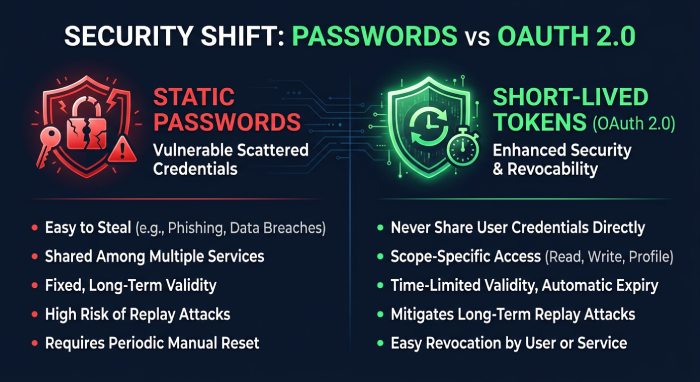
OAuth 2.0 introduces a token-based authentication model that is becoming the standard across cloud email platforms. Rather than storing usernames and passwords within applications, SMTP clients request short-lived access tokens from an identity provider. These tokens grant only the permissions required to send email and expire automatically, reducing the impact of credential compromise.
Seamless Integration with Identity and Role-Based Access
OAuth 2.0 enables SMTP relay authentication for specific applications, devices, or users through centralized identity management. Instead of relying on shared usernames and passwords, organizations can assign permissions based on roles, applications, or service accounts, making it easier to control who can send email and under what conditions.
Relay policies can be applied by domain, user, or application, supporting secure email delivery across cloud, on-premises, and hybrid environments. Identity providers such as Microsoft Entra ID (formerly Azure Active Directory), Google Identity, Okta, and other enterprise identity platforms integrate with OAuth 2.0 to provide centralized authentication, access control, and auditing.
Support for Modern Protocols and Security Enhancements
OAuth 2.0 enhances security by eliminating the need to transmit static credentials over the network, even on ports 587 or 25. It supports TLS protocols, including TLS 1.2 and 1.3, through a certificate-based handshake that ensures server authentication. This, coupled with OAuth authentication, provides strong security for high-volume email and direct send processes. Additionally, POP3 and IMAP4 protocols are being updated for Modern Authentication in cloud mailbox environments.
How OAuth 2.0 Works with SMTP: Tokens, Scopes, and Authorization Flows
OAuth Grant Types for SMTP Relay
OAuth 2.0 offers various flows for secure SMTP authentication. The client credentials grant is frequently utilized in automated systems, enabling business applications and devices to directly acquire an access token from Azure Active Directory using a confidential application identity. For users setting up authenticated SMTP in Microsoft 365, the authorization code grant flow is typically employed.
Scopes and Consent:
Each token issued specifies scopes—like SMTP.Send—which restricts what actions the token permits on Office 365 or Exchange Online. Administrators grant these permissions via the Microsoft 365 admin center, Exchange Admin Center, or Azure portal, ensuring connector settings adhere to organizational security and mail protection requirements.
Token Use in Client SMTP Submission:
Once obtained, access tokens are presented during the SMTP AUTH handshake rather than a username and password. This change is transparent to most SMTP relay configurations but greatly enhances the overall security posture. Tokens can be further locked to specific inbound connectors, static unshared IP addresses, or require valid TLS certificate authentication for connection acceptance.
Mail Flow Integration and Logging
SMTP logs record OAuth-based relay attempts for audit and troubleshooting, while mail flow connectors (such as inbound connector or relay pool definitions) can enforce domain verification, accepted domain checks, and MX endpoint integrity for each session. Hybrid configuration wizard tools can automate certificate-based connector or Azure Multi-factor Authentication (MFA) deployment for hybrid environment mail flow needs.
Handling Throttling, Limits, and Message Rates
OAuth-based relay fully supports Microsoft 365 and Office 365 throttling limits, message rate limits, and limit for sending email policies. This is critical for high volume email scenarios, whether you’re using direct send, routing through a smarthost, or relaying to internet recipients via outbound SMTP. Advanced throttling and anti-spam rules can now be tied to the service description or authentication context, mitigating risk from compromised systems.
Security Benefits: Reduced Credential Exposure and Better Access Control
Eliminating Persistent Credential Risks
OAuth 2.0 minimizes the prevalence of credentials scattered across network scanners, business applications, and multifunction devices. Since access tokens are short-lived, and often restricted to single-use or specific relay pool contexts, a compromised token has far less impact than a leaked username and password. This structural shift upholds the principles of Modern Authentication favored by Microsoft, Google Workspace, Amazon Web Services, and other cloud providers.
Advanced Access Control and Auditability
Each mail recipient, mailbox, or mail flow operation—whether for bulk mail, outbound SMTP, or low-level device authentication—can be traced back to specific OAuth identities and scopes. Big improvements in auditing through SMTP logs, integration with DNS, SPF record, and NDR (nondelivery report) workflows, and support for SMTP logs with granular details about port 25, port 587, static IP address, or TLS/StartTLS events enrich organizational visibility and control.
Compliance, Certificate, and Connector-Based Security
By integrating TLS certificates and certificate-based connectors with OAuth, organizations can verify that only authenticated devices and users send emails via SMTP relay. Each connector can enforce the use of valid TLS certificates, restrict access to specific public IP addresses, or require domain verification from the sending service. This alignment enhances mail protection, anti-spam measures, and security across various environments, including Exchange Online, on-premises Exchange Server, and third-party applications.
Adopting OAuth 2.0 for SMTP relay authentication is not merely a technical enhancement; it is essential for ensuring secure, scalable, and compliant email flow in cloud-centric organizations using Microsoft 365, Office 365, and hybrid setups.
Implementation Considerations for Microsoft 365, Google Workspace, and Other Providers
Deploying SMTP relay and authenticated SMTP requires careful planning to ensure compatibility, security, and compliance with hosted services like Microsoft 365, Office 365, and Google Workspace.
Microsoft 365 and Office 365
Microsoft recommends three methods for relaying email from devices and applications: SMTP client submission (using SMTP AUTH), direct send, and SMTP relay via an inbound connector.
SMTP Client Submission (SMTP AUTH)
SMTP client submission with SMTP AUTH requires each client (such as a scanner or third-party application) to use a mailbox username and password or OAuth credentials to authenticate with the cloud mailbox. This method typically uses port 587 with TLS/StartTLS, a TLS certificate for enhanced security, and respects throttling limits set by Microsoft.
SMTP Relay via Inbound Connector
Configuring an inbound connector in Microsoft 365 or Office 365 permits authorized devices or servers within a trusted network to relay email. The connector enforces accepted domain restrictions, server authentication (based on a static public IP address or certificate-based connector), and connection security protocols such as TLS 1.2 or TLS 1.3.
Direct Send
Direct send allows devices to deliver email to recipients within an accepted domain without authentication, provided messages are sent directly to the organization’s MX endpoint. This setup is best for internal mail flows but may not permit relay to the internet or support bulk outbound SMTP.
Google Workspace and Other Providers
Google Workspace offers similar relay and client SMTP submission scenarios, with specific requirements for device authentication and static IP address assignments. Relay restrictions, connector settings, SPF record validation, and mail protection tools vary by provider, so adjusting DNS and mail flow connectors is crucial.
Hybrid Environment and On-Premises Servers
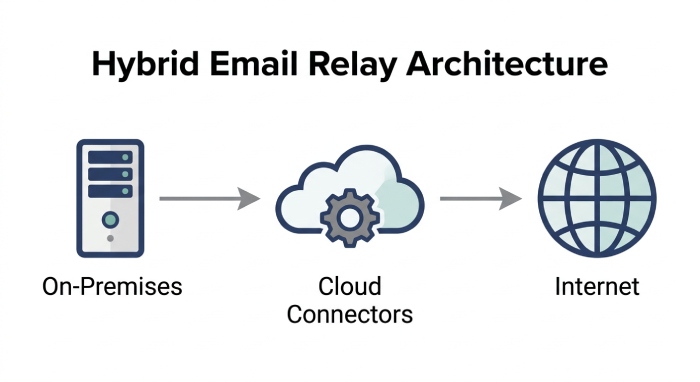
Organizations running a hybrid environment—combining Exchange Server on-premises with Microsoft 365 or Office 365—should use the Hybrid Configuration Wizard to automate connector configuration and ensure seamless relay to the internet via cloud mailboxes. Azure, Microsoft Azure Communication Services, and Exchange Admin Center offer tools to streamline hybrid setup, domain verification, and relay pool management.
Common Migration Challenges and Compatibility Issues
Transitioning from on-premises email servers or legacy systems to cloud-based solutions such as Microsoft 365 or Google Workspace introduces several migration and compatibility hurdles that must be carefully managed.
Modern Authentication vs. Basic Authentication
Many organizations still rely on Basic Authentication (using simple username and password), which is increasingly deprecated by Microsoft, Google, and other major providers. Migrating to Modern Authentication standards, such as OAuth, often necessitates updating business applications, devices, and third-party applications to natively support new protocols like SMTP AUTH over OAuth.
Device Compatibility and Firmware Limitations
Older network scanners, printers, or LOB applications may lack support for current connection security standards (e.g., TLS 1.2 or TLS 1.3) or cannot be configured for client SMTP submission using OAuth credentials. These devices might only support POP3 or IMAP4 alongside outbound SMTP via port 25, limiting their compatibility with new requirements for authenticated SMTP and the ability to relay to the internet.
Static IP Address and DNS Configuration
Providers frequently require that relay connections originate from a registered static public IP address. Failing to update DNS records, MX endpoints, or SPF records can lead to mail recipient issues, message rate limits, blocked outbound messages, and increased nondelivery reports.
Limit for Sending Email and Throttling Limits
Cloud-based services enforce strict message rate limits and throttling limits on high volume email, especially when using SMTP relay or direct send methods. Organizations must architect their relay pool, mail flow, and connector settings to avoid service disruptions or accidental spam filtering.
Best Practices for Securing OAuth-Based SMTP Relay
OAuth-based SMTP relay and Modern Authentication are essential for robust security, especially as support for Basic Authentication continues to wane. Applying best practices is critical in both cloud and hybrid deployments.
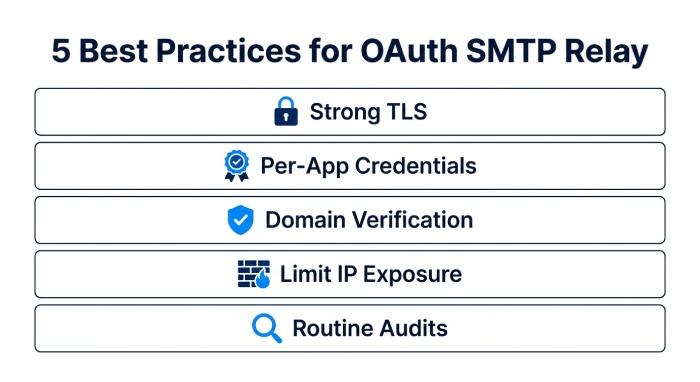
- Require Strong TLS and Connection Security: Enforce a minimum of TLS 1.2 or preferably TLS 1.3 for all SMTP relay connections, using trusted TLS certificates for server authentication. Always require StartTLS or direct TLS where supported.
- Use Per-Device or Per-Application Credentials: Employ per-device or per-business application client IDs with OAuth tokens rather than shared username and password pairs. This allows granular control, auditing, and device authentication, minimizing risk associated with credential sprawl across multiple devices.
- Enforce Domain Verification and Accepted Domains: Restrict relay permissions based on accepted domain whitelists, ensuring messages sent via client SMTP submission or relay pool are subject to mail protection rules, bypass anti-spam where needed, and logged for compliance.
- Limit Network Exposure: Allow SMTP relay, especially with OAuth or Modern Authentication, only from static, registered, and unshared public IP addresses. Block all other inbound SMTP traffic at the network perimeter to prevent unauthorized relay.
- Routine Connector Audits and Anti-Spam Reviews: Regularly review mail flow connectors, SMTP log entries, relay pool usage, and connector settings via the admin center or Exchange Admin Center. Immediately remediate any anomalies, failed authentication attempts, or unusual relay volume patterns to prevent inclusion on spam blocklists or violation of the hosted service’s service description.
General Manager
General Manager at DuoCircle. Product strategy and commercial lead across the email security portfolio.
Secure your email infrastructure
Protect, authenticate, and deliver. Contact our team to find the right solution.