How Pobox Forwarding Affects SPF Authentication & Deliverability

Quick Answer
Pobox email forwarding can cause SPF authentication failures by changing the sender’s IP address during message delivery. Understanding forwarding-related SPF issues, email authentication, and proper configurations helps maintain sender reputation and improve email deliverability.
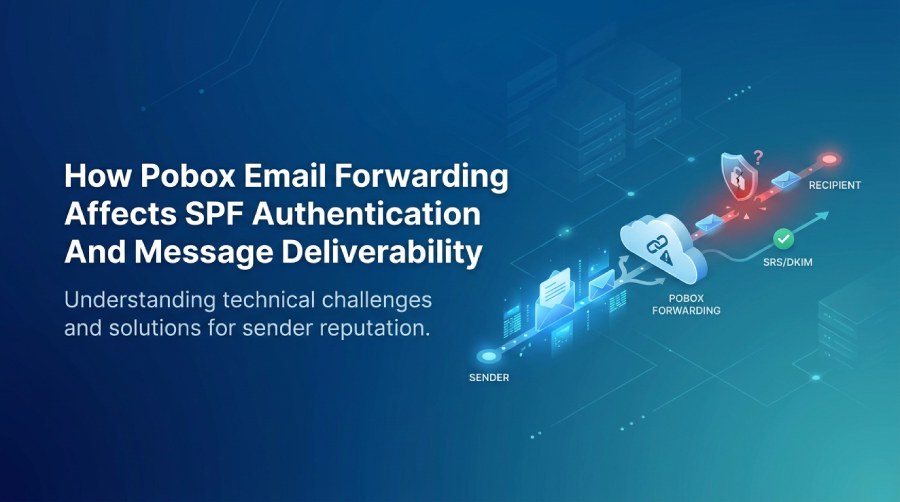
Email forwarding lets you manage messages from multiple addresses in one inbox. Services such as Pobox forward incoming email from one address to another, helping simplify and organize communication. But forwarding can complicate Sender Policy Framework (SPF) authentication: the forwarding server’s IP address may not match the original sender information, leading to SPF failures, DMARC alignment issues, and reduced deliverability.
Understanding how Pobox forwarding affects SPF—and configuring authentication appropriately—can help domain owners protect their sender reputation and ensure legitimate messages reach their recipients.
Understanding Pobox Email Forwarding
Pobox forwards email from custom addresses to another mailbox, so users can manage messages from multiple addresses in one place. For example, a business can set up contact@example.com to forward messages to Gmail or Microsoft 365. When someone writes to that address, Pobox receives the message and forwards it to the destination mailbox.
Forwarding simplifies inbox management, but it also changes how the email reaches its destination. The receiving mail server may see Pobox’s forwarding infrastructure—not the original sender’s mail server—as the connecting server. This matters because SPF checks whether the connecting IP address is authorized to send mail for the domain in the SMTP envelope sender.
What Is SPF Authentication?
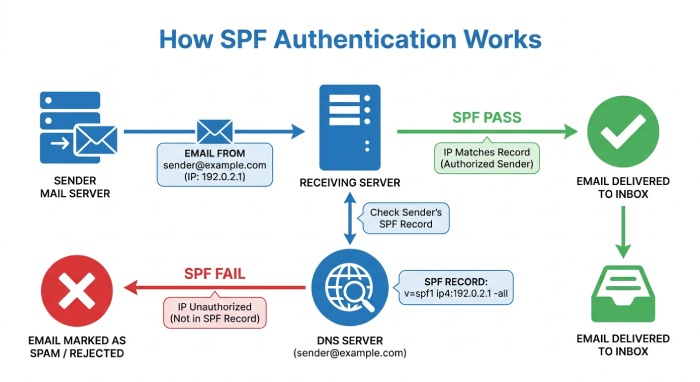
Sender Policy Framework (SPF) helps prevent unauthorized servers from sending email on behalf of a domain. Domain owners publish an SPF record as a TXT record in their DNS configuration, listing the mail servers and IP addresses authorized to send email using that domain.
For example, an SPF record may look like this:
v=spf1 ip4:192.0.2.10 include:_spf.google.com -allThis record authorizes a specific IP address and Google’s designated sending infrastructure. The -all mechanism tells receiving servers that other sources should fail SPF authentication.
When a receiving server gets an email, it checks the connecting IP address against the SPF record for the envelope sender’s domain.
SPF authentication can produce several results:
- Pass: The sending IP address is authorized by the domain’s SPF record.
- Fail: The sending IP address is not authorized.
- SoftFail: The IP address is not authorized, but the domain owner has indicated a less strict failure.
- Neutral: The SPF record does not express a definitive authentication result.
- PermError: The SPF record contains a permanent configuration problem.
- None: No valid SPF record is available for the evaluated domain.
SPF helps prevent email spoofing, but forwarding can complicate authentication because the message may come from a different server than the one that originally sent it.
How Pobox Email Forwarding Affects SPF Authentication
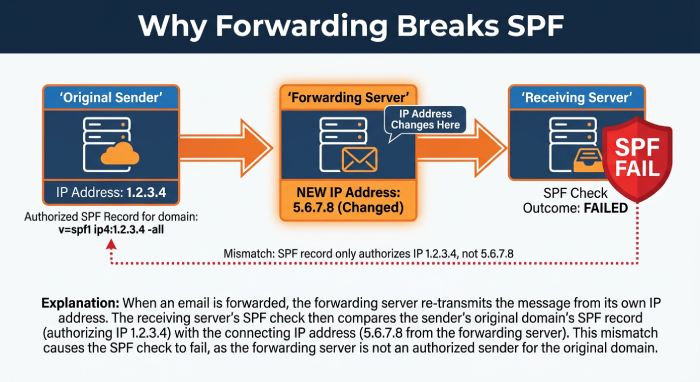
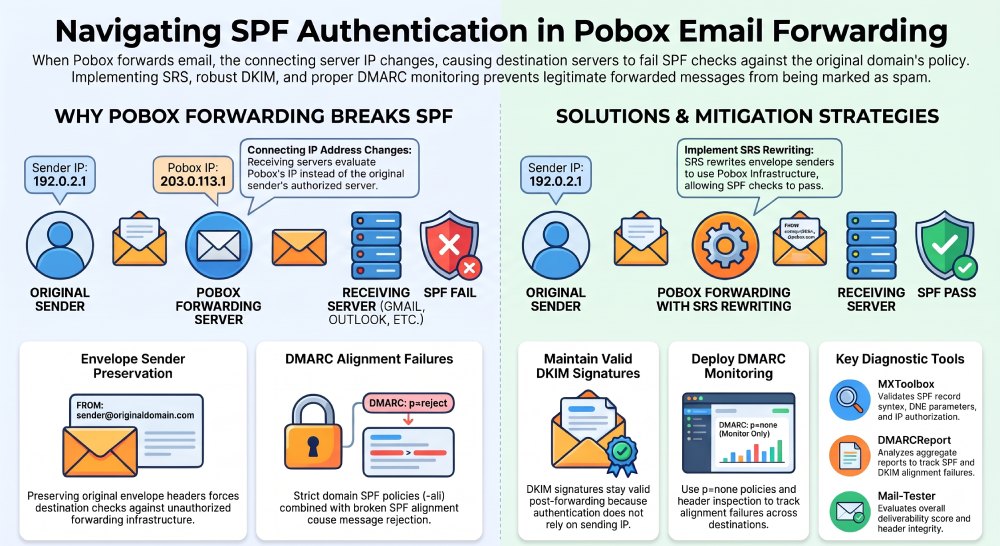
When Pobox forwards an incoming email, it receives the original message and sends it to a new destination. The connecting IP address changes during the process.
Consider the following example:
- A sender sends an email from
sender@example.com. - The message reaches the Pobox forwarding infrastructure.
- Pobox receives the message and forwards it to
recipient@gmail.com. - Gmail evaluates the forwarded message using the IP address of the Pobox forwarding server.
The sender’s SPF record may authorize their mail server, but not Pobox’s forwarding IP address. So even if the message passed SPF when it first arrived at Pobox, the destination server may return an SPF failure.
This is commonly known as the SPF forwarding problem. Pobox does not automatically carry over authorization from the original sender’s SPF record. When the forwarded message arrives, the destination server performs its own authentication checks using the information available at that time.
Why SPF Failures Occur During Email Forwarding
Several technical factors can contribute to SPF authentication failures when using Pobox forwarding.
1. Changes in the Sending IP Address
SPF checks the IP address that connects to the receiving mail server. When Pobox forwards an email, its infrastructure is the immediate sending source. If the original sender’s SPF record doesn’t authorize that IP address, SPF authentication may fail.
2. Original Envelope Sender Preservation
Forwarding services may preserve the original SMTP envelope sender within the email infrastructure. If Pobox forwards a message without changing this information, the destination server checks the original sender’s SPF policy against Pobox’s forwarding IP address.
This can result in an SPF failure because the forwarding server is not listed in the original domain’s SPF record.
3. Strict SPF Policies
Domains using the SPF -all mechanism tell receiving servers to fail authentication for unauthorized senders. As a result, a forwarded message from an unlisted IP address may fail SPF checks.
4. DMARC Alignment Issues
DMARC checks whether SPF or DKIM authentication passes and aligns with the domain in the From header. Forwarding can cause SPF to fail, and a message may also have trouble passing DMARC if its DKIM signature is invalidated.
5. Forwarding Through Multiple Servers
Messages routed through multiple forwarding services may take a more complex delivery path. Each forwarding step can complicate authentication, especially when the original envelope sender information is preserved.
The Role of SRS in Pobox Email Forwarding
Sender Rewriting Scheme (SRS) helps address SPF failures during email forwarding. Instead of keeping the original envelope sender, the forwarding server rewrites the SMTP MAIL FROM address to use a domain associated with its own forwarding infrastructure.
For example, an original envelope sender might be:
bounce@sender.example.comAfter SRS rewriting, the forwarded message may use an address similar to:
SRS0=HASH=example.com=bounce@forwarder.exampleWhen the destination server checks SPF, it evaluates the rewritten forwarding domain—not the original sender’s SPF record against the forwarding server’s IP address. SPF can pass if the forwarding service publishes a valid record that authorizes its sending infrastructure.
SRS offers several advantages:
- Reduces SPF failures caused by forwarding.
- Preserves information about the original sender.
- Helps forwarded messages pass SPF checks.
- Supports better email authentication across forwarding systems.
- Reduces the likelihood of forwarding-related delivery problems.
However, SRS alone does not guarantee DMARC success. The rewritten envelope sender domain may not align with the original From header domain for SPF, making DKIM authentication important.
How Pobox Forwarding Can Affect DMARC Authentication
DMARC (Domain-based Message Authentication, Reporting, and Conformance) builds on SPF and DKIM to help protect domains from email spoofing and domain spoofing. It passes a message when at least one authentication method both succeeds and aligns with the domain in the visible From address. When Pobox forwards a message, SPF may fail because the forwarding server’s IP address is not authorized by the original sender’s SPF record.
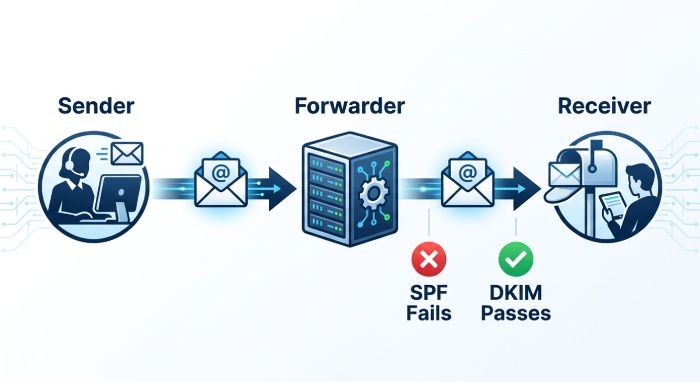
Sender Rewriting Scheme (SRS) may help SPF pass, but the rewritten envelope sender may not align with the original From domain. That makes DKIM especially important for forwarded email. DKIM adds a cryptographic signature that receiving servers can verify using the sender’s public key published in DNS. Because DKIM does not normally depend on the connecting server’s IP address, its signature can remain valid after forwarding if the signed content and relevant headers are unchanged.
Forwarding services, mailing lists, and other intermediate systems may modify a message in ways that invalidate its DKIM signature. For reliable DMARC authentication, domain owners should configure SPF and DKIM correctly and monitor their DMARC reports.
Common Pobox Email Forwarding and Deliverability Problems
Forwarding-related authentication failures can create several email deliverability challenges.
- Emails Delivered to Spam Folders: If forwarded messages fail SPF and DKIM checks, receiving providers may view them as less trustworthy and, depending on other reputation and authentication signals, place them in spam.
- Increased Message Rejections: Some receiving servers apply strict authentication policies. If a message fails their authentication checks, it may be rejected rather than delivered to the recipient’s inbox.
- Reduced Domain Reputation: Repeated authentication failures and poor delivery patterns can harm how receiving providers assess a sender’s domain and sending infrastructure.
- DMARC Policy Enforcement Problems: Domains with restrictive DMARC policies, such as p=quarantine or p=reject, may face delivery issues when forwarded messages fail SPF and DKIM alignment.
- Inconsistent Email Delivery: A message may reach one mailbox but fail to reach another because providers use different authentication, filtering, and reputation systems. These issues demonstrate why email forwarding configurations should be tested across multiple receiving providers.
Best Practices for Improving SPF Authentication With Pobox
Organizations and individual users can follow several practices to reduce authentication problems associated with Pobox email forwarding.
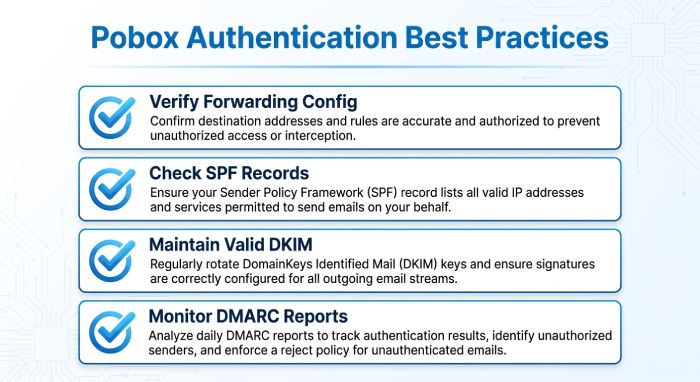
- Verify Pobox Forwarding Configuration: Review your forwarding settings to confirm that incoming messages go to the correct destination address. Consult the service’s current documentation for details on supported forwarding and authentication behavior.
- Check SPF Records: Use an SPF lookup tool to review the original sender’s SPF record. Verify that it’s valid, authorizes the correct sending sources, and stays within the 10-DNS-lookup limit. Don’t add forwarding IP addresses to another organization’s SPF record without authorization.
- Maintain Valid DKIM Signatures: Configure DKIM for every legitimate sending service, then check message headers to confirm whether forwarded emails retain valid DKIM signatures after passing through Pobox.
- Configure DMARC Monitoring: Publish a DMARC record, starting with a monitoring policy such as p=none when appropriate. Review aggregate reports for SPF failures, DKIM problems, and alignment issues with forwarded messages.
- Test Forwarded Messages: Send test emails from different providers to your Pobox address. At the final destination, inspect the message headers for SPF, DKIM, and DMARC results.
- Avoid Unnecessary SPF Changes: Don’t add every forwarding server to your SPF record as a quick fix. Authorize only legitimate sending infrastructure you control; incorrect changes can create security risks and configuration errors.
Tools for Checking SPF and Email Deliverability
Several tools can help identify authentication problems and improve email delivery.
- MXToolbox: Checks SPF records, DNS configurations, and common email authentication issues.
- DMARCReport: Provides DMARC reports and visibility into SPF and DKIM authentication results across sending sources.
- Google Admin Toolbox: Provides diagnostic tools for investigating DNS and email configuration issues.
- Microsoft Remote Connectivity Analyzer: Helps troubleshoot supported Microsoft 365 and Exchange-related connectivity and mail flow issues.
- Mail-Tester: Tests emails for potential authentication and message-quality issues.
These tools can help administrators identify whether forwarding-related SPF failures are affecting message delivery and overall email security. Reviewing the full email headers is also essential, as authentication results offer insight into the message’s original sender and forwarding path.
 Pobox email forwarding can simplify managing multiple addresses, but it may affect SPF authentication and message delivery. Because forwarding changes the connecting IP address, the original sender’s SPF record may fail when the message reaches its destination.
Sender Rewriting Scheme (SRS) can help reduce forwarding-related SPF failures, and valid DKIM signatures provide another layer of authentication. Proper DMARC configuration, regular SPF record checks, and email header analysis can help identify problems early.
For organizations that rely on email service providers (ESP), understanding how forwarding affects authentication is essential. Monitor authentication results and keep DNS configurations accurate to reduce delivery issues, protect domain reputation, and help legitimate messages reach recipients’ inboxes.
General Manager
General Manager at DuoCircle. Product strategy and commercial lead across the email security portfolio.
Secure your email infrastructure
Protect, authenticate, and deliver. Contact our team to find the right solution.