How Sparkpost Custom Bounce Domains Affect SPF Authentication

Quick Answer
SparkPost custom bounce domains affect SPF authentication by aligning the envelope sender domain with their own domain. Proper SPF configuration helps receiving servers verify authorized mail sources, improves DMARC alignment, and supports email deliverability while reducing spoofing risks.
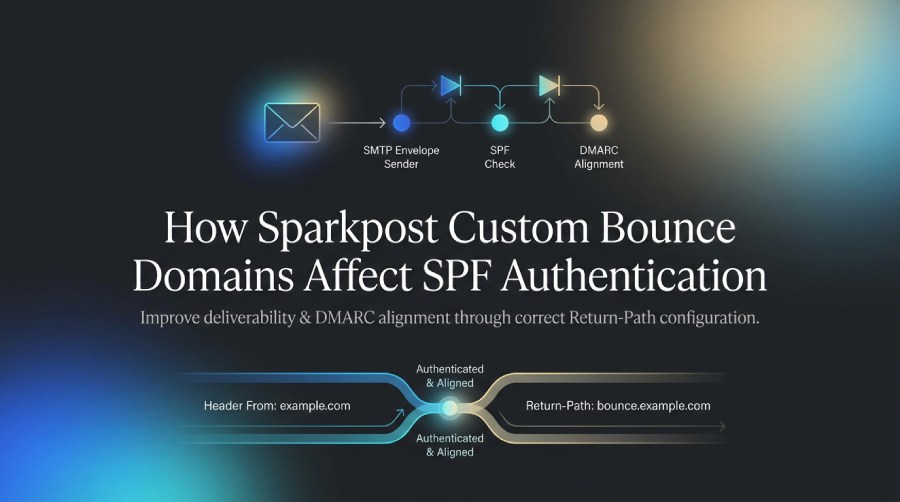
Understanding how SparkPost custom bounce domains affect SPF authentication is essential for improving email deliverability and maintaining reliable email security. A properly configured bounce domain helps align SPF with DMARC, strengthens domain authentication, and makes bounce management easier. This guide explains how custom bounce domains work, how to configure the required DNS records, and how to troubleshoot common SPF authentication issues.
What SPF Checks in SparkPost Actually Authenticate
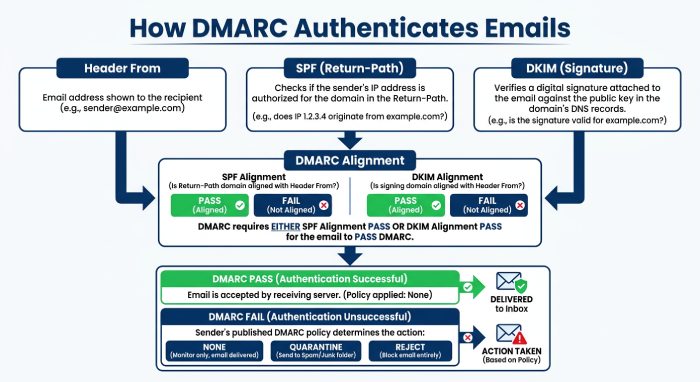
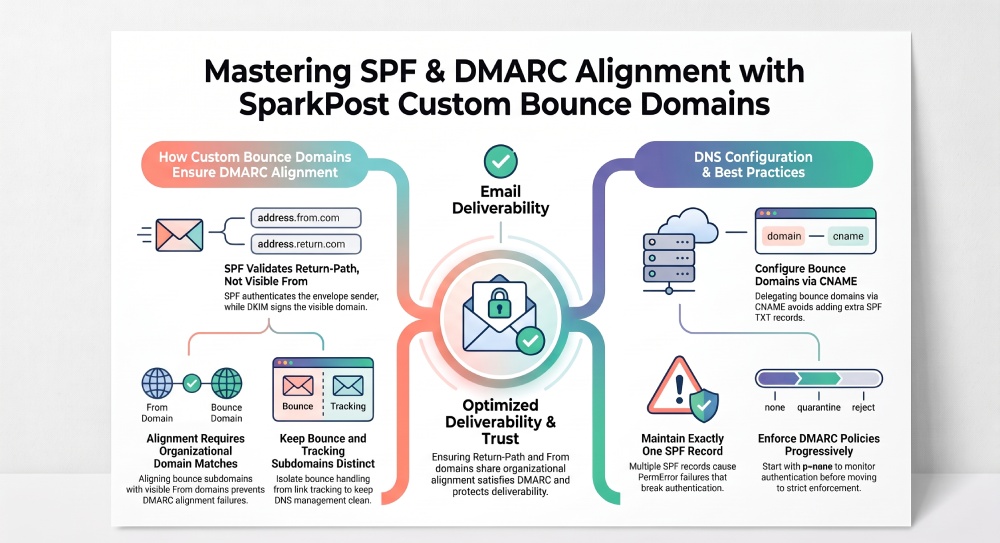
SPF in SparkPost authenticates the domain used in the SMTP envelope sender, also known as the MAIL FROM domain. This domain is commonly associated with the message’s Return-Path. SPF does not directly authenticate the visible From address that recipients see in their inbox. This distinction is important when understanding how custom bounce domains affect email security and DMARC alignment.
When SparkPost sends an email, the receiving mail server checks whether the sending IP address is authorized by the SPF policy applicable to the envelope sender domain. The exact DNS configuration depends on the sending setup. Follow SparkPost’s documented instructions for configuring a custom bounce domain, and verify SPF and DMARC results using the headers of a delivered message.
SPF validates the Return-Path, not the header From
The header From domain is usually one of your verified sending domains, such as:
From: Marketing Team <news@example.com>But SPF evaluates the envelope sender, which may look like:
Return-Path: <bounce@bounce.example.com>That means SPF authentication is tied to the bounce domain, while DKIM is tied to the domain that signs the message. DMARC then evaluates whether either SPF or DKIM passes and aligns with the visible From domain.
Why this matters for email authentication
If your visible From domain is example.com, but your bounce domain is sparkpostmail.com or another non-aligned domain, SPF may technically pass but fail DMARC alignment. For strong email authentication, the bounce domain should be organizationally aligned with the sending domains used in your campaigns, transactional templates, batch sending, broadcasts, and scheduled sending.
Practical example
If you send from billing@example.com, a custom bounce domain like bounce.example.com gives SPF a better chance of aligning with DMARC than a shared or unrelated Return-Path domain.
The Role of Custom Bounce Domains in Return-Path Alignment
A custom bounce domain lets SparkPost use your domain in the Return-Path instead of a default SparkPost-managed domain. This improves brand consistency, DMARC alignment, sender reputation, and compliance for production email sending.
For example:
Header From: updates@example.com
Return-Path: bounce@example.com or bounce.mail.example.com
*DKIM* d=example.com
In this setup, SPF, DKIM, and DMARC can all work together. SPF authenticates the bounce domain, DKIM authenticates the signing domain, and DMARC confirms that at least one authenticated domain aligns with the visible From domain.
Alignment and organizational domains
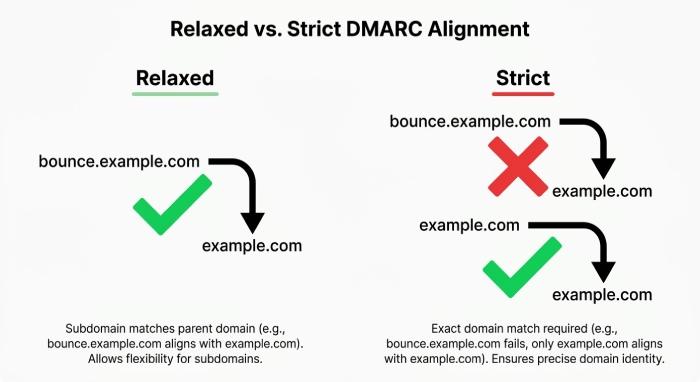
DMARC alignment does not always require an exact domain match. A bounce domain such as bounce.example.com can align with a From domain of example.com because both share the same organizational domain.
Relaxed versus strict alignment
Most senders use relaxed DMARC alignment, where subdomains can align with the root domain. Strict alignment requires an exact match, which is less common and more fragile.
Why a custom bounce domain supports deliverability
Mailbox providers evaluate more than just SPF, DKIM, and DMARC. They also look at sender reputation, complaint rates, email suppression behavior, unsubscribe links, engagement metrics, and abuse and compliance signals. A custom bounce domain gives organizations greater control over their email domain configuration and can support consistent bounce handling. Deliverability still depends on authentication results, sender reputation, recipient engagement, complaint rates, and sending practices.
Relationship to tracking domains
A tracking domain is separate from a bounce domain. The bounce domain controls Return-Path and SPF alignment, while the tracking domain is used for links, redirects, open and click tracking, and tracking and analytics.
Keep bounce and tracking domains distinct
A common setup is:
bounce.example.com
click.example.com
Using separate subdomains keeps DNS management cleaner and helps isolate SPF, DKIM, DMARC, tracking domain, and deliverability configurations.
How to Configure DNS Records for SparkPost SPF and Bounce Domains
To configure email authentication in SparkPost, verify your sending domain and configure DKIM, SPF, and DMARC according to your sending setup. If you use a custom bounce domain, follow SparkPost’s DNS instructions to configure the required records. Once the setup is complete, verify the DNS configuration and test SPF, DKIM, and DMARC results on delivered messages.
Step 1: Verify your sending domains
Your sending domains should be verified in SparkPost before live email sending. These domains are used in the visible From address and often in DKIM signing.
DNS records for sending domains
SparkPost typically requires DNS records for DKIM and domain verification. DKIM is especially important because DMARC can pass through DKIM alignment even when SPF alignment fails. For compliance-focused senders, DKIM should be enabled on all production sending domains, including those used by templates, mail sandbox testing, batch sending, and broadcasts.
Step 2: Add the custom bounce domain
In SparkPost, configure the bounce domain you want to use, such as:
bounce.example.comSparkPost will provide DNS instructions. Depending on the setup, you may need a CNAME or related DNS configuration that delegates bounce handling to SparkPost.
DNS delegation and bounce processing
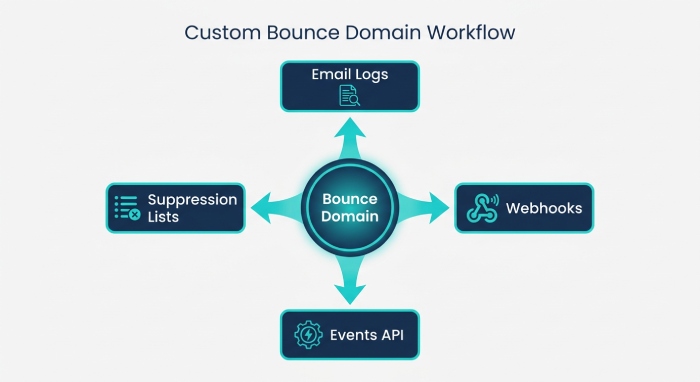
The bounce domain allows SparkPost to receive and process non-delivery reports. These bounces feed into the email log, events, webhooks, events API, suppression lists, and metrics used for deliverability monitoring.
Operational note
If you use workspaces, accounts and access controls, or different user roles for regional teams, standardize who can create or change sending domains, bounce domain records, tracking domain records, and DMARC policy settings.
Step 3: Publish or confirm SPF authorization
For SPF authentication, the receiving mail server checks the domain used in the SMTP envelope sender, also known as the MAIL FROM or Return-Path domain. SparkPost custom bounce domains are configured using the CNAME record provided in the SparkPost account. For a separate custom bounce subdomain, SparkPost’s documentation instructs users to configure the specified CNAME rather than add a separate SPF TXT record to that bounce subdomain. If the sending domain also needs SPF configuration, follow the instructions for that specific setup.
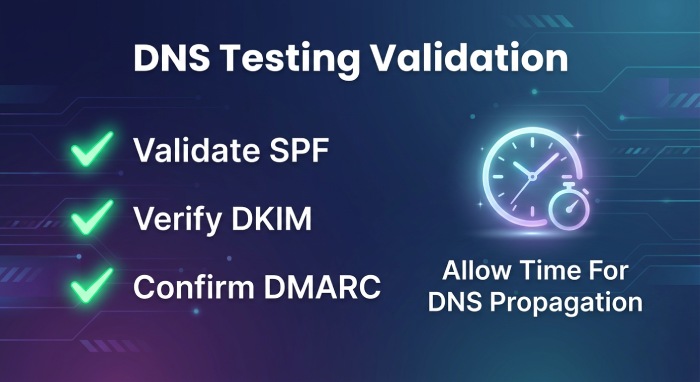
After configuring the DNS records, verify the bounce domain in SparkPost and test a delivered message’s SPF and DMARC results.
Always follow SparkPost’s current documentation, knowledge base, or Application Programming Interface (API) Reference because DNS values can vary by account type, region, and product configuration.
Avoid multiple SPF records
A domain must have only one SPF TXT record. Multiple SPF records can cause SPF PermError failures, harming email authentication and deliverability.
Watch DNS lookup limits
SPF has a 10-DNS-lookup limit. If you also authorize SendGrid, Mailgun, Amazon SES, Resend, Postmark, Brevo, MailerSend, Mailjet, Mandrill, or other platforms on the same domain, SPF can exceed lookup limits. This is especially important during a migration project where old and new providers overlap.
Common SPF Authentication Issues After Adding a Custom Bounce Domain
A custom bounce domain improves alignment only when DNS and SparkPost settings are correct. After adding one, monitor email authentication results carefully through message headers, SparkPost metrics, the email log, webhooks, and deliverability dashboards.
Issue 1: SPF passes but DMARC still fails
This happens when SPF passes for the bounce domain but the bounce domain does not align with the visible From domain.
Example
From: alerts@example.com

Return-Path: bounce@otherdomain.net
SPF: pass
DMARC: fail
SPF passed, but DMARC failed because the authenticated bounce domain does not align with example.com. DKIM alignment can still save DMARC if the DKIM signing domain aligns with the From domain.
Issue 2: DNS records are incomplete or not propagated
DNS propagation delays can make testing inconsistent. A message may fail SPF shortly after configuration even if the record is correct.
Testing recommendations
Use mailbox headers, SparkPost’s email log, CI checks for DNS records, and external authentication testing tools before moving production traffic. For high-volume sending-bulk programs, validate SPF, DKIM, and DMARC before increasing volume.
Issue 3: SPF record is too broad or too complex
Some teams add every vendor to one SPF record: SparkPost, SendGrid, Mailgun, Amazon SES, plus CRM systems and support tools. This can break SPF and complicate compliance.
Use subdomains by traffic type
Use dedicated subdomains for categories such as:
transactional.example.com
marketing.example.com
bounce.example.com
This helps isolate sender ID, category, recipients, contacts, audiences, and suppression behavior.
Issue 4: Infrastructure changes are not reflected in DNS
If you use dedicated IPs, Dedicated IPs pools, IP warmup plans, or SparkPost rate limits, make sure your DNS and authentication strategy match your sending architecture. SPF authorizes domains, but deliverability also depends on IP reputation, content quality, engagement, and compliance controls.
Best Practices for Maintaining SparkPost SPF, DKIM, and DMARC Alignment
Maintaining SPF, DKIM, and DMARC alignment is an ongoing process. It should be part of your email sending governance, not a one-time setup task.
Maintain separate domains for sending, bounce, and tracking
Use a clear structure:
example.com               Visible From domain
bounce.example.com        Custom bounce domain
click.example.com         Tracking domain
This separates email authentication from tracking and analytics while keeping DMARC alignment intact. It also makes troubleshooting easier when open and click tracking, unsubscribe links, webhooks, or email attachments affect message structure.
Keep DKIM aligned with the From domain
DKIM is often the most reliable path to DMARC alignment because forwarding can break SPF. Ensure SparkPost signs with a DKIM domain aligned to your sending domains.
Publish a deliberate DMARC policy
Start with:
v=DMARC1; p=none; rua=mailto:dmarc@example.comThen move toward quarantine or reject after monitoring authentication, abuse and compliance reports, and competitive insights from inbox placement tools.
Monitor events, suppressions, and reputation
Use SparkPost events, Webhooks, the events API, email suppression data, and metrics to detect bounce spikes, complaint patterns, and deliverability issues. Review billing and usage trends as volume grows, especially for scheduled sending, broadcasts, and batch sending.
Watch compliance signals
Strong compliance includes clear unsubscribe links, clean contacts and audiences, proper consent, accurate sender identity, and prompt suppression of invalid or complaining recipients.
Cross-channel governance
If your organization also uses Bird, Twilio, Plivo, Telnyx, Bandwidth, Sinch, Infobip, WhatsApp via Meta, Apple Messages, or a broader Connectivity Platform, keep email authentication policies separate from messaging-channel compliance while maintaining consistent brand governance.
Compare provider behavior when migrating
SparkPost, SendGrid, Mailgun, Amazon SES, Resend, Postmark, Brevo, MailerSend, Mailjet, and Mandrill may handle bounce domain, tracking domain, DKIM, SPF, and DMARC configuration differently. When you migrate, audit DNS records, sender reputation, dedicated IPs, IP warmup, templates, software development kits(SDKs), command-line interface (CLI) scripts, SMTP credentials, and API integrations before shifting production traffic.
Add BIMI only after authentication is stable
BIMI depends on strong DMARC enforcement. Do not prioritize BIMI until SPF, DKIM, DMARC, bounce domain alignment, tracking domain configuration, compliance workflows, and deliverability monitoring are stable.
General Manager
General Manager at DuoCircle. Product strategy and commercial lead across the email security portfolio.
Secure your email infrastructure
Protect, authenticate, and deliver. Contact our team to find the right solution.