How To Configure An Appriver SPF Record: Setup And Troubleshooting Guide

Quick Answer
An AppRiver SPF record authorizes approved mail servers to send emails on your domain’s behalf. Learn how to configure the correct SPF record, verify DNS settings, troubleshoot authentication failures, and improve email deliverability while preventing spoofing.
Configuring an AppRiver SPF record helps receiving mail servers verify whether a sending source is authorized to send email on behalf of your domain. An incorrect configuration can cause SPF failures, complicate email delivery, and make it harder to identify authentication problems. This guide explains how to configure an AppRiver SPF record, update an existing DNS policy, verify the changes, and troubleshoot common issues. It also explains how SPF works alongside DKIM and DMARC to support stronger email authentication.
What Is an AppRiver SPF Record?
Understanding SPF and AppRiver Email Authentication
Sender Policy Framework (SPF) is an email authentication protocol that allows receiving mail servers to check whether the IP address sending a message is authorized by the domain’s published SPF policy.
An AppRiver SPF record identifies authorized sending sources through a mechanism published in your domain’s DNS. The correct configuration depends on the AppRiver service you use and how your organization sends outbound email.
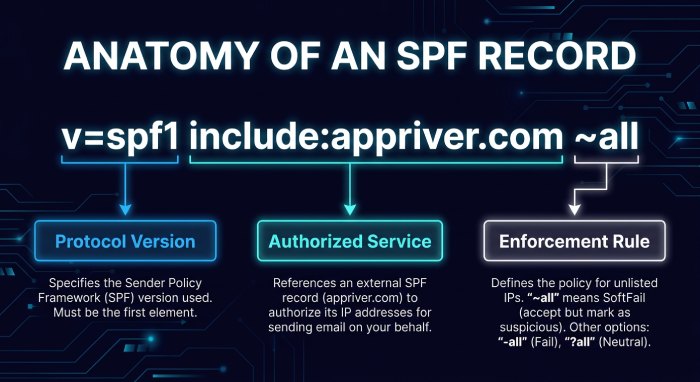
One commonly documented AppRiver SPF mechanism is:
include:appriver.comBefore using this value, confirm that it is appropriate for your specific AppRiver service and account configuration.
If AppRiver is your only authorized sending service, an illustrative SPF record might look like this:
v=spf1 include:appriver.com ~allThis example should not be copied without verifying the required include value. If other platforms also send email using your domain, their authorized sending mechanisms must be included in the same SPF policy.
Why SPF Matters for Email Delivery
SPF helps receiving mail servers evaluate whether a message originates from an authorized sending source. An accurate record can reduce authentication failures caused by missing or incorrect sender authorization.
However, SPF does not guarantee inbox placement or prevent every phishing attack. Receiving systems consider SPF results alongside DKIM, DMARC, sender reputation, and other security signals.
For organizations using AppRiver alongside other email services, maintaining an accurate SPF record is particularly important. Missing mechanisms can cause legitimate messages to fail authentication, while unnecessary mechanisms can increase DNS lookup usage.
Prerequisites Before Configuring AppRiver SPF
Identify Your Domain and DNS Provider
First, identify the domain used for outbound email. This may be your primary business domain, such as example.com, or a dedicated subdomain used for notifications and other messages. Next, determine where your DNS records are managed. Your DNS provider might be your domain registrar, hosting company, or cloud DNS service.
You will need access to the DNS management console to create or modify TXT records. If an IT administrator manages your DNS, coordinate with them before making changes.
Check Your Existing SPF Record
Before creating a new record, check whether your domain already has a TXT record beginning with:
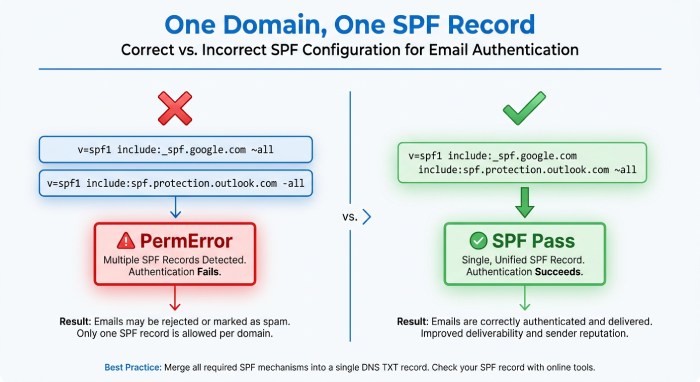
v=spf1A hostname should have only one SPF policy. Publishing multiple SPF records at the same hostname can cause a PermError, preventing receiving systems from evaluating the policy correctly.
If a record already exists, update it rather than creating another one. Review all legitimate sending services, including business email platforms, marketing systems, and transactional email providers.
For example, a domain might already authorize Microsoft 365:
v=spf1 include:spf.protection.outlook.com ~allIf the domain also sends email through AppRiver, the policy may need to include the verified AppRiver mechanism:
v=spf1 include:spf.protection.outlook.com include:appriver.com ~allThis example assumes both services send email using the domain. Confirm the correct mechanisms for your actual configuration before publishing changes.
How to Configure an AppRiver SPF Record
Step 1: Open Your DNS Management Console
Sign in to the service that manages your domain’s DNS. Navigate to the DNS records, zone editor, or advanced DNS settings section.
Locate the records for the domain you want to configure. If you manage several domains, make sure you select the correct one.
SPF is published as a DNS TXT record, not an MX record. You do not need to create an MX record specifically for SPF.
Step 2: Confirm the Correct AppRiver SPF Mechanism
Check your current AppRiver documentation or contact AppRiver support to confirm the required SPF include value for your service.
The include:appriver.com mechanism appears in published setup references, but it should not be assumed to apply to every AppRiver product or configuration.
An SPF include references another domain’s SPF policy. During authentication, the receiving server evaluates that policy as part of determining whether the sending source is authorized.
Step 3: Create or Update the TXT Record
If no SPF record exists, create a DNS TXT record for the relevant sending domain. For a root domain, the host or name field may use @, a blank value, or the domain name, depending on your DNS provider.
If AppRiver is the only authorized sender and the include value has been verified, an illustrative record is:
v=spf1 include:appriver.com ~allIf an SPF record already exists, preserve its legitimate mechanisms and insert the verified AppRiver mechanism before the final qualifier.
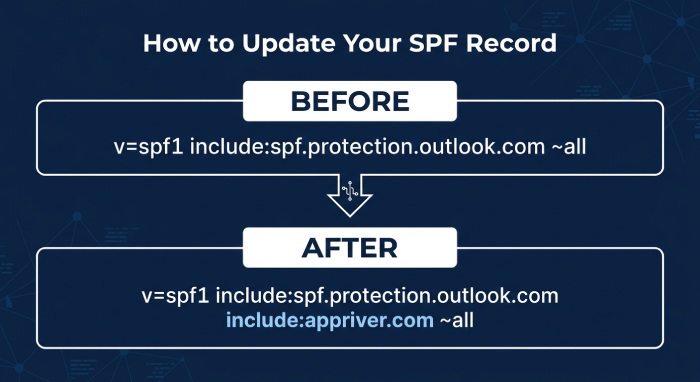
Before:
v=spf1 include:spf.protection.outlook.com ~allAfter:
v=spf1 include:spf.protection.outlook.com include:appriver.com ~allOnly use this combined example if both services send email for your domain. Review the complete policy before saving, especially when additional providers are involved.
Step 4: Select an Appropriate SPF Qualifier
SPF records commonly end with -all, ~all, or ?all.
- -all indicates SPF Fail for sources that do not match the policy.
- ~all indicates SPF Softfail for unmatched sources.
- ?all indicates a neutral result for unmatched sources.
Choose the qualifier based on your existing configuration and enforcement requirements. Before changing from Softfail to Fail, confirm that every legitimate sending service is properly authorized.
The -all qualifier does not independently guarantee that every receiving server will reject a message. Mail systems use authentication results and their own policies to determine how to handle incoming email.
Step 5: Save the DNS Changes
Save or publish the updated TXT record. Check the final value for missing mechanisms, accidental characters, and formatting errors.
DNS changes may not become visible everywhere immediately because resolvers can cache earlier records. Allow time for caches to refresh before concluding that an update has failed.
How to Verify Your AppRiver SPF Record
Check the Published DNS Record
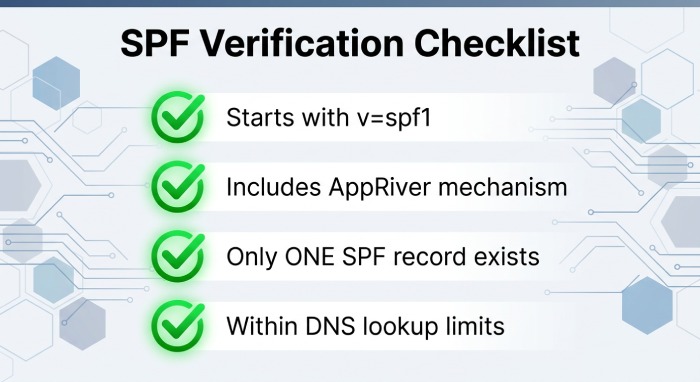
After publishing your changes, use a DNS lookup tool to inspect the domain’s TXT records. Confirm that the expected SPF record is visible, begins with v=spf1, contains the correct AppRiver mechanism, and retains the mechanisms required by other legitimate senders. Also verify that only one SPF policy exists at the hostname and that the record stays within SPF’s DNS lookup limit.
If the record is missing, check that you edited the correct DNS zone and hostname. Some providers also require changes to be explicitly published or confirmed.
Test an Email Message
Send a test message through AppRiver to an account where you can inspect the full message headers. Find the Authentication-Results header and review the SPF result.
An spf=pass result means the sending source passed the evaluated SPF policy for the relevant envelope-sender domain. It does not automatically mean that SPF aligns with the visible From domain for DMARC.
If SPF fails, check the sending IP address, envelope-sender domain, published SPF policy, and any DNS errors reported by the receiving system.
Understand SPF and DMARC Alignment
SPF evaluates the envelope-sender identity, which may differ from the address displayed in the From field. DMARC checks whether SPF or DKIM passes with the required alignment to the visible From domain.
Some AppRiver configurations may use a provider-managed Return-Path domain that does not align with the customer’s visible From domain. In this situation, SPF can pass without satisfying DMARC alignment.
Review the authentication results for your service and configure DKIM appropriately to provide another aligned authentication path.
Troubleshooting Common AppRiver SPF Problems
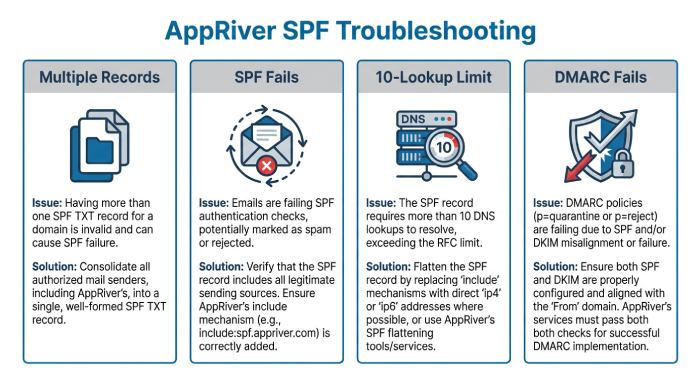
Multiple SPF Records
Problem: A DNS lookup returns multiple TXT records beginning with v=spf1.
Solution: Consolidate the legitimate sending mechanisms into one SPF policy. Remove duplicate policies only after confirming that their authorized senders are preserved in the remaining record.
AppRiver Email Fails SPF
Problem: Messages sent through AppRiver return an SPF Fail result. Solution: Check the actual sending IP address and envelope-sender domain in the message headers. Verify that the SPF record contains the correct mechanism for your AppRiver service and that DNS evaluation completes successfully.
If another gateway or relay sends the message, determine which server connects to the receiving mail system. The SPF policy must authorize the source evaluated by the recipient.
SPF Exceeds the DNS Lookup Limit
Problem: SPF evaluation returns a PermError because the policy exceeds the DNS-query limit. Solution: SPF permits a maximum of 10 DNS-querying** terms during an evaluation. *Nested include mechanisms can contribute to this limit, so counting only the terms written directly in your record is insufficient.
Remove obsolete mechanisms and unnecessary senders where appropriate. Review the complete SPF evaluation before making changes, and consider managed SPF monitoring if your domain relies on numerous email providers.
SPF Passes but DMARC Fails
Problem: The message passes SPF but fails DMARC. Solution: Check whether the envelope-sender domain aligns with the visible From domain. If it does not, review the DKIM result and determine whether the signing domain aligns with the From domain.
Correctly configured DKIM may provide an aligned authentication path when SPF alignment is unavailable. Review the message headers and your DMARC policy before changing DNS records.
DNS Changes Are Not Visible
Problem: The updated SPF record does not appear in a lookup or test message. Solution: Verify the hostname, DNS zone, and saved TXT value. Check Time-To-Live(TTL) settings and resolver caching, and allow time for the updated record to become visible. If the issue persists, ask your DNS administrator or provider to investigate.
Best Practices for Maintaining AppRiver SPF
Keep an inventory of services authorized to send email for your domain. Whenever a provider is added or removed, update the existing SPF policy carefully and test the result.
Avoid publishing multiple SPF records, copying provider examples without verification, or adding unnecessary mechanisms. Review DNS lookup usage whenever your sending infrastructure changes.
Finally, use SPF alongside DKIM and DMARC rather than treating any single protocol as a complete email security solution. Periodic authentication checks can help identify configuration errors before they affect important business communications.
Frequently Asked Questions
What is an AppRiver SPF record?
An AppRiver SPF record is a DNS TXT policy that identifies sending sources authorized to send email on behalf of a domain through an AppRiver service. The correct mechanism should be confirmed against the service’s current configuration guidance.
Can I have multiple SPF records for my domain?
No. A hostname should have one SPF policy. If multiple services send email from the same domain, combine their authorized mechanisms in a single record.
Does SPF guarantee email delivery?
No. SPF is one component of email authentication. Inbox placement also depends on DKIM, DMARC, sender reputation, message content, and recipient filtering policies.
Why can SPF pass while DMARC fails?
SPF may pass for the envelope-sender domain without aligning with the visible From domain. If DKIM also fails or is not aligned, DMARC may fail even when SPF passes.
When should I review my SPF record?
Review it whenever you add or remove an email-sending service, change your email infrastructure, or investigate authentication failures. Regular checks also help identify obsolete mechanisms and DNS lookup problems.
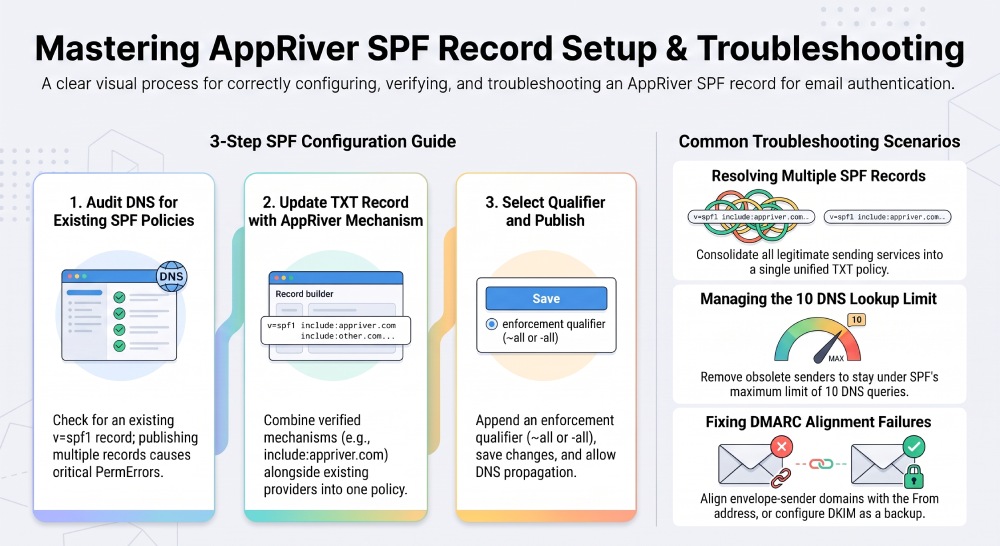
Configuring an AppRiver SPF record involves confirming the correct provider mechanism, reviewing existing DNS settings, publishing one valid TXT policy, and testing the result. For reliable email authentication, maintain SPF alongside DKIM and DMARC, monitor DNS lookup usage, and investigate alignment failures rather than assuming that an SPF pass guarantees DMARC compliance or inbox delivery.
Topics
General Manager
General Manager at DuoCircle. Product strategy and commercial lead across the email security portfolio.
Secure your email infrastructure
Protect, authenticate, and deliver. Contact our team to find the right solution.