Reverse DNS Does Not Match SMTP Banner: Causes, Fixes, and Best Practices

Quick Answer
An SMTP banner mismatch occurs when the server’s SMTP hostname does not align with its reverse DNS (PTR) record. Fix it by matching the PTR, A record, SMTP banner, and HELO/EHLO hostname, then verify SPF, DKIM, and DMARC for stronger email deliverability.
What an SMTP Banner Mismatch Means and Why It Matters
An smtp banner mismatch occurs when the identity announced by a mail server during an SMTP connection does not align with the identity returned by reverse dns for the sending IP address. In practical terms, the receiving server checks whether the SMTP banner, the PTR record, and the related dns records point to a consistent, trusted hostname.
When a remote server connects, the sending mail server presents a server greeting message, often something like:
220 mail.example.com ESMTP Postfix
That greeting is the smtp banner. During the same mail transaction, the receiving server may perform a dns lookup against the sending IP address to verify its reverse dns record. If the PTR record resolves to a different name, such as server123.hostingprovider.com, but the SMTP banner says mail.example.com, the receiving system may flag an smtp banner mismatch.
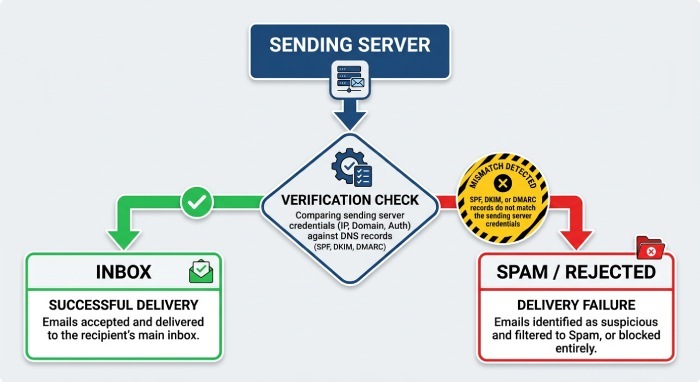
This matters because modern email providers such as Gmail, Outlook, Yahoo, Microsoft 365, and Google Workspace use layered email authentication and reputation systems. While reverse dns alignment is not the same as SPF, DKIM, or DMARC, it is still part of the broader trust model. A mismatch can contribute to negative reputation or trust signals and may play a role in delivery delays, spam placement, throttling, or rejection, depending on the receiving server’s policies and other authentication and reputation signals.
In short, the way a mail server identifies itself affects whether receiving mail servers trust it. Consistent dns records, a correct PTR record, a matching A record, and a valid MX record help establish the authenticity of senders and reduce suspicious signals associated with spoofing.
Common Causes of Reverse DNS and SMTP Banner Mismatches
Misaligned PTR Record, A Record, and SMTP Banner
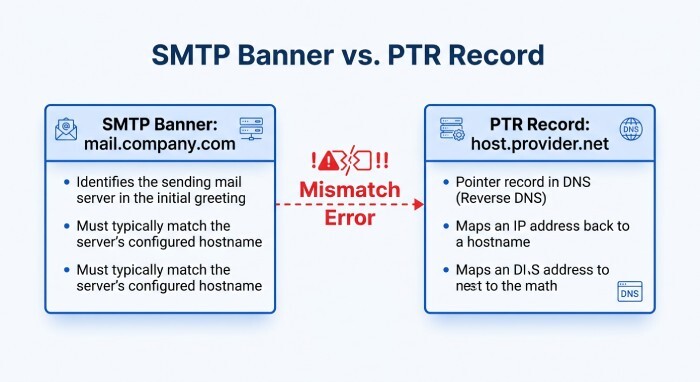
The most common technical reason for an smtp banner mismatch is that the PTR record for the sending IP address points to one domain name, while the smtp banner announces another. For example:
- PTR record:
203.0.113.10 → mail.company.com - SMTP banner:
mail.company.com - A record:
mail.company.com → 203.0.113.10→
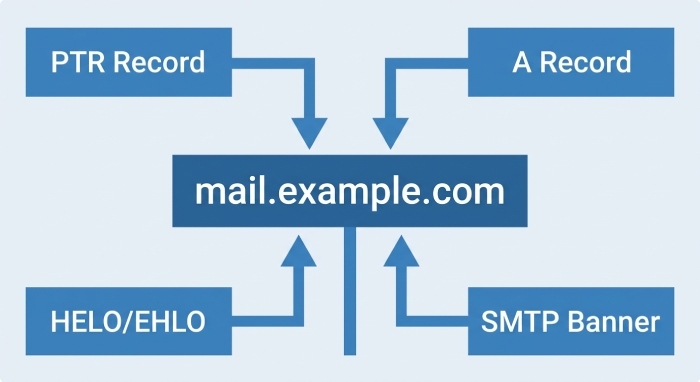
This can still cause deliverability issues if the receiving mail server expects forward-confirmed reverse DNS. Ideally, the PTR record should point to the same mail server hostname used in the smtp banner, and that name should have an A record pointing back to the same IP address.
The MX record also matters. Although the MX record does not need to match the smtp banner exactly in every setup, it should be part of a coherent dns configuration. For example, if your MX record points to mail.example.com, that hostname should have a valid A record, and the sending mail server should identify itself consistently.
Shared Hosting, Multiple Domains, and Provider Defaults
An smtp banner mismatch is especially common on shared hosting platforms. In Shared hosting, many customers send email through the same physical or virtual server. The server may use the hosting provider default smtp banner, while each customer or domain name has separate MX record, SPF, DKIM, and DMARC settings.
This is why searches such ascPanel reverse dns does not match smtp banner are common. In cPanel environments, the outgoing mail server may announce a generic hostname, while the customer expects it to announce mail.customer-domain.com. Unless the hosting provider controls and updates the PTR record, the customer may not be able to fix reverse dns directly from the DNS panel or DNS hosting panel.
Hosting multiple domains on one mail server can also create confusion. A server can receive mail for many domains through different MX record entries, but it normally has one primary smtp banner, one helo hostname, and one ehlo hostname. That primary identity should match the PTR record and A record, even if the server handles many brands or domains.
Cloud, DNS, and Mail Infrastructure Configuration Errors
Cloud servers, VPS instances, and custom mail infrastructure often suffer from basic configuration errors. An administrator may update public dns records in Cloudflare, but forget that reverse dns is usually managed by the IP owner, such as the cloud platform or hosting provider. Cloudflare can manage an A record, MX record, SPF, DKIM, and DMARC, but the PTR record is typically configured outside Cloudflare.
Discussions on Cloudflare Community often clarify this distinction: changing DNS in Cloudflare does not automatically change the reverse dns record. If the PTR record still points to a default cloud hostname, receiving systems may detect an smtp banner mismatch.
You may also see reports like gmail reverse dns does not match smtp banner when Gmail verification checks notice that the smtp banner, reverse dns, and forward DNS do not align. Outlook, Yahoo, Microsoft, and Google Workspace may apply similar email verification logic as part of their anti-abuse systems.
How to Diagnose the Issue with DNS and SMTP Testing Tools
Check DNS Records with Lookup Tools
A proper diagnosis starts by checking the public DNS records for the sending domain and mail server. Use command-line tools such as dig and nslookup, along with other DNS and SMTP testing utilities, to inspect:
- PTR record for the sending IP address
- A record for the mail server hostname
- MX record for the sending and receiving domain
- SPF, DKIM, and DMARC for email authentication
- Public reverse dns result

A typical check might look like this:
dig -x 203.0.113.10If the result returns mail.example.com, then check:
dig mail.example.com AThe A record should resolve back to 203.0.113.10. This forward-confirmed relationship between the PTR record and A record helps receiving systems validate the server.
Also verify the MX record:
dig example.com MXThe MX record should point to a valid mail host, and that host should have a working A record. Inconsistent dns records do not always cause immediate email rejection, but they can increase deliverability issues, especially when combined with weak email authentication.
Test the SMTP Banner and Review Email Headers
Next, test the smtp banner directly. You can use Telnet, OpenSSL, or SMTP testing online tools:
telnet mail.example.com 25The response may show:
220 mail.example.com ESMTP
That value should align with your PTR record, A record, and smtp server settings. If the smtp banner says vps-123.provider.net but your reverse dns returns mail.example.com, or vice versa, you likely have an smtp banner mismatch.
You should also review email headers from messages delivered to Gmail, Outlook, Yahoo, or Google Workspace. Headers can reveal the sending IP address, the HELO or EHLO value, SPF results, DKIM signatures, DMARC alignment, and other email authentication outcomes.
What to Compare During Verification
Compare these values carefully:
- PTR and Forward DNS Alignment: The PTR record should return the primary mail server hostname, and that hostname A record should point back to the same IP. This ensures reverse dns and forward DNS resolve consistently.
- HELO**/EHLO and SMTP Identity:** The HELO/EHLO value should identify the sending server with a valid fully qualified domain name (FQDN). Ideally, the HELO/EHLO hostname should be consistent with the server PTR and forward DNS configuration. The SMTP banner is a separate part of the SMTP conversation and may use the same hostname when the server is configured accordingly.
Step-by-Step Fixes for Aligning rDNS, HELO/EHLO, and Mail Server Hostnames
Update the PTR Record with Your Hosting Provider
The PTR record is usually controlled by the owner of the IP address, not by your public DNS provider. If you use a VPS, dedicated server, or cloud platform, log in to the provider portal or contact the hosting provider and request a reverse dns update.
Set the PTR record to the canonical mail server hostname, such as:
mail.example.com
Then make sure the A record for mail.example.com points to the same IP address. This alignment helps prevent an smtp banner mismatch and improves sender reputation.
Align the SMTP Banner, HELO, and EHLO Values
Update your smtp server settings so the mail server announces the same hostname used in the PTR record. In Postfix, Exim, Microsoft Exchange, or other SMTP platforms, the server identity is usually configurable.
For cPanel, check the server hostname configuration and Exim settings. If the error is cPanel reverse dns does not match smtp banner, confirm whether the primary server hostname is valid, has an A record, and is assigned as the reverse dns name by the hosting company.
Your target alignment should look like this:
- PTR record:
203.0.113.10→mail.example.com - A record:
mail.example.com→203.0.113.10 - SMTP banner:
220 mail.example.com ESMTP - HELO/EHLO:
mail.example.com - MX record:
example.com→ a valid mail host, such asmail.example.com
This structure gives receiving systems consistent signals during verification checks.
Best Practices to Improve Email Deliverability and Avoid Future Mismatches
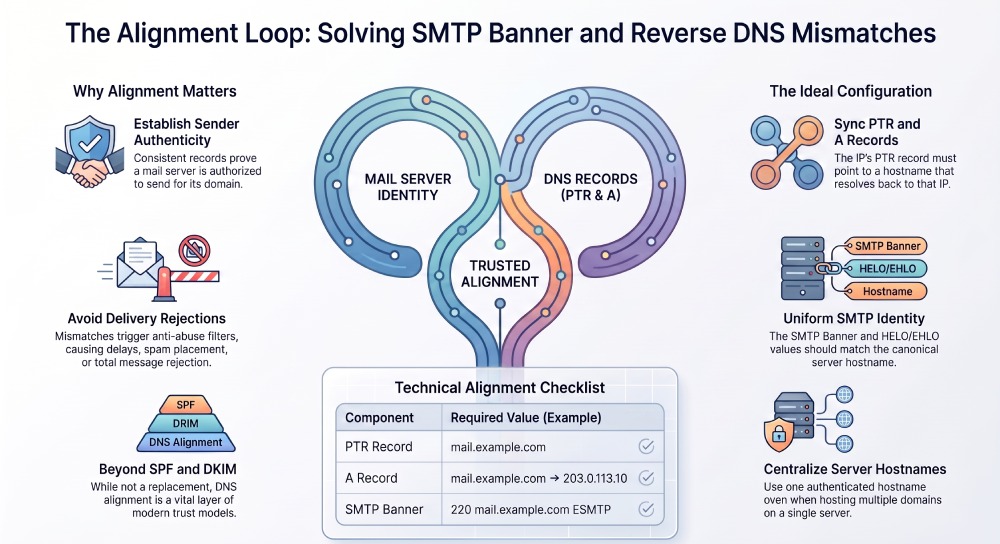
To reduce deliverability issues, treat reverse dns, the smtp banner, and all related dns records as part of one coordinated mail infrastructure. The mail server should have a stable identity, and that identity should be reflected in the PTR record, A record, MX record, and SMTP configuration.
Maintain strong email security with SPF, DKIM, and DMARC. These controls do not replace reverse DNS, but they strengthen email authentication and help prevent spoofing. A server with strong email security, consistent DNS records, and a properly configured SMTP banner is less likely to encounter delivery issues or rejection.
Use DNS and SMTP diagnostic tools to monitor your mail infrastructure and verify that your PTR, A, MX, and SMTP configuration remain consistent. Periodically test these records after migrations, DNS changes, IP address changes, or mail platform upgrades to identify configuration issues before they affect email delivery.
If you use Cloudflare for DNS, remember that Cloudflare manages public DNS zones, not necessarily reverse dns for your server IP. Coordinate changes between your DNS hosting panel, your mail platform, and your hosting provider.
For organizations hosting multiple domains, avoid trying to make the smtp banner match every customer or brand domain. Instead, use one neutral, properly authenticated mail server hostname with a valid PTR record, matching A record, correct reverse dns, and clean email authentication. This approach is more scalable and reduces future smtp banner mismatch problems across Gmail, Outlook, Yahoo, and other major receiving networks.
General Manager
General Manager at DuoCircle. Product strategy and commercial lead across the email security portfolio.
Secure your email infrastructure
Protect, authenticate, and deliver. Contact our team to find the right solution.