Session Hijacking Via Email Attack Methods And Warning Signs

Quick Answer
Session hijacking via email occurs when attackers steal authenticated sessions using phishing, malicious links, or stolen cookies. Learn the most common attack methods, warning signs to watch for, and practical steps to protect your email accounts and prevent unauthorized access.
Email continues to be one of the most reliable communication methods for both businesses and individuals. Unfortunately, cybercriminals are aware of this reliability. While many companies prioritize the protection of usernames and passwords, there has been a notable shift among attackers towards session hijacking — a method that allows them to circumvent standard authentication measures and gain unauthorized access to user accounts.
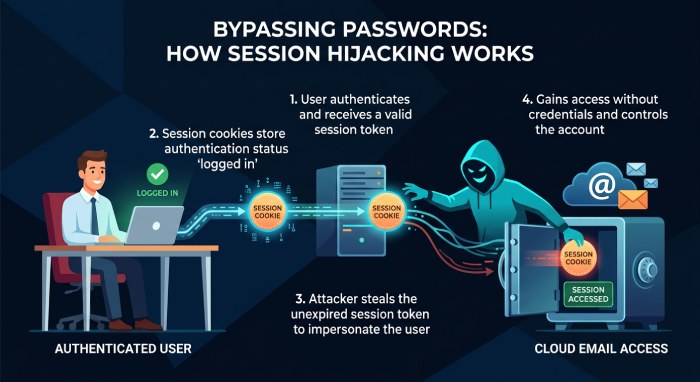
Differing from password theft, session hijacking permits criminals to impersonate legitimate users by acquiring active session tokens. Consequently, even if users utilize multi-factor authentication (MFA), attackers can still obtain access if they manage to capture a valid session cookie.
Given that email frequently serves as the initial vector for these types of attacks, it is crucial to comprehend the mechanics of session hijacking and to be able to identify its indicators to enhance email security.
In this guide, we will clarify what session hijacking via email entails, examine prevalent attack strategies, highlight warning signs, and outline best practices to safeguard your organization.
What Session Hijacking via Email Means and Why It Matters
Session hijacking via email occurs when threat actors steal or abuse a valid user session to access email, cloud applications, or business systems without needing the user’s password again. Instead of breaking authentication directly, attackers target cookies, session tokens, OAuth grants, or browser sessions that prove a user has already signed in.
This matters because a hijacked user session can bypass traditional password controls and enable impersonation, email fraud, and full account takeover. In Microsoft 365, M365, Google Workspace, CRM platforms, file-sharing tools, and other cloud applications, a stolen session may allow malicious users to read sensitive data, send messages, change forwarding rules, or move laterally across the environment.
Why Email Is a High-Value Target
Email is central to modern digital communications. It contains password resets, invoices, contracts, HR records, legal documents, and links to business applications. Once an attacker controls an inbox, they can launch phishing, business email compromise, invoice fraud, or even support ransomware attacks by distributing malicious links internally.
Business Impact
A successful session hijacking incident can lead to:
- Account takeover of executives, finance teams, or administrators
- Impersonation of trusted employees, vendors, or partners
- Exposure of sensitive data and potential data breach reporting obligations
- Violations of compliance requirements, including regulated security frameworks such as FedRAMP
- Disrupted email deliverability if the domain is used for spam or fraud
- Broader enterprise security failures across identity, email, and cloud security controls
Common Attack Methods Used in Email Session Hijacking
1. Adversary-in-the-Middle (AiTM) Phishing
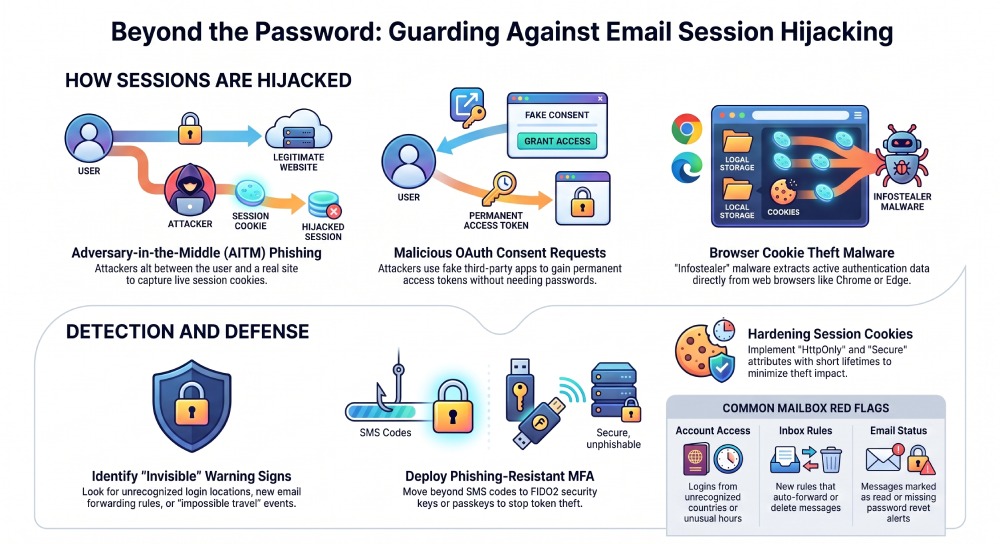
Adversary-in-the-Middle (AiTM) phishing has emerged as a highly effective method for compromising email sessions. Rather than redirecting users to a basic fraudulent login page, attackers place themselves in between the user and the authentic website. During the login process, the attacker discreetly captures the user’s credentials, multi-factor authentication (MFA) responses, and session cookies. After the user successfully authenticates, the acquired session cookie enables the attacker to gain access to the account without requiring the user’s password again or prompting additional MFA verification.
2. Fake Microsoft 365 Login Portals
Microsoft 365 is a widely utilized platform, making it an attractive target for cybercriminals. Attackers frequently dispatch deceptive emails that seem to originate from Microsoft, alerting users about password expirations, security notifications, shared files, invoices, or voicemail messages. When users click on the links embedded in these emails, they are redirected to a convincingly designed Microsoft login page. This allows the attackers to intercept the login process, capturing session cookies and gaining unauthorized access to the user’s account.
3. Malicious OAuth Consent Requests
Not all email session hijacking attacks depend on compromised login credentials. Certain attackers employ strategies that involve sending messages prompting users to permit access to what appears to be a legitimate third-party application. These applications often seek permissions to read emails, retrieve contact information, send messages, or manage files in the cloud. If users agree to these permissions, the application obtains access tokens, enabling it to maintain access to the account without necessitating the user’s password.
4. Browser Cookie Theft Malware
Numerous contemporary malware strains are engineered with the primary objective of capturing authentication cookies that are held in web browsers. Categories such as information stealers, Trojan viruses, harmful browser extensions, and clipboard-centric malware actively search for current session data within browsers before transmitting this information to cybercriminals. Widely used web browsers like Google Chrome, Microsoft Edge, Mozilla Firefox, and Brave are frequent targets due to the prevalence of active login sessions they typically maintain.
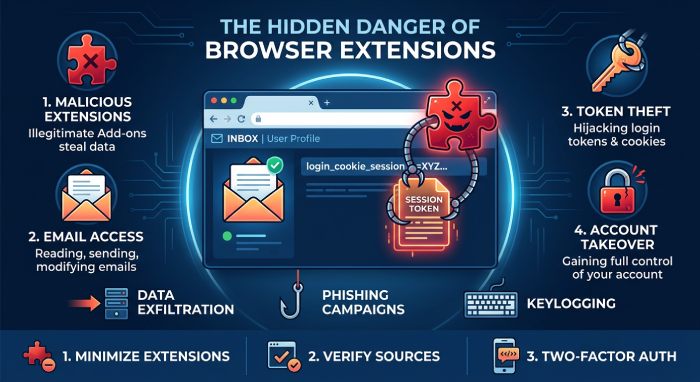
5. Malicious Browser Extensions
Browser extensions have the potential to enhance productivity; however, harmful or fraudulent extensions may present significant security threats. Certain extensions request excessive permissions, granting them access to browsing habits, the ability to modify web content, read clipboard data, or gather stored cookies. After installation, such extensions can covertly capture session tokens from authenticated platforms, including email services.
6. Malware Distributed Through Email Attachments
Email continues to be a prevalent vector for delivering malware that enables session hijacking. Cybercriminals often conceal harmful files as invoices, reports, or other business-related documents, utilizing formats such as ZIP archives, HTML files, OneNote documents, PDF files with embedded links, and Microsoft Office formats. Accessing these attachments can result in the installation of malware designed to track browser activity and extract authentication cookies from ongoing sessions.
7. Evilginx and Reverse Proxy Phishing Kits
Sophisticated phishing tools like Evilginx empower cybercriminals to launch remarkably persuasive phishing schemes. These frameworks function as reverse proxies, relaying login attempts to genuine websites while covertly collecting authentication cookies. Because users engage directly with the authentic authentication service, they are generally less aware of any irregularities, which significantly enhances the effectiveness of this method in circumventing multi-factor authentication safeguards.
8. Cross-Site Scripting (XSS) Exploits
Web applications susceptible to Cross-Site Scripting (XSS) flaws can inadvertently compromise user sessions. Cybercriminals may embed harmful JavaScript in these vulnerable pages, enabling them to intercept browser cookies and send this data to external servers. If session cookies lack adequate security measures and protective attributes, attackers are able to exploit them to mimic legitimate users, thereby achieving unauthorized access to accounts.
9. Session Interception on Public Wi-Fi
While HTTPS encryption significantly mitigates the threat of session hijacking over networks, public Wi-Fi environments still pose security risks. Malicious actors can set up counterfeit hotspots or employ tactics like network sniffing, DNS spoofing, or SSL (Secure Sockets Layer) stripping to capture web traffic on inadequately protected connections. Individuals accessing their email accounts through unsecure networks are particularly vulnerable to session breaches.
10. Authentication Token Replay Attacks
A token replay attack occurs when malicious actors take advantage of authentication tokens that have been previously intercepted, bypassing the need to compromise usernames and passwords. If an application fails to adequately verify the legitimacy, validity period, or the context of the device associated with the token, the attacker may be able to authenticate successfully and access the victim’s email account. To mitigate the risk of such attacks, it is crucial to implement robust token validation measures and maintain ongoing session monitoring.
Warning Signs of Email Session Hijacking
Unrecognized Login Sessions or Devices
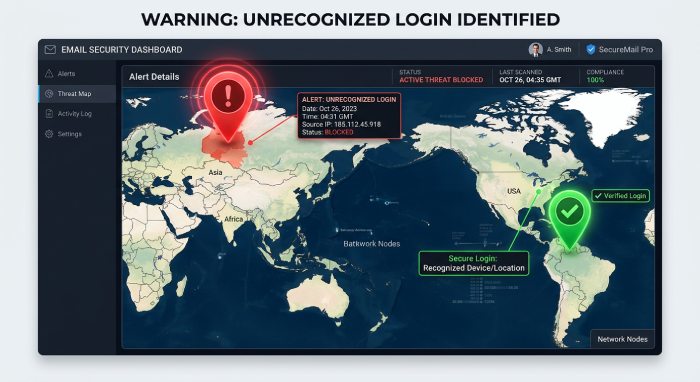
A primary indicator of email session hijacking is the detection of login activity from devices or locations that you do not recognize. Cybercriminals frequently obtain session cookies rather than passwords, enabling them to infiltrate an account without causing a failed login event or a password notification.
Several email services, such as Microsoft 365 and Gmail, provide users the option to examine their recent login activity. If you observe logins from unknown browsers, operating systems, IP addresses, or geographical areas, it could suggest that your active session has been compromised.
 Warning indicators include:
- Login activity from countries you’ve never visited
- Unknown browser or device names
- Multiple simultaneous active sessions
- Sign-ins occurring at unusual hours
- Sudden changes in login history without your knowledge
Regularly auditing account activity is crucial for identifying unauthorized access, allowing for timely intervention before any substantial harm can occur.
Unexpected Changes to Email Account Settings
Session hijackers frequently adjust account configurations soon after obtaining access. Their objective is to ensure continuous control, obscure their actions, or redirect subsequent communications.
These attackers might establish inbox rules that automatically forward messages to outside addresses, conceal particular emails, eliminate security alerts, or turn off spam filters. In some cases, they may alter recovery email addresses or incorporate extra authentication measures to secure ongoing access.
Watch for changes such as:
- New forwarding rules you didn’t create
- Modified mailbox filters
- Unexpected email signatures
- Changed recovery information
- Disabled security alerts
- New connected devices or applications
Because these changes are often subtle, administrators should periodically audit mailbox configurations and forwarding rules.
Missing, Deleted, or Unread Emails
Individuals affected by session hijacking often observe irregularities in their email accounts. Critical messages might vanish, seem to have been opened already, or be relocated to unfamiliar folders.
Malicious actors frequently erase traces of their activities by removing security alerts, financial correspondence, password reset notifications, and professional communications. In cases of business email compromise (BEC), these offenders typically surveil conversations for extended periods before initiating fraudulent schemes.
Signs include:
- Emails marked as read that you never opened
- Missing password reset notifications
- Deleted security alerts
- Emails automatically moved into archives or custom folders
- Conversations disappearing unexpectedly
It is essential to examine even minor irregularities in mailbox activity, especially for business users engaged in sensitive correspondence.
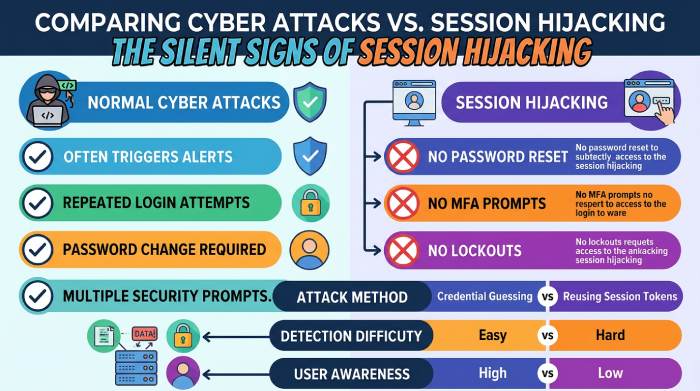
Unusual Account Activity Without Password Changes
A distinguishing feature of session hijacking is that cybercriminals can gain entry to an account without altering the password. By exploiting compromised authentication cookies, victims frequently continue to use their email accounts as usual, while the attackers maintain their unauthorized access discreetly in the background.
This makes session hijacking especially difficult to detect because there may be:
- No password reset notification
- No failed login attempts
- No MFA prompts
- No account lockouts
Instead, you may observe subtle warning signs such as:
- Emails being sent that you didn’t write
- Draft messages appearing unexpectedly
- Contacts reporting suspicious emails from your account
- Increased mailbox activity during periods when you were offline
- Security logs showing active sessions despite no recent login
Should any dubious activities take place without a modification to your password, it is advisable to consider session hijacking as a potential underlying factor.
Unexpected Multi-Factor Authentication (MFA) Behavior
Session hijacking can frequently circumvent multi-factor authentication (MFA) by acquiring session cookies from authenticated users; however, atypical MFA activities can act as significant indicators of potential security threats.
For instance, attackers might initially focus on stealing credentials, leading to a surge in MFA notifications. Alternatively, there may be instances where victims cease to receive MFA prompts entirely, as the intruder utilizes an existing authenticated session rather than initiating a new login.
Potential indicators include:
- MFA approval requests you didn’t initiate
- Multiple authentication prompts in a short period
- Login notifications without corresponding MFA requests
- Security alerts about suspicious authentication attempts
- New trusted devices appearing in your account
Best Practices to Prevent Session Hijacking via Email
1. Enable Multi-Factor Authentication (MFA)
Multi-factor authentication (MFA) serves as a robust safeguard against account breaches. Although advanced threats like adversary-in-the-middle (AiTM) phishing may intercept session cookies post-MFA, implementing MFA significantly reduces most credential-based attacks. Organizations should prioritize phishing-resistant methods, such as FIDO2 security keys or passkeys, over SMS codes whenever feasible.
2. Deploy Advanced Email Security Solutions
Since most session hijacking attacks originate from phishing emails, organizations should deploy advanced email security solutions to block threats before they reach users. Modern platforms like DuoCircle use multiple layers of protection—including phishing detection, malicious link scanning, attachment analysis, spoofing protection, and AI-driven threat intelligence—to identify evolving email threats that traditional filters may miss, helping reduce the risk of session hijacking and account compromise.
3. Use Secure and HTTPS-Only Connections
It is essential for users to connect to email services and web applications via HTTPS-encrypted channels. Such secure connections help safeguard session cookies from being compromised by malicious actors on unsecured networks. Organizations ought to implement HTTPS by utilizing HSTS (HTTP Strict Transport Security) and should aim to deactivate any insecure protocols whenever feasible.
4. Protect Session Cookies
Authentication cookies must be set up with contemporary security measures to enhance their resistance against theft or misuse. Key protective features for cookies include:
- Secure attribute to allow transmission only over HTTPS
- HttpOnly attribute to prevent JavaScript access
- SameSite settings to reduce cross-site request forgery (CSRF) risks
- Short cookie lifetimes for sensitive applications
These controls greatly reduce the chances of successful cookie theft.
5. Educate Employees About Modern Phishing Techniques
Cybercriminals are constantly adapting their phishing strategies. Ongoing security awareness training is essential for empowering employees to identify:
- Fake Microsoft 365 login pages
- QR code phishing (Quishing)
- OAuth consent phishing
- Fake password expiration notices
- MFA fatigue attacks
- Urgent account verification emails
Well-trained users are far less likely to surrender credentials or authentication tokens.
6. Monitor for Suspicious Login Activity
Ongoing surveillance is essential for identifying compromised sessions prior to any substantial harm inflicted by attackers. It is crucial for security teams to keep an eye out for:
- Logins from unusual geographic locations
- Impossible travel events
- New device registrations
- Unrecognized browsers
- Multiple failed login attempts
- Sudden mailbox rule creation
- Unexpected OAuth application permissions
Timely identification enables organizations to swiftly end any compromised sessions.
7. Implement Email Authentication Protocols
Email authentication standards such as SPF (Sender Policy Framework), DKIM (DomainKeys Identified Mail), and DMARC (Domain-based Message Authentication, Reporting, and Conformance) help protect domains from email spoofing and phishing attacks. While these protocols do not directly prevent session hijacking or stop attackers from stealing active session tokens, they significantly reduce phishing emails that often serve as the initial attack vector. Properly configuring and monitoring SPF, DKIM, and DMARC strengthens email security and helps lower the risk of phishing-based account compromise.
The Future of Session Hijacking
As organizations implement more robust authentication measures, such as passkeys and phishing-resistant multi-factor authentication (MFA), cybercriminals are shifting their focus towards compromising authenticated sessions rather than stealing credentials. Consequently, it is crucial for security strategies to adapt; they must extend beyond merely safeguarding the login process to ensure ongoing verification of user identity throughout the duration of active sessions.
To address these evolving threats, innovative technologies like continuous authentication, behavioral analytics, Zero Trust security frameworks, and AI-based threat detection are becoming indispensable. These tools are vital for recognizing unusual session activities and preventing unauthorized access before substantial harm can occur.
Session hijacking has become one of the fastest-growing email security threats because attackers no longer need to steal passwords—they only need a valid authenticated session. As phishing campaigns, malware, and authentication token theft continue to evolve, organizations must adopt a layered security strategy that goes beyond traditional login protection. Combining phishing-resistant MFA, advanced email security, SPF, DKIM, and DMARC, secure session management, employee security awareness, and continuous monitoring can significantly reduce the risk of account takeover.
By preventing phishing attacks before they reach users and detecting suspicious session activity early, organizations can better protect sensitive data, maintain business continuity, and strengthen their overall cybersecurity posture.
General Manager
General Manager at DuoCircle. Product strategy and commercial lead across the email security portfolio.
Secure your email infrastructure
Protect, authenticate, and deliver. Contact our team to find the right solution.