Squarespace DKIM Alignment Problems: How SPF And DMARC Failures Affect Email Authentication

Quick Answer
Squarespace DKIM alignment problems can disrupt email authentication when SPF and DMARC records are misconfigured. Learn how these failures affect email deliverability, domain reputation, and security, and discover ways to troubleshoot and maintain reliable email authentication.
Email authentication helps protect domains from spoofing, phishing, and unauthorized email activity. For businesses using Squarespace domains, misconfigured DKIM alignment, SPF records, or DMARC policies can cause legitimate messages to fail authentication, land in spam, or be rejected by receiving mail servers. Understanding how these protocols work together can help identify configuration issues and support reliable email communication.
Understanding DKIM Alignment in Squarespace
DomainKeys Identified Mail (DKIM) is an email authentication protocol that uses cryptographic signatures to help receiving mail servers verify that an email was authorized by the sending domain and that its signed content was not changed in transit.
When an organization sends email through Google Workspace, Microsoft 365, Squarespace Email Campaigns, or another third-party service, that service may generate a DKIM signature. The receiving server checks the signature against a public key published in the domain’s DNS records.
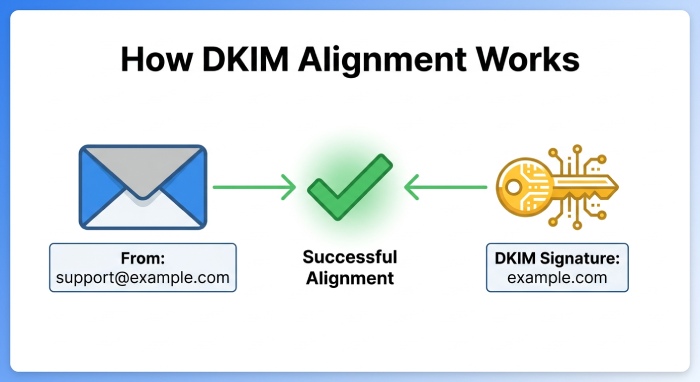
DKIM alignment adds a comparison: the domain in the DKIM signature is checked against the domain in the sender’s From address. For example, an email sent from support@example.com should use an appropriately aligned signing domain, such as example.com.
If the signing domain belongs to a provider or an unrelated subdomain, it may not meet the configured DMARC alignment requirements. Squarespace users should make sure the correct DKIM records are published in their domain’s DNS settings. Depending on the email service, these may be TXT or CNAME records. Incorrect hostnames, missing records, or outdated public keys can prevent receiving servers from validating signatures.
Common Causes of Squarespace DKIM Alignment Problems
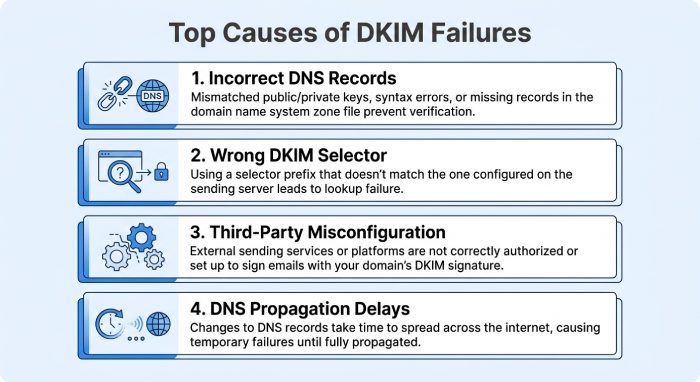
Several configuration issues can prevent DKIM from aligning correctly with a domain managed through Squarespace.
1. Incorrect DKIM DNS Records
Incorrect DNS records are a common cause of DKIM authentication failures. Email providers supply the DKIM values that domain administrators need to publish in DNS. If a record has the wrong hostname, missing characters, or an outdated public key, receiving servers may not find the correct authentication information. For example, Squarespace Email Campaigns requires a CNAME record with the host squarespace._domainkey pointing to squarespace-domainkey.squarespace-mail.com for third-party domain verification. Compare your DNS records with the exact values provided by your email provider.
2. Incorrect DKIM Selector Configuration
A DKIM selector points receiving servers to the DNS record containing the public key used to verify an email signature. Email providers may use different selectors for different services or signing configurations. If an administrator publishes the wrong selector or removes an existing one during an email migration DKIM verification can fail.
For example, Google Workspace and other email platforms may use provider-specific selectors. The selector must match the one in the DKIM-Signature header. Administrators should confirm that both the selector and signing domain match the DNS records provided by their email service.
3. Third-Party Email Service Misconfiguration
Businesses often use several platforms to send transactional emails, newsletters, customer notifications, and promotional campaigns. Each platform may use a different DKIM signing domain. If a service isn’t configured correctly, its messages may pass DKIM verification but fail DMARC alignment.
For example, a company might send email through Google Workspace and a separate marketing platform. If the marketing platform signs messages with its own domain rather than an appropriately aligned company domain, DMARC may fail. Configure custom-domain authentication for every third-party email service your business uses.
4. DNS Propagation and Record Changes
DNS updates may not be available everywhere immediately. After you update DKIM records in Squarespace, some receiving mail servers may still use older information from their DNS caches. Squarespace says DNS changes can take up to 48 hours to take effect. During that time, some email providers may validate the updated records while others continue using cached information. Allow time for propagation, then verify the records again before making further changes.
How SPF Failures Affect DKIM and DMARC Alignment
Sender Policy Framework (SPF) is an email authentication protocol that identifies which mail servers and IP addresses are authorized to send email for a domain. When a message arrives, the receiving server checks the sender’s IP address against the domain’s SPF record. An SPF pass alone doesn’t guarantee a DMARC pass: the domain authenticated by SPF must also align with the domain in the visible From address.
1. Multiple SPF Records
Publishing multiple independent SPF records for the same hostname can trigger an SPF PermError, weakening email security and authentication. This often occurs when organizations add separate records for Google Workspace, Microsoft 365, and marketing platforms. For example, a domain may have one record authorizing Google Workspace and another authorizing a marketing service.
Instead, include all required sending sources in one valid SPF policy. Squarespace can merge SPF records added through its DNS settings. Administrators should verify the final published SPF result to confirm that it correctly includes all authorized services.
2. Exceeding the SPF DNS Lookup Limit
SPF allows up to 10 DNS-querying mechanisms and modifiers during evaluation. Multiple include, a, mx, or redirect entries can push a record over that limit. When this happens, receiving servers may return a PermError rather than validate the sending server. This can affect DMARC by leaving SPF without a valid authentication result. Review your SPF record, remove unnecessary mechanisms, and avoid duplicate third-party authorization entries.
3. Unauthorized Sending Servers
Include every legitimate service that sends email from your organization’s domain in its SPF record. If you add an email marketing platform without updating SPF, messages sent through it may fail SPF authentication. DMARC may still fail even when DKIM is configured correctly if the DKIM signature is unaligned. Keep an up-to-date list of authorized email services and check each new provider’s SPF requirements.
How DMARC Failures Affect Email Authentication
DMARC adds a layer of domain protection by building on SPF and DKIM. It checks that at least one of these authentication methods passes and aligns with the domain in the visible From address.
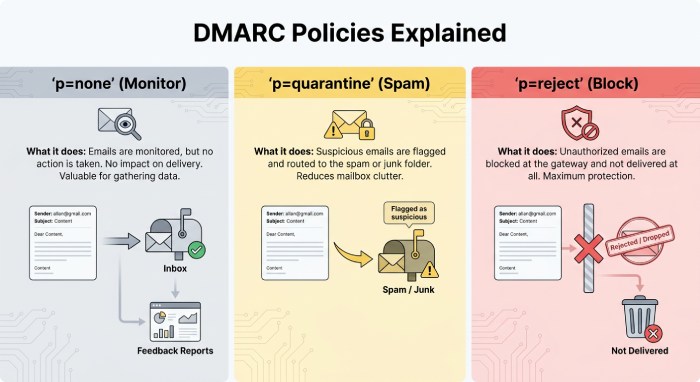
DMARC supports three primary policies:
- p=none: Monitors authentication results without requesting message rejection or quarantine.
- p=quarantine: Requests that messages failing DMARC be treated as suspicious, usually by sending them to spam.
- p=reject: Requests that receiving servers reject messages that fail DMARC.
1. Incorrect DMARC Alignment Settings
DMARC supports relaxed and strict alignment for both SPF and DKIM. With relaxed alignment, the authenticated domain and the visible From domain may be different subdomains of the same organizational domain. Strict alignment requires an exact domain match. For example, if the From address uses example.com and the DKIM signature uses mail.example.com, relaxed DKIM alignment can pass, but strict alignment will fail. As a result, incorrect alignment settings can cause legitimate messages to fail DMARC even when SPF or DKIM authentication succeeds.
2. Missing or Duplicate DMARC Records
A domain should publish only one DMARC record at the _dmarc hostname. Multiple records can prevent receiving servers from processing the policy correctly, while no record leaves them without the domain owner’s DMARC instructions or standard DMARC reporting. Squarespace users should confirm that the correct TXT record is in place and combine any provider-specific DMARC requirements into a single valid record.
3. Strict DMARC Policies Without Proper Testing
Before enforcing a restrictive DMARC policy, review authentication results to avoid disrupting legitimate email. For instance, setting p=reject while a marketing platform has misaligned DKIM and an incomplete SPF record may cause valid campaign messages to be rejected. Start by monitoring authentication reports, fix configuration issues, and then move gradually toward stronger enforcement.
Steps to Troubleshoot Squarespace DKIM, SPF, and DMARC Failures
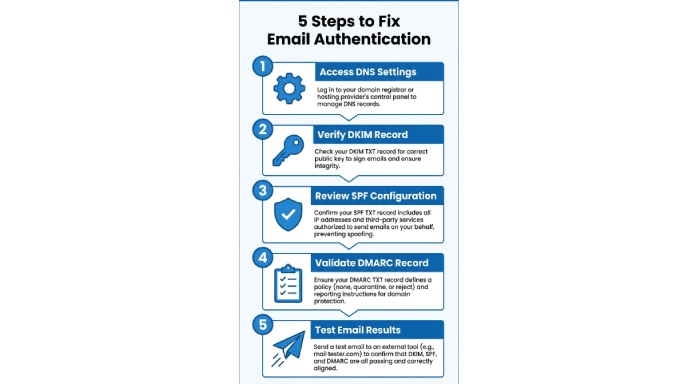
Resolving email authentication problems requires checking the DNS configuration and reviewing actual email authentication results.
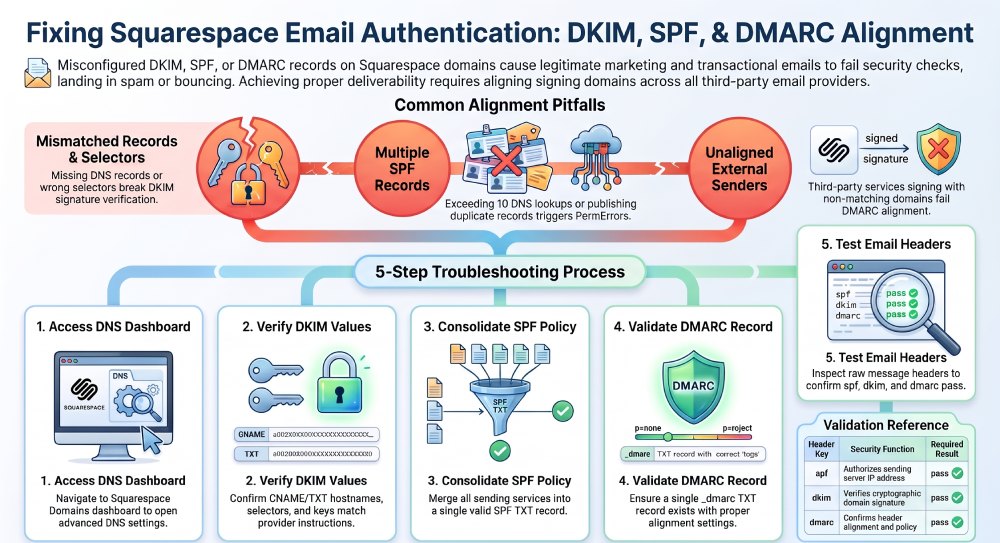
Step 1: Access Squarespace DNS Settings
In Squarespace, open the Domains dashboard and select the domain with authentication issues. Go to DNS, then DNS Settings. If the domain uses a third-party DNS provider, make the changes there instead.
Step 2: Verify the DKIM Record
Get the required DKIM record from your email provider. Verify its record type, hostname, selector, and destination value, then confirm the published record matches the provider’s instructions. Remove outdated entries only after confirming they’re no longer needed.
Step 3: Review the SPF Configuration
Locate the SPF TXT record and confirm it authorizes all legitimate sending services. Check for duplicate records, missing third-party providers, syntax errors, excessive DNS lookups, and authorization of unknown senders. Verify that the policy is published correctly.
Step 4: Validate the DMARC Record
Check the TXT record at _dmarc.example.com. Confirm it contains a valid DMARC policy with appropriate alignment settings, and verify that only one DMARC record exists. If multiple email services specify DMARC requirements, combine the necessary reporting addresses and policy settings into a single valid record.
Step 5: Test Email Authentication Results
Send test emails to accounts hosted by different providers, such as Gmail and Outlook. Open the received message headers and locate the Authentication-Results section.
Review the following results:
- spf=pass indicates that SPF authentication succeeded.
- dkim=pass indicates that the DKIM signature was verified.
- dmarc=pass indicates that DMARC authentication and alignment requirements were satisfied.
If one result fails, investigate the corresponding DNS configuration and sending service.
Best Practices for Maintaining Email Authentication in Squarespace
Organizations should regularly review their email authentication settings to avoid recurring configuration problems.
Consider these best practices:
- Maintain accurate DNS records: Update your SPF, DKIM, and DMARC records whenever email providers change their authentication requirements.
- Monitor DMARC reports: Review aggregate reports for unauthorized senders, alignment failures, and unexpected email activity.
- Avoid unnecessary DNS changes: Incorrect changes can interfere with email authentication and disrupt existing email services.
- Authenticate every sending platform: Configure the appropriate SPF and DKIM records for transactional, marketing, and business communications.
- Test before enforcing DMARC: Review authentication results before moving from
p=noneto quarantine or reject. - Review records after migrations: Verify all authentication records whenever you change email hosting or marketing platforms.
These practices protect your domain reputation, help reduce spoofing, and improve email deliverability.
 Squarespace DKIM alignment issues can undermine email authentication when DNS records, SPF authorization, or DMARC policies are misconfigured. An email may pass an individual authentication check and still fail DMARC if its authenticated domain doesn’t align with the visible From address.
To catch issues before they affect delivery, validate DKIM selectors, keep SPF records accurate, configure one DMARC policy, and monitor authentication reports. Regular DNS maintenance and testing across email providers can also support a more secure, reliable email infrastructure.
Topics
General Manager
General Manager at DuoCircle. Product strategy and commercial lead across the email security portfolio.
Secure your email infrastructure
Protect, authenticate, and deliver. Contact our team to find the right solution.