URL Blacklist Explained: How Email Security Systems Block Malicious Links

Quick Answer
URL blacklists help email security systems identify and block malicious links before they reach users. Learn how URL reputation checks detect phishing, malware, and suspicious websites to improve email security and protect users from online threats.
Email security systems play a critical role in protecting users from phishing, malware, malicious downloads, and other online threats. One of the key defenses they use is URL blacklisting, which identifies and blocks web addresses associated with suspicious or harmful activity. A blacklisted URL can trigger warnings, quarantine emails, disable links, or prevent users from accessing dangerous websites. Understanding how URL blacklists work, why websites get flagged, and how security systems evaluate links can help organizations strengthen email security, protect users, and reduce the risks associated with malicious links.
What Is a URL Blacklist? Definition, Purpose, and Common Use Cases
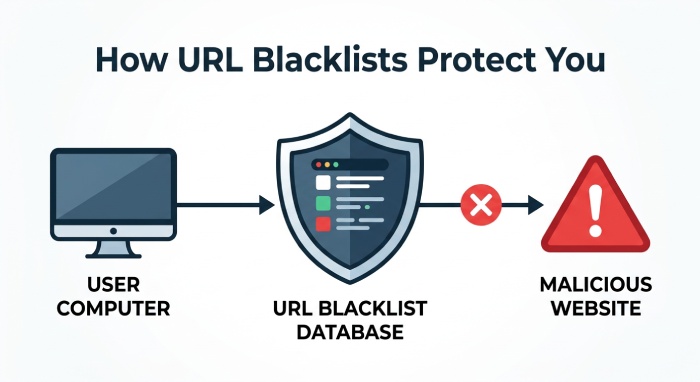
A URL blacklist is a security database that identifies web addresses, domains, pages, folders, or IP addresses associated with suspicious or harmful activity. When an email provider, antivirus software, browser, or filtering gateway sees a link that appears on a URL blacklist, it may block access, quarantine the email, rewrite the link, or display a blacklist warning before the user can proceed.
The purpose is simple: prevent users from visiting destinations that may host malicious content, distribute malware, support phishing attempts, or inject SEO spam into search results. A blacklisted website is not always intentionally malicious; many legitimate businesses become blacklisted after a hacked site, compromised files, a third-party script, or a shared hosting issue exposes visitors to risk.
Common URL Blacklist Use Cases
URL blacklists are used across many environments, including:
- Email security systems that block phishing links and suspicious redirects.
- Browser security features that show a browser warning message such as “dangerous site ahead” or “deceptive site ahead.”
- Search engines like Google that issue search engine warnings when a site is flagged as unsafe.
- Workplace filtering, school filtering, and parental filtering systems that restrict access to risky domains.
- Internet service providers, antivirus vendors, and security platforms that maintain domain, URL, and IP blacklist intelligence.
For website owners, understanding how to check blacklist status is critical. A blacklist warning can cause immediate website traffic loss, user trust damage, and measurable Search engine optimization performance loss.
How Email Security Systems Detect and Evaluate Malicious Links
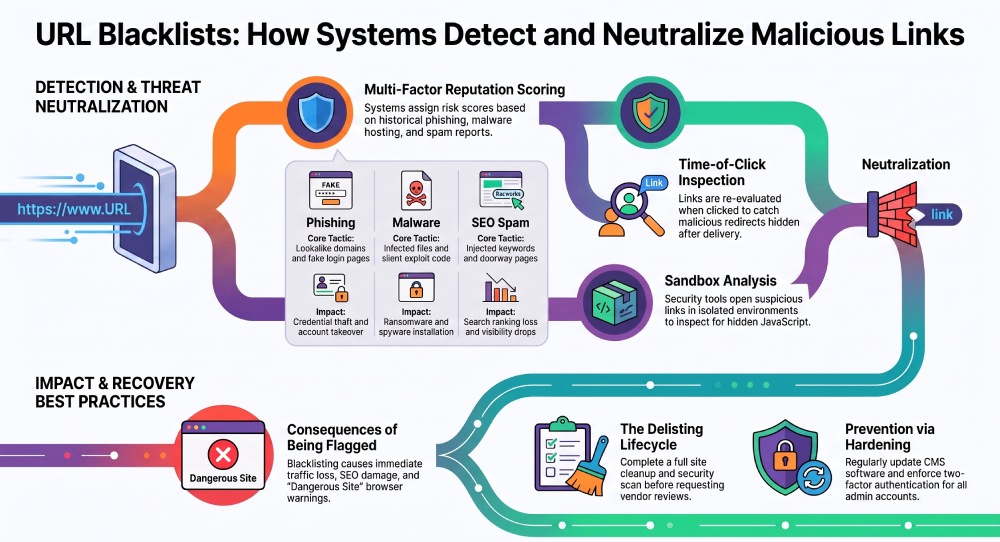
Email security systems evaluate links using a combination of reputation data, behavioral analysis, and real-time scanning. When a user receives an email, the security gateway may inspect every URL in the message and compare it against a URL blacklist, an email blacklist, domain reputation feeds, and threat intelligence from security vendors.
Reputation Analysis and URL Scoring
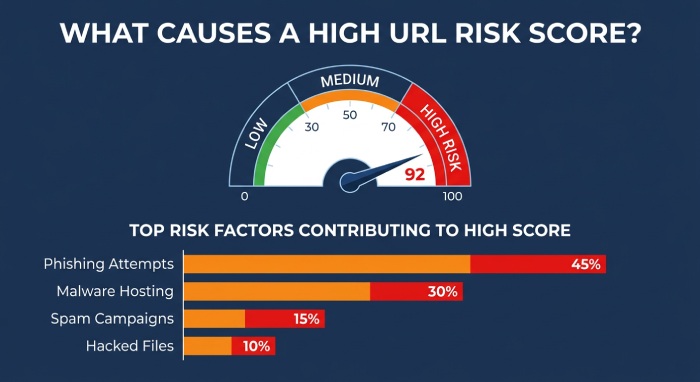
A domain, page, folder, or IP address may receive a risk score based on:
- Prior involvement in phishing attempts
- Hosting of malware, spyware, or malicious downloads
- Association with spam campaigns or SEO spam
- Abnormal sending behavior from an email provider or server
- Reports from users, a support desk, or automated security tools
- Historical evidence of a blacklisted website
If the risk score is high, the system may block the message, rewrite the URL, or show a blacklist warning before the recipient clicks. Some systems also apply a domain-based warning when the entire domain is risky, while others use a directory-level blacklist when only a specific directory, folder, or page is affected.
Real-Time Link Inspection and Redirect Analysis
Modern email security platforms use time-of-click protection. This means a link is checked not only when the email arrives but also when the recipient clicks it. This is important because hackers often send clean links first, then later change the destination using redirects, hidden landing pages, or content injection.
Security tools may open the link in a sandbox and examine:
- Suspicious redirects across multiple domains
- Hidden JavaScript used to evade detection
- A fake login page designed for credential harvesting
- Downloads that install malware or spyware
- Compromised chat widgets, ad networks, or infected ad tags
- Third-party scripts that load malicious content
If the destination changes from safe to unsafe, the system can add it to a URL blacklist and trigger a blacklist warning for users.
Types of Threats Blocked by URL Blacklists: Phishing, Malware, and Spam
A URL blacklist helps email security systems block several high-risk threats before users interact with them.
Phishing Attempts and Credential Theft
Many phishing attempts use emails that appear to come from trusted brands, financial institutions, cloud services, or internal business systems. The link may lead to a fake login page that imitates Microsoft 365, Google, a bank, or a web hosting provider. Once users enter credentials, attackers can access an admin account, email inbox, or corporate application.
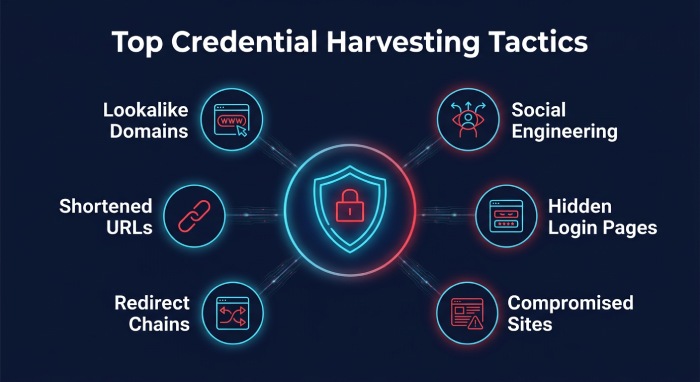
Credential Harvesting Tactics
Attackers commonly use:
- Lookalike domains
- Shortened URLs
- Redirect chains
- Compromised legitimate websites
- Login pages hosted in a hidden directory
- Social engineering messages that create urgency
A URL blacklist reduces the success rate of these phishing attempts by blocking access to known phishing websites before users can submit sensitive data.
Malware, Spyware, and Malicious Downloads
URL blacklists also prevent users from visiting sites that distribute malware, spyware, ransomware, or other malicious downloads. In email campaigns, attackers may link to a file stored on a compromised server or to a page that silently loads exploit code.
A blacklisted website may contain compromised files, hidden scripts, or infected plugins. Even if the website owner is unaware, the site can still be treated as a security threat. Browser security tools, antivirus software, and search engines may show a browser warning message or block access entirely.
SEO Spam and Hacked Content
Not all blacklisting events come from phishing or malware. Some occur because of SEO spam, where hackers inject links, doorway pages, casino keywords, pharmaceutical terms, or cloaked content into a legitimate website. This kind of hacked content can lead to visibility loss, loss of search rankings, a click-through rate drop, and a bounce rate increase when users see a warning instead of the expected page.
A site affected by SEO spam may also receive manual actions in Google Search Console, especially if the injected content manipulates search engine rankings. For this reason, website owners should know how to check blacklist status and inspect their site regularly.
How URLs Get Blacklisted and What Happens When They Are Flagged
URLs are typically blacklisted after automated scanners, user reports, email filters, or search engines detect suspicious behavior. A website does not need to be intentionally harmful to become a blacklisted website.
Common Reasons a URL Gets Blacklisted
A URL may be added to a URL blacklist because of:
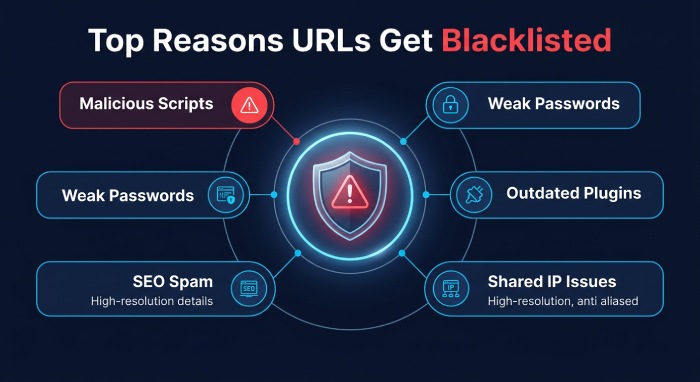
- A hacked site with malicious scripts
- A compromised admin account
- Weak passwords or lack of two-factor authentication
- Outdated CMS plugins or themes
- Compromised files on the server
- Hidden JavaScript inserted by attackers
- Content injection used for SEO spam
- Unsafe third-party scripts
- A shared hosting issue involving another domain on the same IP address
- Malicious code from ad networks, infected ad tags, or vulnerable chat widgets
In some cases, only one page or folder is blocked through a directory-level blacklist. In other cases, the whole domain receives a domain-based warning, or the server’s IP address appears on an IP blacklist.
Impact of a Blacklist Warning
Once a URL is flagged, users may see a blacklist warning, a “dangerous site ahead” notice, or a “deceptive site ahead” warning in browsers. Email security systems may also remove the message, quarantine it, or disable the clickable link.
The business impact can be serious:
- Website traffic loss
- User trust damage
- SEO performance loss
- Visibility loss in search engines
- Loss of search rankings
- Click-through rate drop from search results or emails
- Bounce rate increase when users abandon the page
- Reduced conversions and support desk complaints
For a website owner, the priority is identifying the source of the issue, performing site cleanup, and starting the delisting process as quickly as possible.
How to Check Blacklist Status
Knowing how to check blacklist status helps confirm whether a domain, page, IP address, or email infrastructure is affected. Useful methods include:
- Reviewing Google Search Console for security issues, manual actions, and malware reports
- Using external online tools such as MXToolbox, Network Solutions lookup tools, and other SEO tools
- Running a full security scan with antivirus software or a web application scanner
- Checking email deliverability platforms for email blacklist listings
- Asking the web hosting provider to inspect server logs and suspicious files
When learning how to check blacklist results, remember that one tool may detect a problem while another does not. A complete review should include the domain, specific URL, folder, page, server, and IP address.
Best Practices for Avoiding Blacklisted URLs and Improving Email Security
Avoiding a URL blacklist requires both preventive website security and strong email filtering controls. The goal is to reduce exposure to phishing attempts, malicious content, malware, and SEO spam before they damage users or brand reputation.
Website Security Best Practices
Website owners should follow these practices:
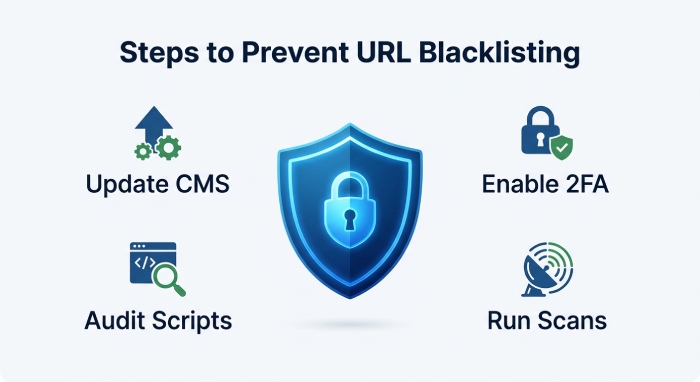
- Keep Content Management System (CMS) software, plugins, and themes updated.
- Use strong passwords and two-factor authentication for every admin account.
- Monitor for unauthorized users, unknown files, and compromised files.
- Limit write permissions on sensitive folders.
- Audit third-party scripts, chat widgets, and ad networks.
- Run scheduled security scans.
- Watch for sudden SEO spam, suspicious redirects, or unfamiliar pages.
- Work with the web hosting provider if the issue may involve a server or shared hosting issue.
If a blacklisted website is found, perform immediate site cleanup. Remove malicious content, repair hacked content, replace compromised files, and verify that redirects, hidden JavaScript, and injected links are gone.
Practical Recovery Steps Before Requesting Review
Before requesting removal from blacklist, document the recovery steps taken. This may include malware removal, password resets, plugin updates, server hardening, and a full security scan. After cleanup, submit a site review request through Google Search Console or the relevant blacklist authority.
Delisting Process and Removal From Blacklist
The delisting process varies depending on who flagged the URL. Google, antivirus vendors, email providers, browser security services, and independent threat intelligence platforms may each maintain separate databases.
Typical steps for removal from blacklist include:
- Confirm the affected domain, URL, folder, page, or IP address.
- Identify whether the issue involves phishing attempts, malware, SEO spam, or malicious content.
- Complete site cleanup and remove all compromised files.
- Run a security scan and verify that no hidden JavaScript, redirects, or content injection remain.
- Submit a site review request or vendor-specific appeal.
- Monitor Google Search Console, MXToolbox, SEO tools, and external online tools for updates.
Successful removal from blacklist depends on proving that the security threat has been resolved. If the root cause remains, the delisting process may fail, or the same URL may be listed again.
Email Security Best Practices
Organizations should combine URL reputation filtering with layered defenses:
- Use an email security gateway that checks a URL blacklist at delivery and time of click.
- Enable attachment sandboxing and malicious link rewriting.
- Block known phishing websites and suspicious newly registered domains.
- Train users to recognize phishing attempts and report a blacklist warning.
- Monitor email blacklist status for sending domains and IP addresses.
- Configure authentication standards such as SPF, DKIM, and DMARC.
- Integrate alerts with the support desk and incident response workflow.
A strong email security program does more than block a single blacklisted website. It continuously evaluates malicious content, malware behavior, phishing attacks, SEO spam indicators, browser security signals, and search engine warnings to protect users before they click.
General Manager
General Manager at DuoCircle. Product strategy and commercial lead across the email security portfolio.
Secure your email infrastructure
Protect, authenticate, and deliver. Contact our team to find the right solution.