Yahoo Phishing Report Email: How To Identify And Report Suspicious Messages

Quick Answer
Learn how to identify and report Yahoo phishing emails, recognize suspicious links, fake login pages, and credential theft attempts. Discover the steps to report phishing messages to Yahoo, protect your account, secure personal information, and prevent cybercriminals from misusing your credentials.
Phishing emails are a common cybersecurity threat that can expose personal information, compromise accounts, and cause financial losses. Yahoo Mail users may receive fraudulent messages that imitate trusted companies, claim there is an account problem, or request sensitive information. Knowing how to identify suspicious emails and use the Yahoo phishing report process helps protect your account and prevent cybercriminals from targeting other users.
What Yahoo Phishing Emails Are and Why They’re Dangerous
A Yahoo phishing email is a fake message designed to look like it came from Yahoo, Yahoo Mail, Yahoo Help, a bank, a government organization, or a familiar brand such as Netflix, Apple, Google, Facebook, AOL, or the US Department of Treasury. The goal is usually to trick you into clicking a malicious link, opening an attachment, entering your password, or giving away personal information such as credit card information or bank account information.
A phishing attack often creates pressure with a security alert, account verification demand, billing notice, prize offer, or warning that your Yahoo account will be closed unless you take urgent action. Cybercriminals and scammers use impersonation tactics to make the phishing email look legitimate. They may copy Yahoo logos, mimic Yahoo Help Central pages, or send a fake message claiming that your mailbox has exceeded storage limits.
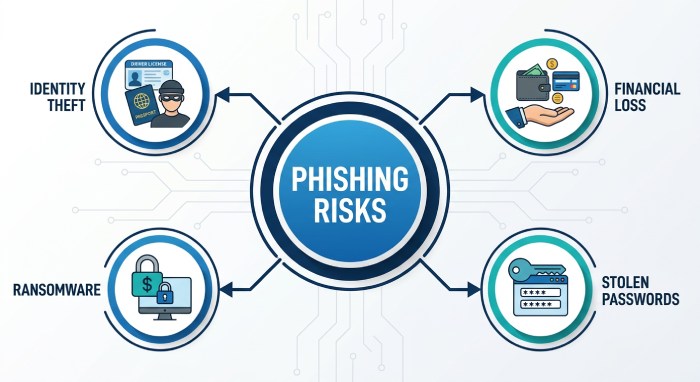
These messages are dangerous because one phishing attack can lead to identity theft, financial theft, business email compromise, malicious software, ransomware, or unauthorized access to your Yahoo Mail account. If criminals capture your password, they may use your inbox to reset accounts elsewhere, read private messages, or send more spam and phishing email campaigns to your contacts.
To protect yourself, treat every unexpected security alert, account verification request, or login warning with caution. Yahoo Mail has anti-phishing and spam detection systems, but no email service provider can block every fraudulent email. That is why knowing how to identify, verify, and report phishing is essential.
Common Signs of a Suspicious Yahoo Email
Red flags that suggest a phishing attack
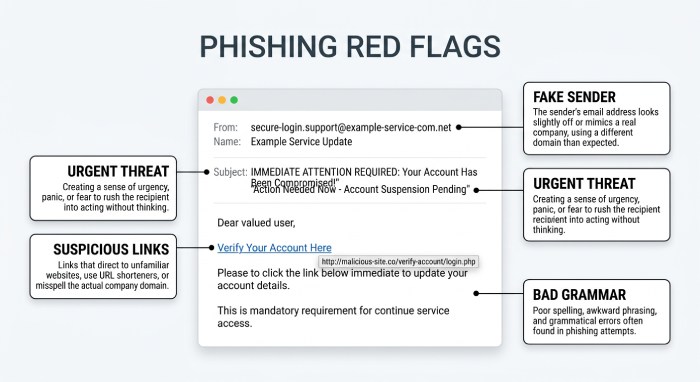
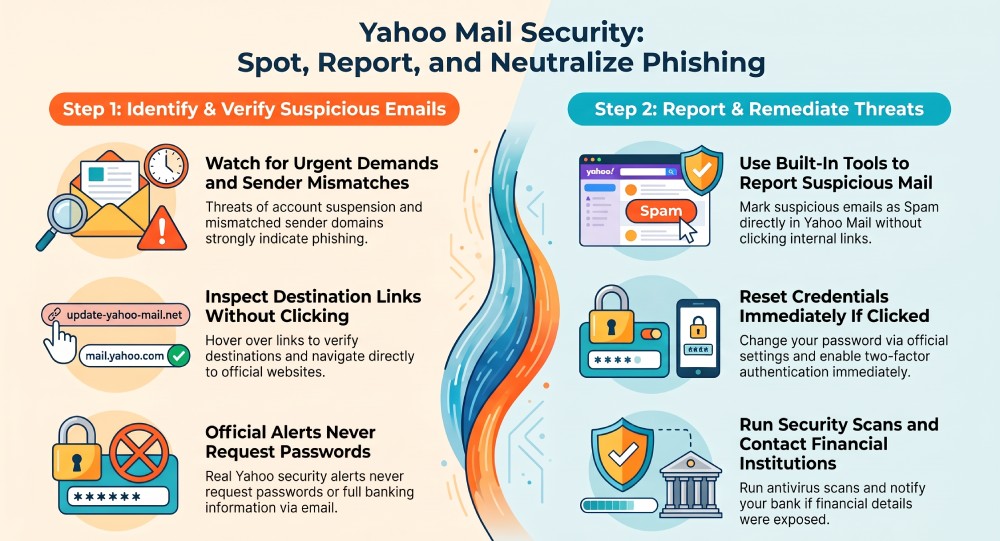
A suspicious email may look convincing at first, but most phishing email attempts include warning signs. Watch for messages that demand urgent action, threaten account suspension, or ask you to “verify sender,” “confirm your mailbox,” or “restore access” by clicking a malicious link. A real Yahoo security alert will not ask you to provide your password, full credit card information, or bank account information by email.
Common signs include:
- A sender address that does not match Yahoo’s official domains
- Poor grammar, odd formatting, or a generic greeting such as “Dear user”
- A button or malicious link that points to an unfamiliar website
- Unexpected attachment files, especially ZIP, EXE, HTML, or macro-enabled documents
- A fake message claiming you violated Yahoo Terms of Service
- A pop-up alert after clicking a link that asks for personal information
- Requests to install “security software” that may actually be malicious software
- A login page where the browser does not show that the connection is secure
In Yahoo Mail, some interface signals can also help. A red exclamation mark may indicate a warning or delivery issue, while a purple check mark or other security icon may appear near certain verified brand messages. However, visual cues are not enough on their own. A scam can still imitate trusted sender branding, so always verify sender details before interacting.
Spam is not always the same as phishing, but the two often overlap. Spam may be unwanted marketing, while a phishing email is designed to steal personal information or compromise your device. If a message looks like spam but also asks for sensitive data, treat it as a phishing attack and report phishing through Yahoo Mail.
How scammers make Yahoo phishing emails look real
Scammers often copy Yahoo Mail design elements, use official-looking colors, and reference products like Yahoo Search, Yahoo Help, or Yahoo account recovery. Some phishing attack messages pretend to come from Microsoft Defender, Windows Defender, Norton, McAfee, or antivirus protection providers. Others reference password manager providers such as 1Password or LastPass to make the message sound more credible.
For example, a user named John might receive a fraudulent email claiming, “Your Yahoo account was accessed from Australia. Click here to secure your account.” The malicious link may lead to a fake Yahoo login page that captures his password and personal information. Another message might claim to be from the FBI, USA.gov, or a European Union regulator and tell the user to report online harm through a fake portal.
Be especially careful with messages referencing legal or safety programs such as the EU Digital Services Act, Take It Down Act, or a take it down request. While legitimate reporting systems exist, attackers can abuse those terms to make a phishing email feel official.
How to Verify Whether a Yahoo Message Is Legitimate
Safe checks before you click anything
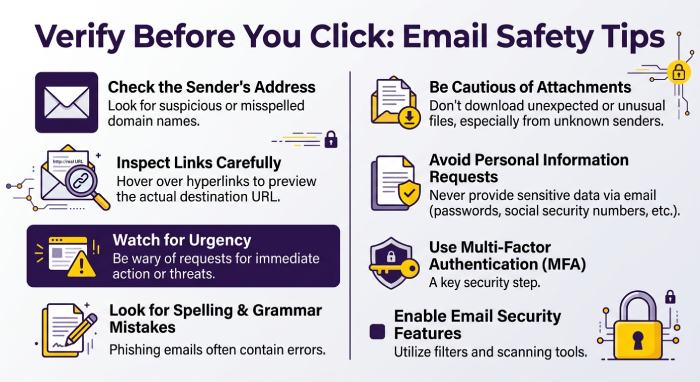
Before clicking a link, opening an attachment, or replying, slow down and verify the message. The safest approach is to avoid links in the email and go directly to Yahoo Mail or Yahoo Help Central by typing the address into your browser. If there is a real security alert, account verification requirement, or Terms of Service issue, it should appear in your Yahoo account settings or official notifications.
To protect yourself:
- Check the sender address carefully. Look beyond the display name.
- Hover over links without clicking. If the destination is not a Yahoo domain, do not open it.
- Do not enter your password after following an email link.
- Confirm whether the browser says the connection is secure before signing in anywhere.
- Use a password manager such as 1Password or LastPass; it may not autofill on fake domains.
- Keep antivirus protection active through tools such as Norton, McAfee, Microsoft Defender, or Windows Defender.
- Search Yahoo Help Central or Sender Hub for official guidance if the message involves delivery, sender reputation, or email forwarding.
A legitimate Yahoo Mail message should not pressure you into providing personal information by email. It should not ask for full credit card information, bank account information, or your password. If a message claims to be from a bank, Apple, Netflix, Google, Facebook, AOL, or a government organization, visit that organization’s official website separately rather than using the email link.
If you are still unsure, do not reply. Replying confirms that your address is active and may increase spam. Instead, report phishing or mark as spam from within Yahoo Mail.
How to Report Phishing Emails to Yahoo Safely
Using Yahoo Mail’s report tools
The safest way to report a suspicious email is to use Yahoo Mail’s built-in reporting tools. Select the message without clicking its links or downloading attachments, then click or tap Spam to report it. If Yahoo displays a phishing alert with a Report option, follow the on-screen instructions. The available options may vary depending on your Yahoo Mail interface.
Reporting a suspicious email helps Yahoo identify potential phishing and spam and improve its email-filtering efforts. Reports may also help Yahoo recognize patterns in abusive messages and take action against activity that violates its policies. Although reporting cannot guarantee that similar emails will be blocked, it can contribute to safer email experiences for users.
General safe reporting steps:
- Open Yahoo Mail through its official website or mobile app.
- Select the suspicious email without clicking links or opening attachments.
- Click or tap Spam to report the message.
- If Yahoo displays a phishing alert with a Report option, follow the on-screen instructions.
- After reporting, delete the message if you no longer need it.
- If similar messages continue arriving, consider blocking the sender or creating a filter where those options are available.
Avoid ordinary email forwarding unless Yahoo Help specifically instructs you to forward the message with full headers. Simple email forwarding can alter technical details that investigators use. If you are reporting business email compromise, identity theft, financial theft, or a major phishing attack, you may also report online harm to relevant authorities.
For serious cybercrime, consider filing a report with the FBI’s Internet Crime Complaint Center, especially if money, credit card information, bank account information, or business credentials were stolen. USA.gov also provides guidance on reporting scams, and users in the European Union may have additional reporting rights under regional digital safety rules.
Reporting phishing emails helps Yahoo and other email providers identify suspicious messages and improve their spam-filtering and abuse-detection efforts. These reports can contribute to broader efforts to reduce phishing attempts and protect users from similar threats.
What to Do If You Clicked a Phishing Link or Shared Information
Immediate steps to protect yourself after a mistake
If you clicked a malicious link, opened an attachment, or entered personal information, act quickly. A phishing attack can escalate fast, especially if you shared your password, credit card information, or bank account information.
Take these steps immediately:
- Change your Yahoo account password from the official Yahoo Mail login page.
- Enable two-factor authentication if available.
- Check account recovery email addresses and phone numbers.
- Review recent login activity and connected apps.
- Run antivirus protection with Microsoft Defender, Windows Defender, Norton, McAfee, or another trusted tool.
- Scan for malicious software or ransomware if you downloaded anything.
- Contact your bank if financial theft is possible.
- Monitor accounts for identity theft.
- Report phishing in Yahoo Mail if the message is still available.
- Delete email copies after reporting.
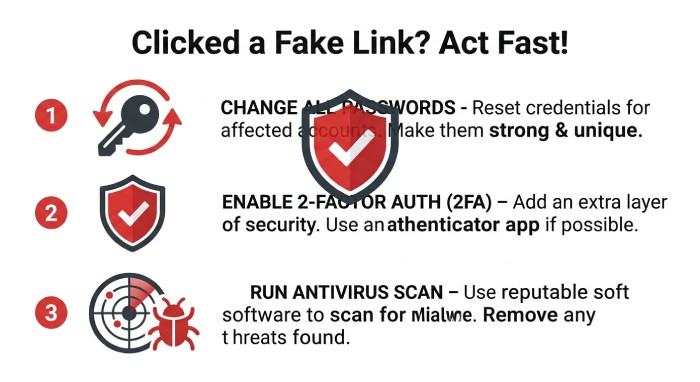 If you reused the same password on other accounts, change it on every affected account to prevent further credential theft and account compromises. Use a strong, unique password for each service to reduce the risk of attackers gaining unauthorized access. A password manager can help you generate and store unique passwords and identify weak or reused credentials.
If a phishing message also involves threats, harassment, or impersonation, preserve relevant evidence, such as screenshots, message details, and sender information, before deleting it. Report the content through the relevant platform’s safety or abuse-reporting tools. If you believe you are in danger or the incident involves serious threats, consider contacting the appropriate local authorities.
To protect yourself going forward, keep Yahoo Mail spam filters enabled, report abuse whenever a suspicious email reaches your inbox, and treat every unexpected security alert as unverified until you confirm it through official channels. Strong email security practices can help reduce the risks associated with spam, malicious links, and phishing attempts. The faster you report phishing, the faster Yahoo and other security teams can reduce the impact of spam, malicious link campaigns, and future phishing email attempts.
General Manager
General Manager at DuoCircle. Product strategy and commercial lead across the email security portfolio.
Secure your email infrastructure
Protect, authenticate, and deliver. Contact our team to find the right solution.