Email Downtime Detection: From Detection To Faster Recovery

Quick Answer
Email downtime detection helps organizations identify email outages quickly, understand their impact, and respond faster. Learn how real-time monitoring, alerts, and proactive troubleshooting can reduce downtime, speed recovery, and maintain reliable email communication.
Email serves as a vital communication channel for contemporary businesses. It facilitates internal interactions among employees, provides a means for customer support, and plays a crucial role in notifications, transactions, and essential business processes. Even brief interruptions in email service can significantly undermine productivity and hinder communication with customers.
Consequently, monitoring for email outages has become a key aspect of managing email infrastructure. Rather than relying on employees or customers to notify them of delivery issues, organizations can proactively track their email systems to detect potential disruptions as soon as they arise.
However, detection is merely the initial phase. The ultimate objective is to transition from identifying problems to diagnosing them, responding effectively, and achieving quicker recovery times.
What Is Email Downtime Detection?
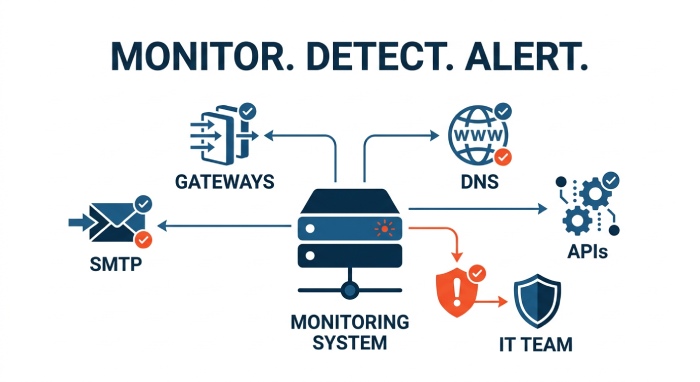
Email downtime detection involves the ongoing surveillance of email systems to detect any interruptions, inconsistencies, or performance declines. Organizations may track various elements of their email infrastructure based on the monitoring solution employed.
- SMTP servers
- Mail gateways
- DNS and MX records
- Mail delivery
- Authentication services
- Email APIs
- Third-party email providers
- Connectivity between mail servers
A monitoring system conducts routine checks and issues alerts upon identifying any failures or anomalies.
An email downtime monitoring system can alert the IT team if an SMTP server ceases to accept connections, enabling administrators to address the issue before it escalates into a larger business concern.
Why Email Downtime Detection Matters
Email outages typically strike at the most inconvenient times, such as overnight or during critical sales periods. Without active monitoring, businesses might remain unaware of issues until users voice their complaints.
Take, for example, a company experiencing an unresponsive SMTP relay. Employees might first think a delayed email is just a one-time error. As failures escalate, IT receives an influx of tickets. By the time the root cause is identified, significant time has been wasted.
Email downtime detection changes this approach.
Rather than depending solely on user feedback, proactive monitoring serves as an early indicator of potential issues. This heightened awareness facilitates quicker investigations and, ultimately, more expedient resolutions.
How Email Downtime Detection Works
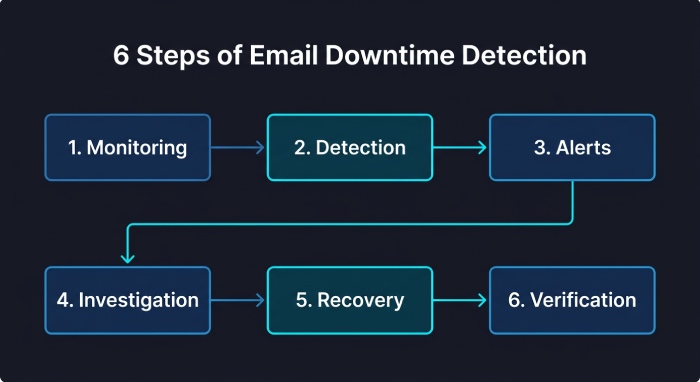
The fundamental process is simple, though enterprise monitoring can be quite complex.
1. Continuous Monitoring
The monitoring system conducts periodic assessments of designated email services and infrastructure elements. These evaluations may involve verifying server accessibility, establishing an SMTP connection, testing authentication protocols, and ensuring that emails can successfully navigate the delivery process.
2. Failure Detection
When a monitoring assessment does not succeed, the system logs that occurrence. It is important to note that a solitary failure does not necessarily indicate an outage; brief network disruptions, packet losses, or other transient issues can trigger false alarms. Consequently, numerous monitoring systems implement multiple assessments or establish thresholds prior to officially recognizing an outage.
3. Alert Generation
When an issue satisfies the specified outage criteria, an alert can be triggered. Notifications may be dispatched via email, SMS, messaging applications, dashboards, or other communication channels. The goal is clear: to deliver the appropriate information to the relevant individual swiftly and efficiently.
4. Investigation
Upon receiving an alert, administrators have the ability to delve into the root cause of the issue. They can examine factors such as server accessibility, DNS settings, authentication processes, network connections, mail queues, security measures, and the status of external services.
5. Recovery
After pinpointing the root cause of the issue, the IT team is able to implement necessary solutions. This recovery process may include actions such as rebooting a service, rectifying DNS errors, troubleshooting network challenges, managing capacity constraints, or collaborating with an email service provider.
6. Recovery Verification
The procedure should not conclude simply because the server seems to be functioning normally. An effective monitoring system must confirm that email services have genuinely resumed their standard operations. This is crucial in avoiding scenarios where an administrator mistakenly believes the issue has been resolved while users are still experiencing difficulties in sending or receiving emails.
Detection Is Only the Beginning
One of the biggest mistakes organizations make is treating downtime detection as the entire solution.
Knowing that email is unavailable is valuable, but it does not automatically explain why it is unavailable.
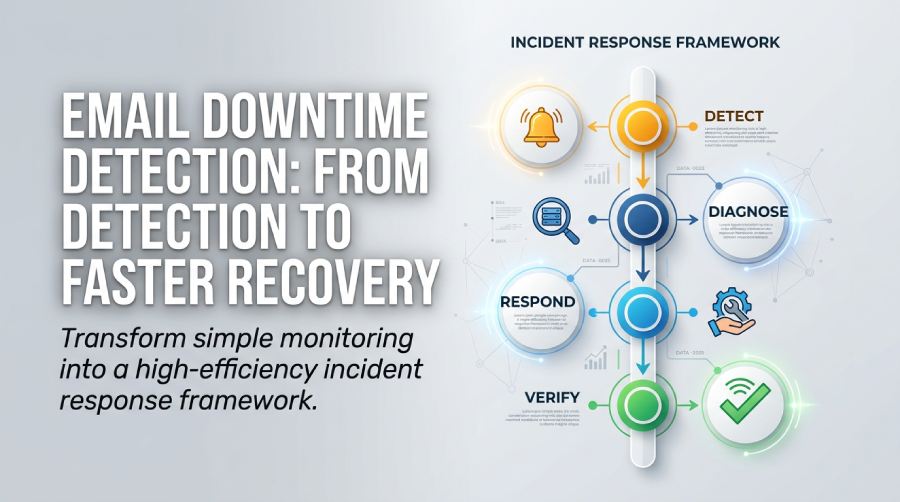
For faster recovery, organizations should build a process around four key stages:
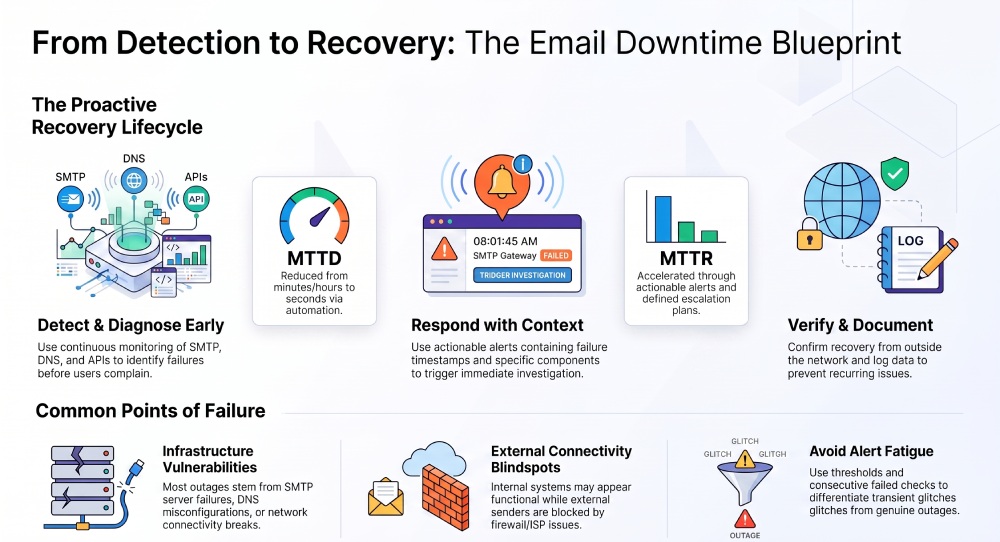
Detect → Diagnose → Respond → Verify
- Detection identifies the problem.
- Diagnosis determines its cause.
- Response involves fixing or containing the problem.
- Verification confirms that normal email operations have been restored.
This method enhances monitoring by evolving it from a basic alert system into a comprehensive incident response framework.
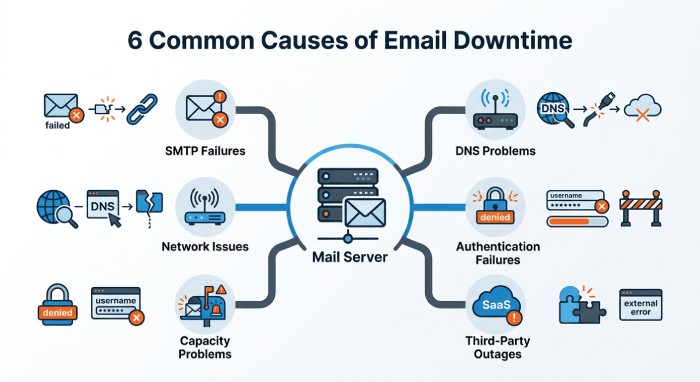
Common Causes of Email Downtime
Recognizing the typical factors that lead to downtime enables organizations to develop more efficient monitoring approaches.
- SMTP Server Failures: SMTP servers manage outgoing emails. When an SMTP service fails, users might face bounced messages, delays, or outright sending issues. Monitoring SMTP connectivity is essential for prompt issue detection.
- DNS Problems: DNS is vital for email delivery. Issues like incorrect MX records, inaccessible DNS servers, or configuration changes can hinder other mail systems from finding an organization’s email setup. Thus, monitoring DNS resolution is essential for detecting email downtime.
- Network Connectivity Issues: An email server might be running but unreachable due to network issues. Factors such as firewall adjustments, routing errors, ISP outages, or connectivity breaks can hinder access for users and external mail systems.
- Authentication Failures: Contemporary email systems depend significantly on authentication. Issues with credentials, authentication services, or configuration may hinder access to email for users and applications.
- Capacity and Resource Problems: Server overload, storage constraints, large email queues, or sudden traffic surges can impact email accessibility. Implementing a monitoring solution that assesses infrastructure performance and email availability enables organizations to pinpoint potential issues before they escalate into significant outages.
- Third-Party Provider Outages: Numerous organizations rely on external email solutions, including cloud platforms, SMTP services, and security gateways. An outage in any of these services can disrupt email functionality, despite the internal systems functioning properly.
How Alerts Support Faster Recovery
An alert is most useful when it provides enough information for an administrator to begin troubleshooting immediately.
A basic notification saying “Email is down” may not be sufficient.
A more useful alert could indicate:
- Which service failed
- When the failure started
- Which monitoring test failed
- Whether the problem is ongoing
- Whether other email components are affected
- The severity of the incident
- Previous related incidents
This context streamlines the information-gathering process for administrators. Additionally, organizations should implement escalation protocols. For instance, a severe email outage could trigger immediate alerts to an on-call administrator, whereas a slight performance issue might be recorded for future review.
Reducing False Positives
While prompt alerts are valuable, frequent false alarms can lead to alert fatigue among administrators. If they consistently receive notifications for minor issues, they may overlook important alerts.
To enhance email downtime detection, it is crucial to differentiate between temporary problems and actual outages.
Organizations can use techniques such as:
- Multiple consecutive failed checks
- Configurable failure thresholds
- Different severity levels
- Recovery notifications
- Dependency monitoring
- Historical performance comparisons
The goal is to achieve a balance between detecting outages quickly and avoiding unnecessary alerts.
Monitoring Email Availability From Outside the Network
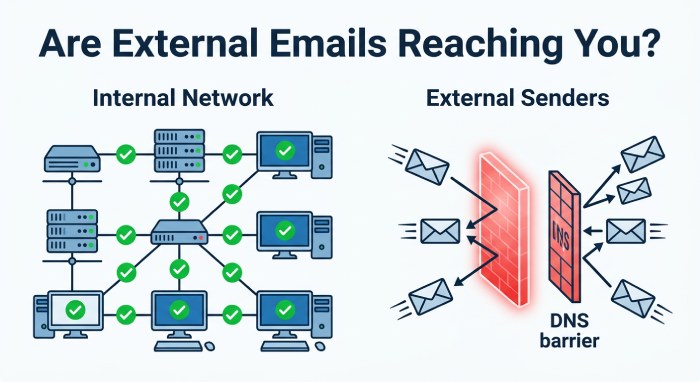
Internal monitoring alone may not provide a complete picture.
An email service may seem functional within the corporate network, yet external senders might be unable to connect.
This issue could stem from firewall malfunctions, DNS complications, routing errors, or problems with external connectivity.
External monitoring offers valuable insights by assessing email services from outside the organization.
This is especially critical for businesses reliant on communications from customers, partners, suppliers, and other outside entities.
Using Historical Data to Improve Recovery
Each downtime incident offers valuable insights for future occurrences. Monitoring systems can retain records of outages, response durations, recurring issues, and recovery times. This historical data enables IT teams to spot trends. For instance, it may show that email outages commonly follow certain configuration adjustments or peak traffic times. Such insights can guide proactive maintenance, allowing organizations to tackle root causes rather than merely reacting to the same issues.
Establishing an Email Downtime Response Plan
Effective monitoring is most successful when paired with a defined response strategy. An organization must specify who will receive alerts, conduct investigations, communicate with impacted users, and oversee recovery efforts.
A basic response process could look like this:
- Step 1: Confirm the alert: Evaluate if the identified issue constitutes a legitimate outage.
- Step 2: Identify the affected service: Identify if the concern pertains to SMTP, DNS, authentication, a mail gateway, or any other related element.
- Step 3: Assess the impact: Determine the scope of the outage to identify if it impacts an individual user, a specific department, the whole organization, or external email communications.
- Step 4: Investigate the root cause: Examine the logs, assess the current state of the infrastructure, evaluate recent modifications, and scrutinize the provider details.
- Step 5: Apply the appropriate fix: Reestablish the impacted service while ensuring that any further disturbance is kept to a minimum.
- Step 6: Verify recovery: Please verify that users are able to successfully send and receive emails, and that the external delivery system is operating as expected.
- Step 7: Document the incident: Document the events that transpired, detail the resolution process, and outline preventive measures to avoid similar occurrences in the future.
Measuring Email Recovery Performance
Organizations should measure more than whether an outage occurred.
- Two useful metrics are Mean Time to Detect (MTTD) and Mean Time to Recover (MTTR).
- MTTD measures how quickly an organization identifies an incident after it begins.
- MTTR measures how quickly the organization restores normal service.
Improved email downtime detection can lower Mean Time to Detect (MTTD) by automating problem identification. Enhanced alerts, documentation, and troubleshooting processes contribute to a reduction in Mean Time to Recovery (MTTR).
For instance, identifying an outage in two minutes rather than thirty provides administrators with a crucial advantage in recovery efforts.
Email Downtime Detection and Business Continuity
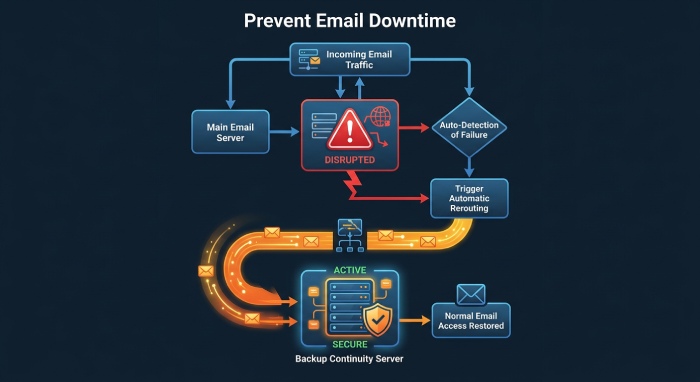
Email monitoring is essential for comprehensive business continuity planning. Companies need to be aware of the implications when their main email service is disrupted. Based on their needs, they might require alternative communication solutions, redundant systems, or continuity services. The goal extends beyond merely identifying outages; it’s about preventing email failures from halting vital business functions.
Best Practices for Faster Email Recovery
Email outages can significantly impact communication, productivity, and customer relations. Implementing a robust recovery plan enables organizations to swiftly address issues and resume normal email functions with minimal interruptions.
1. Monitor Critical Email Services Continuously
Direct attention to the oversight of email services and infrastructure critical for day-to-day operations. Implementing ongoing detection of email outages enables the identification of accessibility problems immediately upon occurrence, empowering IT teams to initiate investigations prior to any significant impact on business activities.
2. Configure Actionable Alerts
Alerts must offer comprehensive insights beyond merely indicating that an email service is down. They should encompass pertinent details regarding the impacted service, the nature of the failure, and the timestamp of when the issue was identified. Effectively configured alerts enable administrators to quickly grasp the situation and respond accordingly.
3. Establish a Clear Escalation Process
Not all email disruptions can be addressed by a single individual or group. It is essential to establish well-defined escalation processes that outline the designated responders for various incident categories. Urgent outages must promptly inform the relevant administrators, engineers, or service providers responsible for email security to avoid avoidable delays.
4. Analyze Availability and Historical Incidents
Keeping track of the accessibility of both internal and external email can offer a comprehensive understanding of the overall health of the service. Furthermore, preserving records of past outages allows organizations to recognize patterns, recurring issues, and vulnerabilities within their email systems. Such insights can facilitate proactive enhancements and minimize the risk of future interruptions.
5. Test the Recovery Process Regularly
A recovery plan’s effectiveness hinges on the team’s familiarity with its execution during a genuine outage. It is essential to routinely assess monitoring alerts, escalation protocols, backup systems, and recovery procedures. Conducting simulated incidents can expose any shortcomings in the process and confirm that all team members are clear on their roles when an actual email outage takes place.
 Email downtime can swiftly create significant issues for businesses lacking a reliable method to detect and address service interruptions.
The first essential step is effective email downtime detection, which involves continuous monitoring of email infrastructure and notifying administrators of any issues. However, managing outages effectively requires a comprehensive approach that encompasses detection, diagnosis, response, recovery, and verification.
By integrating proactive monitoring with timely alerts, structured escalation processes, historical analysis, and a clear recovery strategy, organizations can minimize downtime and expedite the restoration of services.
Ultimately, the objective is to not only recognize email outages promptly but also to respond efficiently and recover swiftly, thereby minimizing the impact on business operations.
General Manager
General Manager at DuoCircle. Product strategy and commercial lead across the email security portfolio.
Secure your email infrastructure
Protect, authenticate, and deliver. Contact our team to find the right solution.