How to Forward Email Without Losing DKIM and DMARC Alignment

Quick Answer
Email forwarding can break DKIM signatures and DMARC alignment if messages are modified. Preserve original content, configure forwarding servers properly, avoid unnecessary header changes, and use ARC to maintain authentication, reduce delivery failures, and improve email deliverability.
Email forwarding is a common practice for businesses that need to redirect messages between inboxes, departments, employees, or external email services. However, forwarding can create email security and authentication problems, particularly when messages rely on DomainKeys Identified Mail (DKIM) and Domain-based Message Authentication, Reporting, and Conformance (DMARC). A forwarded email may fail authentication if its original headers or message content are modified during transmission.
Understanding DKIM and DMARC Alignment
DKIM adds a cryptographic signature to outgoing emails using a private key. Receiving servers use the corresponding public key published in DNS to verify the signature and determine whether signed message components have changed.
DMARC builds on SPF and DKIM by checking whether at least one authentication method passes and aligns with the visible From domain. This helps receiving servers verify the sender’s identity and prevent email spoofing.
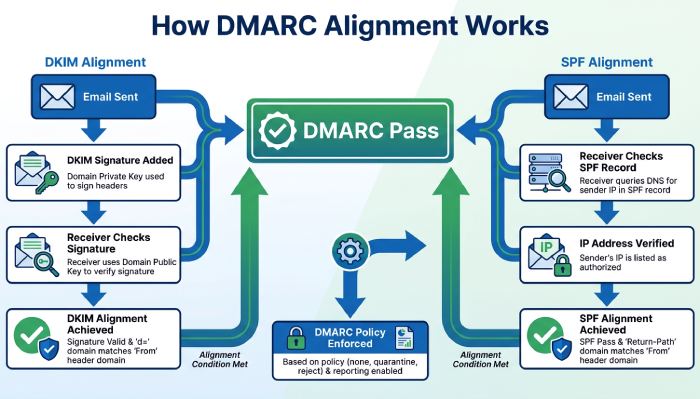
For DMARC to pass, an email must satisfy at least one of these conditions:
- DKIM alignment: The DKIM signing domain (d=) must align with the domain in the visible From address under the domain’s configured relaxed or strict alignment mode.
- SPF alignment: The domain authenticated through SPF must align with the visible From address.
When forwarding changes the authentication details or message structure, these checks may fail.
Why Email Forwarding Causes DKIM and DMARC Failures
Several forwarding practices can create authentication issues.
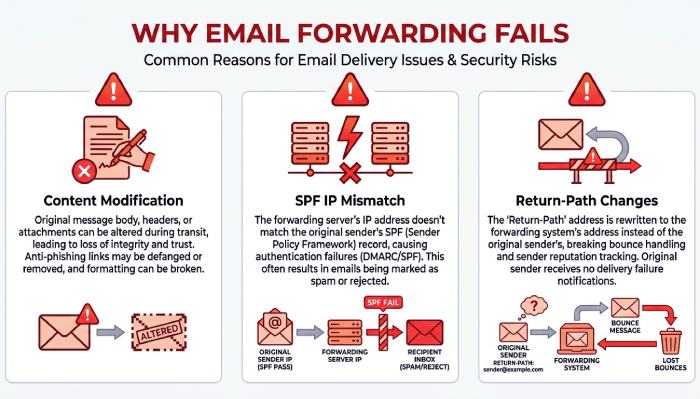
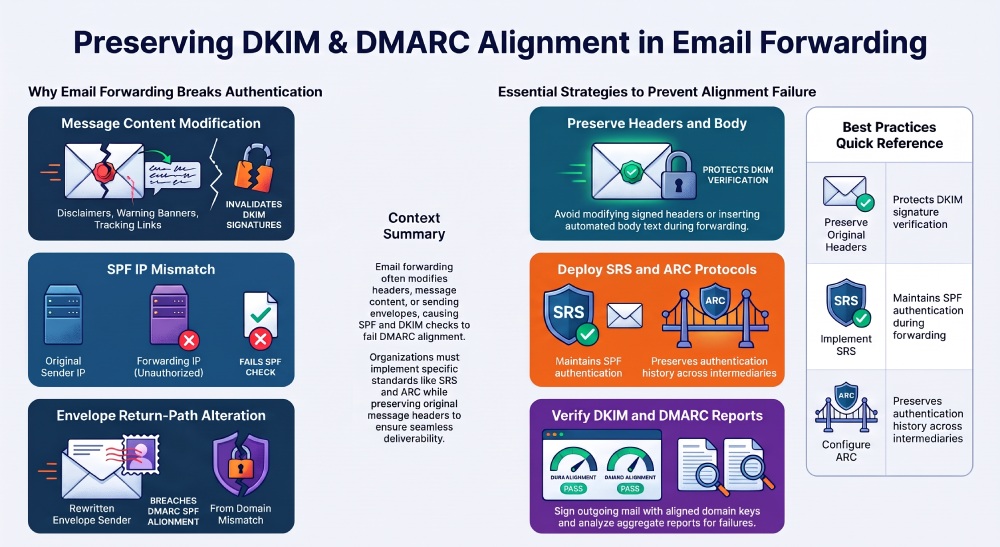
- Message Content Modification: Forwarding services may change signed email content by adding disclaimers, warning banners, or tracking information. These modifications can cause DKIM signature verification to fail.
- SPF Authentication Breaks: SPF may fail during forwarding because the receiving server evaluates the forwarding server’s IP address against the original sender’s SPF record, which may not authorize that IP address.
- Changes to the Return-Path: During forwarding, some services rewrite the SMTP envelope sender using Sender Rewriting Scheme (SRS). This can help SPF pass for the forwarding domain, but the rewritten domain may not align with the original visible From domain, potentially causing DMARC SPF alignment to fail.
- Multiple Forwarding Servers: Messages that pass through several forwarding services may experience repeated changes to headers, sender information, or message content. Each additional intermediary can introduce another opportunity for authentication problems.
How to Forward Email Without Breaking DKIM and DMARC
1. Preserve Original Message Headers
Preserving original email headers is essential for DKIM verification. Forwarding services should avoid changing signed headers, such as From, Subject, and Date, because modifications can invalidate the DKIM signature.
Choose forwarding services that maintain the original message structure and minimize unnecessary header changes to prevent authentication failures.
2. Avoid Modifying the Email Body
One of the most effective ways to protect DKIM signatures is to avoid unnecessary changes to message content.
Forwarding services should minimize:
- Automatic email disclaimers.
- Additional promotional messages.
- Tracking links and rewritten URLs.
- Formatting changes.
- Automatic content insertion.
If an organization must add legal disclaimers, consider applying them before the original sender generates the DKIM signature or using a separate message rather than modifying the forwarded content.
3. Implement Sender Rewriting Scheme (SRS)
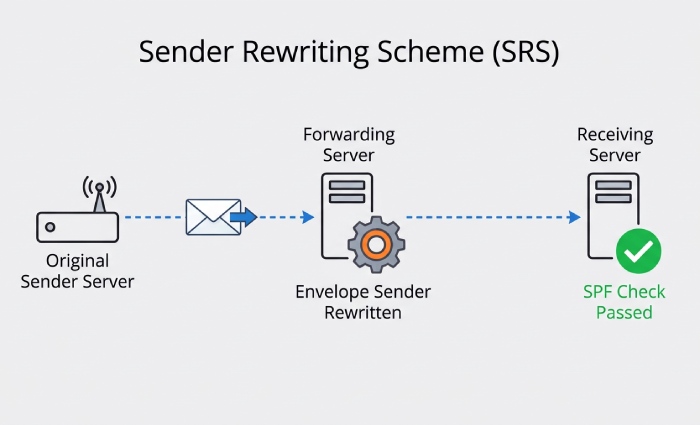
Sender Rewriting Scheme (SRS) helps prevent SPF failures during email forwarding by replacing the original envelope sender address with one from the forwarding server’s domain. This allows the forwarded email to pass SPF authentication for the rewritten domain.
SRS is useful for mailing lists and forwarding gateways because it allows the forwarding server to authenticate its own sending IP address through SPF. However, SRS does not preserve SPF alignment with the original visible From domain. A valid, aligned DKIM signature can still allow DMARC to pass.
4. Use ARC Authentication
Authenticated Received Chain (ARC) records authentication results and adds cryptographically sealed headers as messages pass through intermediary servers. This allows receiving systems to evaluate the original authentication history when forwarding-related changes affect SPF or DKIM results.
ARC is particularly useful when trusted intermediaries modify messages or forward them through infrastructure that affects SPF or DKIM authentication. However, ARC does not guarantee DMARC passage because receiving servers determine whether to trust the ARC chain when making authentication and delivery decisions.
5. Maintain Correct SPF Records
Organizations should regularly review SPF records to ensure all legitimate sending services are authorized. Using SRS allows forwarding servers to authenticate their own sending IP addresses without requiring the original sender to add those forwarding IP addresses to its SPF record.
Avoid unnecessary IP addresses in SPF records, as they can increase DNS lookup complexity. Regular checks also help identify configuration errors and unauthorized senders.
6. Configure DKIM Signing Correctly
DKIM configuration should be reviewed across all legitimate email-sending services.
Ensure that:
- Outgoing messages receive valid DKIM signatures.
- The signing domain aligns with the visible From domain.
- Public keys are correctly published in DNS.
- Forwarding services preserve the original DKIM-signed content.
- Key rotation is performed without disrupting email authentication.
If an organization uses multiple email platforms, each platform should be configured to sign messages with an appropriate domain.
7. Monitor DMARC Reports
DMARC aggregate reports provide useful information about email authentication activity across a domain.
These reports can help administrators identify:
- Forwarding services causing SPF failures.
- Messages with invalid DKIM signatures.
- Sources failing DMARC alignment.
- Unexpected sending infrastructure.
- Authentication problems affecting legitimate emails.
Start with a monitoring policy using p=none while reviewing authentication results. After identifying legitimate sending sources and correcting configuration issues, organizations can gradually move toward enforcement with p=quarantine or p=reject.
Best Practices for Maintaining Email Authentication
A consistent email authentication strategy can reduce forwarding-related problems and improve deliverability.
Consider the following best practices:
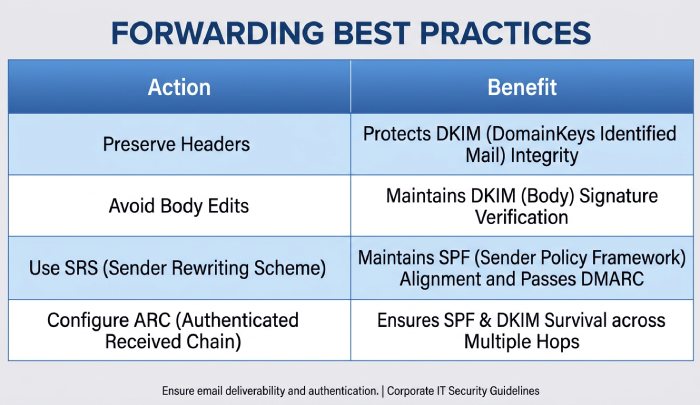
| Best Practice | Benefit |
|---|---|
| Preserve original headers | Protects DKIM verification |
| Avoid modifying message bodies | Reduces DKIM signature failures |
| Implement SRS | Helps maintain SPF authentication during forwarding |
| Configure ARC | Preserves authentication history |
| Maintain valid SPF records | Authorizes legitimate sending sources |
| Use aligned DKIM signatures | Supports DMARC alignment |
| Monitor DMARC reports | Identifies forwarding-related failures |
Organizations should also test forwarding configurations before implementing them across all business accounts. Testing with different receiving providers can reveal authentication issues that may not appear in a single email environment.
How to Troubleshoot DKIM and DMARC Failures After Forwarding
To troubleshoot DKIM and DMARC failures after forwarding, inspect the Authentication-Results header for SPF, DKIM, and DMARC results. Compare the original and forwarded message headers to identify changes that may affect authentication.
Follow these checks:
- Check SPF results: Inspect the Return-Path and SMTP envelope sender to determine whether SRS rewriting is configured correctly.
- Verify DKIM alignment: Compare the DKIM signing domain (d=) with the visible From domain and check whether the signature remains valid.
- Inspect signed content: Review the DKIM-Signature header, including the signed header list (h=) and body hash (bh=), to identify potential message modifications.
- Review ARC headers: Examine ARC-Authentication-Results, ARC-Message-Signature, and ARC-Seal to understand the authentication history recorded by intermediary servers.
- Analyze DMARC reports: Identify recurring SPF alignment failures, DKIM signature failures, and forwarding sources affecting legitimate email delivery.
These checks can help administrators identify whether forwarding-related changes, incorrect SRS configuration, or DKIM modifications are responsible for authentication failures.
General Manager
General Manager at DuoCircle. Product strategy and commercial lead across the email security portfolio.
Secure your email infrastructure
Protect, authenticate, and deliver. Contact our team to find the right solution.