

Email spoofing and phishing pose significant risks to businesses, regardless of their size. Implementing a DMARC reject policy is crucial for safeguarding your domain, enhancing email credibility, and making sure only legitimate messages are delivered to inboxes.
This guide provides ten straightforward steps to help you transition your domain to a secure DMARC reject policy with confidence.
Why reject policy readiness matters
Getting to a confident reject policy is about more than checking a box—it is the culmination of a disciplined DMARC implementation that hardens email authentication and elevates email security from reactive to preventative. A mature DMARC policy prevents cybercriminals from sending spoofed emails that impersonate your brands, delivering tangible brand protection and domain protection across your entire portfolio. With a precise policy configuration, you can stop non-compliant mail at scale and raise your DMARC success rate measurably.
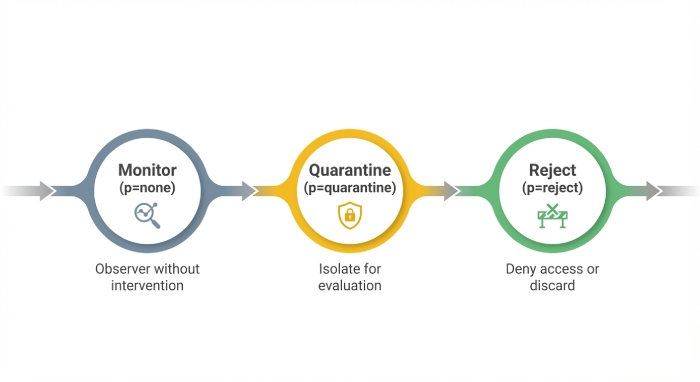
From monitoring mode to enforcement mode
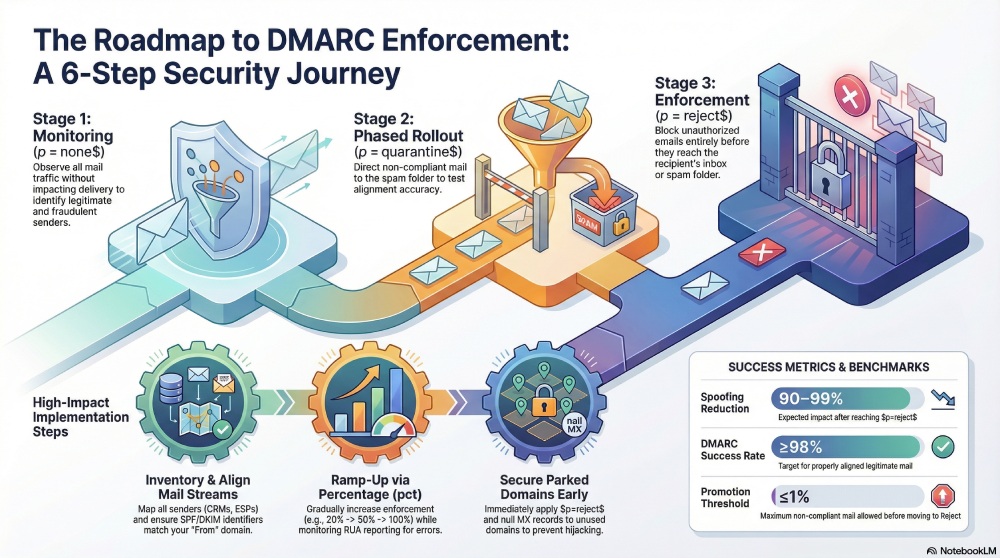
Most programs begin with DMARC monitoring at p=none to observe traffic without impact, then progress to phased rollout with p=quarantine, and finally DMARC enforcement at p=reject. This monitoring mode-to-enforcement mode journey is a policy transition that hinges on clean data, careful service discovery, and disciplined policy monitoring. Along the way, you’ll compare quarantine vs reject outcomes, reduce email spoofing and impersonation threats, and protect recipients and recipient servers from fraudulent senders.
Key outcomes and risk reduction
As your DMARC policy hardens from p=none to p=quarantine and eventually to p=reject, you reduce email fraud and improve reputation protection. You’ll minimize misconfiguration issues that lead to DMARC warning signals in reports, mitigate spoofed emails, and ultimately deploy a reject policy that blocks non-compliant mail before it reaches the spam folder or inbox. Organizations investing in email security frequently pair DMARC with MTA-STS and other controls for layered defense.
Step 1: Map your domain landscape and mail streams
A thorough inventory is the foundation of DMARC implementation and DMARC policy readiness. Catalogue every organizational and brand domain and subdomain—including active, marketing, transactional, and parked assets. For each domain, list every outbound sender: ESPs, CRM platforms, HR systems, product notifications, support, billing, and devices/MFPs. Capture owners, sending IPs/hosts, and whether traffic is relayed through Office 365, Microsoft Exchange, Salesforce, Marketo, Mailchimp, or custom MTAs on GCP/Google Cloud Platform.
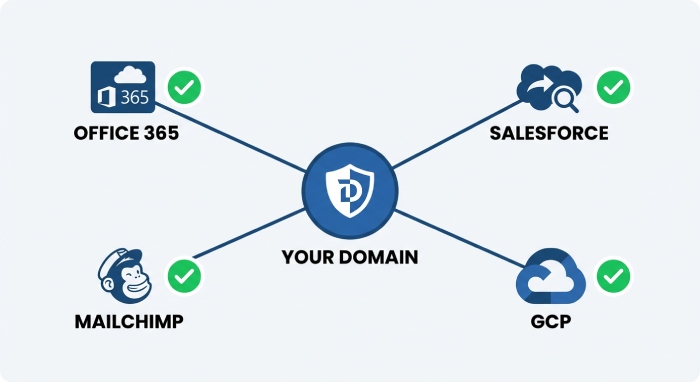
Inventory and service discovery
- Identify third-party senders and legitimate senders across all lines of business.
- Record Return-Path domains, HELO names, and whether SPF and DKIM are already present.
- Note who the email administrator is for each stream to accelerate triage and policy change approvals.
- Use service discovery to classify traffic types (marketing vs transactional), which informs quarantine policy vs reject policy timing.
Tools and best practices
- Use Valimail Domain Checker (also referenced as Domain Checker) or mxtoolbox.com to snapshot existing DMARC record, SPF, and DKIM status; Agari and Fortra also provide reconnaissance tooling.
- Validate via command-line tools: nslookup and dig to fetch each DNS record; verify cloud-based DNS providers return consistent answers.
- Track DNS propagation windows when publishing or modifying records to avoid false negatives during DMARC validation.
- Maintain a single source of truth for DNS record ownership and change history; this de-risks policy transition and future policy enforcement.
Step 2: Establish SPF and DKIM foundations
SPF and DKIM are the heart of email authentication, and both must be engineered for alignment and resilience before DMARC enforcement.
SPF design that scales
- Publish a clean SPF DNS record within the 10 DNS-lookup limit; prefer include mechanisms over ip4 clutter.
- Avoid ptr and +all; during discovery, consider ~all (softfail) and move to -all (hardfail) once stable.
- Consolidate authorized senders (e.g., Office 365, Salesforce, Marketo, Mailchimp) and document their include chains to prevent misconfiguration.
- Monitor for flattening issues and avoid brittle manual IP lists; in complex environments, a phased rollout of changes reduces risk.
DKIM configuration details
- Deploy 2048-bit DKIM keys with unique selectors per platform; rotate keys on a schedule.
- Ensure every sender signs consistently; verify d= aligns with the visible From domain you intend to protect.
- For Microsoft and GCP-based services, confirm tenant and custom domain alignment; test across Microsoft Exchange relays and Google Cloud Platform routes.
- Archive DKIM public keys and selectors to streamline audits and policy configuration updates.
Step 3: Design for DMARC alignment from the start

Alignment determines whether authenticated results “count” toward DMARC policy decisions. Design for alignment early to minimize non-compliant mail as you move toward a reject policy.
Align the visible From domain
- Configure DKIM so the d= domain matches the From domain; start with relaxed alignment (adkim=r).
- Set custom Return-Path (MailFrom) domains for third-party senders so SPF alignment succeeds; begin with aspf=r and tighten if needed.
- Standardize subdomain usage by function (e.g., marketing.brand.com, notices.brand.com) to simplify domain protection and future policy recommendation reviews.
Quarantine vs reject implications
- Use p=quarantine as a proving ground to measure the impact of non-compliant mail hitting the spam folder; then escalate to p=reject once legitimate senders are aligned.
- Define clear criteria for promotion: e.g., <1% unauthenticated, unknown traffic for 30 days before p=reject.
- Document business exceptions and determine if any streams should retain a quarantine policy longer; apply sp= on subdomains to stage different enforcement levels without jeopardizing the apex domain.
Step 4: Publish a DMARC record in monitor mode
Start with a precise DMARC record in monitoring mode to gather data without affecting delivery.
Compose your DNS record
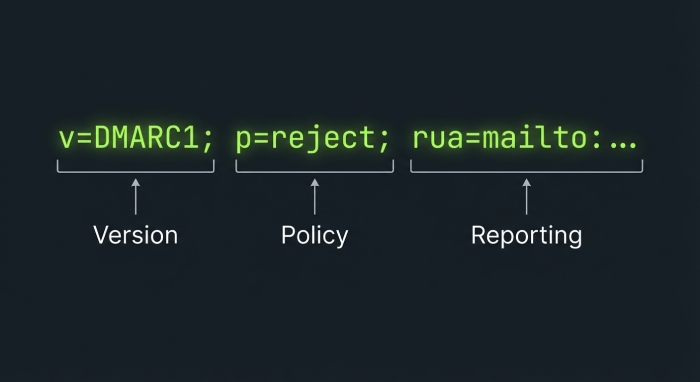
- Example baseline: v=DMARC1; p=none; rua=mailto:dmarc-aggregate@yourdomain.com; ruf=mailto:dmarc-forensic@yourdomain.com; fo=1; ri=86400
- Add sp= to specify subdomain policy value if needed; ensure the rua tag points to a monitored reporting address.
- Confirm correct DMARC tags and syntax, including v=DMARC1, policy value, and mailto: formatting in the DMARC record.
- Publish the TXT DNS record at _dmarc.yourdomain.com; verify via nslookup and web validators after DNS propagation.
Validation and DMARC reporting

- Perform DMARC validation with tools from Valimail, Valimail Automation, mxtoolbox.com, Agari, or Fortra; Fortra’s Customer Phishing Protection Bundle can complement DMARC reporting workflows.
- Check that aggregate (RUA) and forensic (RUF) mailboxes accept large XML attachments; coordinate with your mailbox administrator if size or filtering blocks reports.
- Pay attention to DMARC warning indicators like malformed rua tag entries or unreachable mailboxes; fix issues before proceeding to p=quarantine.
- Keep DMARC monitoring at p=none until you have high-confidence visibility of all streams and a clear plan for policy transition.
Step 5: Build your reporting and analysis workflow
Raw RUA XML must be transformed into insight that drives policy enforcement decisions.
Normalize and triage the data
- Centralize DMARC reporting into a SIEM or analytics tool; normalize by source, domain, and alignment status.
- Build dashboards for DMARC implementation progress, highlighting non-compliant mail, unknown sources, and alignment failures by domain.
- Set alerts for sudden spikes in fraudulent senders or alignment regressions; correlate with SPF/DKIM changes and DNS record updates.
Roles, SLAs, and policy transition
- Define SLAs for remediation: the email administrator and service owners must fix third-party senders quickly when DMARC tags indicate misalignment.
- Use a phased rollout: move from p=none to p=quarantine, then to p=reject, verifying each policy change against delivery and business KPIs.
- Document policy suggestion and policy recommendation criteria (e.g., volume thresholds, failure rates) for promoting quarantine policy to reject policy.
- Communicate policy enforcement timelines with stakeholders; test on lower-risk subdomains first, then roll to apex domains for complete domain protection and reputation protection.
- Revalidate after each policy transition to maintain momentum toward full DMARC enforcement and a durable DMARC policy.
Statistical Data: Representative DMARC program KPIs during rollout
| Metric | Value / Range | Notes |
| Reduction in spoofed emails after moving to p=reject | 90–99% | Significant decrease in fraudulent mail |
| Share of authenticated mail (SPF or DKIM aligned) before enforcement | 85–95% | Baseline alignment before DMARC enforcement |
| Time from p=none to p=quarantine in phased rollout | 30–60 days | Gradual enforcement period |
| Time from p=quarantine to p=reject for apex domain | 30–90 days | Additional phased rollout period |
| Non-compliant mail rate threshold before promotion to reject policy | ≤1% sustained for 30 days | Ensures low error rate before full enforcement |
| DMARC success rate (alignment pass) after full enforcement | ≥98% | Target for properly aligned mail |
| Percentage of third-party senders aligned before enforcement mode | 100% | Required for smooth enforcement |

Step 6: Remediate legitimate senders to achieve alignment
Enable DKIM and align identifiers per platform
Every legitimate sender must pass and align on SPF or DKIM for the DMARC policy to apply correctly. Prioritize DKIM because it survives forwarding and list-servs better and boosts email authentication consistency. For each platform, enable DKIM with your domain, ensure the d= domain matches the organizational domain or the aligned subdomain, and verify selector publication as a DNS record. This is core DMARC implementation work and should be verified during DMARC validation and DMARC monitoring before any policy transition.
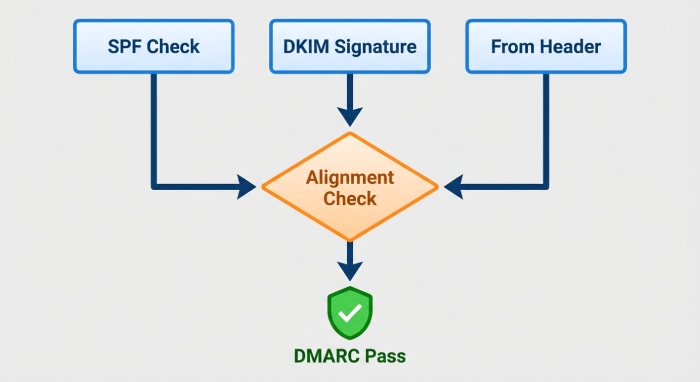
Office 365 / Microsoft Exchange and Microsoft 365
- Enable DKIM signing for each custom domain, rotate selectors periodically, and confirm alignment in DMARC reporting. Microsoft guidance often includes a policy suggestion if alignment is missing; follow that policy recommendation but confirm with your email administrator.
- If SPF alignment is required, configure a custom bounce/return-path using Microsoft-approved methods. Validate updates via command-line tools (nslookup) and check propagation in cloud-based DNS portals.
Salesforce, Marketo, Mailchimp
- Turn on DKIM in each sender platform and set the Bounce/Return-Path to a domain you own to align SPF’s Mail From.
- Add or update SPF includes as a DNS record (e.g., include:spf.marketo.net) and ensure the v=DMARC1 DMARC record lists the correct rua tag reporting address for visibility into non-compliant mail.
GCP / Google Cloud Platform and G Suite (Gmail)
- Enable DKIM on each domain in Admin Console, publish selectors, and retest alignment. For services hosted on GCP, ensure service discovery identifies all outbound IPs and third-party senders using your domain.
Configure custom return-path and SPF includes
Where vendors support a custom return-path, configure it to a domain or subdomain you control. Update SPF to include each sender’s mechanism and keep the SPF record under 10 lookups to avoid misconfiguration. This is fundamental policy enforcement hygiene and protects against email spoofing by fraudulent senders.
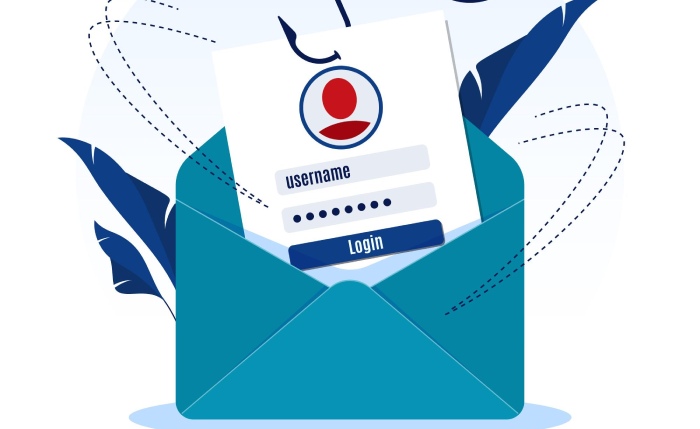
Use dedicated subdomains when vendor constraints exist
If a platform cannot align DKIM or return-path with your apex domain, assign a dedicated subdomain (e.g., mail.example.com). Publish a specific DMARC record for that subdomain if needed and apply a quarantine policy or reject policy as you progress. Dedicated subdomains improve domain protection, simplify policy configuration, and accelerate DMARC policy readiness.
Retest until pass and alignment are consistent
Retest using seed lists and tools like Valimail Domain Checker (Valimail’s Domain Checker) and mxtoolbox.com. Confirm pass + alignment for DKIM or SPF across all legitimate senders. Verify DMARC tags in the DMARC record (v=DMARC1; p=none/p=quarantine/p=reject; rua tag) and monitor DMARC success rate and non-compliant mail trends in RUA reports from Agari or Valimail Automation.
Step 7: Lock down parked and high‑risk domains early
Apply strict DMARC policy on unused domains
Unused or parked domains should move directly to a reject policy for immediate reputation protection. Publish a DMARC record at the organizational domain with p=reject and an sp=reject subdomain policy to cascade protection. This early DMARC enforcement blocks spoofed emails and impersonation threats from cybercriminals and reduces the attack surface before a broader phased rollout on active domains.
Harden DNS and mail routing
- Publish a null MX (MX 0 .) to signal no inbound mail handling and add v=spf1 -all to prevent SPF pass.
- Confirm DNS propagation with nslookup and policy monitoring via DMARC reporting. Use cloud-based DNS for rapid policy change and version control. These best practices limit misconfiguration while maximizing domain protection.
Step 8: Move from monitor to enforcement gradually

Ramp p=quarantine with pct and monitor impact
Shift from p=none (monitoring mode) to a quarantine policy using p=quarantine with a pct ramp—e.g., 20 → 50 → 100. Observe RUA data and mailbox administrator feedback to see how recipient servers treat quarantined messages (e.g., routed to the spam folder). This phased rollout supports careful DMARC validation and highlights non-compliant mail that still needs remediation. The quarantine vs reject staging also reduces risk from any lingering third-party senders.
Transition to p=reject with pct to reach full enforcement
Once stragglers are resolved, change the DMARC policy to p=reject with a pct ramp up to 100 in enforcement mode. Continue DMARC monitoring throughout the policy transition to catch unexpected failures and keep a running log of policy change decisions for audit. Apply sp= policies to explicitly control subdomain behavior and ensure consistent policy enforcement across brands and regions.
Apply explicit sp= controls for subdomains
Set sp=quarantine during early enforcement on subdomains that are still stabilizing, then update to sp=reject as alignment becomes consistent. This methodical DMARC implementation supports brand protection while minimizing delivery disruptions.
Step 9: Validate deliverability and edge cases before 100% reject
Run seed tests, watch bounces and feedback loops
Before reaching 100% p=reject, test across major inbox providers and gateways. Analyze bounces, feedback loops, and DMARC reporting to ensure legitimate senders are not inadvertently blocked. Engage mailbox administrators and email administrators to tune routing and confirm that recipient servers are handling aligned messages as expected.
Account for forwarding, lists, and ARC
Prefer DKIM alignment because it is resilient to forwarding and mailing lists; SPF typically breaks in those flows. Assess relaxed vs strict alignment modes and document any required exceptions. Where you control the path or have key partners, consider ARC to preserve authentication results. Complement DMARC with MTA-STS where relevant to strengthen email security transport. If any DMARC warning surfaced during testing (e.g., partial alignment), address it prior to final enforcement.
Step 10: Operationalize ongoing governance
Establish monitoring, key rotation, and record hygiene
- Implement alerts on anomalies in DMARC reporting (sudden spikes in non-compliant mail). Track DMARC success rate as a primary KPI.
- Rotate DKIM keys periodically and retire old selectors; document key lifecycles and enforce a vendor onboarding checklist requiring DKIM and a custom return-path.
- Monitor SPF record growth and lookup counts; use service discovery to detect new third-party senders. Regularly audit DNS records for accuracy and stale entries.
Vendor onboarding, audits, and incident response
- Require every new platform (Office 365, Salesforce, Marketo, Mailchimp, or niche tools) to meet alignment prior to sending. Publish clear policy value requirements and a policy recommendation template for teams to follow.
- Maintain an incident playbook for email fraud and spoofed emails, including rapid DMARC record policy change options, escalation paths, and takedown workflow. Consider solutions like Fortra’s Customer Phishing Protection Bundle alongside Valimail Automation to enhance policy monitoring and reputation protection. Reinforce the overall email security posture with layered controls beyond DMARC, SPF, DKIM, and DNS.
FAQs
What pct values should I use when moving to p=quarantine and p=reject?
Start with 20–25% and increase to 50% and then 100% as reports stabilize. Use RUA trends to confirm that non-compliant mail is dropping and legitimate senders remain aligned before each increment.
Do I need both SPF and DKIM aligned for DMARC enforcement?
DMARC requires alignment on either SPF or DKIM, but aligning both gives resilience and higher deliverability. DKIM alignment is preferred for scenarios involving forwarding and list-servs.
How do I verify my DMARC record and DNS record updates?
Use command-line tools like nslookup, check with mxtoolbox.com, and try Valimail Domain Checker. Always confirm v=DMARC1, rua tag, and policy value (p=none, p=quarantine, or p=reject) and allow for DNS propagation time.
What if a legitimate sender cannot align with my apex domain?
Delegate a dedicated subdomain and align DKIM and return-path there. Apply an appropriate DMARC policy on that subdomain, ramping from p=quarantine to p=reject as alignment proves stable.
Key Takeaways
- Remediate every legitimate sender: enable DKIM, align return-path, update SPF includes, and retest until alignment is consistent.
- Lock down parked domains fast with p=reject, sp=reject, null MX, and v=spf1 -all to cut off spoofed emails and reduce risk.
- Use a phased rollout: p=none to p=quarantine with pct ramp, then to p=reject, while monitoring RUA and resolving non-compliant mail.
- Validate edge cases before 100% reject; favor DKIM alignment, evaluate alignment modes, and apply ARC when appropriate.
Operationalize governance: DMARC reporting alerts, DKIM key rotation, SPF hygiene, vendor onboarding requirements, and an incident playbook.