

SMTP authentication issues can silently hinder email delivery, harm the reputation of the sender, and cause frustration for both teams and recipients when they persist. These problems typically arise from misconfigured credentials or outdated security protocols, often due to preventable oversights in mail server and service configurations.
This article presents effective strategies to help you avoid repeated SMTP authentication issues, ensuring your email systems remain dependable, secure, and efficient.
Preventing recurring SMTP authentication errors: Best practices for mail servers and services
Recurring issues with SMTP authentication error messages usually trace back to a handful of root causes: weak or mismatched authentication method selections, insecure or outdated transport settings, and inconsistent SMTP configuration across clients and services. To break the cycle, standardize how your SMTP server accepts secure submissions, how your SMTP client negotiates STARTTLS, and how credentials are provisioned and rotated. Align SMTP requirements with your email provider’s published server settings and enforce them uniformly on every SMTP endpoint you operate.

A durable approach blends policy and implementation:
- Require TLS 1.2 or higher on every SMTP connection, and explicitly enable STARTTLS on submission ports.
- Limit accepted SASL mechanisms to modern ones; avoid plain authentication and login authentication unless protected by STARTTLS and TLS 1.2.
- Normalize SMTP configuration via environment variables like SMTPAUTHMETHOD, SMTPENABLESTARTTLS, and SMTPOPENSSLVERIFYMODE so that all apps behave consistently.
- Audit SMTP login outcomes, correlate SMTP errors by code, and establish rate limits to suppress brute-force attempts against any SMTP account.
- Coordinate with your email provider to verify SMTP restrictions (e.g., throttling, IP reputation checks) and server configuration expectations.
Hygiene and consistency prevent the majority of SMTP authentication error loops before they start.
Baseline checklist for stability
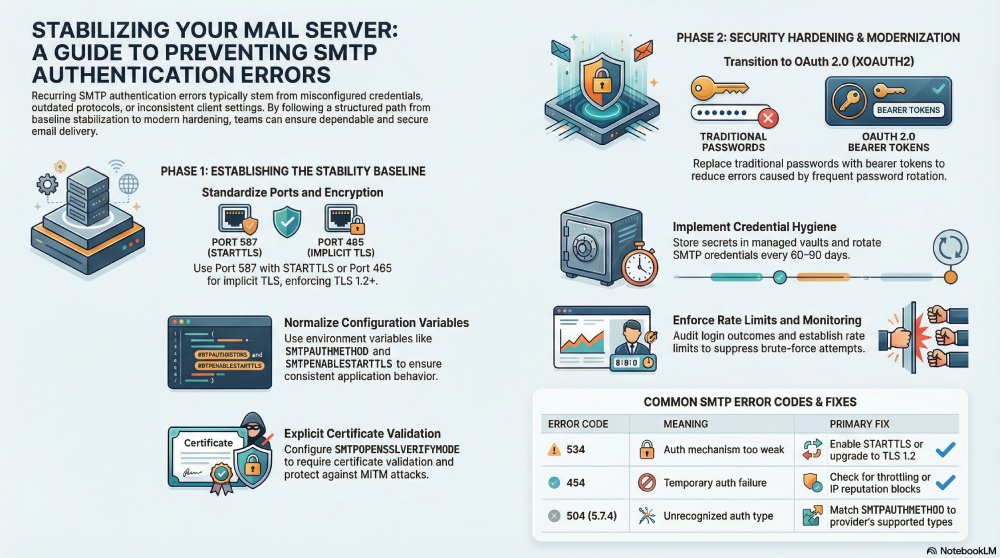
- Verify the SMTP port (587 preferred, 465 for implicit TLS) and require STARTTLS on port 587.
- Enforce TLS 1.2 across the SMTP server and clients; enable TLS; disable TLS 1.0 and disable TLS 1.1 everywhere.
- Set SMTPENABLESTARTTLS to true, define SMTPAUTHMETHOD explicitly, and configure SMTPOPENSSLVERIFYMODE to require certificate validation.
- Rotate the SMTP password on a defined schedule, and confirm the correct SMTPFROMADDRESS and SMTPACCOUNT for each application.
- Document the authentication method supported by your email provider and test SMTP connection paths after every change.
How SMTP authentication works: SASL mechanisms, submission ports, and the auth flow
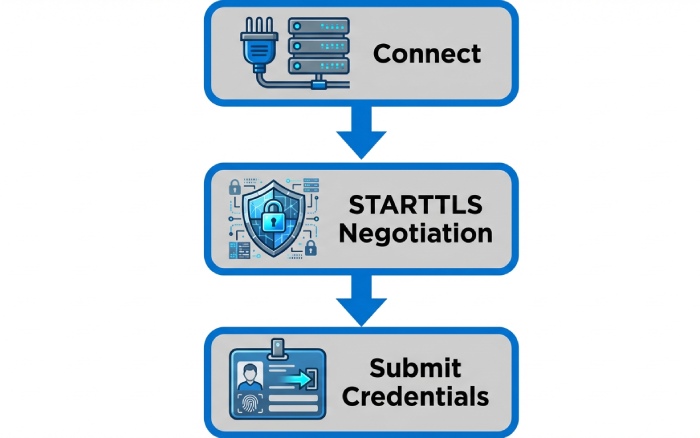
In SMTP authentication, a client submits credentials using a SASL mechanism during the AUTH stage. The SMTP client connects to the SMTP server on a submission-capable SMTP port, negotiates encryption, then presents supported mechanisms. If the authentication type mismatches the server’s policy, an SMTP authentication error follows.
Key moving parts:
- SASL mechanisms: login authentication and plain authentication are widely implemented, but they must be wrapped in STARTTLS. XOAUTH2 enables OAuth 2.0 tokens instead of an SMTP password.
- Submission ports: Port 587 with STARTTLS is the modern default; port 465 offers implicit TLS. Legacy SMTP on port 25 is typically restricted for relay and often blocked by email providers.
- Transport: STARTTLS upgrades a plaintext SMTP connection to an encrypted session; enforce TLS 1.2 to avoid downgrade and cipher issues.
SASL mechanisms in practice
- LOGIN: The client sends base64-encoded username and SMTP password in steps; acceptable only when STARTTLS and TLS 1.2 are negotiated.
- PLAIN: The client sends a single base64-encoded blob containing the username and password; also requires STARTTLS at a minimum.
- XOAUTH2: Uses OAuth 2.0 bearer tokens, eliminating stored passwords and reducing recurring SMTP authentication error patterns caused by password rotation.
Your SMTP configuration should explicitly declare SMTPAUTHMETHOD to avoid the “Unrecognized authentication type” server error when the SMTP server disables weak methods.
Why STARTTLS + TLS 1.2 matter
STARTTLS ensures credentials sent via login authentication or plain authentication are protected in transit. Requiring TLS 1.2 avoids a TLS mismatch between modern clients and legacy endpoints, and it aligns with most email provider security baselines.
Submission ports and SMTP endpoint selection
Use port 587 for authenticated submission with STARTTLS. Choose 465 only if your SMTP client does not support STARTTLS reliably. Always target the provider’s supported SMTP endpoint; for Microsoft 365 and Exchange Online, don’t rely on smtp-legacy.office365.com except during carefully controlled migration or fallback tests.
Recognizing patterns in recurring failures: decoding 535/534/454 and related error codes
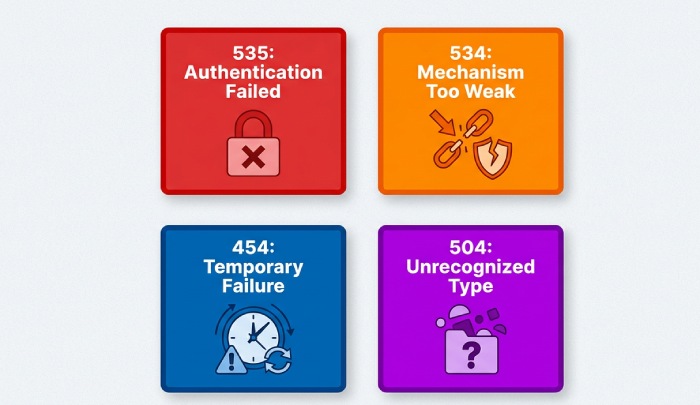
- SMTP534 Authentication mechanism is too weak: The SMTP server requires STARTTLS, TLS 1.2, or a stronger mechanism (e.g., XOAUTH2). This appears when SMTPENABLESTARTTLS is false or when the SMTP port is wrong.
- 454 Temporary authentication failure: Can indicate throttling, temporary backend issues, or SMTP restrictions triggered by rate limits. If repeated, coordinate with your email provider.
- 504 5.7.4 Unrecognized authentication type: The server has disabled the mechanism your SMTP client is attempting. Set SMTPAUTHMETHOD to a supported method or enable OAuth 2.0.
Correlate SMTP messages with server logs. In Exchange Online and Microsoft 365, telemetry will often reveal policy blocks, IP reputation, or client TLS version issues. If you consistently see the same SMTP errors, test SMTP connection paths with OpenSSL or swaks to rule out TLS mismatch conditions.
Server-side hardening: secure submission, TLS requirements, SASL mechanisms, and rate limits
On your SMTP server or local server relays, define strong defaults so weak settings cannot slip in through application-specific configuration files.
- Enforce STARTTLS on port 587 and require TLS 1.2. Set SMTPOPENSSLVERIFYMODE to verify-peer/verify-host to protect against MITM.
- Disable weak SASL: Allow XOAUTH2 where possible; allow login authentication and plain authentication only if STARTTLS is established. Document the permitted authentication type in your server configuration.
- Rate limit authentication attempts per IP, per SMTP account, and per SMTP endpoint to curb brute force that can trigger cascades of SMTP authentication error events.
- Maintain security updates and automatic updates for TLS libraries and ciphers on Ubuntu Server and Windows hosts. After changes, restart server components to apply new server settings.
In hybrid or cloud-forward designs, use a cloud-based service to front-end a local server, offloading spam filtering and reputation to improve deliverability and reduce SMTP errors.

Microsoft 365 and Exchange Online specifics
Microsoft guidance emphasizes modern auth and TLS 1.2 for SMTP authentication. In Exchange Online and Office 365:
- Basic auth is being phased out; use OAuth 2.0 (XOAUTH2) wherever supported. Office Outlook, Outlook.com, Microsoft Teams integrations, Dynamics 365, Power Platform, and Microsoft Copilot scenarios benefit from token-based auth and centralized policy. Azure policies can further enforce SMTP requirements.
- Avoid smtp-legacy.office365.com except for exceptional legacy SMTP cases. Persistent 504 5.7.4 or “Unrecognized authentication type” often indicates a disabled mechanism or a tenant policy. Reference community insights from Aholic Liang-MSFT and VasimTamboli, and ongoing coverage at office365itpros.com.
- If patterns persist, contact your email provider or Microsoft technical support with timestamps and SMTP messages to accelerate troubleshooting SMTP escalations.
Modernizing auth: OAuth 2.0 for SMTP, app passwords, and phasing out legacy/basic authentication
Moving from passwords to tokens dramatically reduces recurring SMTP authentication error loops:
- Adopt XOAUTH2 wherever the SMTP client supports it. This replaces the SMTP login plus SMTP password exchange with a bearer token, aligning with Microsoft 365 and Exchange Online standards.
- For systems that cannot support OAuth 2.0, consider app passwords (where still allowed) as a transitional step while planning upgrades. Clearly label the authentication method in the configuration file via SMTPAUTHMETHOD.
- Decommission legacy SMTP workflows incrementally. Inventory every application using plain authentication or login authentication, enable STARTTLS and TLS 1.2, and plan a phased migration. Many Mastodon and Ubuntu deployments, for example, can be upgraded without downtime.
Modern auth also improves governance and auditability, integrates with collaboration features across Microsoft Edge, Windows, and Microsoft Teams, and supports scalable messaging patterns across multi-tenant workloads.
Client and application configuration hygiene: ports, TLS modes, cipher support, and retry strategies

Most repeat failures originate in inconsistent client settings. Standardize how every SMTP client in your fleet connects and authenticates.
- Ports and transport: Use SMTP port 587 with STARTTLS. Ensure SMTPENABLESTARTTLS is set and verified. If a client must use 465, confirm cipher support and TLS 1.2. Mismatches cause TLS mismatch errors and recurring SMTP authentication error patterns.
- Credentials and identity: Confirm SMTPFROMADDRESS matches the SMTP account permitted to send. Store the SMTP password securely and rotate it; document the authentication method per app. In containers or CI/CD, define SMTPAUTHMETHOD, SMTPENABLESTARTTLS, SMTPOPENSSLVERIFYMODE, SMTPACCOUNT, and SMTPFROMADDRESS via environment variables to enforce uniform SMTP configuration.
- Ciphers and verification: Align client cipher suites with server configuration; failing verification should not be bypassed. Use SMTPOPENSSLVERIFYMODE to enforce strict certificate checks.
- Retries and backoff: Implement exponential backoff on 454 errors and cap retries to avoid rate-limit triggers. Distinguish between 535 (credentials) and 534 (policy/transport) to avoid pointless retries.
- Testing: After any change, test SMTP connection flows from the application host. On Ubuntu Server, use openssl sclient -starttls smtp against the target SMTP endpoint to validate STARTTLS and TLS 1.2. For a Mastodon server sending email notifications, keep a runbook that validates encryption, ports, and credentials before deploying updates.
Operational tips:
- Keep server configuration and client configuration file templates under version control to minimize drift.
- After rotating certificates or applying security updates, restart server daemons to ensure new settings take effect.
- If you hit opaque SMTP errors from a third-party email service, escalate early: collect logs, timestamps, and sample SMTP messages, then contact your email provider with the artifacts they require.
Finally, train teams on SMTP authentication fundamentals and centralize guidance. Include a one-page policy on authentication type selection, required STARTTLS usage, mandatory TLS 1.2, and how to remediate a failed SMTP login. For organizations with broad SaaS use, align practices with Microsoft 365 and Exchange Online policies and evaluate a cloud-based service for ingress/egress hygiene.
Credential and token management: rotation, lockout policies, secrets storage, and least privilege

Strong credential hygiene is essential to avoid an SMTP authentication error cascade that disrupts email communication. Treat the SMTP account as a privileged identity: enforce secrets rotation, implement lockout policies, and scope rights to the minimum required. For services like a Mastodon server on Ubuntu Server or a local server forwarding alerts, rotate the SMTP password every 60–90 days, and document the process in your runbook so the SMTP configuration is updated across environments simultaneously.
- Rotation and format: Use randomly generated credentials with at least 20 characters. If your SMTP client supports OAuth or tokens from Exchange Online or your email provider, rotate app passwords or tokens with the same rigor and verify the authentication method in your configuration file after each rotation.
- Lockout policies: Limit failed attempts to mitigate brute force. Excessive failures should trigger rate limits and temporary blocks to prevent further SMTP authentication errors while preserving service uptime.
- Secrets storage: Store the SMTP login and SMTP password in a managed secret store (for example, Azure Key Vault, HashiCorp Vault, or system keyrings). Avoid embedding credentials directly in a configuration file; instead, reference environment variables like SMTPACCOUNT, SMTPFROMADDRESS, SMTPAUTHMETHOD, and SMTPENABLESTARTTLS.
- Least privilege: Provision an SMTP account with send-only rights restricted to the required SMTP endpoint and sender addresses. This reduces blast radius if a key leaks and helps satisfy SMTP requirements that many providers enforce as SMTP restrictions.
When using Office 365 or Microsoft 365 to relay, check whether your email provider requires modern auth with a specific authentication type. If plain authentication is still allowed on a legacy SMTP path such as smtp-legacy.office365.com, treat it as transitional only. Plan to move to login authentication with TLS 1.2 or OAuth as your authentication method of record and deprecate legacy SMTP flows.
Certificates and STARTTLS: hostname verification, full chains, SNI, and mitigating TLS inspection issues

STARTTLS is table stakes for email security, but only if you validate certificates correctly and enforce TLS 1.2. Misconfigurations here often manifest as an SMTP authentication error even though the root cause is a TLS mismatch.
Hostname verification and full chains
- Verify the certificate CN/SAN matches the SMTP server hostname you connect to. If your SMTP client connects to mail.example.com but the certificate is issued to smtp.example.net, hostname verification will fail.
- Present full chains: many SMTP servers require the intermediate CA chain. Missing intermediates cause a server error during the SMTP connection and can mislead operators into changing the authentication method unnecessarily.
- In apps that expose verification flags, set SMTPOPENSSLVERIFYMODE to “peer” (or the strictest supported mode) to avoid silent downgrades. Combine this with SMTPENABLESTARTTLS=true to force STARTTLS even when the server advertises weak alternatives.
Ensure the negotiated cipher and protocol meet provider requirements: enable TLS and explicitly disable TLS 1.0 and disable TLS 1.1. Some Office Outlook and Outlook.com relays reject older protocols with 504 5.7.4 policy failures. If you see an Unrecognized authentication type after STARTTLS, check for protocol downgrade or an incompatible extension.
SNI, proxies, and inspection
- Require SNI: Multi-tenant hosts (including many cloud-based service relays) select the correct certificate by SNI. When the SMTP client omits SNI, the server may present a default certificate, prompting TLS mismatch errors.
- Bypass TLS inspection for SMTP port 587 and 25 where possible. Middleboxes that intercept STARTTLS can strip features and break login authentication or plain authentication negotiation, leading to recurring SMTP errors.
Mitigation checklist
- Pin to TLS 1.2 on your SMTP client and verify cipher overlap with your email provider.
- Confirm your DNS name resolves to the documented SMTP endpoint and not an internal proxy.
- If inspection cannot be avoided, add a rule to exempt SMTP messages on ports 465 and 587 from decryption, or work with technical support to install full chains on the proxy.
Monitoring and protection: structured logging, alerting, anomaly detection, and automated blocking
Structured logs are critical for troubleshooting SMTP and for proactive defense. Emit fields for authentication method, SMTP server hostname, SMTP port, STARTTLS negotiation result, and latency for each SMTP connection. Include the SMTPAUTHMETHOD and SMTPENABLESTARTTLS values so you can correlate configuration drift with SMTP authentication error spikes.
- Alerting: Build alerts for repeated authentication failures, TLS 1.2 negotiation failures, and sudden shifts to plain authentication. Tie alerts to runbook entries that guide operators to test SMTP connection workflows.
- Anomaly detection: Track typical SMTP client behavior (e.g., volume of email notifications per service) and detect deviations. For Exchange Online or Office 365 destinations, flag bursts of 504 5.7.4 or Unrecognized authentication type errors as indicators of misaligned server settings.
- Protection stack: Use IP reputation checks and rate limits; block abusive sources automatically.
H5: Automated blocking (fail2ban)
- Configure fail2ban to parse SMTP errors from your MTA logs and block IPs issuing repeated SMTP login failures. Tune ban times to reduce the chance of locking out a legitimate local server during maintenance.
- Coordinate with your email service provider to ensure that upstream blocks do not hide underlying SMTP configuration mistakes.
For a managed protective layer and threat filtering in front of your SMTP server, consider augmenting with email security.
Environmental pitfalls: firewalls, NAT and CGNAT, proxies, DNS, and time synchronization (NTP)

Network boundaries often masquerade as authentication problems. If a Mastodon server or Ubuntu-based monitoring system sits behind CGNAT, outbound port rules may silently block SMTP port 587. Verify egress ACLs and that proxies are not intercepting STARTTLS. Where proxies are required, enforce certificate pinning to reduce TLS mismatch risks.
- Firewalls and NAT: Allow outbound to your email provider’s SMTP endpoint ranges; for Microsoft, consult Exchange Online IP ranges. If rate limiting triggers on source NAT pools, pin critical services to a small set of static egress IPs.
- DNS: Misconfigured DNS can send the SMTP client to the wrong host, yielding certificate errors. Cache TTLs appropriately, and avoid stale records when the email provider updates infrastructure.
- NTP: Skewed system time breaks certificate validation and OAuth flows. Keep NTP in sync on Windows and Ubuntu Server. Time drift can produce sporadic server error responses during STARTTLS negotiation.
The broader Microsoft ecosystem Azure, Dynamics 365, Power Platform, Microsoft Teams, and Office 365 often relies on shared relay policies. Changes announced at venues like Microsoft AI Tour or in posts on office365itpros.com can affect SMTP requirements; incorporate these updates into your operational reviews.
Troubleshooting: test commands, diagnostic tools, and error triage

A disciplined testing process helps distinguish SMTP authentication from transport issues.
- Test STARTTLS and TLS 1.2: Use openssl to test SMTP connection behavior: `openssl sclient -starttls smtp -connect smtp.example.com:587 -tls12 -servername smtp.example.com`. Confirm certificate chain, SNI, and protocol.
- Verify authentication method: Tools like swaks can exercise login authentication and plain authentication explicitly: `swaks –to you@example.com –server smtp.example.com –port 587 –auth LOGIN –auth-user “$SMTPACCOUNT” auth-password “$SMTPPASSWORD” –tls`. Switch to `–auth PLAIN` to test plain authentication if the email provider allows it.
- Common failures: An SMTP authentication error after STARTTLS often indicates mismatched SMTPAUTHMETHOD or bad SMTP password. If you receive Unrecognized authentication type, confirm the server supports the advertised method and that SMTPENABLESTARTTLS is set to true so mechanisms are exposed post-upgrade.
When relaying through Exchange Online, beware legacy SMTP flows. If smtp-legacy.office365.com accepts your connection but returns 504 5.7.4, you may be hitting new SMTP restrictions. Review server settings, enable TLS 1.2, and contact your email provider for current policy. Community responses from experts like Aholic Liang-MSFT and VasimTamboli frequently emphasize modern auth readiness and certificate hygiene.
Capture diagnostic bundles: redact secrets, export logs with SMTPOPENSSLVERIFYMODE, SMTPFROMADDRESS, and SMTP endpoint settings, and share with technical support if needed. Always include the exact server configuration and configuration file snippets that define the authentication type to accelerate troubleshooting SMTP.
Operations and preventive maintenance: runbooks and checklists
Codify operations to prevent regressions that lead to recurring SMTP errors.
- Runbooks: Include steps to rotate the SMTP password, update SMTPAUTHMETHOD and SMTPENABLESTARTTLS, verify TLS 1.2, and test SMTP connection before and after changes. Add rollback steps and a “restart server” decision tree for both Windows and Ubuntu.
- Preventive checklist:
-
- Validate certificates monthly; confirm full chain and SNI behavior on the SMTP server.
- Audit SMTP configuration for drift; ensure login authentication remains primary and plain authentication is disabled unless required for a specific legacy SMTP path.
- Review security updates and automatic updates that may change OpenSSL defaults; re-test after patching.
- Re-confirm firewall egress on SMTP port 587 and 465; document any proxy bypass rules for STARTTLS.
- Inventory SMTPACCOUNT, SMTPFROMADDRESS, and other secrets; verify access policies remain the least privilege.
If you relay from cloud-based service workloads in Azure or from applications like Office Outlook, Outlook.com connectors, or Microsoft Edge WebView-based apps, ensure your server configuration aligns with current Microsoft 365 guidance. For organizations leveraging Microsoft Copilot or collaboration features across Microsoft Teams, harmonize quotas and scalable messaging patterns so bursts of email notifications do not trigger provider throttles.

FAQs
Why do I get an SMTP authentication error after enabling STARTTLS?
This usually indicates the SMTP client negotiated TLS but attempted an unsupported authentication method. Verify SMTPAUTHMETHOD matches what your email provider supports post-STARTTLS and that TLS 1.2 is enforced to avoid policy blocks.
Which SMTP port should I use for modern authentication?
Most providers recommend SMTP port 587 with STARTTLS. Port 465 (implicit TLS) is also common, but ensure your SMTP configuration and SMTP client support the provider’s documented authentication type.
How do I fix a 504 5.7.4 error from Exchange Online?
A 504 5.7.4 often points to policy or protocol mismatches, such as legacy SMTP or outdated ciphers. Enable TLS, disable TLS 1.0, disable TLS 1.1, and confirm your SMTP login and SMTP password are correct for the chosen authentication method.
What settings are required for smtp-legacy.office365.com?
This legacy SMTP host may accept connections but enforce stricter SMTP restrictions. Ensure STARTTLS is used with TLS 1.2 and confirm whether login authentication or plain authentication is permitted; if unsure, contact your email provider.
How can I test my SMTP connection safely in production?
Use openssl and swaks from a maintenance host to test STARTTLS, SNI, and authentication outside the production app. Always perform tests during a change window and roll back if any server error or TLS mismatch appears.
Do proxies or TLS inspection break SMTP authentication?
Yes, TLS inspection can strip STARTTLS or present the wrong certificate, causing SMTP authentication errors. Exempt SMTP ports from inspection and verify SNI and full chain delivery.
Key Takeaways
- SMTPStandardize SMTP configuration with explicit SMTPAUTHMETHOD and SMTPENABLE_STARTTLS, and test regularly using openssl and swaks.
- Rotate SMTP login credentials securely, store secrets in vaults, and enforce least privilege to minimize risk.
- Monitor structured logs for authentication method drift, TLS failures, and abnormal SMTP messages; automate blocking with fail2ban.
- Validate environment dependencies—firewalls, DNS, proxies, and NTP—to avoid subtle SMTP connection and policy failures.