5 Common SPF Permerror Causes and Quick Fixes You Need to Know

Quick Answer
Five common SPF permerror causes: more than 10 DNS lookups in the include chain, multiple SPF records on the same hostname, syntax errors in the v=spf1 record, deprecated ptr or exists mechanisms, and bad redirect or include targets. Fixes: consolidate to one record, replace broad mechanisms with ip4/ip6, drop ptr, and re-test with a checker.
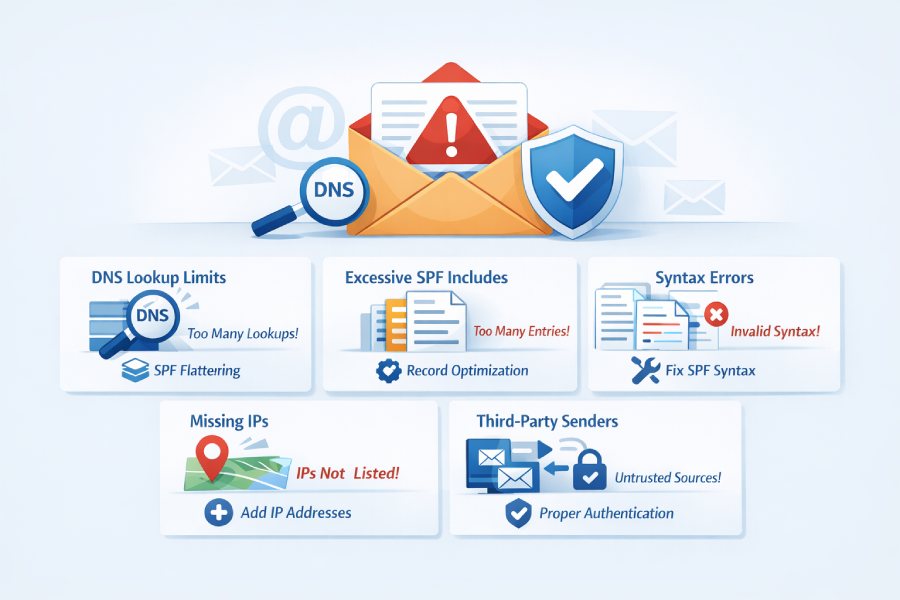
If not addressed, SPF permerrors can disrupt your email authentication and negatively impact your deliverability. Common issues, such as DNS misconfigurations and syntax errors, can usually be resolved easily if you know what to search for.
In this article, we’ll explore five typical causes of SPF permerrors and provide straightforward solutions to help you regain credibility for your email domain.
Why SPF permerrors matter for deliverability and security
An SPF permerror is a permanent SPF error returned during SPF authentication, typically because the published SPF record cannot be evaluated according to the standard. Even if your DKIM and DMARC policies are sound, a persistent SPF failure erodes sender reputation, undermines email deliverability, and hurts inbox placement. For MSP and enterprise teams, one unnoticed SPF misconfiguration can ripple across outbound email security, domain health, and overall email authentication protocols.
Because SPF check results directly influence filtering, you need consistent SPF record validation, rigorous SPF DNS validation, and a predictable SPF policy setup. Routine SPF troubleshooting should be paired with DMARC, BIMI, MTA-STS, and TLS-RPT monitoring to keep sender policies aligned and to prevent SPF error codes from masking real risk. Below are two of the most common and costly root causes of an SPF permerror, plus practical ways to fix SPF permerror quickly without sacrificing legitimate mail flow.
1) SPF too many DNS lookups (>10): Why it triggers a permerror

The most frequent SPF permerror occurs when the policy exceeds the SPF lookup limit. Mechanisms such as include, a, mx, exists, ptr, and redirect trigger DNS lookups. If total DNS lookups during an SPF check exceed 10, the receiver can return an SPF error or permerror. This is often the result of layered vendors, nested SPF include chains, or an aggressive SPF implementation that grew over time.
Exceeding the SPF maximum lookups usually happens when:
- Multiple cloud senders are chained via SPF include.
- a and mx mechanisms expand to many hosts at your DNS providers.
- Legacy exists or ptr mechanisms remain in place.
- A redirect sends resolution to another SPF policy that also expands.
This scenario is a classic SPF record limit problem specifically the operational SPF lookup limit not the text-length constraint itself.
To diagnose issues with SPF lookup limits, utilize reliable tools such as dmarcian, Kitterman, or Google Admin Toolbox to conduct thorough checks. Analyze each mechanism and include statement to tally the DNS lookups, while validating results in real-world scenarios using email header analysis tools. Make sure to align any SPF failures with actual sending entities to confirm that the problems are based on live traffic rather than merely theoretical configuration errors.
To resolve SPF permerrors without affecting legitimate senders, minimize DNS lookups by substituting broad mechanisms with specific IP addresses. Simplify SPF includes safely, eliminate costly mechanisms like ptr and exists, and remove duplicate vendor includes. Conduct retests after each modification, set up automated SPF monitoring, and consider distributing traffic across subdomains to maintain each SPF record within the 10-lookup limitation.
2) Multiple SPF records for the same domain: Merge and consolidate

Publishing more than one TXT record that begins with v=spf1 often leads to an SPF permerror. Receivers expect one canonical SPF record per domain; multiple competing policies create SPF record issues and unpredictable SPF authentication results.
1. Diagnose duplicate records
- Run: dig +short TXT example.com and confirm you have exactly one v=spf1 entry. Ignore unrelated TXT records such as site verifications.
- Use a Domain Scanner or SPF domain scanner from providers like EasyDMARC to spot duplicates across DNS providers.
- Perform an SPF record raw validation using an SPF Record Raw Check to ensure evaluation matches expectations.
2. Quick fixes to consolidate correctly
A precise merge is the fastest way to fix SPF permerror caused by duplicates.
a. Merge mechanisms into one ordered SPF record
- Combine mechanisms from all existing entries into a single SPF record, preserving intended sender policies.
- Keep only one all mechanism at the end (choose -all or ~all according to your SPF policy and risk tolerance).
- Validate the final SPF syntax with an SPF record checker and re-run an SPF raw check to ensure no SPF error persists.
b. Remove legacy types and extras
- Delete any old SPF RR (the obsolete SPF DNS record type) and extraneous TXT entries starting with v=spf1.
- Document a change window to accommodate TTLs and avoid overlap during consolidation.
c. TTL and change control
- Stage changes in a maintenance window; lower TTLs before edits to reduce propagation delay.
- After the merge, perform an Email Deliverability Test and a full SPF check from multiple vantage points.
Recommended diagnostics and tools for SPF validation
A repeatable validation workflow reduces the risk of regression and keeps SPF record optimization on track.
- SPF record checker and SPF Record Checker: Use multiple tools to cross-verify SPF DNS validation and interpretation differences.
- SPF record generator and SPF Record Generator: Draft clean policies, manage SPF records, and model what-if changes without risking production.
- SPF raw check and SPF Record Raw Check: Confirm exactly what receivers will evaluate, including nested includes and all DNS lookups.
- DMARC Record Checker and email header analyzer: Tie SPF and DMARC outcomes together and view live authentication results.
- Domain Scanner and Reputation Monitoring: Monitor domain health, watch for SPF misconfiguration, and track sender reputation over time.
- Email Deliverability Test, Phishing Link Checker, and EasyDMARC platform options such as Easy SPF can help with tools for SPF, email verification, and broader reporting.
- Consider vendor ecosystems like EasyDMARC, EasySender, and Touchpoint alongside your email deliverability platform to operationalize SPF test routines and ongoing SPF troubleshooting.
- For broader email security needs, evaluate solutions such as email security.

Implementation guardrails, best practices, and policy design
To avoid recurring SPF permerror incidents, stabilize your SPF implementation with the following:
- Clarify SPF policy and SPF policy setup: Define which services can send on behalf of each domain and subdomain, and establish a standard SPF configuration pattern (root vs. delegated subdomains).
- Treat SPF include usage with care: Document each include, why it exists, and who owns it; adopt “SPF manage include” practices to minimize hidden expansion and keep DNS lookups predictable.
- Control growth against the SPF record limit and SPF lookup limit: Track SPF DNS queries per evaluation and enforce a hard budget under 10.
- Prefer ip4/ip6 where feasible: This reduces variability and headroom pressure.
- Enforce sound SPF syntax: Validate every change with an automated SPF record validation step in CI, including SPF record raw validation for parity across receivers.
- Maintain SPF and DMARC alignment: Ensure domains and subdomains keep consistent SPF domain alignment with organizational DMARC policy; confirm interplay with SPF and DKIM.
- Plan for scale (SPF for MSPs, SPF for enterprises): Standardize templates, use an SPF solution that automates SPF flattening, and implement runbooks to fix SPF error quickly when incidents arise.
- Publish a stable -all or ~all: Choose a stance aligned to risk and monitored by TLS-RPT, MTA-STS reporting, and DMARC feedback loops.
- Keep a living SPF record example in documentation so teams can compare production against a known-good template and avoid common SPF record issues.
- Coordinate with DNS Providers: Version-control DNS record changes, use approvals, and monitor for unexpected edits that could lead to SPF failure.
Example baseline policy (for documentation): v=spf1 ip4:203.0.113.0/24 include:spf.example-saas.com ~all. Validate with an SPF check before publishing. AutoSPF’s SPF checker tool expands the full include chain and tallies your DNS lookups, so you can confirm a fix actually clears the permerror before it reaches production.
By designing with sender policies in mind, maintaining strict controls around SPF DNS validation, and leveraging repeatable tools, you dramatically reduce the chance of an SPF permerror especially those caused by SPF too many DNS lookups or multiple SPF records and ensure resilient SPF authentication across your estate.
3. Syntax errors and invalid tokens
Typical SPF syntax pitfalls
Most SPF permerror events originate from simple SPF syntax mistakes. Common offenders include omitting v=spf1 at the start of the SPF record, missing spaces between each SPF mechanism, and replacing spaces with commas or semicolons. Using wrong modifiers such as redirect: instead of redirect=, invalid CIDR ranges on ip4/ip6, placing the all mechanism in the middle of the policy, or inserting unknown/unsupported tokens all trigger an SPF error. Even deprecated mechanisms like ptr can still appear in legacy sender policies and cause SPF failure in strict environments.
Beyond basic formatting, mixing mechanisms improperly or overusing SPF include without understanding recursion can cause subtle SPF record issues. For example, an include followed by a hardfail -all but preceded by an early all softfail can lead to ambiguous evaluation. These missteps are prime candidates for targeted SPF troubleshooting to protect email deliverability and sender reputation.

Validator-driven diagnosis
Use strict tools for SPF check and SPF record validation that implement RFC 7208 rules and show the exact token causing the failure. A robust SPF record checker or SPF Record Checker will flag missing v=spf1, mis-typed mechanisms (e.g., exist vs exists), bad ip4:203.0.113.0/33 CIDR, or unknown macros. When you need a deeper lens, run an SPF raw check or an SPF Record Raw Check to see the literal TXT strings as published and how the parser interprets them. Pair this with an Email Header Analyzer to confirm SPF authentication outcomes on received messages and correlate SPF error codes captured in headers.
Teams can automate routine SPF test runs with tools for SPF such as EasyDMARC’s Domain Scanner, Easy SPF, and DMARC Record Checker. These help validate SPF DNS queries, surface SPF misconfiguration early, and improve domain health across multiple DNS Providers.
Quick fixes and canonical patterns
- Start the record with v=spf1 and separate every SPF mechanism with a single space.
- Use correct tokens: ip4:203.0.113.0/24, ip6:2001:db8::/32, include:spf.provider.com, a, mx, exists:domain, and the final all.
- Use redirect=target.tld (equals sign), only once, and do not mix redirect= with an all that would bypass the redirect.
- Place all at the end; avoid deprecated ptr; remove any unrecognized text or vendor placeholders.
- Validate through an SPF check, then repeat with an SPF raw check to ensure the parser sees exactly what you intend.
Baseline SPF record example
A clean starting point to prevent an SPF permerror is:
v=spf1 ip4:203.0.113.0/24 include:spf.google.com -all Document this as part of your SPF policy setup and SPF implementation playbook so new senders follow SPF best practices.
Handling special mechanisms and modifiers
Treat include as controlled expansion, not a dumping ground. Limit the number of includes and confirm each target domain is stable. Use redirect= only when fully delegating your SPF policy to another domain. If you must consolidate many IPs or hosts, consider SPF flattening with care to avoid exceeding the SPF lookup limit and the SPF maximum lookups ceiling during DNS lookups.
4. Broken include or redirect chains and void lookups
1. How include and redirect work
An SPF include pulls in another domain’s policy; redirect= transfers policy evaluation entirely to the target domain. Both require DNS lookups and are bounded by the SPF lookup limit. Misconfigured targets NXDOMAIN, TXT records without valid SPF content, or circular references lead to void lookups and ultimately an SPF permerror. These are textbook SPF record issues that can silently degrade email authentication and inbox placement.

Detecting NXDOMAIN, empty policies, and loops
Use a traversal tool that expands the full include tree and measures recursion depth. A professional SPF record checker should enumerate each include, note whether the target domain exists, fetch its SPF record, and count SPF DNS queries used. Combine this with an SPF domain scanner to spot decommissioned vendors or vanity includes that return no policies. If you see multiple void lookups or a loop between subdomains, you are likely approaching SPF too many DNS lookups and risking a hard SPF failure.
2. Quick fixes for chain integrity
- Replace or remove includes pointing to retired services; never guess hostnames use vendor-published SPF include records.
- Ensure every include target resolves and returns a valid SPF policy; avoid “placeholder” TXT that lacks v=spf1.
- Prevent circular references: do not have subdomain A include B while B redirects back to A.
- Use redirect= only for full delegation; combining redirect= with local all defeats the redirect model.
- If you are nearing SPF too many DNS lookups, consider SPF flattening (static IP expansion) or consolidating vendors. Validate changes with an SPF check and SPF record raw validation before production.
For MSP teams and large email programs, centralize governance of SPF and DMARC. Solutions like EasyDMARC, EasySender, and Touchpoint along with Reputation Monitoring and an Email Deliverability Test help enterprises and MSPs manage SPF records at scale, reduce SPF misconfiguration, and sustain outbound email security across brands and regions.
5. TXT quoting, chunking, and length mistakes
1. How DNS TXT concatenation works
SPF is published as a DNS TXT record. Each DNS TXT string must be quoted, and any single string cannot exceed 255 characters. DNS concatenates adjacent quoted strings to form the full SPF record. Misplaced quotes, extra escapes added by certain DNS Providers’ control panels, or an oversize single string produce parsing errors and, frequently, an SPF permerror.
Diagnosing with dig and raw validation
Query the zone directly (for example, dig +short TXT example.com) and inspect the exact published strings. Verify they concatenate cleanly into one SPF line that begins with v=spf1 and contains only valid SPF mechanism tokens and modifiers. Cross-verify with an SPF raw check, and use an SPF Record Generator to reconstruct a clean record if your UI has mangled quoting. This kind of SPF DNS validation is essential preventive maintenance for domain health.
2. Quick fixes for long records
- Enter the policy as one contiguous line in UIs that auto-quote; otherwise, split into multiple quoted chunks (<255 chars each) that DNS will join.
- Trim bloat by removing redundant mechanisms, collapsing contiguous IP ranges, and limiting overlapping includes.
- If length and complexity remain high, move bulk logic to a subdomain and use redirect=child.example.net to keep the apex SPF record small.
- Be mindful of the SPF record limit realities: while there is no official “total character” cap, resolvers and MTAs may enforce packet-size behaviors; the practical limiter is the SPF lookup limit and the 10-DNS-lookup rule that often causes SPF too many DNS lookups before length does.
When optimizing, weigh SPF flattening to reduce DNS lookups, but schedule re-flattening when vendors rotate IPs. Pair SPF with DKIM and DMARC (and even BIMI, MTA-STS, and TLS-RPT) for comprehensive email authentication protocols. This layered approach improves email deliverability and supports SPF domain alignment in your DMARC regime.

To operationalize this, consider:
- Run a periodic SPF test via an email deliverability platform and confirm SPF authentication in received headers.
- Use a DMARC Record Checker, Phishing Link Checker, and an Email Header Analyzer to corroborate policy impact.
- Maintain a runbook for SPF configuration changes, SPF manage include decisions, and SPF record optimization to avoid drift.
Finally, for teams new to sender policies, reference an SPF solution catalog with a curated SPF Record Generator, a policy template library, and guided SPF implementation steps. Training staff on SPF and DKIM fundamentals, and the interplay of SPF and DMARC, reduces the chance of introducing a fix SPF error that creates new problems.
For organizations handling sensitive communications, partnering with an experienced provider for email security can streamline email verification, enforce SPF DNS queries hygiene, and minimize SPF failure risks during rapid change windows.
FAQs
What causes an SPF permerror most often?
The most common causes are bad SPF syntax, unknown tokens, broken include/redirect chains, and exceeding the SPF lookup limit with too many DNS lookups. Validator tools surface the exact token or step causing the SPF error so you can fix SPF permerror quickly.
How do I diagnose “SPF too many DNS lookups”?
Expand the include tree and count DNS lookups used by include, a, mx, and exists mechanisms. If the count reaches 10, consider SPF flattening, pruning includes, or vendor consolidation and verify with an SPF check.
Is SPF flattening safe to use?
Yes, if managed. SPF flattening reduces runtime DNS lookups by inlining IPs, but flattened IPs must be refreshed when providers change ranges. Use automation and schedule reviews to stay below the SPF maximum lookups threshold.
Can I use redirect= and -all together?
Use redirect= only when delegating entirely to another policy. Combining redirect= with a local all can defeat the redirect logic and may result in SPF record issues or even an SPF permerror.
How should I format long SPF records in DNS?
Keep each quoted TXT chunk under 255 characters and let DNS concatenate them. Validate with an SPF raw check (or SPF Record Raw Check) to ensure the final SPF record parses correctly.

Which tools help validate and build SPF?
Use an SPF record checker for compliance, an SPF Record Generator to build policies, and an Email Header Analyzer to verify results in transit. Platforms like EasyDMARC provide a Domain Scanner, Reputation Monitoring, and an Email Deliverability Test for ongoing SPF troubleshooting.
Does SPF alone guarantee inbox placement?
No. SPF authentication is one signal among many. Combine SPF with DKIM, DMARC, and consistent sending practices to improve inbox placement and protect outbound email security.
Key Takeaways
- Most SPF permerror incidents stem from SPF syntax mistakes, broken include/redirect chains, or TXT quoting/length errors validate early with an SPF check and SPF raw check.
- Keep DNS lookups under the SPF lookup limit; use careful SPF flattening or vendor consolidation to avoid “SPF too many DNS lookups.”
- Use a strict SPF record checker, SPF Record Generator, and domain scanning tools to prevent SPF misconfiguration and protect email deliverability.
- Delegate with redirect= only when appropriate, place all at the end, and avoid deprecated or unknown SPF mechanism tokens.
Pair SPF with DKIM and DMARC, and monitor domain health continuously to maintain sender reputation across enterprises and MSP environments.
General Manager
General Manager at DuoCircle. Product strategy and commercial lead across the email security portfolio.
Secure your email infrastructure
Protect, authenticate, and deliver. Contact our team to find the right solution.