

How DKIM public and private keys work
DKIM helps email providers verify that a message really came from your domain and that it was not changed while being delivered. At the heart of DKIM is a pair of cryptographic keys called the public key and the private key. These two keys work together to sign emails and prove their authenticity to receiving mail servers.
If you have ever wondered how DKIM actually works behind the scenes, this guide will walk you through it step by step. You will learn what each key does, how they interact, and why managing them correctly is essential for protecting your email reputation.
What is DKIM and why does it use keys?
DKIM is an email authentication method that proves two important things: that an email really came from the domain it claims to be from, and that it was not changed while traveling across the internet.
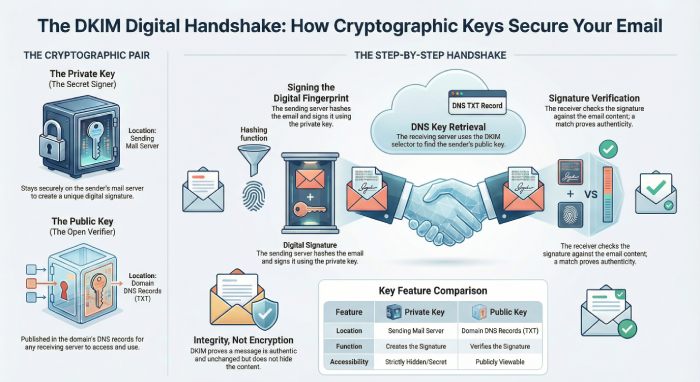
It works using a pair of cryptographic keys, a private key and a public key. The private key stays safely on the sender’s email server. When an email is sent, this private key is used to create a special digital signature based on the email’s content and headers. This signature is added to the message as a hidden DKIM header.
The public key is published in the domain’s DNS records and is available to receiving mail servers. When an email arrives, the receiving server looks up this public key and uses it to check the DKIM signature. If the signature matches, the server knows the message is real and has not been tampered with.
This is why DKIM uses keys to create trust between senders and receivers.
What is a DKIM public key
A DKIM public key is the part of the key pair that lives in your domain’s DNS records. It is stored as a TXT record and is visible to any mail server on the Internet. When an email is sent from your domain, the receiving mail server looks up this public key using the DKIM selector found in the email header.
The job of the public key is to verify the digital signature that was added to the email. It does not create the signature. It only checks whether the signature matches what was created by the sender. If the public key can successfully validate the signature, the email is treated as authentic and unchanged. Since the public key cannot be used to send or sign emails, it is safe to be shared publicly.
What is a DKIM private key
A DKIM private key is the secret part of the key pair that stays on your email sending server. It is never placed in DNS and is never shared with receiving mail servers. This key is used only when an email is being sent.
When a message leaves your system, the private key creates a digital signature based on the email headers and body. This signature proves that the message was approved by your domain and that its content has not been altered after sending.
Only the private key can create this signature. If someone else gets access to it, they could send emails that appear to come from your domain. That is why keeping the private key secure is critical for DKIM to work properly.

How DKIM public and private keys work together
DKIM uses both keys in a simple but powerful flow that signs an email when it is sent and verifies it when it is received. Here is how that process works.
The email is prepared for sending
An email is created by a user or application on the sending domain. Before it leaves the mail server, DKIM looks at important parts of the message, including selected headers and the email body, to prepare it for signing.
A hash of the email is generated
The mail server creates a unique digital fingerprint of the email content. This fingerprint is based on the headers and body of the message. Even a small change in the email would create a different fingerprint.
The private key signs the hash
The DKIM private key is used to sign this fingerprint. This creates a digital signature that is added to the email as a hidden DKIM header. The email is now ready to be sent.
The public key is retrieved
When the receiving mail server gets the email, it reads the DKIM header and uses the selector to find the public key in the sender’s DNS records.
The signature is verified
The receiving server creates its own fingerprint of the email and checks it against the DKIM signature using the public key. If both match, the email passes DKIM and is trusted as authentic.
DKIM key rotation: why and how it matters
DKIM key rotation means changing your DKIM keys from time to time instead of using the same ones forever. Just like passwords, DKIM keys can become weak or risky if they stay active for too long. If a private key is ever leaked or misused, attackers could send fake emails that look like they came from your domain. Rotating keys helps reduce this risk and keeps your email system safer.
The process is simple. A new key pair is created, which includes a new private key and a new public key. The new public key is added to your DNS using a new DKIM selector. After that, your email server starts signing emails with the new private key. The old key is kept for a short time so that older emails can still be verified.
Once all old messages are no longer needed, the old DKIM key can be safely removed. This keeps your domain clean and secure.
Common myths about DKIM public and private keys
DKIM keys are often misunderstood, which leads many domain owners to make the wrong decisions about how they use and manage them. Let’s clear up some of the most common myths so you can use DKIM the right way.

DKIM encrypts your emails
One of the biggest myths is that DKIM encrypts email content. DKIM does not hide or lock your message. It does not make the email private. Instead, DKIM only creates a digital signature that proves the message has not been changed and that it came from an authorized domain. Anyone who intercepts the email can still read it. DKIM is about trust and integrity, not privacy.
The public key can be used to send emails
Some people worry that putting a DKIM public key in DNS allows anyone to send email as their domain. This is not true. The public key can only verify signatures. It cannot create them. Only the private key can generate a valid DKIM signature. That private key stays on your sending server and is never published. Without the private key, fake emails will fail DKIM checks.
One DKIM key is enough forever
Many domain owners think that once DKIM is set up, it can be left alone forever. In reality, DKIM keys should be rotated regularly. Over time, keys can become weak or exposed. Using the same key for years increases the risk that it could be misused. Regular rotation keeps your email system safer and more reliable.
DKIM alone guarantees inbox delivery
DKIM is a powerful authentication tool, but it does not guarantee that your emails will land in the inbox. It only proves that your domain is responsible for the message and that the content has not been changed. Spam filtering, sender reputation, and DMARC also play a big role. DKIM works best when it is combined with SPF and DMARC for full email protection.

Final thoughts
DKIM public and private keys play a critical role in keeping email trustworthy. The private key signs every outgoing message, and the public key allows receiving mail servers to verify that signature. Together, they make sure your emails are not altered and that they truly come from your domain.
But DKIM is not something you set once and forget. Keys must be protected, monitored, and rotated regularly to stay secure. Misunderstanding how DKIM works can lead to weak setups, failed authentication, and lost email trust.
When DKIM is properly configured and combined with SPF and DMARC, it becomes a powerful layer of protection against spoofing, phishing, and email abuse. By understanding how DKIM keys work, you put yourself in a much stronger position to protect your brand, improve deliverability, and build long-term trust with inbox providers and your recipients. To know more, contact DuoCircle today.