10 Ways To Master DMARC Failure Troubleshooting And Fix Email Authentication Fast

Quick Answer
To fix a DMARC failure fast: reproduce it to Gmail or Outlook and pull full headers, read Authentication-Results to see whether SPF, DKIM, or alignment broke, verify the _dmarc TXT record syntax, confirm the From, Return-Path, and DKIM d= align, identify any forwarding path that strips SPF, and remediate before tightening policy.

When a DMARC failure hits production, act methodically. The fastest path to restore email authentication, protect domain security, and recover email deliverability is a repeatable DMARC troubleshooting workflow that isolates alignment issues, fixes misconfigured signatures, and eliminates unauthorized sending sources without disrupting business email.
Below are five high‑impact ways (of the ten) to resolve a DMARC fail quickly and with confidence.
Way 1, Verify the failure signal fast
Reproduce and capture full headers
Start by reproducing the DMARC failure with a controlled test to an external mailbox provider like Gmail, Outlook, or Yahoo.
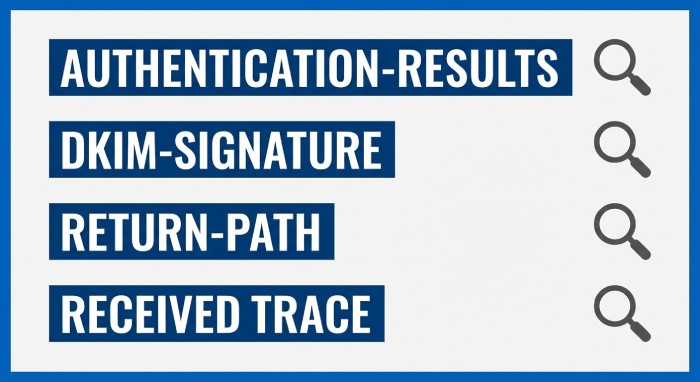
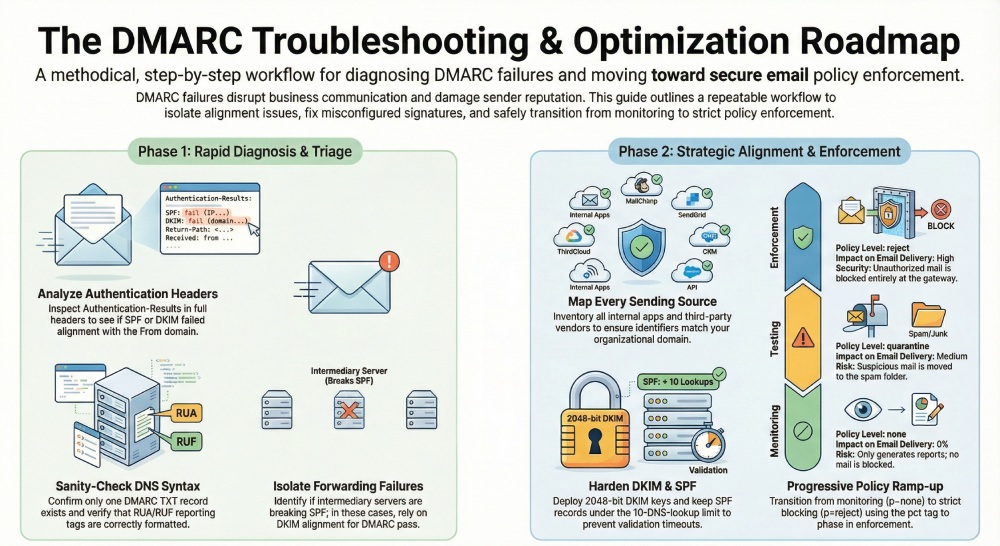
Perform email header analysis immediately: open full headers and examine Authentication-Results to see which authentication checks failed. Confirm whether SPF and DKIM alignment broke for the visible From domain, and whether the MTA path (including any intermediary servers) introduced domain misalignment. Manual header analysis prevents guesswork and accelerates DMARC troubleshooting.
Check for:
- SPF and DKIM validation outcomes (pass/fail) and whether alignment is relaxed or strict.
- A DKIM signature that fails verification (DKIM failure) due to key rotation, canonicalization mismatch, or misconfigured signatures.
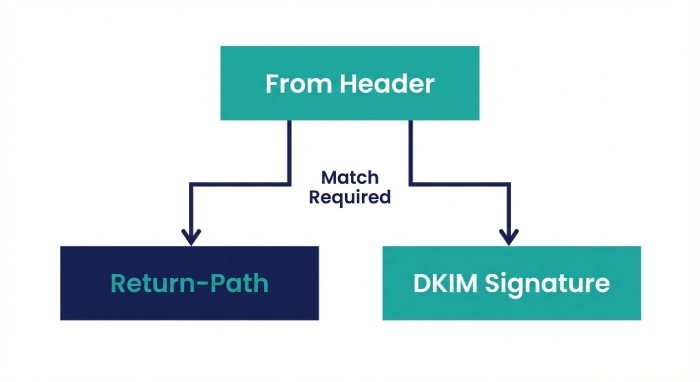
- The Return-path header to validate the Envelope-From versus From domain, which determines SPF alignment.
- Organizational domain match to determine if subdomain usage still satisfies alignment under your DMARC policy.
If you see a Gmail DMARC failure, Outlook DMARC failure, or Yahoo DMARC failure, compare the provider’s Authentication-Results formatting; consult Gmail support, Google support, or Yahoo error codes for provider‑specific nuances. Note if email forwarding has altered the path, as intermediary servers may preserve DKIM but break SPF, causing an avoidable DMARC fail.
Confirm what broke: SPF, DKIM, alignment, or policy
- An SPF failure with a pass on DKIM can still trigger DMARC fail if DKIM alignment is not met.
- Passing SPF or DKIM without alignment will not satisfy DMARC compliance.
- If both pass but DMARC still fails, you likely have alignment issues (e.g., d= in the DKIM signature doesn’t match the From domain, or the Return-Path domain doesn’t match under your chosen alignment mode).
These authentication checks also surface unauthorized sending sources that erode sender reputation, damage email deliverability, and jeopardize message integrity.
Header fields to scan
- Authentication-Results: spf=, dkim=, dmarc=
- DKIM-Signature: d=, s=selector, bh=, b=
- Return-Path and Envelope-From
- From and Reply-To
- Received trace for intermediary servers
Way 2, Sanity-check DMARC DNS instantly
Validate DMARC record formation and syntax
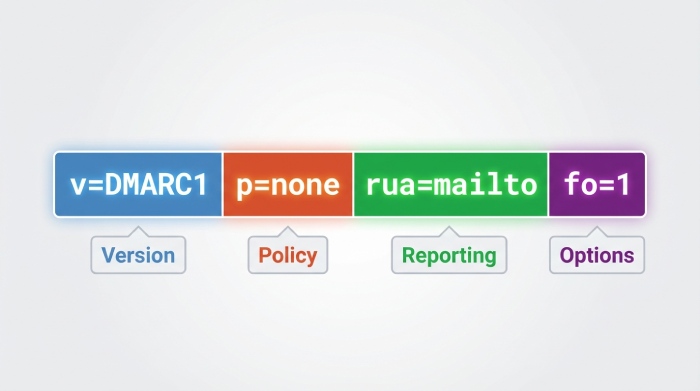
Confirm a single TXT record at _dmarc.yourdomain with correct DMARC record formation. Typical baseline:
- v=DMARC1; p=none (initially for monitoring); rua=mailto:…; ruf=mailto:…; fo=1; pct=100; aspf=r; adkim=r
- Ensure rua tag URIs are valid and accessible for aggregate reports; enable ruf for forensic reports where compliant.
- Verify DNS records have no stray CNAMEs, no duplicates, and no quoting errors.
Use a DMARC checker or DMARC analyzer to lint syntax and alignment mode (aspf/adkim). Tools from providers such as PowerDMARC Analyzer or DuoCircle can flag formatting and policy enforcement pitfalls fast.
Avoid common DNS pitfalls that trigger DMARC fail
- Multiple DMARC records cause a DMARC failure; only one TXT must exist.
- Incorrect p= value or malformed tags prevent DMARC policy evaluation.
- Misconfigured rua/ruf URIs block DMARC reports, undermining monitoring and threat detection.
- Set adkim and aspf to r for a relaxed DMARC policy while you triage; strict is ideal later, but a relaxed DMARC policy reduces false DMARC fail during transitions.
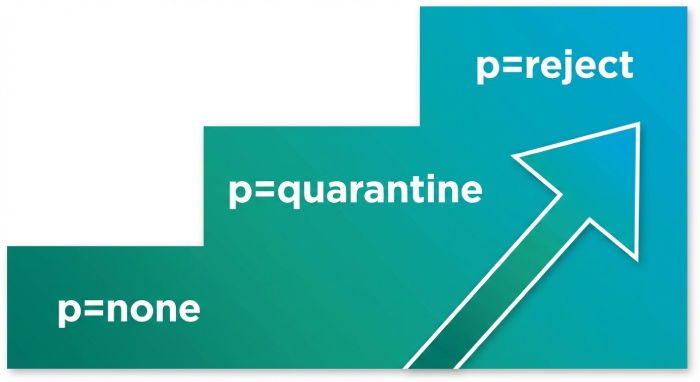
- Document your DMARC policy decisions (p=none to start; graduate to p=reject as alignment stabilizes) to support policy enforcement and long‑term email security.
Refer to Domain-based Message Authentication Reporting and Conformance (DMARC) specifications and confirm organizational domain match behavior before enforcing.
Way 3, Turn on reporting you can act on
Enable aggregate and forensic reporting with context
Activate the rua tag for aggregate reports and, where privacy policies allow, ruf for forensic DMARC reports. Aggregate reports reveal sources, volumes, pass/fail rates, and alignment issues across third-party email providers and internal MTAs. Forensic reports provide message-level snapshots when a DMARC fail occurs, helping pinpoint misconfigured signatures or unauthorized sending sources.
Route XML into a dashboard that correlates data by:
- Source IP, ESP (Email Service Provider), and MTA
- From domain and organizational domain match status
- Identifier alignment (SPF alignment and DKIM alignment)
Leverage PowerDMARC, PowerDMARC Analyzer, and PowerDMARC Threat Intelligence to visualize trends, enrich with threat intelligence, and flag a malicious IP address behind domain spoofing or a spoofing attack. A structured feed of DMARC reports strengthens monitoring, email authentication, and domain security.
Group failures to prioritize quick wins
- Segment failures by provider (e.g., MailChimp, SendGrid) and fix those with the largest volume first.
- Classify by failure vector: SPF failure versus DKIM failure versus alignment issues.
- Start under p=none for safe observation, then move toward p=reject once authorized sending sources are fully aligned and DMARC compliance is steady.
This data-driven DMARC troubleshooting rapidly improves sender reputation and email deliverability while deterring phishing and email spoofing.
Way 4, Map every sender to identifiers
Inventory internal and third‑party senders
Create a complete inventory of email vendors, internal apps, and service accounts. For each stream, record:
- Envelope-From (Return-Path) for SPF alignment
- DKIM d= domain and selector for DKIM alignment
- Visible From domain used in the UI
Use the MailChimp admin portal and SendGrid admin portal to export sending domains and DKIM status. Include Google Workspace and Microsoft Exchange Online senders, plus any ESP or ad‑hoc MTA that might introduce unauthorized sending sources. This mapping exposes domain misalignment and misconfigured signatures fast.
Tag streams by business owner, volume, and risk
- Label owners and SLAs so fixes don’t stall.
- Track volumes to focus on changes that will best lift email deliverability and sender reputation.
- Identify external mailbox provider flows and forwarding behaviors that may disrupt SPF and DKIM validation.
- Mark streams relying on intermediary servers; for those, emphasize DKIM alignment to preserve message integrity when SPF can’t survive forwarding.
This inventory underpins sound DMARC policy choices and ongoing email security.
Way 5, Fix SPF alignment quickly
Harden your SPF record and enforce alignment
Remediate SPF alignment decisively:
- Add or correct vendors include mechanisms for each authorized sending source; validate against provider docs.
- Keep SPF record evaluation within 10 DNS lookups; collapse or remove redundant include chains.
- Prefer a dedicated Return-Path domain per sender to enforce organizational domain match without side effects.
- Avoid +all and ptr; they harm threat detection, widen attack surface, and can cause a DMARC failure by allowing unintended hosts.
- Use redirect= for subdomain policies and to centralize maintenance across DNS records.
Run an SPF check after each change. If forwarding breaks SPF, ensure DKIM signature passes with DKIM alignment; this dual path prevents a DMARC fail and sustains DMARC compliance as you step toward p=reject. During remediation, a relaxed DMARC policy (aspf=r) can reduce incidental failures; later, tighten alignment as confidence grows.
Edge cases: forwarding, intermediaries, and vendors
- Email forwarding through intermediary servers often invalidates SPF; rely on strong DKIM alignment and robust keys to maintain authentication checks and message integrity.
- Rotate keys if you detect DKIM failure due to expired or weak keys; re‑sign on the source MTA.
- Coordinate with third-party email providers (e.g., MailChimp, SendGrid) to align Envelope-From and DKIM d= with the From domain; consult their docs and support teams in the MailChimp admin portal and SendGrid admin portal.
SPF mechanism ordering
- Place ip4/ip6 for known ranges first, followed by include:vendor domains, then a conservative default such as ~all once alignment is verifiably correct under your DMARC policy. As you approach policy enforcement, reassess mechanisms to minimize false positives and eliminate windows for domain spoofing.
Safe mechanism ordering
Start with explicit IPs you control, then vetted include mechanisms for authorized sending sources, followed by neutral or soft-fail defaults during testing. As DMARC troubleshooting resolves alignment issues and misconfigured signatures, advance to stricter outcomes and, ultimately, p=reject to counter phishing and email spoofing without compromising email deliverability.
By systematically verifying the failure signal, validating DNS, enabling actionable reporting, mapping every sender, and correcting SPF alignment, you’ll minimize DMARC failure events, stabilize email authentication protocols, and strengthen domain security and sender reputation at speed.
Way 6, Restore DKIM confidence
Standardize signing domains and alignment
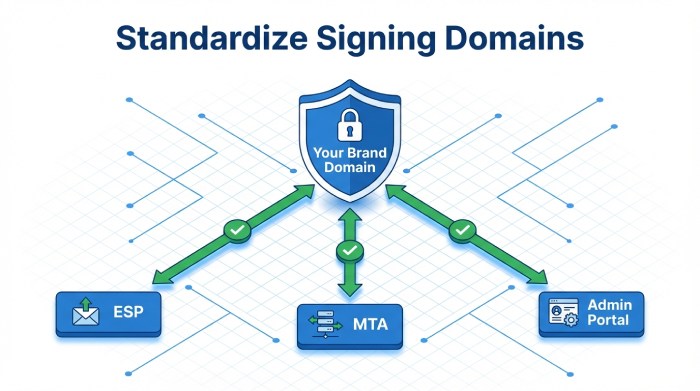
Reassert control of DKIM alignment by ensuring every sender signs with your organizational domain or an intentionally aligned subdomain. Require an organizational domain match in the DKIM signature’s d=, and remove domain misalignment introduced by third-party email providers and email vendors. In practice, that means enforcing a single, brand-owned domain across your ESP (Email Service Provider), MTA (Mail Transfer Agent), MailChimp admin portal, and SendGrid admin portal so DKIM alignment is consistent and immune to configuration drift.
Harden email authentication by auditing all DNS records for each DKIM selector, verifying TXT availability globally, and confirming no stale or misconfigured signatures remain. This alone eliminates frequent DMARC failure scenarios, reduces DMARC fail rates during peaks, and stabilizes sender reputation. When you see DMARC fail patterns in DMARC reports, prioritize DKIM alignment corrections first; they are usually faster to fix than SPF alignment when intermediary servers or email forwarding are involved.
Publish robust selectors and validate integrity
Publish 2048-bit DKIM keys on correctly named selector TXT records and prefer relaxed/relaxed canonicalization to survive benign in-transit modifications. Confirm body hash integrity with real message samples; minuscule footer injections or whitespace changes can trigger DKIM failure and downstream DMARC failure if canonicalization is too strict. Include DKIM signature verification in your routine authentication checks and DMARC troubleshooting playbooks to catch misconfigured signatures before they cause delivery pain.
Key rotation and operational safety
Define a safe rotation cadence, create a second live selector, update senders to the new selector, and revoke the old key only after validation across all platforms. Document rollback steps to prevent a sudden DMARC fail cascade if a selector is removed prematurely.
Body length limits and minimal mutations
Avoid the l= tag; it can weaken message integrity guarantees. Minimize message/body mutations by downstream systems to preserve DKIM alignment and prevent avoidable alignment issues that lead to DMARC failure.
Way 7, Engineer alignment on purpose
Configure relaxed aspf/adkim and align identifiers
Set adkim=r and aspf=r to encourage rapid pass outcomes while you remediate systemic alignment issues.
Engineer alignment explicitly: match the visible From to the Envelope-From (Return-path header) and to the DKIM signature d=. Doing so increases both SPF alignment and DKIM alignment pass rates, helping email authentication survive real-world routing. This reduces DMARC failure at Gmail, Outlook, and Yahoo and accelerates DMARC troubleshooting when exceptions appear.
Tune your DMARC policy with sp= for subdomains to keep control as programs scale. Couple this with a relaxed DMARC policy early in rollout to collect aggregate reports and reduce the blast radius of a misstep. As alignment matures, alignment issues and DMARC fail events should steadily decline across providers, improving email deliverability and domain security.
Govern subdomains and vendor standardization
Standardize vendor configs so at least one aligned identifier always passes. Where SPF alignment is risky (mailing lists, intermediaries), make DKIM alignment mandatory and verified in CI/CD. Codify requirements in onboarding checklists for third-party email providers and ensure DMARC record formation includes the rua tag for visibility. Use PowerDMARC and PowerDMARC Analyzer to quickly identify unauthorized sending sources and misconfigured signatures contributing to DMARC failure across Gmail, Outlook, and Yahoo.

Way 8, Defuse forwarding and list pitfalls
Survive forwarding and intermediary servers
Expect SPF failure on forwarders and intermediary servers; SPF check depends on the connecting IP and frequently breaks under email forwarding or list redistribution. Design for survivability by leaning on DKIM alignment, which preserves message integrity end-to-end and prevents DMARC fail during hops. Where available, consider ARC to attest original authentication checks; while not a DMARC signal, ARC can inform external mailbox provider decisions at Google and Microsoft.
When DMARC failure spikes at specific providers (for example, Gmail DMARC failure paired with Yahoo DMARC failure but clean DKIM validation on your edge), check Yahoo error codes, consult Gmail support and Google support guidance, and escalate with the recipient’s MTA team if needed. Document these cases in your DMARC troubleshooting backlog to prevent repeats.
Control modifications and tune policy
Minimize mailing list/footer rewrites, subject tagging, and URL wrapping that can break DKIM and trigger alignment issues. Keep a relaxed DMARC policy and p=none during pilot phases, then increase policy enforcement gradually as data shows stability. Feed aggregate reports and forensic reports into your threat detection stack to spot a malicious IP address or spoofing attack patterns, improve email security, and catch unauthorized sending sources that fuel domain spoofing, phishing, and email spoofing.
Way 9, Enforce without outages
Progressive policy enforcement with metrics
Start with p=none to gather aggregate reports via the rua tag, establish baselines, and quantify DMARC compliance. Define success/failure thresholds for aligned volume, pass rates, and block rates; then ramp to p=reject using pct to phase in enforcement. Track DMARC fail, DKIM failure, and SPF failure trends by source, and require SPF and DKIM validation for all authorized sending sources before raising pct. This disciplined approach protects sender reputation, amplifies email deliverability, and strengthens domain security without disruption.
Use forensic DMARC reports, where legally and operationally appropriate, to accelerate DMARC troubleshooting of high-impact incidents. Combine DMARC analyzer dashboards, a DMARC checker, and manual header analysis to validate authentication checks quickly and pinpoint DMARC record formation errors.
Communication, rollback, and SLAs
Publish change calendars, notify stakeholders, and align vendor SLAs before tightening the DMARC policy. Maintain a documented rollback (e.g., revert from p=reject to a relaxed DMARC policy at p=none) if KPIs slip. Coordinate with MailChimp, SendGrid, Microsoft, and other email vendors to remediate domain misalignment or misconfigured signatures that could cause an outage. Include contingency notes for Gmail DMARC failure, Outlook DMARC failure, and Yahoo DMARC failure pathways with provider-specific escalation details.
Way 10, Build a rapid-response playbook
Tooling, analyzers, and header workflows
Create a repeatable checklist: run dig/nslookup for DNS records, verify each SPF record and selector TXT, and perform an email header analysis on samples from Gmail, Outlook, and Yahoo. Use a DMARC analyzer and DMARC checker, such as PowerDMARC with PowerDMARC Threat Intelligence, to correlate aggregate reports with threat intelligence and spot unauthorized sending sources or a malicious IP address quickly. Keep a short list of helpers and services, including DuoCircle, to streamline routing, filtering, and diagnostics alongside your MTA logs.
Operationalize DMARC troubleshooting: compare Return-path header, From, and DKIM d= for organizational domain match; confirm SPF check results and DKIM signature validity; and document any DKIM failure vs. SPF failure paths. Maintain playbooks for Gmail support, Yahoo error codes, and escalation via Google support. Where needed, conduct manual header analysis and confirm email authentication protocols (Domain-based Message Authentication Reporting and Conformance (DMARC), Sender Policy Framework (SPF), and DomainKeys Identified Mail (DKIM)) are implemented exactly as specified.
Alerts, KPIs, and cadence
Stand up monitoring that alerts on DMARC reports deltas, pass-rate drops, and spikes in DMARC failure or DMARC fail at specific providers.
Track KPIs: overall pass rates, aligned volume by source, block rates under policy enforcement, and time-to-mitigate. Define a key rotation cadence for DKIM, validate changes in staging, and re-check message integrity post-change. This closed-loop process enhances email authentication outcomes, boosts email deliverability, and continuously raises domain security maturity.
FAQs
What causes most DMARC failure events?
Common drivers include alignment issues from domain misalignment, misconfigured signatures, or changes introduced by intermediary servers and email forwarding. Start DMARC troubleshooting by validating SPF alignment, DKIM alignment, and basic authentication checks across your major senders.
How do I choose between strict and relaxed alignment?
Begin with relaxed (aspf=r, adkim=r) to reduce DMARC fail during rollout, then tighten if your ecosystem is stable. Strict modes demand perfect matches and can reduce email deliverability if vendors aren’t standardized.
Why does SPF fail after messages are forwarded?
SPF check authenticates the connecting IP, which changes during forwarding, so SPF failure is expected. Rely on DKIM alignment and message integrity to avoid subsequent DMARC failure.
When should I move from p=none to p=reject?
After aggregate reports show high aligned volume, minimal DMARC fail outliers, and verified coverage of all authorized sending sources. Ramp gradually with pct and maintain rollback steps to prevent outages during policy enforcement.
How do ARC and DKIM help with mailing lists?
DKIM alignment preserves integrity despite path changes, while ARC can convey original authentication checks through lists. Together they lower the chance of DMARC failure when lists modify messages.
Which tools speed up DMARC troubleshooting?
Use dig/nslookup, header parsers, a DMARC analyzer/DMARC checker, and platforms like PowerDMARC for aggregate and forensic reports. Pair tooling with manual header analysis to confirm Return-path header, organizational domain match, and selector correctness.
Key Takeaways
- Make DKIM alignment reliable: standardize d= to your organizational domain, use 2048-bit keys, relaxed/relaxed canonicalization, and safe rotation.
- Engineer alignment intentionally: configure relaxed aspf/adkim, align From, Return-path, and DKIM d=, and standardize vendor settings.
- Expect SPF to break on forwarding; rely on DKIM and consider ARC while minimizing message mutations to preserve integrity.
- Enforce DMARC policy progressively: start at p=none, use pct to ramp toward p=reject, and track KPIs with clear rollback paths.
- Build a rapid-response playbook with diagnostics, DMARC reports monitoring, and provider-specific escalations to protect deliverability and sender reputation.
General Manager
General Manager at DuoCircle. Product strategy and commercial lead across the email security portfolio.
Secure your email infrastructure
Protect, authenticate, and deliver. Contact our team to find the right solution.