Mail Relay Server Security: Preventing Spam And Unauthorized Access

Quick Answer
A mail relay server (SMTP relay, smart host) accepts and forwards messages between mail systems under SMTP. An open relay accepts mail for any destination without authentication and gets weaponized for spam within hours, which destroys sender reputation and deliverability. Authenticated relays require SMTP AUTH or OAuth2 and apply per-identity, per-IP, and per-domain rate limits. Hardening checklist: use port 587 with STARTTLS or 465 with SMTPS for client submission, reserve port 25 for server-to-server only, deny unauthenticated relay by default, enforce TLS 1.2+ with strong ciphers, publish MTA-STS and TLS-RPT policies, deploy DANE with DNSSEC where possible, rotate credentials and require 2FA on console access, and apply per-tenant quotas with automatic pause on volume spikes. Misconfiguration usually traces to legacy defaults or unclear ownership between application and MTA teams.
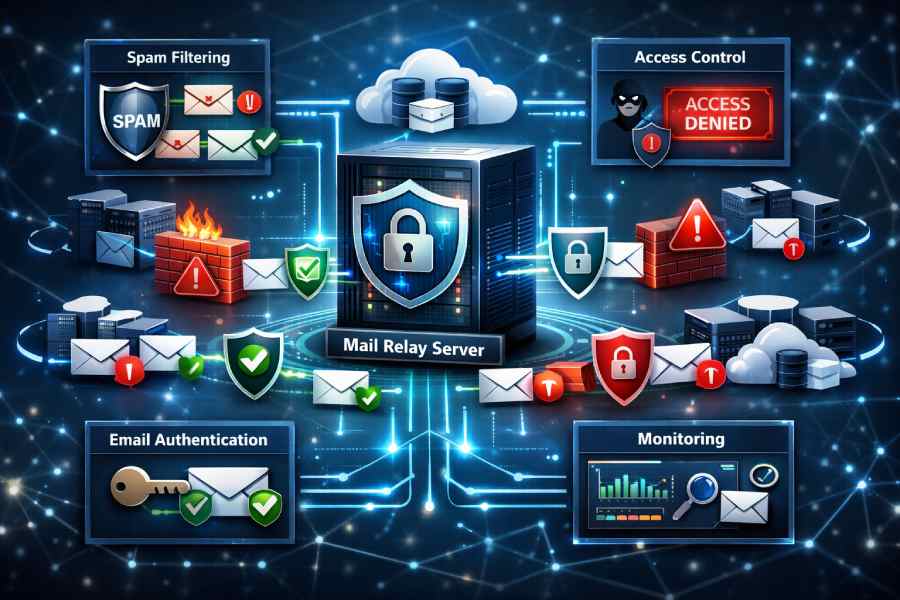
What mail relay servers are, why they’re targeted, and the risks of misconfiguration
A mail relay server is the SMTP-facing component that accepts, routes, and forwards messages under the simple mail transfer protocol. In practice, an smtp server acting as a relay server moves electronic letters (digital mail) from senders to the recipient’s smtp server, often using a smart host to aggregate and optimize outgoing email.
This email relay function sits at the core of email infrastructure, bridging applications and user agents with the broader internet and the mail transfer agent (MTA) ecosystem. Because so much email sending and receiving email flows through it, spanning email marketing, transactional email, and routine email notifications attackers view the smtp relay as a high-value pivot for spam distribution, phishing, and malware distribution.
Teams sometimes deploy an smtp relay service to centralize sending email from WordPress, WooCommerce, Shopify, and HubSpot integrations, or to support Enterprises, Franchises, Real Estate brokerages, and SaaS platforms. Well-known email service provider options and specialists, such as DuoCircle, Mailgun, Mailjet, and Sinch, offer smart host capabilities to streamline mail transfer and inbox delivery.
But an exposed open relay or weak smtp authentication can derail email deliverability, poison sender reputation, and trigger email bounce spikes across campaigns and automated flows. The stakes are high: a single misconfigured smtp server can become a launchpad for spam, undermine GDPR-aligned data handling, and break mission-critical email API integrations.
Why relay servers are targeted and how misconfigurations happen
Attackers hunt for any relay server that accepts unauthenticated smtp relaying or that can be coerced into acting as an open relay. Common security risk patterns include:
- Anonymous submission on the wrong smtp port or unrestricted smtp relay port exposure to the internet
- Missing or weak smtp authentication and security controls, allowing credential stuffing or OAuth token theft
- No STARTTLS enforcement, permitting downgrade attacks that intercept the smtp protocol
- Lack of outbound rate limits, causing sudden spikes in email sending, email campaign abuse, and widespread spam complaints
- Inadequate bounce monitoring and email monitoring, hiding deliverability problems and misuse
Misconfiguration often stems from legacy defaults, rushed deployments in cloud environments like Google Cloud, or unclear ownership between application teams and MTA operators running the mail transfer agent.
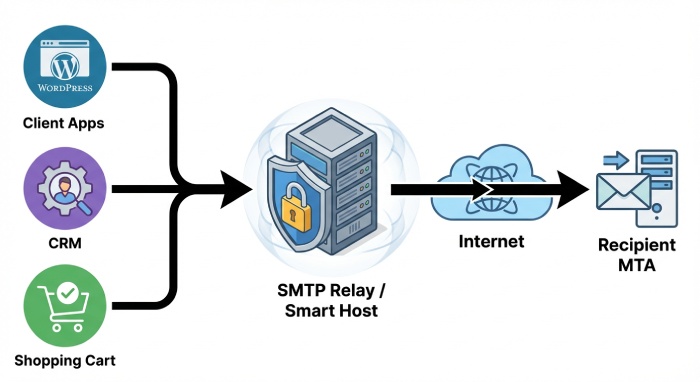
Open Relays vs. Authenticated Relays: Submission ports, relay restrictions, and client/server roles
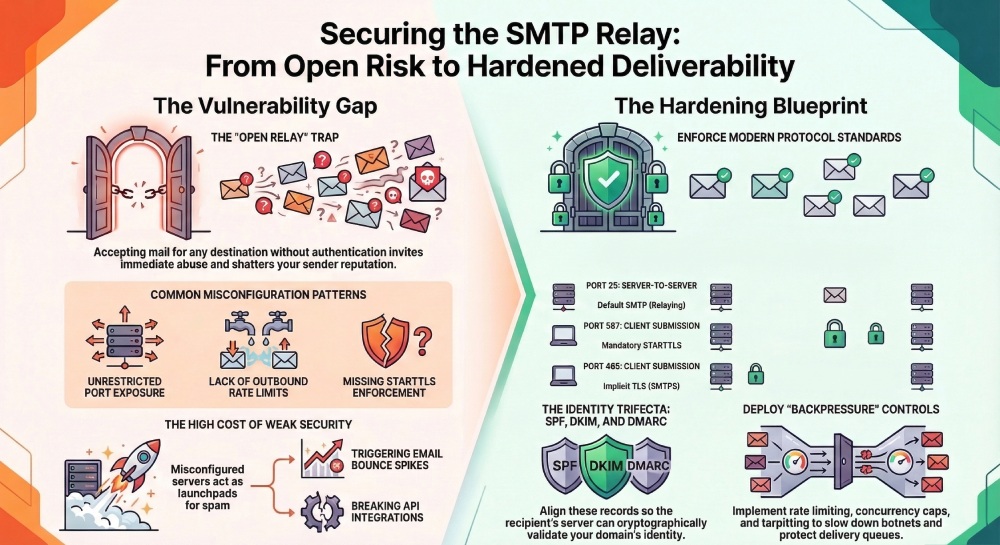
An open relay accepts mail for any destination without authenticating the sender or enforcing relay restrictions. This instantly invites abuse and shatters email deliverability. In contrast, authenticated relays require smtp authentication and enforce strict policies: only verified identities can perform email sending to external domains, often constrained by rate, sender, IP, and domain rules. The distinction is fundamental to secure email.
Submission ports and relay restrictions
- Use submission ports 587 (STARTTLS) or 465 (SMTPS) for authenticated clients; reserve port 25 for server-to-server transfer under the simple mail transfer protocol.
- Deny unauthenticated email relay by default and require SASL-based smtp authentication.
- Restrict which identities, IPs, or applications can send via your smart host, and where they can send (e.g., prevent high-risk TLDs or enforce internal-only mail transfer for some apps).
- Apply per-tenant quotas for email campaigns and transactional flows to protect the relay server and safeguard overall deliverability.
A properly configured smtp relay forwards messages to the recipient’s smtp server while validating the envelope sender, HELO/EHLO domain, and relay protocol integrity. This protects both outgoing email and downstream receiving email systems from abuse.
Client and server roles across the pipeline
- Mail User Agents and apps (e.g., WooCommerce order confirmations, HubSpot lead nurtures) act as clients, submitting messages to the smtp server.
- The MTA (mail transfer agent) conducts smtp relaying and routes to the recipient’s smtp server; IMAP or POP handles mailbox access later for users.
- A smart host often centralizes policy, logging, smtp tracking, and bounce handling across diversified sources.
Rate limiting and quotas to prevent abuse
Implement per-identity and per-IP rate caps, concurrent connection limits, and per-domain thresholds. Tie these controls to monitoring, so unexpected surges in email sending or a runaway email campaign pause automatically.
Authentication and Encryption: SMTP AUTH best practices, STARTTLS/SMTPS, TLS policies, OAuth2, MTA-STS, and DANE
Robust smtp authentication and security are foundational. Enforce SMTP AUTH with strong, unique credentials, or OAuth2 for modern, key-bound access. Mandate TLS 1.2+ with strong ciphers when negotiating STARTTLS on 587, or use SMTPS on 465 for implicit TLS. Block cleartext auth on any smtp port.
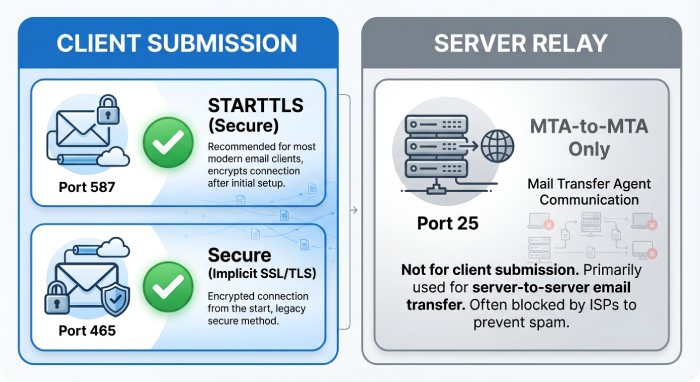
Protocol, ports, and modern policy controls
- Prefer submission on 587 with STARTTLS; allow 465 (SMTPS) when client stacks mandate it; keep 25 for server-to-server delivery only.
- Implement MTA-STS and TLS-RPT to assert your TLS policy to other servers and gain visibility into downgrade attempts.
- Where possible, deploy DANE with DNSSEC so the recipient’s smtp server can cryptographically validate your certificate advertisement.
- Rotate and store credentials securely; implement 2FA for console access and scoped tokens for API-based sending.
Hardening details that move the needle
- Enforce smtp protocol minimums (TLS 1.2 or higher) and disable legacy auth (LOGIN/PLAIN without TLS).
- Use a dedicated ip for high-volume senders and segregate bulk email marketing from transactional email to reduce cross-contamination of reputation.
- In hybrid stacks (e.g., Google Cloud VMs behind NAT or with egress controls), pin routes to your smart host and prevent direct-to-MX attempts.
Identity and Reputation Controls: SPF, DKIM, DMARC, reverse DNS, HELO/EHLO validation, and alignment
Identity-layer controls determine whether the recipient’s smtp server trusts your messages. Publish SPF records that include your smtp relay service and smart host IP ranges. Sign all messages with DKIM at the organizational domain. Enforce DMARC with at least p=quarantine and progress to p=reject as visibility matures.
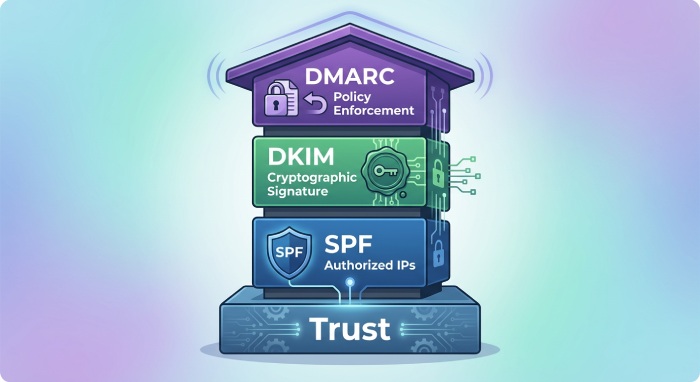
Alignment, validation, and operational hygiene
- Maintain strict DMARC alignment so the visible From domain matches or aligns with the SPF/DKIM-authenticated domain. This is essential for email deliverability and inbox delivery across modern filters.
- Configure reverse DNS (PTR) to match the forward DNS for your smtp server and ensure consistent HELO/EHLO identity.
- Validate HELO/EHLO names, reject literal IP HELOs, and apply syntax checks to curb forged clients.
- Add bounce monitoring to detect authentication failures and run email validations against contact lists to reduce email bounce rates from stale addresses.
Building durable reputation
- Separate bulk email campaigns from transactional flows with different DKIM selectors and a dedicated ip pool.
- Monitor deliverability via postmaster tools, smtp tracking, and email metrics; segment traffic by stream (newsletter vs receipts) for faster triage.
- While teams focus on newsletter engagement, segmentation, a/b testing, MJML or an email editor for an email template, and upstream marketing ops like landing pages and a form builder, ensure your relay server enforces the same identity rigor. This harmony keeps email campaigns and automation credible across the ecosystem.
Compliance tip: Map data paths for GDPR and document which email service provider or API is used per stream. Audit changes in DNS and templates through change control.
Network and Access Controls: Firewalls, allowlists/denylists, DNSBL/RBL/URIBL, IPv6 considerations, and egress restrictions
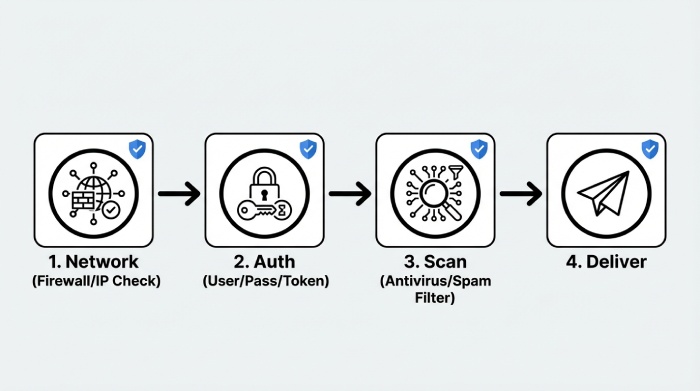
Network-layer defenses prevent abuse before the smtp server parses content. Lock down firewall rules to limit inbound submission to trusted sources. Maintain allowlists for your application subnets and denylists for abusive IPs. Integrate DNSBL/RBL/URIBL checks to score sources and embedded URLs; that helps prevent your relay protocol from becoming a pass-through for spam.
Firewalls, egress, and cloud nuances
- In cloud environments (e.g., Google Cloud), outbound port 25 may be restricted; force all outgoing email through your smart host on 587 or 465. Block direct-to-MX from app hosts so only the relay server handles smtp relaying.
- Apply egress filtering to prevent lateral movement and malware distribution if a workload is compromised.
- If legacy systems like an MCP Server or on-prem MTA participate in mail transfer, standardize policies and logging across sites to avoid blind spots.
Lists, IPv6, and monitoring at scale
- Use reputable DNSBL/RBL providers and URIBL feeds; tune thresholds to avoid false positives that would harm deliverability.
- Manage IPv6 carefully: ensure proper PTRs, SPF mechanisms, rate controls per /64, and consistent HELO/EHLO. Many recipient’s smtp server operators weigh IPv6 hygiene heavily for trust.
- Centralize email monitoring and logs; export smtp tracking events to your SIEM via API to correlate authentication failures, content flags, and bursts in email sending volume.
Operational note: For application ecosystems spanning Shopify stores, WooCommerce sites, and WordPress blogs, consolidate sending through a hardened smart host run by your chosen email service provider. That single policy point improves supervision of email marketing, transactional email, and automated email notifications. It also simplifies remediation when abuse is detected and aligns with best practices in SMTP, the simple mail transfer protocol, and the broader Simple Mail Transfer Protocol standards family.
Finally, remember that mail relay server security is not just technical hardening. It touches contact lists hygiene, email validations, and segmentation strategy; clean data reduces complaints and protects your sender reputation. Keep “content to conduit” discipline: strong templates and copy reduce spam flags, and disciplined relay configuration ensures those messages reach the recipient’s smtp server reliably.
Abuse Prevention Techniques
Throttling and admission control
Effective abuse prevention starts with controlling how much traffic an smtp relay will accept and process at once. Implement rate limiting per user, per IP, and per domain to cap sending email volumes and protect the smtp server from bursts that could degrade email deliverability. Concurrency caps at the relay server ensure that simultaneous SMTP sessions, especially for bulk email campaign traffic, do not overwhelm mail transfer queues or the recipient’s smtp server during peak sending email windows.
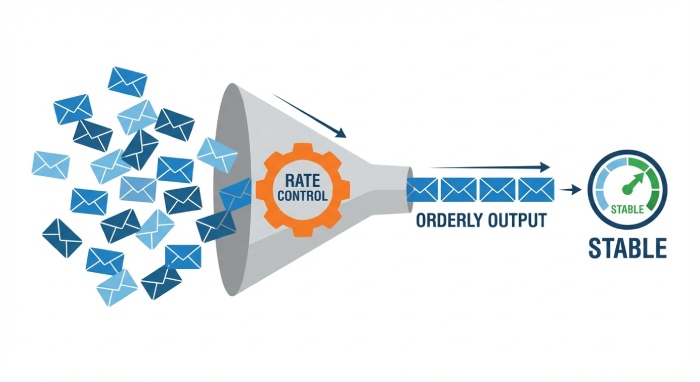
Rate limiting and concurrency caps
- Define per-credential and per-API key quotas for outgoing email and transactional email, and enforce per-second/per-minute ceilings on smtp relaying. Tie these controls to your email service provider billing tiers for predictable scaling.
- Apply separate concurrency caps for authenticated smtp relay connections versus anonymous connections to reduce security risk. Use a dedicated ip for high-volume email campaigns where you can tune smtp port throughput and queue depth in isolation.
- Use adaptive limits informed by bounce monitoring and email metrics. If a spike in email bounce rates or complaint signals arises, automatically back off email sending to protect sender reputation and inbox delivery.
Backpressure, queue management, and tarpitting
Backpressure slows acceptance when delivery queues expand, preventing saturation of the mail transfer agent (MTA). Queue management should prioritize time-sensitive email notifications and digital mail, while de-prioritizing bulk newsletter traffic if the relay server is under stress. Tarpitting deliberately delays SMTP responses, reducing the ROI for botnets attempting to abuse an email relay and deterring open relay testing. These techniques, when combined with SMTP protocol-level rejection for policy violations, help maintain stable mail transfer and better deliverability.
Greylisting and reputation defenses
Greylisting temporarily defers first-time senders, forcing legitimate MTAs to retry as the simple mail transfer protocol expects. This low-cost check filters out many basic spam waves before they hit content filters. Combine with IP reputation, ASN scoring, and country risk to cut down on malware distribution and high-velocity attacks against your smtp relay service.
Blocking open relay abuse and smart host hygiene
Never operate an open relay. Require smtp authentication and security for all outbound use, restrict allowed MAIL FROM/RCPT TO domains, and enforce HELO/EHLO validation. If you run a smart host for distributed franchises or real estate field offices, apply per-tenant quotas, segmentation of contact lists, and clear acceptable use policies. Align with GDPR processing rules to prevent unsanctioned forwarding and ensure that the recipient’s smtp server is contacted only after policy checks and email validations pass.
Content and Malware Filtering
Spam filters and policies (Rspamd/SpamAssassin)
Deploy a multi-engine stack: Rspamd for performance and Lua policies, SpamAssassin for rule depth, plus DNSBLs, SURBLs, and DMARC/SPF/DKIM verification at your smtp server edge. Weight signals such as URL reputation, language anomalies, and a/b testing tags common in email marketing to avoid false positives on legitimate email campaigns. Use outbound policies to scan email template markup (including MJML) and links to landing pages or form builder endpoints to stop suspicious sending email behaviors before the recipient’s smtp server is engaged.
Antivirus and outbound DLP
Integrate ClamAV or a commercial engine for antivirus scanning, and enforce attachment/MIME rules (block executable archives, enforce size caps, and allowlists for business-critical formats). Outbound DLP should flag PII, PCI, or health data exfiltration; enforce encryption or quarantine to maintain secure email practices. These layers safeguard both transactional email and electronic letters generated by WooCommerce, Shopify, or WordPress plugins that rely on your smtp relay.
Attachment/MIME and policy enforcement
Define strict MIME policies to prevent double-extensions, malformed headers, and scriptable files. Quarantine suspicious PDFs or office documents for manual review when email monitoring flags anomalies, and throttle or pause the email relay if a spike suggests malware distribution. Ensure that a smart host enforcing these rules preserves email deliverability by preventing tainted outgoing email from reaching the recipient’s smtp server, which also protects your sender reputation.
Secure Configuration Checklists
Postfix and Exim hardening
For Postfix, disable VRFY/EXPN, set smtpdclientmessageratelimit, and enforce submission via the proper smtp relay port (587 or 465 with TLS). Require smtp authentication with modern ciphers, enforce TLS 1.2+, set strictsmtpdsenderloginmaps, and limit relaydomains to prevent open relay exposure. For Exim, use hostlistwhitelist/blacklist, tlsadvertisehosts, auth_plain as disabled unless over TLS, and data ACLs to apply content policy before final acceptance, improving email deliverability for legitimate sending email while rejecting abuse early.
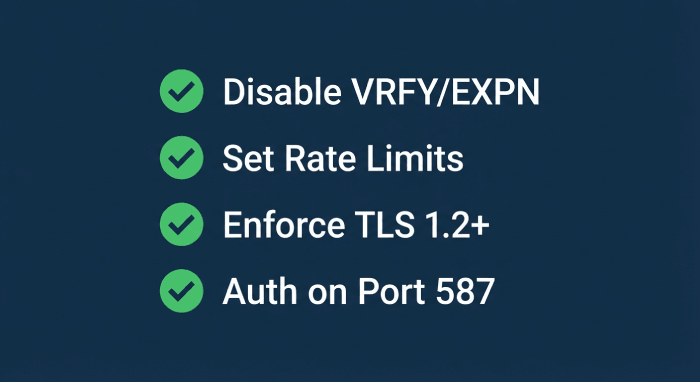
TLS, smtp authentication and security
- Enforce STARTTLS with robust cipher suites; pin policies where feasible to ensure secure email. Document smtp authentication and security standards for all clients, including IMAP users who authenticate through the same identity store.
- Lock down the smtp port 25 for server-to-server and the submission ports for authenticated clients; log and alert on anomalous use of any mail relay server interface. Standardize relay protocol timeouts and maximum message sizes by role to protect the email infrastructure.
Microsoft Exchange and Sendmail specifics
On Microsoft Exchange, enforce authenticated submission connectors, malware filtering, and outbound DLP; consider MCP Server integrations for advanced policy handling. Sendmail should use access.db for relay control, TLSRequired, and submission-specific queue groups. Across all MTAs, document change control, run security baselines from vendors like Mailgun, Mailjet, Sinch, or DuoCircle, and consider managed smart host offerings on Google Cloud to offload edge risk while keeping the simple mail transfer protocol flow compliant with SMTP and deliverability norms.
Monitoring, Logging, and Alerting
Metrics, log analysis, SIEM
Track core email metrics: acceptance rate, queue size, delivery latency to the recipient’s smtp server, authentication failures, email bounce codes, and complaint rates. Feed logs into a SIEM for correlation focus on spikes in smtp protocol errors, relay server rejections, and anomalies in smtp tracking events from your email api. Build dashboards for bounce monitoring, inbox delivery by domain, and cohort comparisons for newsletter engagement across Enterprises and multi-brand tenants.
Anomaly detection and feedback loops
Use supervised models or heuristic thresholds for anomalies in email sending rates, sudden changes in segmentation patterns, or deviations in newsletter versus transactional email ratios. Integrate ISP feedback loops and Google Postmaster data to automate backoff when abuse complaints rise. Alert playbooks should differentiate marketing blasts from order confirmations or HubSpot automations so you don’t throttle critical email notifications and digital mail.
Incident Response and Recovery
Detecting compromise and containment
Indicators of compromise include unexplained surges in outgoing email, higher 5xx responses from a recipient’s smtp server, or a rapid increase in email bounce percentages. When detected, immediately isolate affected credentials, pause queues, and, if necessary, fence the smart host for the impacted tenant or business unit especially important for Franchises or Real Estate groups running shared email infrastructure. Blocklist egress to known bad domains, snapshot forensic logs, and quarantine suspicious mail transfer agent queues for investigation.
Credential rotation and IP delisting
Rotate all smtp authentication secrets, revoke API tokens, and invalidate OAuth grants used by WordPress, WooCommerce, or Shopify plugins. If blocklisted, initiate delisting with evidence: fixed misconfigurations, closed open relay vectors, and new rate limits. Shift traffic to a warm dedicated ip with lower volume while you re-establish sender reputation, and gradually ramp email campaigns after improved email validations and a clean content score.
Recovery and postmortem hardening
Run a blameless postmortem: map the attack path, quantify deliverability impact, and document specific smtp server and mail relay server rule changes. Tighten admission controls, add greylisting or tarpitting as needed, and enhance outbound DLP and antivirus policies. Update runbooks in your Email Academy or internal knowledge base, validate remediation in staging with a/b testing of templates, and verify via controlled sending email to seed accounts across major email service provider ecosystems.
FAQs
What is the difference between an smtp relay and a smart host?
An smtp relay forwards messages to the next hop in the simple mail transfer protocol path, while a smart host is a specialized relay server used to centralize policy and routing. Many organizations use a smart host to manage compliance, spam prevention, and consistent email deliverability.
How do rate limits improve email deliverability?
Rate limits prevent sudden spikes in outgoing email that trigger throttling by the recipient’s smtp server. By pacing, sending email and applying backpressure, you reduce email bounce rates and protect sender reputation.
Should I enable greylisting on high-volume email campaigns?
Yes, but apply it selectively. Greylisting is effective against low-quality senders, but you may bypass it for authenticated smtp relaying and known partners to avoid delaying time-sensitive transactional email or email notifications.
What ports should I use for authenticated submission?
Use the smtp relay port 587 with STARTTLS or port 465 for implicit TLS. Reserve smtp port 25 for server-to-server delivery between MTAs following the SMTP relay protocol.
How do I monitor for compromised credentials?
Watch for anomalies in email metrics: sudden increases in authentication failures, delivery latency, or complaints. Centralize logs in a SIEM, enable alerts, and correlate with email api usage to spot unauthorized email sending.
How can content filters avoid blocking legitimate marketing?
Tune Rspamd/SpamAssassin scores, allowlist known marketing tools like HubSpot or Mailjet, and regularly test email template variations with a/b testing. Validate contact lists, use segmentation, and ensure landing pages are clean to maintain inbox delivery and newsletter engagement.
Key Takeaways
- Enforce layered abuse controls rate limiting, concurrency caps, greylisting, and tarpitting to protect the smtp relay and sustain email deliverability.
- Harden every smtp server and MTA: lock down authentication, ports, TLS, and relay policies to eliminate open relay risk.
- Deploy robust filtering Rspamd/SpamAssassin, antivirus, MIME rules, and outbound DLP to stop malware distribution and protect sender reputation.
- Instrument comprehensive monitoring and SIEM alerts tied to email metrics and feedback loops to detect anomalies early.
- Prepare incident playbooks for isolation, credential rotation, IP delisting, and postmortem hardening to restore stable email sending and receiving email operations.
General Manager
General Manager at DuoCircle. Product strategy and commercial lead across the email security portfolio.
Secure your email infrastructure
Protect, authenticate, and deliver. Contact our team to find the right solution.