

Improperly authenticated emails can leave your domain susceptible to issues such as spoofing, phishing, and undelivered messages, often without your awareness. Conducting a Domain-based Message Authentication, Reporting, and Conformance (DMARC) assessment is essential to uncover security vulnerabilities that malicious actors may take advantage of, and it helps ensure that your email system is adequately secured.
In this article, we will examine eight significant indicators that suggest your domain requires a DMARC assessment to protect your brand’s reputation and enhance email delivery efficiency.
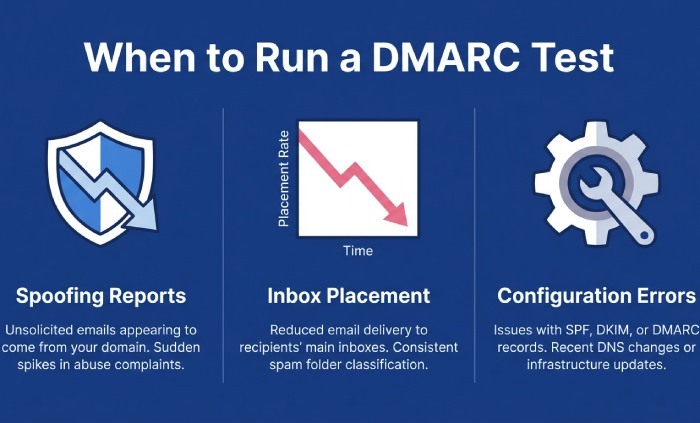
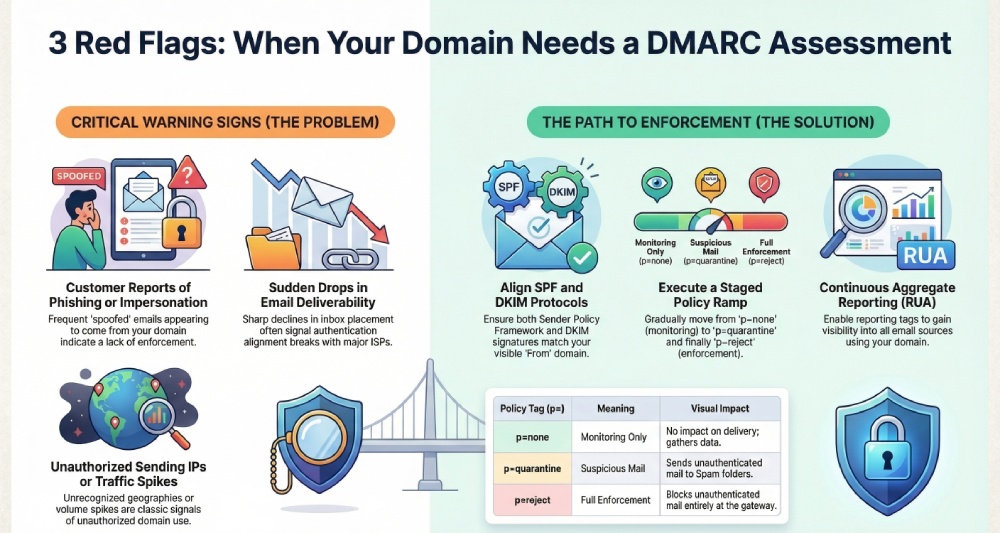
Warning Sign #1: Customers report phishing or brand‑impersonation emails “from” your domain
Run a DMARC test and confirm the basics
When customers forward suspicious messages that appear to come from your domain name, perform a rapid DMARC test across recent samples. Start with a DMARC check using a trusted DMARC checker and DMARC diagnostic tool to confirm a valid DMARC record exists at _dmarc.yourdomain. Use a DMARC lookup or DMARC record lookup to verify the v tag (v=DMARC1 per RFC 7489), ensure your DMARC policy is defined (p=none/quarantine/reject), and that reporting is enabled. Repeat this DMARC validation regularly—ongoing DMARC record testing is essential after any DNS or mail-flow change.
- Confirm the DNS presence: verify the dns record type is a DNS TXT record published under the correct host.
- Validate DMARC syntax and DMARC version: catch any DMARC error before enforcement.
- Do not confuse DMARC policy with a website’s dmca policy; DMARC governs email authentication, while a DMCA policy relates to copyright complaints.
Strengthen reporting to pinpoint spoof sources fast
Enable and verify DMARC reporting so you can see where unauthorized use is coming from. Add a rua tag for DMARC aggregate reports and a ruf tag for DMARC forensic reports where legal and appropriate; choose an fo tag and rf tag (often afrf) consistent with your analysis needs. A thorough DMARC domain analysis of these DMARC report feeds will surface sources of email spoofing across ISPs and regions.
Align SPF and DKIM on sample messages
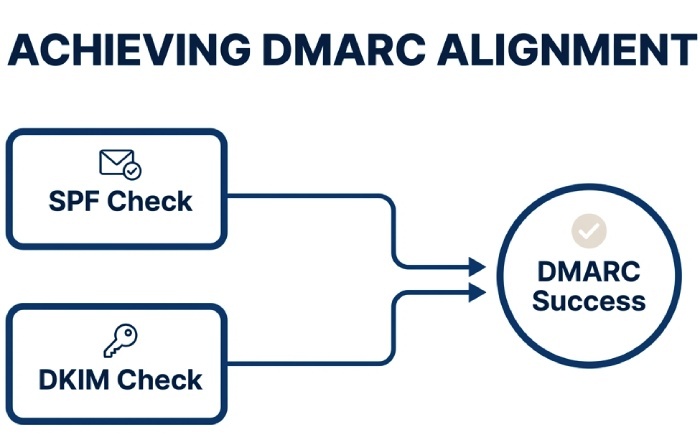
- Perform an spf check to confirm spf alignment with your visible From: domain; keep Sender Policy Framework lookups under the 10-lookup limit.
- Run a dkim check to validate the dkim signature and dkim alignment for each sending platform. Document the active selector(s).
- Ensure at least one path aligns (SPF or DKIM) to avoid DMARC failure at Google, Yahoo, Gmail, and other mailbox providers.
Configure a policy ramp
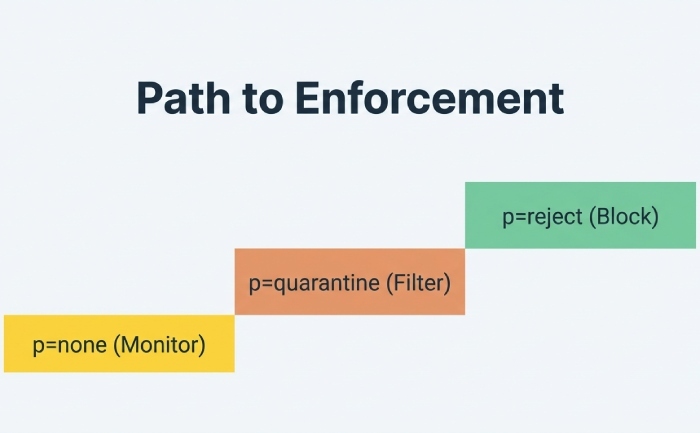
- Start with none policy only while you gather telemetry via DMARC aggregate reports.
- As you fix gaps, move to a quarantine policy via the p tag and increase the pct tag gradually.
- Complete the journey with a reject policy to achieve DMARC enforcement for strong phishing protection and brand protection.
Data handling and privacy note
If you enable ruf, ensure your Privacy Policy covers how forensic samples are handled, and again, avoid mixing up DMARC record settings with your website’s dmca policy obligations.
Warning Sign #2: Sudden drops in inbox placement, opens, or sender reputation
Diagnose alignment and failures across all streams
A sharp decline in email deliverability often signals alignment breaks. Use a DMARC test and DMARC checker to validate DMARC alignment on every stream: marketing, transactional, finance, and support. Per Gmail Sender Requirements and Yahoo Mail guidance, at least one path must align. Run a comprehensive DMARC record lookup and DMARC validation to detect DMARC misconfiguration causing silent DMARC failure with major ISPs.
- Validate selectors and keys: stale DKIM selectors or a misapplied dkim signature can cause intermittent issues.
- Compare Return-Path, d= domain, and From: domain to confirm alignment.
- Document changes with a DMARC monitor process to maintain DMARC compliance over time.
Fix failing selectors and move toward enforcement
Tighten alignment by setting adkim and aspf to “s” where feasible. This reduces domain spoofing and rebuilds trust with Google, Yahoo, and other providers.
Selector hygiene and error prevention
- Rotate keys regularly and remove deprecated selectors to avoid DMARC error scenarios.
- Confirm spf alignment for all providers; reconcile any CNAME or forwarding behavior that breaks SPF.
- Use a DMARC diagnostic tool like EasyDMARC, MXToolbox, or DMARCian to automate DMARC verification, DMARC record testing, and DMARC domain analysis at scale for an MSP or Enterprise.
Next, escalate your DMARC policy from p=none to p=quarantine and, after validating no critical senders fail, to p=reject. This staged DMARC implementation and DMARC configuration path supports sustainable DMARC enforcement without disrupting authorized email. Remember, DMARC controls email authentication; your dmca policy is unrelated and should not be conflated with policy tags.
Warning Sign #3: Your DMARC record is missing, malformed, or stuck at p=none
Locate and validate your DMARC record in DNS
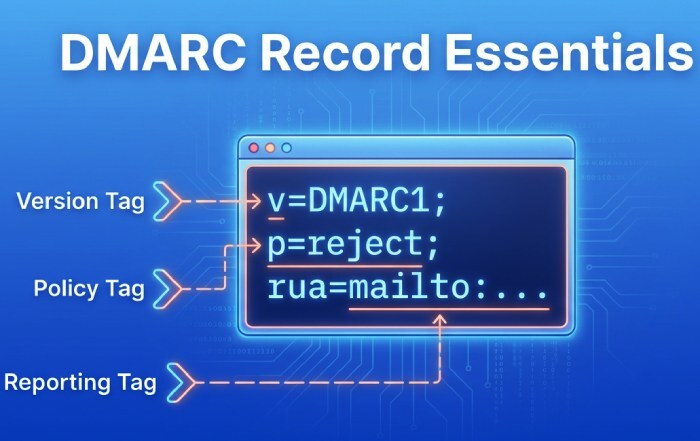
Immediately run a DNS and DMARC test to find the DNS TXT record at _DMARC.yourdomain. Use a DMARC lookup and DMARC record lookup to confirm the v=DMARC1 DMARC version and correct DMARC syntax. If absent, publish DMARC record entries promptly and verify with a DMARC record checker. Repeat DMARC check cycles after propagation to ensure stable DMARC validation across resolvers.
Set critical DMARC tags correctly
- v tag: v=DMARC1 (required)
- p tag: choose none policy for monitoring, then move to a quarantine policy and ultimately a reject policy
- sp tag: define subdomain handling to prevent gaps on delegated or marketing subdomains
- rua tag and ruf tag: route DMARC aggregate reports and DMARC forensic reports to controlled mailboxes
- fo tag and rf tag: specify failure reporting behavior and format (e.g., afrf)
- pct tag: ramp enforcement safely across traffic
This is where DMARC tags explained documentation helps prevent DMARC misconfiguration. Regular DMARC record testing with a DMARC diagnostic tool reduces risk, and a periodic DMARC report review ensures your DMARC setup stays aligned with evolving senders.
Move from monitoring to enforcement with a plan
Maintain p=none only long enough to gather data. Once SPF and DKIM show consistent alignment, increase pct in stages and switch to quarantine, then reject. Track results in your DMARC aggregate reports and investigate any spikes in DMARC failure. Align these changes with mailbox-provider feedback and internal business calendars. Again, keep in mind: a DMARC policy is an email-layer control and must not be mistaken for a site’s dmca policy or takedown process.
Warning Sign #4: New or changed third‑party senders were added without authentication checks
Authenticate every platform before it goes live
Whenever you add or change a marketing platform, CRM, billing system, help desk, or other Email Service Provider, run a DMARC test and DMARC check on pilot messages. Confirm:
- SPF: The provider’s include is within the 10-lookup limit; perform an spf check and ensure spf alignment with your From: domain name.
- DKIM: Enable DKIM and confirm a valid dkim signature; test dkim alignment on live traffic using selectors specific to that sender.
- Documentation: Record selectors, sending IPs, and envelope domains for ongoing DMARC verification and troubleshooting.
Leverage Sender Policy Framework (SPF) and DomainKeys Identified Mail (DKIM) correctly to meet DMARC controls defined in RFC 7489. For multi-tenant ESPs, a dedicated subdomain can simplify email authentication and reduce risk of unauthorized use.
Subdomain strategy and governance
- Use the sp tag to apply distinct subdomain policies; keep marketing on a dedicated subdomain when possible.
- Establish a DMARC monitor regimen with automated DMARC reporting reviews to detect drift after vendor updates.
- Conduct recurring DMARC record testing with a DMARC record checker and schedule a DMARC record lookup after any DNS change.
Operationalize tooling and oversight
Adopt a DMARC diagnostic tool such as EasyDMARC, MXToolbox, or DMARCian to centralize DMARC domain analysis, DMARC implementation, and error detection. These platforms streamline DMARC record testing, continuous DMARC validation, and proactive alerts about DMARC error patterns that could degrade deliverability.
- Build a runbook for DMARC setup and DMARC configuration with clear escalation to DMARC enforcement when platforms are fully aligned.
- Coordinate with an MSP or internal security team to tie DMARC outcomes to broader email security and phishing protection programs.
- For comprehensive risk management beyond DMARC, align with organizational cybersecurity practices; see resources like cybersecurity for additional context.
As you tighten your DMARC policy, confirm mailbox-provider expectations from Google and Yahoo, and monitor how Gmail applies Gmail Sender Requirements. Keep brand protection front and center by swiftly addressing any DMARC failure in your DMARC report data. Finally, remember that DMARC governs the DNS-layer email controls for your domain name—legal notices such as a dmca policy exist separately and should be maintained alongside, not instead of, robust DMARC controls.
Warning Sign #5: Bounce logs or postmaster tools show SPF permerrors, DKIM fails, or “header/from misalignment”
Run a DMARC test to isolate failing pathways by source
When Google Postmaster Tools, Yahoo Postmaster, or MTA bounce logs flag SPF permerrors, DKIM fails, or header/from misalignment, start with a targeted DMARC test to see which pathway is breaking for each sending stream. Use a reputable DMARC checker to run a fresh DMARC check, then follow up with a DMARC lookup and a DMARC record lookup to confirm your current DNS posture. A dedicated DMARC diagnostic tool from EasyDMARC, MXToolbox, or DMARCian can segment failures by IP, envelope-from, and DKIM selector, and provide DMARC validation plus DMARC record testing against the live DNS record.
- Use DMARC record checker utilities to verify that your DMARC record is published correctly, that the DMARC policy is read by receivers, and that the DMARC version and DMARC syntax comply with RFC 7489.
- Pair the DMARC record lookup with an spf check and dkim check so you can confirm spf alignment, inspect the dkim signature, and validate dkim alignment for each sender tied to the domain name.
SPF: Fix includes, flattening, and permerrors
SPF permerrors often stem from too many DNS lookups or broken include chains in the Sender Policy Framework. Conduct an spf check to identify exceeded limits and circular references. If third-party Email Service Providers push you over the 10-lookup cap, apply controlled SPF flattening or provider-specific mechanisms. Ensure envelope-from domains reflect the same organizational domain used in the From: header to maintain spf alignment under DMARC, and review the sp tag in your DMARC policy if subdomains route differently.
DKIM: Publish missing selectors and rotate keys
For DKIM fails, verify that public keys exist as a DNS TXT record for each active selector and that the dkim signature aligns with the visible From: domain. If selectors are missing, publish them promptly; rotate stale keys and standardize selector naming across senders. A dkim check from your DMARC checker suite helps confirm dkim alignment, signature validity, and canonicalization settings for DomainKeys Identified Mail.
Forwarding survival: prefer DKIM alignment
Because SPF can break during forwarding, prioritize DKIM alignment to preserve email deliverability. Standardize the From: domain name and ensure all legitimate platforms sign with a strong DKIM key aligned to that domain under DMARC.
Standardize From: domains and enforce alignment
Header/from misalignment typically points to branding inconsistencies or multi-tenant platforms sending on your behalf. Normalize the visible From: for all campaigns and system mail, then leverage your DMARC policy to require alignment. Move from a none policy to a quarantine policy and ultimately a reject policy as you resolve DMARC misconfiguration. This staged DMARC implementation supports DMARC compliance without causing unnecessary DMARC failure for legitimate mail, protecting against email spoofing while maintaining authorized email flow.
- Use a DMARC monitor phase with pct tag set below 100 to test changes.
- Document exceptions in Enterprise relay paths and MSP-managed services so your DMARC configuration remains accurate and repeatable.
Warning Sign #6: Unrecognized sending IPs, geographies, or traffic spikes
Turn on visibility with DMARC aggregate reporting
Unknown senders and sudden volume spikes tied to your domain name are classic signals of unauthorized use. Enable rua tag destinations to receive DMARC aggregate reports (RUA) and confirm with a new DMARC test that reports are flowing. Most DMARC checker platforms (EasyDMARC, MXToolbox, DMARCian) also provide DMARC reporting dashboards, DMARC domain analysis, and automated DMARC verification. These reports show authentication outcomes per IP, per source, and per header domain, enabling you to detect abuse quickly and improve phishing protection and brand protection.
- Ensure your DMARC record includes a valid mailto: for rua tag, adheres to DMARC syntax as defined in RFC 7489, and references the right organizational domain.
- If your provider requires it, approve report recipients via DNS or follow their Privacy Policy controls.
Map every legitimate sender and publish DMARC record correctly
Inventory each Email Service Provider and system that sends on behalf of your domain. For each, configure Sender Policy Framework and DomainKeys Identified Mail, confirm a working dkim signature, then publish DMARC record updates to your DNS. Validate the v tag, p tag, sp tag, rua tag, ruf tag, fo tag, rf tag (often rf=afrf), and pct tag in the DMARC tag set—this is where DMARC tags explained by your platform can help. Always publish as a DNS TXT record at _DMARC.yourdomain and verify via a DMARC record checker and DMARC record testing.
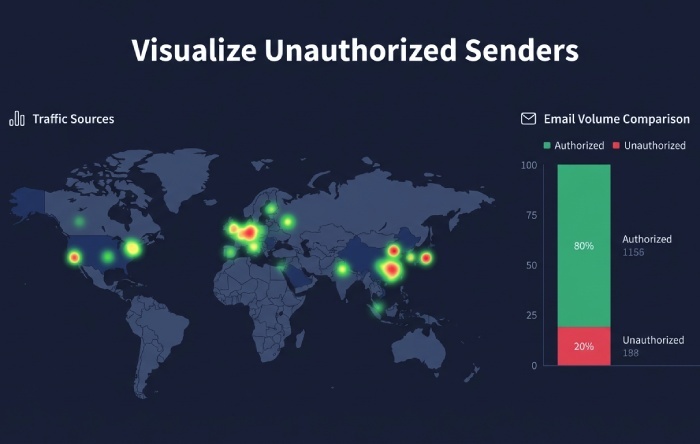
Quarantine/reject to stop abuse—whitelist the real sources
After you identify true senders, move to DMARC enforcement. Use a quarantine policy first, then a reject policy to halt unauthorized use at receivers. Keep a none policy only during early DMARC setup or testing. Tighten DMARC alignment (strict mode if viable) on high-risk transactional domains, and coordinate with Gmail and Yahoo Mail requirements; both Google and Yahoo have evolving Gmail Sender Requirements that favor strong email authentication and enforcement for bulk senders. Work with each MSP and Enterprise platform to ensure alignment while whitelisting authorized IPs.
- Monitor for DMARC error events as you harden enforcement and remediate any DMARC misconfiguration promptly.
- Keep a running DMARC report trail to validate progress and document email security posture for auditors.
Warning Sign #7: Executive or internal spoof attempts (BEC)
Confirm exact-domain spoofing is blocked and align internal relays
Business Email Compromise attempts often use your exact domain name. Use a targeted DMARC test to prove that, at DMARC enforcement, such messages result in DMARC failure at receivers. Validate ruf tag routing to permitted mailboxes if you plan to receive DMARC forensic reports; note that some providers limit these for privacy reasons and require explicit consent per Privacy Policy. When allowed, request afrf format via rf tag and tune fo tag to capture useful failure data without over-collection. Validate internal relay paths so DKIM survives hops and SPF aligns where appropriate.
Harden sensitive subdomains with strict alignment
Apply the sp tag for subdomain policy and consider strict DMARC alignment for finance, HR, and executive subdomains. If a system is not yet ready for enforcement, temporarily use a none policy while you complete DMARC configuration and DMARC implementation steps. Once validated with a DMARC check and DMARC validation, graduate to a quarantine policy and then reject to neutralize impersonation.
Pair technical controls with awareness and monitoring
Even perfect DMARC can’t stop lookalike domains, so complement controls with security awareness, executive training, and continuous monitoring. For comprehensive protection, integrate your email program within your broader cybersecurity practice—see cybersecurity resources for layered defenses that augment DMARC with threat intel and gateway filtering.
- Keep a clean audit trail with ongoing DMARC reporting and alerting.
- Distinguish your legal dmca policy (copyright takedown) from your DMARC policy (email authentication); keep both documented so legal and security teams can respond quickly.
Warning Sign #8: BIMI logo won’t display; brand protections aren’t working
Verify enforcement, alignment, and sender reputation
Mailbox providers only display BIMI when authentication is strong. Run a DMARC test across all senders and perform a DMARC check to confirm your DMARC policy is at p=quarantine or p=reject, alignment is passing, and the DMARC record exists on the correct DNS label. Use a DMARC lookup and DMARC record lookup to verify your dns record values match live configuration, then complete DMARC validation with a DMARC record checker. Align SPF and DKIM consistently across each Email Service Provider to satisfy Gmail Sender Requirements and Yahoo display logic.
Validate BIMI DNS and VMC, and fix upstream misconfigurations
Ensure the BIMI selector DNS is correct, the SVG Tiny P/S logo is hosted securely, and VMC is in place if required by Gmail. Many BIMI issues trace back to upstream DMARC misconfiguration, such as missing rua tag, inconsistent DKIM selectors, or incomplete DNS. Re-run DMARC record testing after changes to confirm the fix. For legal brand defense, maintain a public dmca policy alongside email controls; despite the similar acronym, DMARC and DMCA serve different purposes. Document your dmca policy on your site while you enforce your DMARC policy technically.
- Cross-check BIMI and DMARC across every domain name and subdomain to prevent gaps in brand protection.
- Reconfirm compliance with DMARC, SPF, and DKIM (as defined in RFC 7489 and related specs) after any platform change.
FAQs
What is the fastest way to diagnose DMARC failures across all my senders?
Run a DMARC test with a trusted DMARC checker, then perform a DMARC lookup and DMARC record lookup to confirm DNS posture. Use a DMARC diagnostic tool to segment failures by IP, pathway (SPF/DKIM), and domain, and follow up with DMARC validation.
How do I prioritize SPF vs. DKIM when I see forwarding-related issues?
Prioritize DKIM alignment because SPF often breaks during forwarding. Ensure each platform signs with a valid dkim signature aligned to your From: domain and verify with a dkim check and DMARC check.
Which DMARC tags matter most when moving to enforcement?
Validate v tag, p tag, sp tag, rua tag, ruf tag, pct tag, fo tag, and rf tag for accurate reporting and policy behavior. Always publish DMARC record updates as a dns txt record and confirm with a DMARC record checker.
Can I receive forensic (RUF) reports from all providers?
Not always—some providers restrict DMARC forensic reports for privacy reasons or require opt-in. Where supported, request afrf format via rf tag and ensure recipients comply with your Privacy Policy.
Why won’t my BIMI logo show even though I have DMARC?
BIMI requires DMARC at enforcement (quarantine or reject), good alignment, and often a VMC. Re-run a DMARC test, verify your dns record for BIMI, and correct any DMARC misconfiguration discovered during DMARC record testing.
How do I distinguish DMARC policy from DMCA policy?
Your DMARC policy controls email authentication and enforcement for your domain name, while a dmca policy governs copyright takedown requests for content misuse. Both help brand protection but in different domains—technical email security versus legal rights management.
Key Takeaways
- A DMARC test plus a DMARC check, DMARC lookup, and DMARC record lookup quickly reveal SPF, DKIM, and alignment gaps per source.
- Use DMARC aggregate reports (rua) to map all senders, then move from none policy to quarantine policy and reject policy for DMARC enforcement.
- Fix SPF permerrors and DKIM fails, standardize From: domains, and prefer DKIM alignment to withstand forwarding.
- Validate every DMARC record and DNS TXT record with a DMARC record checker and DMARC record testing to avoid DMARC misconfiguration.
Maintain both a technical DMARC policy for email authentication and a legal dmca policy for content/brand misuse.