DMARC enforcement best practices: Moving from ‘none’ to ‘reject’

Quick Answer
DMARC enforcement is the move from p=none (monitoring only) to p=quarantine or p=reject, where receiving servers actually act on authentication failures. At p=none, mail that fails SPF and DKIM still reaches the inbox; the domain is reported on but not protected. The phased path is: inventory every legitimate sender using DMARC RUA reports, fix SPF and DKIM alignment for each one, move to p=quarantine with a low pct tag (for example pct=25), watch for legitimate mail being filtered, then ramp pct up to 100, and finally switch to p=reject. The pct tag exists specifically to limit blast radius during the transition. Enforcement is what closes the door on spoofing; without it, the DMARC record is documentation, not protection.
DMARC enforcement best practices: Moving from ‘none’ to ‘reject’
by DuoCircle
It’s 2026, and email-based attacks remain one of the major concerns for organizations. It opens the door to sophisticated attacks such as phishing, brand impersonation, and business email compromise. This means cursory checks are no longer enough.
What you really need are firm measures that give you control over who is allowed to send emails on your behalf and stop unauthorized messages from reaching inboxes. This is not about adding more tools to your existing security infrastructure but fine-tuning your strategies to use email authentication more effectively. Moving DMARC from ‘monitoring’ to ‘enforcement’ is one such measure that can provide your organization with stronger protection against spoofing, build trust, and reduce the risk of fraudulent messages being delivered.
Why is DMARC monitoring not enough?
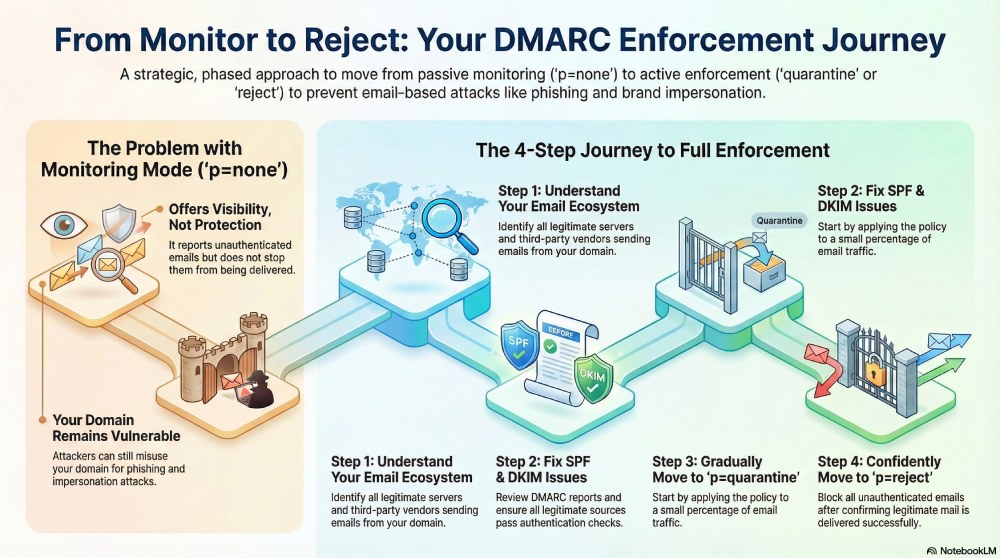
When you first configure DMARC, it is usually done with a DMARC policy at “p=none” or in monitoring mode. This gives you insight into how emails are actually sent from your domain and how receiving servers handle them. At this stage, DMARC reports help you understand which servers are sending emails on your behalf, whether those emails are passing SPF and DKIM checks, and, if not, how receiving mail servers handle those failures. Over time, this helps you understand how email is actually being sent from your domain, especially when multiple tools or vendors are involved.
This is only one part of the picture. While “p=none” gives you visibility, it does not do anything about unauthenticated emails and how they will be handled by the recipient’s servers. As long as the DMARC policy is at “p=none”, emails that fail authentication checks will still be delivered. This means attackers will still be able to misuse your domain for phishing or impersonation, despite taking all the seemingly right measures. When you apply stricter DMARC policies, such as quarantine or reject, receiving mail servers start taking strict action against authentication failures.
This way, emails that fail these checks are handled differently from legitimate messages. They are either filtered and sent to the spam folder or rejected altogether. This makes it much harder for anyone to misuse your domain and turns DMARC into something that actually stops fraudulent emails, not just something that reports them.
How to transition from “p=none” to “p=quarantine” or “p=reject” seamlessly and effectively?
As your email ecosystem gets more complex with multiple sending systems, the transition from monitoring to enforcement mode becomes more strategic and critical. Moving too quickly to enforcement in such an environment can lead to legitimate emails being blocked or filtered. This is why it is recommended that you take a structured and phased approach. Here’s how you can transition from “p=none” to “p=quarantine” and subsequently “p=reject” in an effective manner:
Understand your email ecosystem first
The first step to effective DMARC implementation is having a clear view of your email ecosystem. This means identifying all the servers that send emails on your behalf, such as marketing tools, customer support systems, transactional email services, and third-party vendors, etc. Once you know what systems are actively sending emails, you can start validating whether they are expected and properly configured.
Fix SPF and DKIM issues, if any
Before you move to a stricter DMARC policy, thoroughly review DMARC reports to identify where SPF and DKIM are failing and which sending systems are affected. It is important to ensure that all legitimate sources are passing SPF and/or DKIM, and that the domains are aligned with your DMARC policy.
Move to “p=quarantine” gradually
After you are sure that SPF and DKIM issues have been properly addressed for all legitimate sending sources, you can move on to “p=quarantine” in a controlled manner. Start by applying the policy to a small percentage of traffic using the ‘pct’ tag, giving you room to validate enforcement while keeping legitimate email delivery stable. If you are confident that your legitimate emails are passing through without issue, you can gradually increase the percentage until “p=quarantine” is fully applied.

Move on to “p=reject” once you are confident with the setup
Implement “p=reject” only after p=quarantine has been in place for some time without causing delivery issues. At this stage, DMARC reports should show all your legitimate emails passing through and landing in recipients’ inboxes, and only unauthenticated emails should be failing SPF and DKIM checks. Now you can confidently move to p=reject, knowing that your email environment is stable. With this policy in place, emails that fail DMARC checks will be blocked entirely and will not reach recipients.
If you are struggling to ensure secure, seamless email delivery, chances are your DMARC setup is still in monitoring mode. Transitioning to enforcement enables you to respond to authentication failures, prevent unauthorized email delivery, and protect your domain from misuse. To get started with your DMARC enforcement journey, contact DuoCircle today.
Topics
General Manager
General Manager at DuoCircle. Product strategy and commercial lead across the email security portfolio.
Secure your email infrastructure
Protect, authenticate, and deliver. Contact our team to find the right solution.