

In the fast-moving digital world of today, effective email delivery is essential for businesses that rely on smooth communication and customer interactions. Whether you’re dispatching transaction notifications, marketing initiatives, or crucial information, using a managed outgoing SMTP email server guarantees that your emails arrive securely and punctually. Yet, with numerous providers offering different features, pricing structures, and deliverability rates, selecting the best one can be daunting.
To assist you, we’ve compiled a list of 9 trustworthy providers for managed outgoing SMTP email server solutions — each recognized for their performance, scalability, and seamless integration. This guide will introduce you to the leading options that enhance email deliverability, streamline server management, and accommodate your expanding communication needs without the complexities of technical issues.
What a managed outgoing SMTP server solves
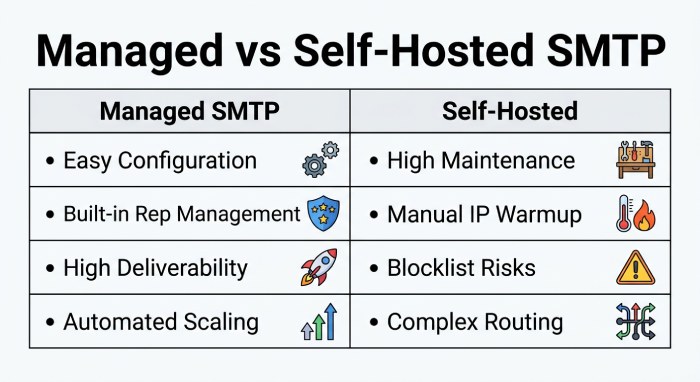
A managed outgoing SMTP server gives you a reliable, policy-compliant path to send emails from applications and websites without maintaining your own SMTP mail server. Instead of wrestling with IP reputation, blocklists, and ISP throttling, you leverage a cloud-based SMTP relay that implements the Simple Mail Transfer Protocol end to end. Your mail client or app connects with provider-issued SMTP credentials, and the provider handles outbound email routing, bounces, and feedback loops to improve email deliverability.
Compared with running a self-hosted mail server, a managed outgoing mail server simplifies configuration and governance. You set a single SMTP server address, choose the right SMTP port with SSL/TLS, and enable SMTP authentication. From there, the service enforces encryption options, connection limits, and other SMTP parameters to protect your domain and recipients. This approach is compatible with common email provider ecosystems—whether your business users rely on Gmail, Yahoo, AOL, or Outlook.com—and works alongside POP/IMAP inbox access as needed.
Because the Simple Mail Transfer Protocol is extensible, most providers offer a dual path: connect via a traditional outgoing SMTP server or integrate directly with an SMTP API. Both routes are suitable for transactional messages, newsletter sending, and even careful bulk email use, as long as you follow domain verification and compliance guidelines.
Core configuration elements
Addresses, ports, and encryption
- SMTP server address: Point your app or mail client to the hostname your SMTP service provides.
- SMTP port: Use 587 (modern STARTTLS), 465 (implicit TLS), or 25 (legacy; often blocked). Confirm firewall rules permit egress on your chosen port.
- Encryption options: Enforce SSL/TLS and modern ciphers. Run a test email to validate your TLS handshake and certificate chain.
Credentials and authentication
- SMTP authentication: Use per-application SMTP credentials and limit scope. Rotate authentication credentials on a schedule.
- SMTP settings: Document SMTP details (hostname, port, auth type, TLS requirement) in your runbooks and CI/CD secrets.
Testing and monitoring
After email client configuration, send a test email to multiple networks (e.g., Gmail and Outlook.com) and track email metrics (opens, clicks, bounces, delays). This validates both your SMTP protocol handshake and provider-side policies.
Top managed SMTP relay providers
Provider 1 – DuoCircle
DuoCircle offers a managed SMTP relay service combined with robust email security and continuity features. Designed for businesses using platforms like Microsoft 365 or Google Workspace, it provides reliable outbound email delivery alongside advanced spam filtering, phishing protection, and archiving. With built-in redundancy and failover capabilities, DuoCircle ensures emails continue flowing even during outages. Configure your outgoing SMTP server with DuoCircle’s relay settings, enable TLS encryption, and benefit from enhanced security without sacrificing deliverability—making it a strong choice for organizations prioritizing both reliability and protection.
Provider 2 – Twilio SendGrid
Twilio SendGrid delivers a scalable SMTP relay and SMTP API with powerful deliverability tooling—Event Webhook, suppression management, subuser accounts, and dynamic templates. Dedicated IPs and automated warmup help maintain reputation during traffic spikes. Its robust docs, SDKs, and granular account segmentation make it a strong outgoing SMTP server for teams combining transactional and marketing sends. Configure SMTP settings quickly in your app, set the SMTP server address and SMTP port 587 with TLS, and rely on SendGrid’s adaptive policies to route outbound email efficiently.
Provider 3 – Amazon SES
Amazon SES is a cost-efficient, high-throughput SMTP relay tightly integrated with AWS. It supports DKIM/SPF/DMARC, dedicated IPs, managed warmup, and its Virtual Deliverability Manager. After moving from sandbox to production and completing domain verification, you can point your outgoing mail server to SES, add SMTP authentication, and start sending at scale. Developers embedded in AWS stacks favor SES for professional SMTP and predictable costs.
Provider 4 – Mailgun by Sinch
Mailgun is developer-centric, offering both traditional SMTP email and a rich REST API, advanced routing, inbound parsing, validations, and detailed logs. With EU/US regions, optional dedicated IPs, and deliverability consulting, Mailgun gives product teams programmatic control without heavy marketing baggage. Set your mail client or app to the Mailgun SMTP server address, ensure STARTTLS on port 587, and use webhooks plus email metrics to fine-tune email delivery.
Provider 5 – Postmark
Postmark is transactional-first with exceptional inbox speed and high reliability. Its Message Streams separate transactional and broadcast traffic, improving reputation. Clear event history and webhook coverage support fast troubleshooting. Postmark’s shared pools are known for strong reputation, with dedicated IPs as you scale—ideal for password resets and critical app notifications where the outgoing SMTP server must be rock solid.
Provider 6 – SparkPost (by MessageBird)
SparkPost excels at high-volume SMTP relay and analytics via Signals, offering adaptive delivery and reputation insights. Dedicated IPs, robust compliance controls, and proactive deliverability intelligence make it a fit for data-driven teams. Configure your SMTP parameters carefully, leverage the SMTP API or relay endpoint, and monitor Signals to manage spikes in bulk email without harming your domain reputation.
Provider 7 – Mailchimp Transactional Email (Mandrill)
Mandrill is an SMTP/API add-on for Mailchimp users sending order confirmations, receipts, and alerts. It leverages Mailchimp templates, merge tags, and reporting, with straightforward SMTP settings if you already use Mailchimp. It requires a Mailchimp account and paid transactional add-on and is not for cold outreach. For storefronts, it’s a convenient outgoing mail server that keeps brand templates consistent.
Provider 8 – SMTP2GO
SMTP2GO is an easy-to-deploy managed SMTP with 24/7 human support, a global MTA network, real-time dashboards, and link/open tracking. It provides dedicated IPs, warmup guidance, and compliance help for SMBs. If you want predictable deliverability and hands-on assistance rather than deep engineering, point your mail client to SMTP2GO’s SMTP server address, enable SMTP authentication, and start sending with confidence.
Provider 9 – Brevo (formerly Sendinblue)
Brevo combines an EU-based SMTP relay with marketing automation, SMS, and light CRM. With GDPR-friendly hosting options, transactional templates, webhooks, and dedicated IPs on higher tiers, Brevo is an accessible all-in-one platform for European SMBs. A generous free tier (daily cap) helps teams test newsletter sending and transactional flows before committing to higher volumes.
Setup tips for popular clients and ISPs
When pointing a mail client like Airmail, Apple Mail, or Outlook to a managed SMTP mail server, override the default outgoing SMTP server from your email provider and enter the new SMTP server address, SMTP port, and SMTP authentication details. This ensures your app can send emails through a professional SMTP relay while keeping inbox access via POP or IMAP unchanged.
Many networks and legacy ISPs (BT Connect, 1&1, AT&T, Bluewin, Comcast, Earthlink, Gmx, HotPop, Libero, Lycos, O2, Orange, Tin, Tiscali, Verizon, Virgin) restrict port 25. Use 587 with STARTTLS or 465 with implicit TLS. Maintain an internal SMTP server list so support teams can quickly locate SMTP details for each environment. Always add the provider’s SMTP relay server host to allowlists and verify firewall rules permit outbound connections.
Avoiding ISP blocks
- Choose ports 587/465 over 25.
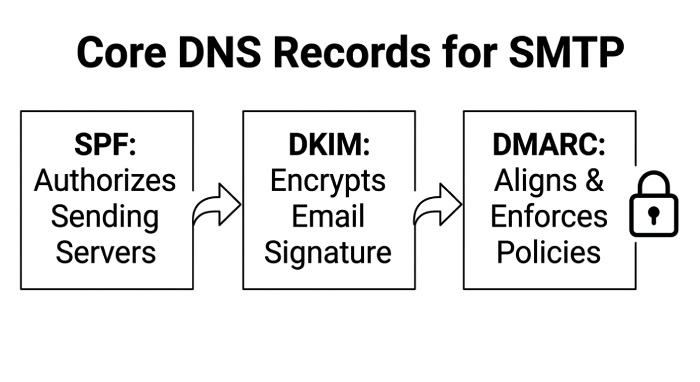
- Complete domain verification (SPF, DKIM, and DMARC).
- Throttle newsletter sending and bulk email; segment transactional vs. promotional traffic.
- Regularly send a test email to major receivers (Gmail, Yahoo, Outlook.com) to catch reputation shifts early.
Deliverability, authentication, and compliance
Strong email deliverability starts with authenticated traffic. All providers here support SPF/DKIM, with DMARC alignment recommended. Configure DNS settings precisely, enforce encryption options, and separate traffic types. For additional protection, consider layered controls and email security. Most cloud-based SMTP platforms provide reputation dashboards and feedback loops; use them to remove complainers and manage suppression lists. Follow laws governing outbound email and consent, and avoid risky acquisition lists to protect your outgoing mail server reputation.
Warmup and IP reputation
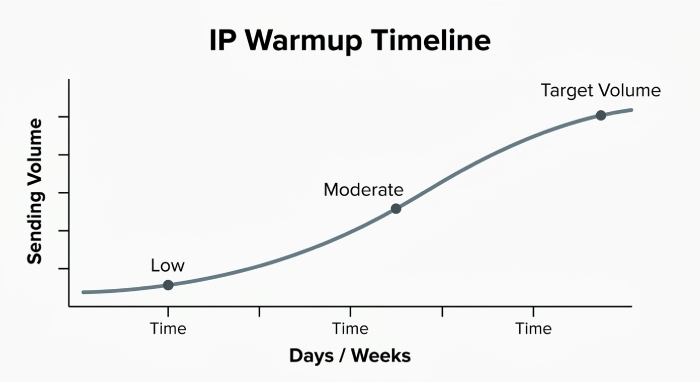
If you adopt dedicated IPs, follow automated warmup plans. Ramp volume over days or weeks, use consistent SMTP parameters, and monitor email metrics like bounce rate, complaint rate, and block events. Many platforms (SendGrid, Amazon SES, Mailgun, Postmark, SparkPost, Brevo, SMTP2GO, Elastic Email, and Mailchimp Transactional) provide warmup guidance or automation.
Implementation checklist
Collect your SMTP details
Gather the SMTP server address, supported SMTP port, required SSL/TLS mode, and the exact SMTP authentication scheme. Store SMTP credentials and other authentication credentials securely and rotate them periodically.
Domain setup
- Perform domain verification and publish SPF/DKIM/DMARC records.
- Align subdomains for transactional vs. marketing traffic to protect the primary domain.
Client configuration
- Update application secrets and email client configuration with correct SMTP settings.
- Confirm firewall rules and egress policies for the SMTP protocol on chosen ports.
Testing and monitoring
- Send a test email across providers and seed lists; validate placement and latency.
- Use provider logs, webhooks, and dashboards to track deliverability, deferrals, and blocks.
Ongoing review
Audit your SMTP service quarterly, verify rate limits, revisit encryption options, and ensure your processes still meet compliance for your regions and audiences.
Troubleshooting common errors
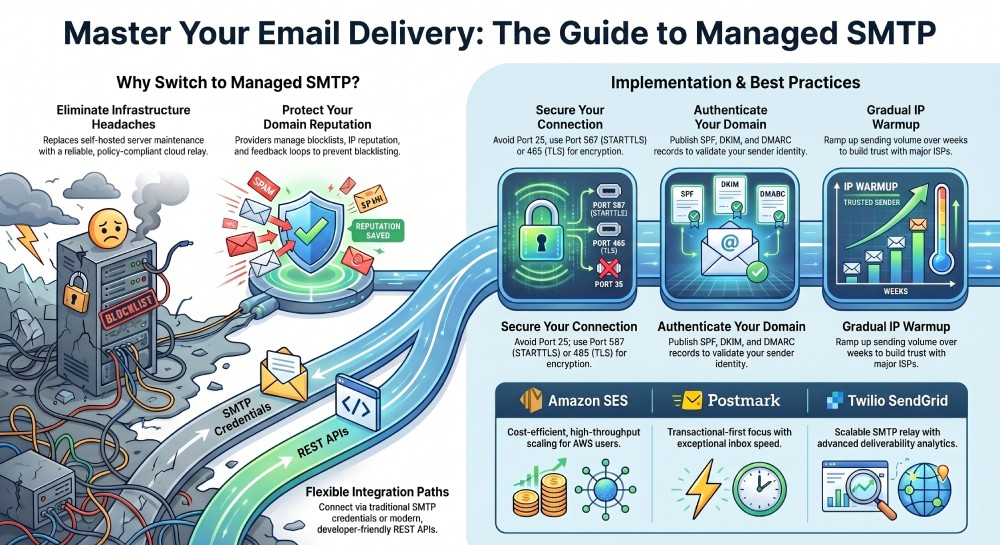
If authentication fails, double-check SMTP authentication mode and regenerate SMTP credentials. If connections time out, verify the SMTP port and firewall rules; many ISPs block 25. TLS errors usually mean mismatched encryption options—switch to STARTTLS on 587 or enable implicit TLS on 465. Persistent bounces indicate missing DNS settings or reputation issues; review SPF/DKIM/DMARC, domain verification, and sender consistency.
Finally, confirm your mail client isn’t overriding the outgoing SMTP server with a default from your email provider, and ensure your application isn’t mixing SMTP API and relay configurations inadvertently. The Simple Mail Transfer Protocol is forgiving when configured correctly—methodically validate each setting to restore a healthy outgoing mail server path.