Reducing Business Email Compromise with Microsoft 365 Zero Trust Email Security

Quick Answer
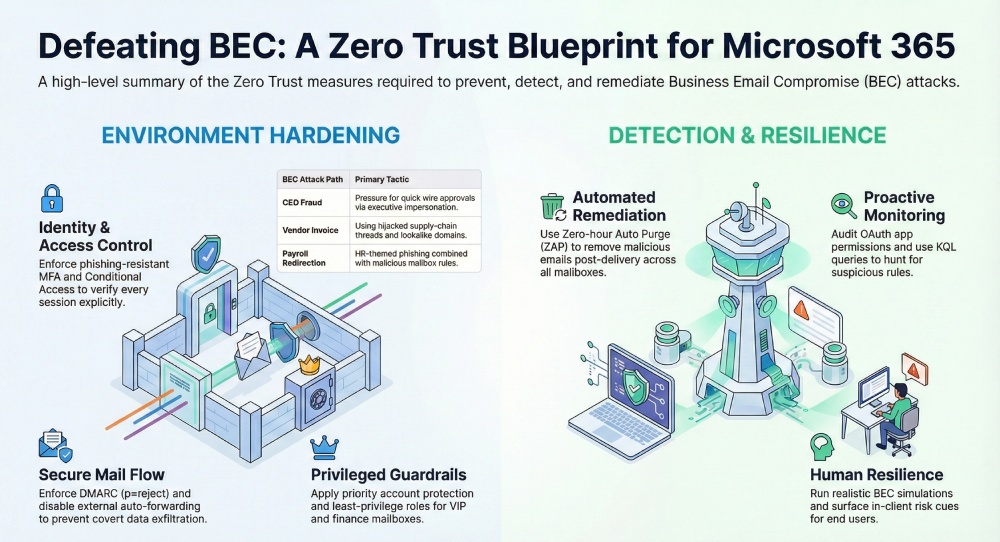
Reducing business email compromise (BEC) in Microsoft 365 means applying Zero Trust principles, assume breach, verify explicitly, least privilege, to identity, mailbox, and mail flow. Ten measures matter: model BEC paths (CEO fraud, vendor invoice compromise, payroll redirect, OAuth consent abuse); enforce phishing-resistant MFA and Conditional Access; protect VIP and finance mailboxes via Defender for Office 365 priority accounts; tune anti-phishing, Safe Links, Safe Attachments, and ZAP; enforce SPF, DKIM, and DMARC at p=reject after staged monitoring; disable external auto-forwarding; alert on suspicious inbox rules; apply Purview DLP and sensitivity labels to payment data; require publisher verification and least-privilege OAuth scopes; hunt with KQL across impossible travel, MFA fatigue, and inbox rule creation. Pair technical controls with Attack Simulation Training and out-of-band callback procedures for finance approvals.

Business email compromise remains one of the most costly advanced threats because it exploits trust, targets finance workflows, and evades traditional malware detection. A Zero Trust approach in Microsoft 365 applies “assume breach,” continuous verification, and least privilege to email security, collaboration tools, and mail flow.
Combining Microsoft Defender for Office 365, Exchange Online Protection (EOP), and Conditional Access yields layered threat protection against phishing, malware attacks, and social engineering while enabling rapid investigation, automated remediation, and proactive Threat Hunting.
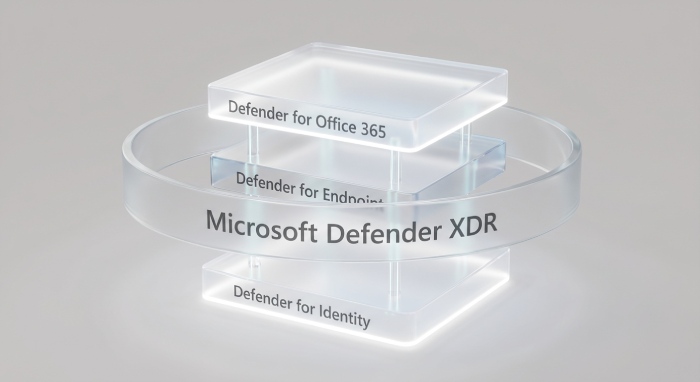
Microsoft’s protection stack spans Microsoft Defender XDR, Defender for Endpoint, and Defender for Identity to correlate identities, devices, and email events. This integration in the Defender portal strengthens Office 365 security with security monitoring, incident response, and threat intelligence that extend across Microsoft Teams, Microsoft Outlook, Azure, Dynamics 365, and Power Platform. For cloud organizations facing evolving security challenges, Microsoft Zero Trust guidance, security documentation, and security updates provide clear security guidance and security resources to stay secure by default and sustain a strong security posture.
Use cloud-based email filtering to block commodity phishing and credential-harvesting campaigns, then harden authentications and authorization with multi-factor authentication and access control. Align risk management and compliance objectives to security policies, threat remediation playbooks, and security assessment results. For readers comparing ecosystems, see this independent resource on email security to understand broader approaches, then map those learnings back to Microsoft 365.
Zero Trust Measure #1: Define the BEC threat model and Zero Trust objectives
Model common BEC attack paths
- CEO fraud and executive impersonation that pressure quick wire approvals.
- Vendor invoice compromise using hijacked supply-chain threads and lookalike domains.
- Payroll redirection through HR-themed phishing and malicious mailbox rules.
- OAuth consent abuse against collaboration tools and cloud apps to persist access.
These business email compromise patterns often avoid malware attacks entirely, so your cloud-based email filtering, user training, and downstream finance controls must assume breach and focus on detection and containment.
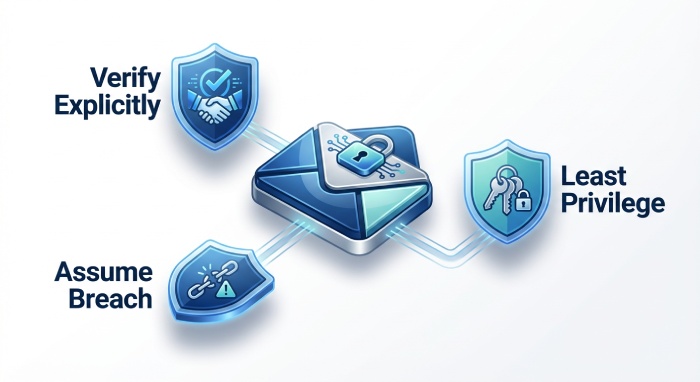
Map Zero Trust principles to email
- Assume breach: Treat every message and identity as untrusted; validate authentications, sender integrity (SPF, DKIM, DMARC), and anomalous mail flow.
- Verify explicitly: Use Defender for Office 365 anti-phishing, mailbox intelligence, Safe Links, and Safe Attachments at time-of-click; verify session risk with Conditional Access.
- Least privilege: Limit admin roles in Exchange Online; restrict auto-forward and inbox rules; enforce minimal app permissions via Defender for Cloud Apps.
Set measurable KPIs aligned to Microsoft 365 controls
- Phish catch rate and time-to-remediation via Threat Explorer and automated investigation.
- Auto-forward blocks and anomalous rule detections.
- VIP protection coverage (priority account protection) and alert MTTR.
- DMARC-aligned (p=reject) acceptance rate and spoof prevention efficacy.
- KPI ownership visible in a portal overview dashboard within the Defender portal to guide investigation and threat remediation.
Zero Trust Measure #2: Verify identity explicitly for mail access
Strong authentication and Conditional Access
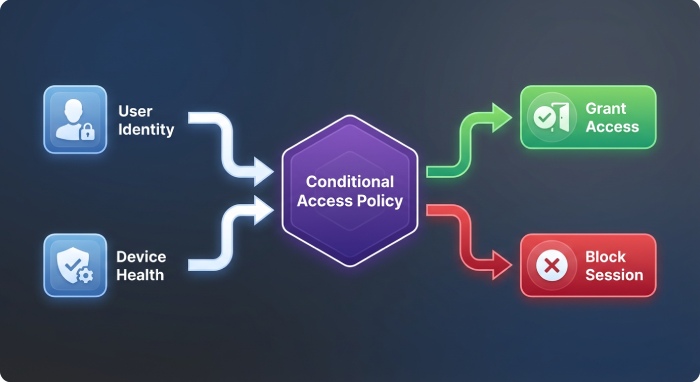
- Enforce phishing-resistant MFA: FIDO2 security keys, passkeys, and Microsoft Authenticator number matching.
- Conditional Access policies: Require compliant or hybrid-joined devices (backed by Microsoft Defender for Endpoint and Microsoft Defender Vulnerability Management posture), block risky sign-ins, enforce sign-in risk policies from Microsoft Entra ID Protection, and require verified locations or device health for Exchange Online and Microsoft Outlook.
Eliminate legacy protocols and reduce attack surface
- Disable legacy/basic auth for POP, IMAP, and EWS where feasible; restrict SMTP AUTH to approved service accounts.
- Apply session controls and token lifetime policies to shrink the attack surface and prevent long-lived risky sessions.
- Integrate sign-in telemetry with Microsoft Defender XDR for Threat Hunting that correlates authentications, authorization decisions, and mailbox activity.
Operationalize identity protection
- Monitor impossible travel, unfamiliar sign-ins, and suspicious inbox rule creation.
- Use access control reviews for service principals; monitor OAuth consent via Defender for Cloud Apps.
- Document policies in security documentation and provide training and certification for admins to ensure consistent incident response.
Zero Trust Measure #3: Protect privileged, VIP, and finance mailboxes
Privileged access and role hygiene
- Use Entra Privileged Identity Management for Exchange roles with just-in-time elevation, approval workflows, and role separation.
- Block standing global admin for mail; enforce least privilege and time-bound access for helpdesk and eDiscovery roles.
VIP and finance mailbox hardening
- Prioritize VIP and finance users in Defender for Office 365 with priority account protection and stricter anti-phishing thresholds.
- Harden shared AP/AR mailboxes: disable auto-forward, limit external replies, require MFA for delegated access, and enforce transport rules that add external sender tagging and route high-risk messages through additional cloud-based email filtering.
- Apply stricter data loss and vendor payment verification workflows; integrate with Dynamics 365 finance processes where applicable.
Monitoring, auditing, and alerts
- Enable mailbox auditing by default; alert on delegate additions, forwarding rule changes, and permission grants.
- Use the Defender portal for real-time investigation and automated remediation of suspected BEC, including account compromise with no malware detection.
- Correlate identity anomalies from Defender for Identity and device risk from Defender for Endpoint to accelerate threat protection and threat remediation.
Zero Trust Measure #4: Turn on and tune Microsoft Defender for Office 365
Anti-Phishing and impersonation controls
- Configure Anti-Phishing policies with user and domain impersonation protection, mailbox intelligence, and lookalike detection.
- Enable advanced heuristics for BEC to analyze language patterns, first-contact scenarios, and supplier relationships.
Safe Links, Safe Attachments, and ZAP
- Turn on Safe Links (time-of-click) for messages and Microsoft Teams; enable Safe Attachments (dynamic detonation) with Dynamic Delivery to preserve user experience.
- Ensure zero-hour auto purge (ZAP) is enabled to remove malicious emails post-delivery across mailboxes when new signals emerge.
- Validate mail flow impact and exceptions using Advanced Delivery for trusted third-party gateways and non-Microsoft security services to maintain security service integration without breaking legitimate traffic.
Validate and iterate with Threat Explorer
- Use Threat Explorer for investigation, hunting for suspicious senders, recently registered lookalike domains, and anomalous reply-to patterns.
- Leverage automated investigation and response to contain and remediate at scale; document actions for compliance and risk management.
- Employ Microsoft Copilot for Security to speed triage, summarize investigation context, and recommend next-step remediation in Office 365 security cases.
Zero Trust Measure #5: Authenticate and authorize email sources
SPF, DKIM, and DMARC enforcement
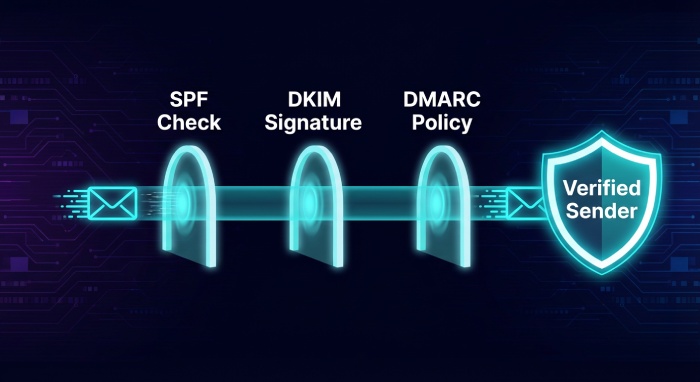
- Publish SPF and DKIM for all sender domains; enforce DMARC with p=reject after staged monitoring.
- Monitor aggregate and forensic DMARC reports to guide policy tightening and reduce abuse that fuels business email compromise.
Transport controls and delivery exceptions
- Enabling EOP anti-spoofing and reference authentication results in transport rules to quarantine or reject failures.
- Configure Advanced Delivery exceptions for known-good gateways and scanners to avoid duplicate filtering and ensure coherent protection stack behavior.
- Add external sender tagging and first-contact safety tips to raise user awareness, especially for finance workflows.
Brand and domain defenses
- Continuously monitor for lookalike domains and homoglyph attacks; consider BIMI to reinforce brand trust when alignment is met.
- Use Microsoft External Attack Surface Management to inventory exposed mail-related assets and third-party services affecting mail flow.
- For broader cloud protections, integrate Defender for Cloud, Defender for Business, Defender for Cloud Apps, and Defender for IoT to reduce adjacent entry points that adversaries pivot through to reach secure email.
Across these measures, maintain a cadence of security assessment, security monitoring, and policy tuning. Align with Microsoft Zero Trust guidance, keep configurations secure by default, and track outcomes in the Defender portal. By unifying Microsoft Defender controls, cloud-based email filtering, and Office 365 security policies, organizations measurably raise threat protection against phishing, malware attacks, and BEC, while improving investigation speed, automated remediation, and ongoing Threat Hunting.
Zero Trust Measure #6: Block covert exfiltration and payment fraud patterns
Disable external auto-forwarding by default
In a Zero Trust posture, disable external auto-forwarding everywhere in Microsoft 365, allowing narrowly scoped exceptions for break-glass workflows. Use transport rules and Exchange Online mail flow settings to enforce this across cloud organizations. This reduces business email compromise (BEC) blast radius, preventing covert data exfiltration and payment fraud setup. Pair this control with Defender for Office 365 and its cloud-based email filtering to block advanced threats and phishing that attempt to create forwarding rules after account takeover.
Alert on suspicious inbox rules and actions
Enable alerting for suspicious inbox rules such as move/delete/forward patterns and sudden rule creation. Microsoft Defender and Office 365 security auditing detect anomalous authentications and authorization changes that typically precede malware attacks or BEC staging. Drive automated remediation and investigation via Microsoft 365 Defender incidents, leveraging threat protection analytics and threat remediation to quarantine malicious messages and remove rogue rules at scale.
Transport rules for high‑risk payment phrases
Create Exchange Online transport rules that flag or block phrases such as “urgent wire,” “payment update,” “banking change,” or “ACH details.” Combine these with content scanning for invoice patterns, attachment inspection, malware detection, and cloud-based email filtering. Use secure email banners for external senders and high-risk communications, feeding telemetry into Microsoft Defender XDR for broader Threat Hunting across the protection stack.
Apply DLP and sensitivity labels to payment data
Apply Microsoft Purview DLP for financial data, IBAN/SWIFT patterns, and invoice templates. Use sensitivity labels with encryption to protect payment instructions at rest and in transit, and require multi-factor authentication for access control to labeled content.
Encryption on payment instructions
Require “Confidential Payments” labels that enforce encryption and conditional access, restricting forward/print and ensuring only finance-approved identities can open content in Microsoft Outlook, Microsoft Teams, and Dynamics 365 workflows.
Zero Trust Measure #7: Govern OAuth apps and third‑party integrations
Require publisher verification and admin consent
Mandate publisher verification, application permissions reviews, and admin consent workflows in Microsoft Entra ID. Block unsanctioned apps seeking high-risk Graph/EWS scopes (Mail.ReadWrite, offline_access). Defender for Cloud Apps App Governance surfaces risky apps, anomalous token use, and suspicious authentications for rapid investigation and remediation.
Restrict permissions and disable unused protocols
Enforce least privilege for Graph and EWS, disable legacy/basic protocols, and tighten Exchange application access policies. Apply conditional access to constrain risky sessions, require compliant devices, and integrate authorization checks across Microsoft 365 and Azure services.
Tighten Exchange application access policies
Constrain EWS and Graph to approved service principals; monitor and revoke stale tokens. Audit app consent grants regularly, and use security policies in the Defender portal to automate threat protection responses when anomalous app activity is detected.
Monitor tokens, audit service principals, and revoke risk
Continuously audit service principals, OAuth consents, and token lifetimes. Configure alerts for mass mailbox access, suspicious new inbox rules, and token reuse across geographies (impossible travel). Integrate telemetry with Microsoft Defender XDR and non-Microsoft security services via SIEM/SOAR for comprehensive security monitoring and threat intelligence correlation.
Zero Trust Measure #8: Continuously monitor, detect, and respond
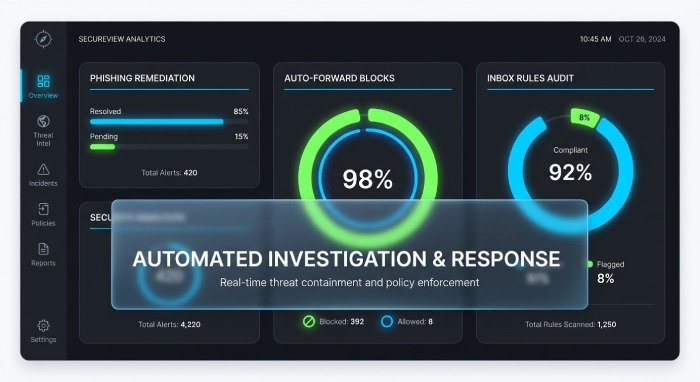
Use Microsoft 365 Defender incidents, AIR, and ZAP
Leverage Microsoft 365 Defender incident correlation, Automated Investigation and Response (AIR), and Zero-hour Auto Purge (ZAP) to stop phishing and malware attacks post-delivery. ZAP removes malicious emails retroactively as cloud-based email filtering verdicts update. Incidents unify signals across Microsoft Defender for Office 365, Defender for Endpoint, and Defender for Identity for faster investigation and remediation.
Hunt with KQL for BEC indicators
Operationalize Threat Hunting with Kusto Query Language (KQL) for BEC indicators: sudden inbox rule creation, unusual MFA prompts, mass external replies, impossible travel sign-ins, and VIP-targeted messages. Use Entra ID risky user/sign-in signals and identity protection to triage authentications and prioritize risk management and incident response.
Signals to prioritize: risky sign-ins and MFA fatigue
Hunt for token theft, MFA fatigue, and anomalous consent grants. Enrich with Defender for Cloud Apps session data and Microsoft Defender Vulnerability Management posture to understand attack surface and lateral movement potential.
Maintain a BEC playbook and contain quickly
Maintain a tested BEC playbook: out-of-band payment verification, account containment (password reset, token revocation, session kill), mail flow rule review, and message trace. Use the Defender portal for portal overview and one-click remediation, and coordinate legal/compliance notifications. Microsoft Copilot for Security can accelerate investigation, summarizing alerts and proposing remediation steps aligned to Microsoft Zero Trust guidance and security documentation.
Zero Trust Measure #9: Build resilient people controls
Attack Simulation Training for realistic BEC
Run Attack Simulation Training scenarios (supplier invoice, CEO request, vendor bank change). Target executives/EAs and finance staff with tailored simulations and just-in-time education. Reinforce verification procedures and secure by default patterns that reduce human-factor security challenges.
Report Message/Phish and in‑client risk cues
Deploy the Report Message/Report Phish add-ins in Microsoft Outlook.
Surface in-client alerts: external recipient tags, first-time sender prompts, and abnormal reply domain warnings. These cues reduce susceptibility to phishing and business email compromise and feed telemetry back to Defender for Office 365 for ongoing threat protection and investigation.
Train finance and leadership on verification
Codify callback procedures using verified numbers in supplier records. Replace informal approvals with secure email approvals gated by conditional access and multi-factor authentication, or use collaboration tools and shared channels in Microsoft Teams for controlled approval workflows tied to Power Platform automations.
Zero Trust Measure #10: Secure external collaboration and supplier trust
External domain controls and cross‑tenant access
Implement external domain allow/block lists and fine-grained cross-tenant access settings. Use Microsoft External Attack Surface Management to profile supplier domains and detect changes that expand your attack surface. Integrate with Defender for Cloud and Defender for Business to protect shared resources in hybrid environments.
Vet suppliers’ SPF/DKIM/DMARC posture
Continuously assess suppliers’ email authentication and domain hygiene. Combine DMARC enforcement with cloud-based email filtering and Office 365 security anti-spoof policies to reduce impersonation. For broader risk management, leverage Defender for IoT for connected devices in vendor environments and Microsoft Defender for Endpoint to catch payload-based malware attacks in shared projects.
Communication Compliance and workflow replacements
Use Communication Compliance to detect payment-related keywords and exfiltration patterns across Microsoft Teams and email. Where possible, replace email approvals with secured workflows in Dynamics 365 or Power Platform, or use Teams shared channels that enforce access control, conditional access, and authorization policies. For broader ecosystem alignment, share security resources and security guidance with suppliers and align on security updates cadence.
For buyers evaluating layered defenses, independent email security tools can augment Microsoft 365 cloud-based email filtering. Ensure any security service integration aligns with your protection stack and mail flow, and validate integration points with Microsoft Defender and non-Microsoft security services to sustain strong Office 365 security.
FAQs
How does Defender for Office 365 help against BEC beyond basic filtering?
Defender for Office 365 combines cloud-based email filtering with ZAP, AIR, and advanced Threat Hunting to detect phishing, account takeover, and post-delivery changes like malicious inbox rules. It unifies signals with Microsoft Defender XDR for faster investigation and remediation across identities, endpoints, and apps.
Should we block all external auto-forwarding?
Yes, block by default and approve narrowly scoped exceptions with documented business needs. This Zero Trust control disrupts covert exfiltration and payment fraud setups often used in business email compromise.
What OAuth app controls are most critical?
Require publisher verification and admin consent, restrict high-risk Graph/EWS permissions, and monitor stale tokens and anomalous grants. Use Defender for Cloud Apps App Governance and Entra ID risk signals to audit service principals and revoke risky access quickly.
What are the top KQL hunts for BEC?
Prioritize hunts for impossible travel, unusual MFA prompts, sudden inbox rule creation, mass external replies, and VIP-targeted phishing. Correlate with risky sign-ins, message trace, and token reuse to accelerate incident response.
How should we verify payment changes securely?
Use out-of-band callbacks to verified numbers, require labeled and encrypted payment instructions, and replace ad hoc email approvals with secured workflows or Teams shared channels. Enforce multi-factor authentication and conditional access on all finance-related approvals.
Key Takeaways
- Disable external auto-forwarding, alert on suspicious inbox rules, and use DLP plus sensitivity labels to block covert exfiltration and payment fraud.
- Govern OAuth apps with publisher verification, least privilege, and continuous auditing; integrate findings in Microsoft 365 Defender for rapid remediation.
- Operationalize Threat Hunting with KQL, leverage AIR and ZAP, and run a tested BEC playbook guided by Microsoft Zero Trust principles.
- Train users with realistic BEC simulations, enable Report Phish, and surface in-client risk cues to strengthen human defenses.
- Secure supplier collaboration with domain controls, DMARC enforcement, Communication Compliance, and workflow-based approvals that enforce access control and compliance.
General Manager
General Manager at DuoCircle. Product strategy and commercial lead across the email security portfolio.
Secure your email infrastructure
Protect, authenticate, and deliver. Contact our team to find the right solution.