10 Best Practices for DKIM on Subdomains to Improve Email Deliverability

Quick Answer
Strong DKIM on subdomains follows ten practices: sign with the exact subdomain in d= for DMARC alignment, use unique selectors and keys per subdomain and platform, deploy 2048-bit RSA-SHA256 (or Ed25519), delegate vendors via CNAME, publish RFC 6376 compliant TXT records, use relaxed canonicalization, rotate keys on schedule, secure private keys, monitor by subdomain, and coordinate with DMARC, SPF, and ARC.

A disciplined approach to DKIM across subdomains is one of the highest‑impact ways to strengthen email authentication and protect domain reputation. In line with RFC 6376, DKIM uses a public/private key pair to digitally sign selected header fields so a receiving server can verify message signature integrity and detect message alteration in transit.
When a brand operates multiple subdomains and custom domains, each signing domain must be engineered with precise DNS record design TXT record data at selector._domainkey. and robust operational controls.
The following best practices consolidate what leading email services, DNS Hosting Providers, and enterprise platforms such as Microsoft 365 and Exchange Online recommend for durable email deliverability at scale.
In every example below, remember the core DKIM mechanics: the sending server signs with the private key, the public key is published in a DKIM record (a TXT record under _domainkey), and a selector differentiates keys per service and subdomain. This alignment across the organizational domain, subdomains, and each signing domain ensures predictable DKIM verification, measurable DMARC outcomes, and resilient fraud protection against phishing attacks.
Best Practice #1: Sign with the exact subdomain in the d= value to ensure DMARC alignment and isolate sender reputation per subdomain
Why subdomain‑exact d= alignment matters
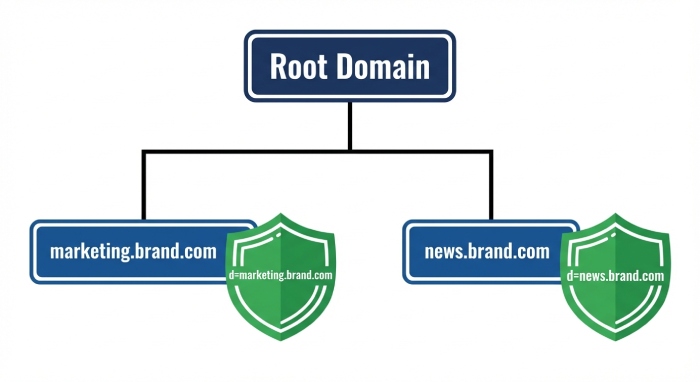
- Use the exact subdomain in the d= value of the DKIM-Signature header field to align with the visible From address under DMARC. For example, if marketing.contoso.com is the From domain, the DKIM signature should present d=marketing.contoso.com, not d=contoso.com.
- This isolates the domain reputation of each signing domain, preventing a problem on one subdomain from spilling into the organizational domain or sibling subdomains.
- It ensures the receiving server can verify message signature alignment at the correct scope, improving email deliverability and simplifying incident response.
Implementation tips and examples
- For contoso.com, use dedicated records such as Selector1._domainkey.marketing.contoso.com with a public key in DNS that matches the private key used by the sending server.
- For Microsoft 365 scenarios, your initial domain (for example, cohovineyardandwinery.onmicrosoft.com) should not be used as the signing domain for public mail. Instead, sign with cohovineyard.com or purpose‑built subdomains like marketing.contoso.com. Defender for Office 365 and Exchange Online support subdomain configuration without forcing onmicrosoft.com into the d= value.
- Validate using PowerShell cmdlets such as Get-DkimSigningConfig in Exchange Online to confirm that the d= value and selector (s= value) are correct across multiple domains.
Best Practice #2: Assign unique DKIM selectors and keys for each subdomain and each sending platform to avoid key reuse and simplify traceability
Design per platform and per subdomain
- Every subdomain should use its own selector and key pair. Avoid reusing a private key across subdomains, custom subdomains, or bulk email services.
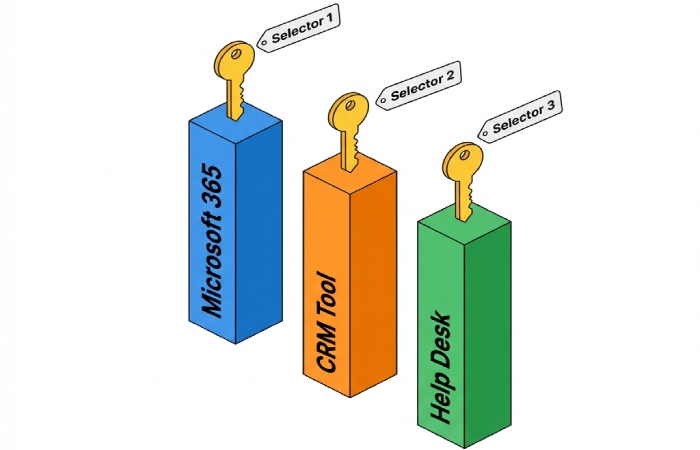
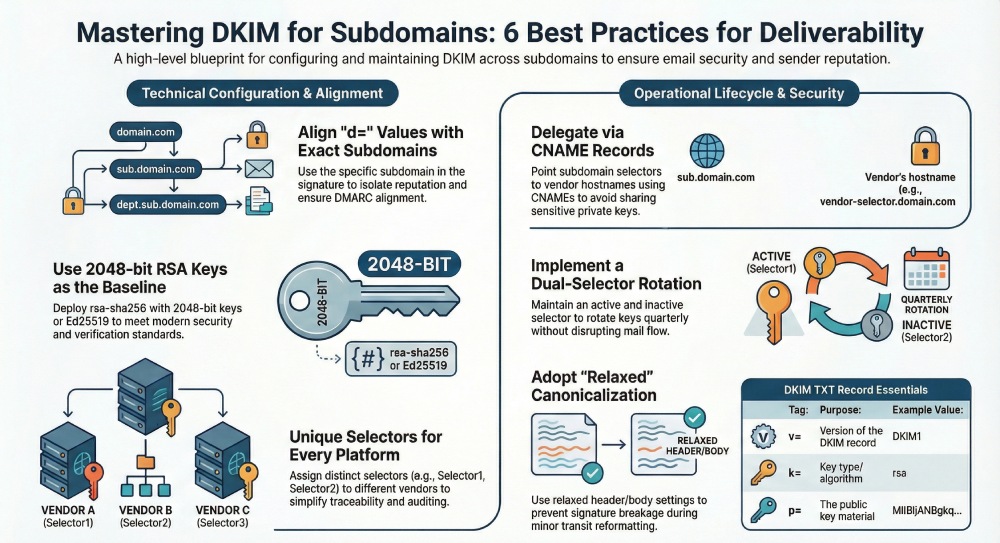
- Map selectors to platforms: Selector1 for Microsoft 365, Selector2 for a marketing automation vendor such as dmarcly.com, and different selectors for other email services or mail routing stacks.
- With unique selectors, each DKIM record in DNS (TXT record under _domainkey) clearly ties a public key to a specific signing domain and platform, improving auditing and DKIM verification.
Operational hygiene for selectors and keys
- Maintain a documented inventory of each selector, its points to address (for CNAME record delegation), and the hostname that publishes the public key.
- Implement key rotation and track which selector is the active selector versus an inactive selector awaiting retirement.
- For parked domains, either disable signing or sign with a non‑routable policy so that unused subdomains do not accidentally inherit production keys.
Active vs. inactive keys and rollover windows
- Keep the prior selector available as an inactive selector for a short overlap while caches expire, then remove that TXT record.
- Rotate the key pair on a predictable schedule across all subdomains to balance security and operational stability.
Suggested naming convention
- Use semantic selector names: Selector1.domainkey.marketing.contoso.com for the marketing platform; Selector2.domainkey.newsletters.cohowinery.com for newsletter mail.
Best Practice #3: Use strong algorithms (rsa‑sha256) with 2048‑bit keys, or Ed25519 where supported, for every subdomain to meet modern security expectations
Algorithm and key strength choices
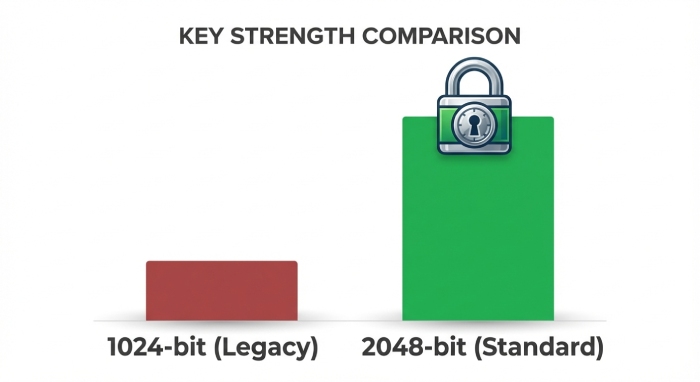
- Configure rsa-sha256 with 2048‑bit keys as the baseline for every subdomain’s DKIM record. Where both the sending server and receiving server ecosystems support it, Ed25519 can offer a smaller public key in DNS and efficient verification.
- Maintain a robust public/private key pair per selector. Never share a private key between vendors or across custom domains.
- Confirm your DNS Hosting Providers and domain registrar support long TXT record values; RFC 6376 allows splitting using quoted strings to meet the 255‑character limit.
Key rotation and validation workflow
- Establish key rotation at least annually, or more frequently for high‑value business email. Rotate per subdomain so one signing domain’s change does not disrupt others.
- After publishing DKIM records with the new public key, send test messages to mail servers you control and inspect the DKIM-Signature header field. Verify that the s= value (selector) and d= value (signing domain) match the intended subdomain, and that the message header validates.
- Use tools from vendors and platforms (e.g., Microsoft 365 message traces, Defender for Office 365, or CloudFlare DNS analytics) to verify message signature results and check for message alteration in transit.
Best Practice #4: Delegate third‑party sending via dedicated subdomains and CNAME‑managed selectors, never sharing keys across vendors or subdomains
Why CNAME delegation protects keys and simplifies ops
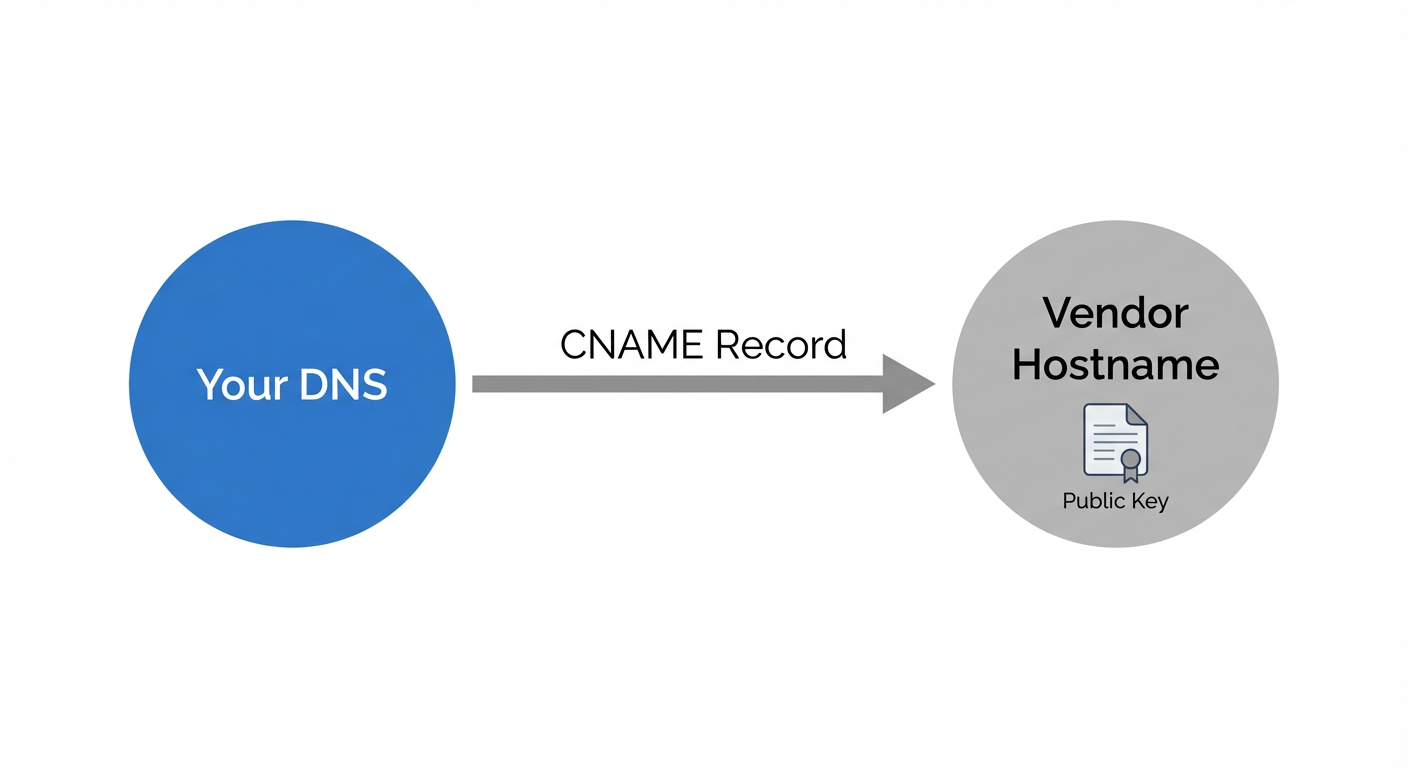
- For third‑party email services and bulk email services, create dedicated subdomains (e.g., marketing.contoso.com) and delegate DKIM via a CNAME record rather than copying a TXT record.
- With CNAME-managed selectors, your selector.domainkey.subdomain CNAME record points to address vendor‑assigned hostnames (for example, selector1.domainkey.marketing.contoso.com CNAME s1._domainkey.vendor.example). The vendor publishes the TXT record and public key in DNS at their hostname, while you retain control of the signing domain and subdomain configuration.
- This separation avoids sharing a private key and aligns with least privilege across multiple domains.
Implementation patterns with real‑world platforms
- In Microsoft 365 and Exchange Online, you might use marketing.contoso.com for campaigns while keeping cohovineyard.com and cohowinery.com for corporate mail. For legacy tenants tied to onmicrosoft.com (e.g., cohovineyardandwinery.onmicrosoft.com), ensure public mail uses your custom domain.
- CloudFlare or similar DNS Hosting Providers make it easy to add the CNAME record at Selector1._domainkey.marketing.contoso.com and monitor propagation.
- Maintain per‑vendor selectors (Selector1, Selector2), and never permit a vendor to reuse your private key. This is crucial for compliance, incident isolation, and fraud protection.
Note: Strengthen layered defenses with DMARC and SPF, and consider external controls like email security to complement DKIM for end‑to‑end protection.
Best Practice #5: Publish RFC‑compliant DKIM TXT records at selector.domainkey.subdomain with correct tag syntax, 255‑char string chunking, and sensible TTLs

Publishing DKIM records with precision
- Always publish the DKIM record as a TXT record at selector.domainkey.. The _domainkey label is mandatory and appears in every signing domain’s DNS record hierarchy.
- Include required tags in the TXT record value: v=DKIM1; k=rsa; p=; and optional parameters per RFC 6376. Ensure the s= value in the DKIM-Signature header matches the selector label, and the d= value matches the exact subdomain.
- For long public key material, respect the 255‑octet limit using quoted string concatenation. Use the DNS system’s dynamic partition character handling (quoted strings with spaces) to split and join the TXT data safely.
TTLs, validation, and troubleshooting
- Set a sensible TTL that balances agility for key rotation with stability for global caches commonly 1 hour to 24 hours per DKIM record, depending on change cadence.
- After publishing DKIM records, send test mail to multiple external providers to confirm DKIM verification and alignment with the visible From address. Inspect the DKIM-Signature header field and related header field values to verify that the message signature validates on the receiving server.
- For delegated models, ensure each CNAME record resolves to a hostname that serves a valid TXT record. If a CNAME chain breaks or the vendor misconfigures the public key in DNS, DKIM verification will fail.
Example zone snippets and edge cases
Example for a custom domain using a subdomain: Selector1.domainkey.marketing.contoso.com TXT “v=DKIM1; k=rsa; p=MIIBIjANBgkq…” Selector2.domainkey.newsletters.cohowinery.com CNAME s2.domainkey.vendor.mail.example.
- When migrating an initial domain (onmicrosoft.com) to production custom domains, ensure all selectors under domainkey are updated.
- For parked domains, publish no DKIM record or a placeholder with no p= value; avoid accidentally enabling signing on inactive namespaces.
By rigorously applying these five practices, precise d= alignment per subdomain, unique selectors and keys, modern algorithms, safe third‑party delegation with CNAME record management, and standards‑compliant publishing you will strengthen email authentication across subdomains, protect your organizational domain, and improve email deliverability at scale.
Best Practice #6: Choose resilient canonicalization and sign stable headers
Adopt relaxed/relaxed canonicalization for DKIM to keep signatures valid as messages traverse gateways and subdomains. RFC 6376 allows canonicalization choices; relaxed/relaxed tolerates whitespace normalization and minor header reformatting that commonly occur with bulk email services, archivers, and list servers. This reduces DKIM signature breakage caused by message alteration in transit between a sending server and a receiving server across different mail routing paths.
Sign headers that rarely change in transit
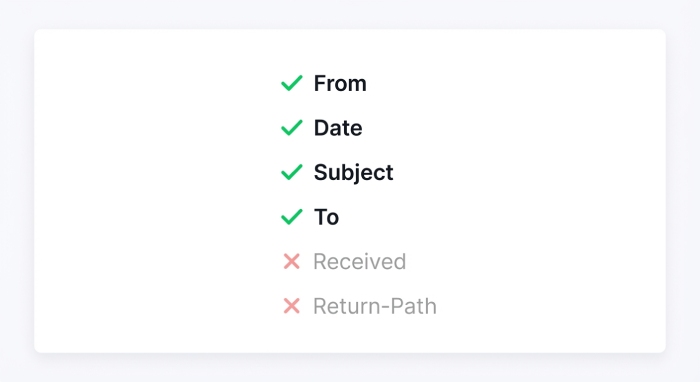
Include From, Date, Subject, and To in your signed header set. These header field values are the most stable and are referenced by the DKIM-Signature in the message header. Avoid signing headers that intermediaries commonly modify (e.g., Received, Return-Path, List-*), which can cause DKIM verification to fail at the receiving server. For multi-tenant email services and subdomain configuration scenarios, stability is crucial when your d= value (signing domain) differs from the visible From address.
Practical example across subdomains
- An outbound campaign from marketing.contoso.com sent via a bulk platform may rewrap long headers. With relaxed header/body canonicalization, the DKIM-Signature remains intact, and mailbox providers can verify message signature integrity.
- For Microsoft 365 and Exchange Online relays, additional headers injected by Defender for Office 365 won’t invalidate a relaxed DKIM record if you limited signed headers to stable ones.
Check selector and DNS alignment in transit
Because DKIM uses a selector to locate the public key, ensure each selector’s DNS record remains reachable even if mail is forwarded through subdomains. The dynamic partition character (the dot) between selector and domainkey in the hostname (for example, selector1.domainkey.cohowinery.com) ensures the receiving server can query the correct TXT record or follow a CNAME record chain for the public key in DNS.
Best Practice #7: Implement controlled key lifecycle per subdomain
Manage a distinct public/private key pair for each subdomain and maintain a reliable schedule for key rotation. This isolates compromise risk and keeps email authentication resilient for multiple domains under one organizational domain.

Maintain dual selectors and rotate predictably
Keep two selectors per signing domain: an active selector serving traffic and an inactive selector staged for the next rotation. For Microsoft 365, the common pattern uses Selector1 and Selector2. Use Get-DkimSigningConfig in PowerShell to verify which selector is active per custom domain and switch during maintenance windows. Rotate keys at least quarterly, or more frequently for high-volume business email and sensitive subdomains.
Selector hygiene and DNS records
- Publish a DKIM record for each selector at selector._domainkey.. Use a TXT record when you manage the keys yourself, or a CNAME record that points to address targets hosted by your provider.
- For CloudFlare or other DNS Hosting Providers, document TTLs so you can time cutovers cleanly. Confirm the CNAME record resolves to the vendor’s hostname and surfaces the correct public key.
Revoke stale keys and track inventory
Revoke any inactive selector that is no longer needed, especially after vendor changes or when retiring parked domains. Maintain an inventory mapping of subdomains to selector names, key sizes, creation dates, and expiration plans. For example, map cohovineyard.com, cohowinery.com, and marketing.contoso.com to their current active selector, the d= value, and the s= value. This inventory prevents orphaned DNS records and reduces attack surface.
Example lifecycle plan
- Q1: Rotate Selector1 to Selector2 on cohovineyardandwinery.onmicrosoft.com and cohovineyard.com; audit DKIM verification results for one week.
- Q2: Rotate keys for the initial domain onmicrosoft.com and any custom subdomains; retire stale CNAME record chains and remove unused TXT records.
Best Practice #8: Secure private keys and restrict access
Your private key is the root of trust for DKIM. Treat it like a code-signing certificate: tightly control access, segregate by subdomain, and monitor custody. Use an HSM or cloud KMS where possible so the private key never leaves a controlled boundary, and ensure only authorized mail server components can digitally sign.
Segregate by subdomain and avoid source repos
Do not reuse one key pair across all subdomains. Instead, assign a unique key pair per signing domain, preventing lateral impact if one private key is exposed. Never store the private key in code repositories or CI/CD pipelines; pull-signing via a service that holds the key centrally is safer. Many providers publish the public key via a CNAME record, allowing you to delegate control without distributing private keys.
Audits, custody, and provider delegation
- Audit key custody quarterly, and log all administrative access. Verify the public key matches what your DKIM record advertises by checking the TXT record content the CNAME record ultimately resolves to.
- Where a vendor manages keys, confirm the CNAME record’s points to address target and hostname are correct. This preserves email deliverability while protecting fraud protection controls against phishing attacks.
Leverage platform controls
In Microsoft 365 and Exchange Online, DKIM for each custom domain uses platform-managed signing keys, reducing handling risk. Validate configurations with Get-DkimSigningConfig and monitor Defender for Office 365 reports for anomalies. Organizations using CloudFlare or other DNS Hosting Providers should restrict DNS record edits to a limited group and enforce change approvals through their domain registrar accounts.
Best Practice #9: Monitor DKIM pass/fail and alignment by subdomain
Visibility is vital to maintain domain reputation. Monitor DKIM pass/fail and alignment rates per subdomain using DMARC aggregate and forensic reports, Gmail Postmaster Tools, and Microsoft SNDS. Use a dashboard (for example, dmarcly.com) to correlate the d= value (signing domain) and s= value (selector) with the From address so you can rapidly detect misconfigurations.

What to watch and how to respond
- Alignment: Validate whether the d= value matches the organizational domain or a subdomain per your DMARC adkim setting. Misalignment erodes email authentication confidence and can reduce inbox placement.
- Failures: Investigate DKIM failures by checking if the public key in DNS is available, if the TXT record or CNAME record is correct, and whether intermediaries altered the message header beyond what relaxed canonicalization tolerates.
- Source drift: If a new sending server appears in DMARC reports for a subdomain, ensure its selector is present under _domainkey and that you’re publishing DKIM records for that path.
Diagnostic checklist
- Confirm the DKIM-Signature header field includes the expected s= value and d= value.
- Query selector.domainkey.contoso.com and selector.domainkey.marketing.contoso.com to verify the DNS record, public key, and TTL.
- Reproduced with test sends from business email systems and bulk email services to verify message signature across routes and verify message signature at major receivers.
Best Practice #10: Coordinate DKIM with subdomain policies in DMARC/SPF/ARC
DKIM doesn’t stand alone. Align your DKIM record strategy with DMARC, SPF, and optionally ARC to build a layered email authentication posture. For subdomains, use DMARC’s sp= policy to set behavior distinct from the organizational domain, and tune adkim (strict vs. relaxed) as you stabilize each signing domain.
Phased enforcement and multi-provider realities
Start with p=none and sp=none while you validate DKIM verification outcomes and SPF pass rates across multiple domains and providers. Gradually move to quarantine and then reject as alignment stabilizes. In environments involving Microsoft, CloudFlare-managed DNS, and third-party senders, consider ARC on intermediaries that must alter content to preserve trust at the receiving server when DKIM cannot survive unavoidable transformations.
Practical coordination steps
- Ensure each subdomain used for sending has SPF authorization and at least one active selector under _domainkey with a valid DNS record.
- Use CNAME record delegation for vendors so they can rotate the key pair without DNS “freeze,” while you maintain control at the domain registrar.
- For custom subdomains, document mail routing paths and sign from the same d= value consistently to keep alignment predictable.
To further harden operations and streamline incident response, build this program into your broader email security processes and training so teams can spot and remediate gaps before they impact deliverability.

FAQs
What headers should I sign to minimize DKIM failures?
Sign stable headers: From, Date, Subject, and To. Avoid headers that frequently change in transit, and use relaxed/relaxed canonicalization so minor formatting changes do not break the DKIM signature.
How often should I rotate DKIM keys for subdomains?
Quarterly is a common baseline, but high-volume or sensitive subdomains may warrant monthly key rotation. Maintain dual selectors (active selector and inactive selector) so you can cut over cleanly and revoke stale keys.
Should my DKIM DNS records be TXT or CNAME?
If you manage the keys, publish a TXT record containing the public key. If a provider manages keys, publish a CNAME record that points to address targets they control; this lets them rotate keys without your manual updates.
How do I verify which selector is active in Microsoft 365?
Use PowerShell and Get-DkimSigningConfig to view the active selector per custom domain in Exchange Online. You can switch between Selector1 and Selector2 during scheduled maintenance to complete key rotation.
What if my DMARC reports show DKIM misalignment?
Confirm the d= value matches the organizational domain or intended subdomain per your adkim setting. Then check that the selector’s DNS record exists under _domainkey and that your sending server is actually using the correct selector.
Can I reuse one DKIM key across multiple domains?
Avoid reusing a private key across multiple domains or subdomains. A per-signing domain key pair isolates risk and makes revocation or rotation straightforward without affecting unrelated mail flows.
Why do some providers recommend ARC?
ARC preserves authentication results when messages are modified by intermediaries like mailing lists. It complements DKIM, DMARC, and SPF, helping maintain trust at the receiving server when transformations would otherwise break signatures.
Key Takeaways
- Use relaxed/relaxed canonicalization and sign stable headers to keep DKIM intact across subdomain mail flows.
- Maintain dual selectors per subdomain, rotate keys on schedule, and remove stale DNS records to protect domain reputation.
- Secure private keys with strict access controls; prefer provider-managed CNAME delegation over distributing keys.
- Monitor DMARC reports, Gmail Postmaster Tools, and Microsoft SNDS to track DKIM pass/alignment and fix issues quickly.
Coordinate DKIM with DMARC/SPF/ARC policies, using sp= and adkim to phase subdomains to quarantine/reject as performance stabilizes.
General Manager
General Manager at DuoCircle. Product strategy and commercial lead across the email security portfolio.
Secure your email infrastructure
Protect, authenticate, and deliver. Contact our team to find the right solution.