

How can enterprises fix the 10 DNS lookup limit issue
For many enterprises, SPF failures are not caused by incorrect syntax or missing records. They happen because the SPF record silently exceeds a technical limit that most teams are not actively monitoring: the 10 DNS lookup limit. As organizations scale their email operations, they naturally add more sending tools, vendors, and services. Over time, this creates complex SPF records that appear valid on the surface but fail during real-world evaluation by inbox providers.
The challenge is that SPF failures caused by lookup limits are often invisible. Emails may still be sent, but deliverability slowly degrades as messages land in spam, fail DMARC alignment, or lose sender trust. Without a clear understanding of how SPF lookups work and why enterprises hit this limit so quickly, the issue can be difficult to diagnose and even harder to fix.

This guide explains how SPF lookups work, why the 10 DNS lookup limit exists, why enterprises are especially vulnerable to exceeding it, and, most importantly, how organizations can fix and prevent SPF lookup failures to ensure long-term email reliability.
What are SPF lookups?
When a mail server evaluates your SPF record, it does more than simply read the text published in DNS. It follows the instructions defined in the record to identify which mail servers are authorized to send email on behalf of your domain. Each external check performed during this process is known as an SPF lookup.
Certain SPF mechanisms, such as include, a, mx, exists, and redirect, require the receiving server to retrieve SPF information from other domains. For example, an include mechanism directs the server to review another domain’s SPF record and apply its rules when making the authentication decision. Each of these actions requires a DNS query, and every DNS query counts as one lookup.
If the referenced domain itself includes additional mechanisms that point to other services, further DNS lookups are required. As these references stack up, a chain of DNS queries is created. When this chain becomes too long, the SPF evaluation can exceed technical limits, causing the SPF check to fail even when the record appears correctly configured.

What is the 10 DNS lookup limit issue
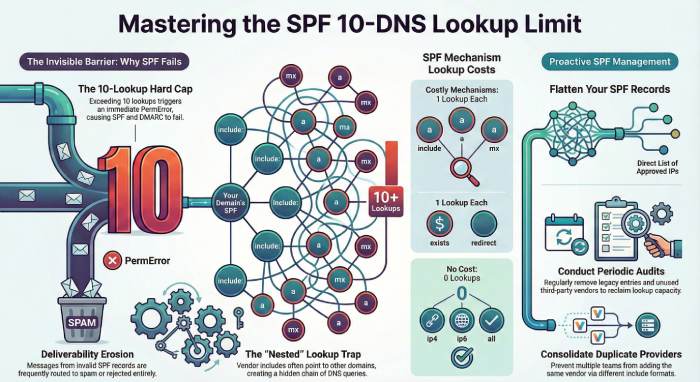
When an inbox provider checks your SPF record, it is allowed to perform a maximum of 10 DNS lookups to complete the verification process. A DNS lookup happens whenever the SPF record points to another location for information. This includes lookups triggered by the include, a, mx, exists, and redirect mechanisms. The limit applies to the total number of lookups, including any nested or chained references. Major email providers such as Gmail, Outlook, and Yahoo strictly enforce this rule.
If evaluating your SPF record requires 11 or more lookups, the receiving server immediately stops processing the record and returns a PermError, which stands for permanent error. At this point, SPF is treated as a failure, even though the record itself still exists in DNS and may appear valid when viewed manually.
An SPF failure has broader consequences. Since SPF is a key input for DMARC, DMARC alignment also fails. As a result, receiving mail servers may no longer trust emails sent from your domain. Messages can be marked as suspicious, routed to spam, or rejected entirely. This is why SPF records that exceed the lookup limit often cause deliverability problems that are difficult to trace.
When you go past the 10-lookup limit, SPF evaluation stops, sending IPs cannot be verified, domain trust erodes, phishing protection weakens, and overall email deliverability declines.
Why does the 10 DNS lookup limit exist
The 10 DNS lookup limit exists to protect email infrastructure from abuse and performance issues.
When a receiving mail server checks an SPF record, it has to make real-time DNS queries during the SMTP conversation. DNS lookups take time and computing resources. If there were no limit, a single email could trigger dozens or even hundreds of DNS requests, slowing down mail servers and creating unnecessary load on DNS systems across the internet.
This limit also prevents malicious or poorly designed SPF records from being used as a denial-of-service vector. An attacker could intentionally create SPF records with long, looping, or deeply nested references that force receiving servers to perform excessive DNS queries. By enforcing a hard cap of 10 lookups, mailbox providers ensure that SPF checks remain fast, predictable, and safe.
Another reason for the limit is consistency. SPF evaluation happens during message processing, not after delivery. Mail servers need a quick yes-or-no decision to determine whether an email is authorized. A strict lookup limit ensures that SPF checks complete within a reasonable time frame, allowing providers to process large volumes of mail efficiently.

In short, the 10 DNS lookup limit exists to balance security, performance, and reliability. It keeps SPF evaluations lightweight, protects inbox providers from abuse, and ensures that email authentication can scale without slowing down global email delivery.
Why enterprises hit the 10 DNS lookup limit fast
Enterprises often reach the 10 DNS lookups limit much more quickly than smaller organizations because their email ecosystems are far more complex. Here is what makes their ecosystem intricate:
Use of multiple email-sending services
Enterprises typically use several third-party platforms such as marketing tools, CRM systems, support desks, HR software, and transactional email providers. Each service usually requires an SPF include, and every include consumes DNS lookups.
Hidden lookups from nested includes
Many email vendors rely on additional third-party infrastructure. When an SPF record includes a vendor’s domain, that vendor’s SPF record may include other services, silently adding more DNS lookups.
Accumulation of legacy entries
Old or inactive email services are often left in the SPF record. Even if they are no longer used, their include mechanisms still count toward the lookup limit.

Complex email architecture
Large organizations often separate email sending by department, region, or function. This increases SPF record length and introduces more lookup-consuming mechanisms.
Lack of centralized SPF management
Different teams may add new SPF entries independently, without visibility into the total lookup count, causing the record to exceed limits over time.
Frequent vendor changes and testing
Enterprises regularly onboard, test, and rotate email vendors. Temporary SPF entries added for testing often remain in production records longer than intended.
Because of these factors, enterprises can quickly exceed the 10 DNS lookups limit, leading to SPF failures and downstream deliverability issues.
Ways to stay within the lookup limit
Staying within the 10 DNS lookup limit is not about restricting how many email tools your organization uses. It is about managing how those tools are represented in your SPF record. With proper structure and ongoing maintenance, even domains that rely on multiple email platforms can remain compliant and avoid SPF-related authentication failures.
Remove unused includes regularly
Over time, organizations evolve their email stack. Marketing platforms are replaced, CRM systems are retired, and vendors change. However, SPF records are often left untouched. As a result, old include statements for services that no longer send email remain in place. These unused entries still trigger DNS lookups during SPF evaluation, consuming your lookup limit without providing any benefit. Conducting periodic SPF audits and removing obsolete entries helps reduce unnecessary lookups, simplifies your record, and lowers the risk of accidental SPF failures.
Avoid adding duplicate providers
Duplicate entries are another common issue, especially in large organizations where multiple teams manage email tools independently. A provider may already be authorized through an existing include, but gets added again manually in a different form. These duplicate mechanisms do not strengthen authentication or improve deliverability. Instead, they inflate lookup counts and increase record complexity. Reviewing your SPF record for overlapping or redundant includes allows you to consolidate entries and reclaim wasted lookup capacity.

Flatten SPF when complexity increases
When your SPF record relies heavily on nested includes, flattening becomes an effective solution. SPF flattening replaces include chains with a direct list of approved sending IP addresses. By resolving all external references in advance and publishing a simplified record, you significantly reduce DNS lookups at evaluation time. This approach is especially useful for domains that depend on multiple large email platforms, where nested includes can quickly push lookup counts beyond the limit.
Monitor SPF changes proactively
Every time a new email service is added, your SPF record changes. Without actively checking the resulting lookup count, it is easy to exceed the limit without noticing. SPF failures caused by lookup overflow often occur silently and only surface through deliverability issues. Monitoring your SPF record after each update ensures that new tools do not unintentionally break authentication.
Establish ownership and documentation
Assigning clear ownership for SPF management and documenting why each include exists helps prevent unnecessary additions. When teams understand what is already authorized, they are less likely to introduce redundant or risky changes.
Together, these practices keep your SPF record clean, compliant, and scalable. More importantly, they ensure reliable authentication and consistent email delivery as your organization grows. Visit Duocircle for further details.