SMTP Protocol Basics for IT and Cybersecurity Professionals

Quick Answer
SMTP (Simple Mail Transfer Protocol) is the application-layer push protocol that transports mail between clients, submission agents, and mail transfer agents. Standardized in RFC 5321 (with submission in RFC 6409 and authentication in RFC 4954), SMTP uses a store-and-forward model: messages travel from a mail user agent to a submission server (port 587), then between MTAs (port 25), and finally into the recipient's message store, where IMAP or POP3 fetches them. Core commands are HELO/EHLO, MAIL FROM, RCPT TO, DATA, and QUIT. Modern deployments layer authentication (SMTP AUTH), encryption (STARTTLS, RFC 8314 implicit TLS), and identity validation (SPF, DKIM, DMARC) on top of the base protocol to defend against spoofing, spam, and man-in-the-middle attacks. Cybersecurity professionals should know these layers because most email-borne attacks exploit weaknesses at the protocol or authentication boundary.
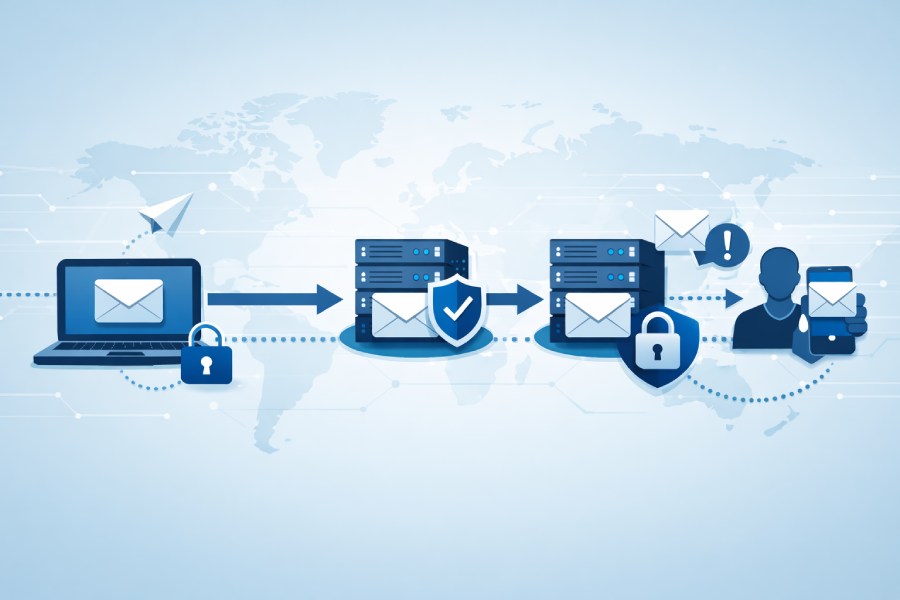
The Simple Mail Transfer Protocol (SMTP) is the foundational communication protocol for sending electronic mail across the Internet. Developed by the Internet Network Working Group and standardized in multiple key RFCs, most notably RFC 5321, SMTP governs the process of email transmission between email clients, mail servers, and intermediary systems. As digital communication has become ubiquitous, SMTP’s importance in ensuring the reliable delivery of electronic messages cannot be overstated.
SMTP primarily operates at the application layer of the OSI model and uses push technology to route outgoing emails. In a typical scenario, when a user sends an email from a mail user agent (like Outlook or Thunderbird), the SMTP protocol facilitates transferring the message from the client to a mail server. This process distinguishes SMTP from protocols like IMAP and POP3, which focus on retrieving and managing stored emails rather than their transport. SMTP’s store and forward approach enables messages to be passed between multiple servers (often called message transfer agents) until they reach the recipient’s domain name destination, allowing for robust mail routing even during transient network issues.
Historically, SMTP emerged to replace older, less efficient approaches like FTP (File Transfer Protocol) and proprietary protocols used in network mail and ARPANET. Key figures such as Ray Tomlinson, credited with implementing the first networked email on BBN’s ARPANET, and Jon Postel, who acted as RFC Editor for many pioneering Internet standards, played instrumental roles in developing SMTP and the wider Internet Mail Consortium.

SMTP Protocol Structure and Core Functions
SMTP is designed to enable a straightforward, extensible way of transporting electronic mail. As an Internet standard, it provides a protocol structure composed of command and response sequences exchanged between email clients, message submission agents, and mail servers.
Core Functions
Message Submission: Handles the intake of messages from a mail user agent to a message submission agent, typically using port 587 as detailed in RFC 2476.
- Mail Relay and Relaying: Transfers email from one mail server to another, often using port 25 as outlined in RFC 5321. This process is crucial for mail propagation across networks.
- Mail Delivery: Deposits the email into the receiving domain’s message store, where it can be accessed via IMAP or POP3.
- Authentication and Encryption: Modern SMTP supports authentication and encryption through extensions like those defined in RFC 2554 (SMTP AUTH) and RFC 8314, helping to mitigate threats such as email spoofing, spam, and man-in-the-middle attacks.
SMTP is inherently a text-based protocol, historically designed for ASCII content but later extended with standards such as RFC 1869 (ESMTP) and multipurpose Internet Mail Extensions (MIME) to support binary data transfer, 8-bit clean encoding, and internationalized email addresses.
Key SMTP Commands and Response Codes
A fundamental aspect of working with SMTP is understanding the command/response dialogue that governs message submission and transfer. SMTP commands and response codes are both defined in RFC 5321 and enhanced in later specifications for extension support and interoperability.
Common SMTP Commands

- HELO/EHLO: Initiate a session with the mail server, with EHLO supporting Extended SMTP (ESMTP) per RFC 1869.
- MAIL FROM: Identifies the sender’s email address.
- RCPT TO: Specifies the recipient’s email address.
- DATA: Transmits the body of the message, including headers and content.
- QUIT: Ends the SMTP session.
- AUTH: Begins the authentication process, introduced in RFC 2554.
- STARTTLS: Negotiates encryption over the existing connection as mandated by RFC 8314, enhancing email security.
Typical Response Codes
SMTP uses three-digit response codes to indicate success, failure, or further instructions:
- 220: Service ready
- 250: Requested action completed
- 354: Start mail input
- 421/451/550: Service not available or mailbox errors (often linked to blocklists and spam prevention mechanisms)
Understanding these commands and codes is essential for IT professionals troubleshooting email propagation issues, integrating email clients, or hardening mail relay configurations.
How SMTP Works: From Mail Client to Mail Server
The process of SMTP-driven email transmission involves several well-defined steps and components, ensuring a reliable flow from sender to recipient. Here’s an overview of the data flow and cooperating agents:
- Mail User Agent (MUA): The email client (e.g., Microsoft Outlook, Mozilla Thunderbird) constructs and submits a message.
- Message Submission Agent (MSA): Receives the message from the MUA, commonly on port 587, enforcing policies such as user authentication and spam prevention.
- Message Transfer Agent (MTA): The core mail server or relay (like Sendmail in BSD/UNIX systems) passes email along to other MTAs en route to the final destination, using port 25 by default.
- Mail Delivery Agent (MDA): On reaching the recipient’s domain, the message is stored for retrieval using IMAP or POP3.
This process exemplifies store and forward, where the electronic mail message may traverse multiple relay points (or hops) before reaching its intended domain name and email address. Each hop involves a handshake under the Simple Mail Transfer Protocol and, when properly configured, may include checks for blocklist status to mitigate open mail relay abuse and email spam.
It’s essential for IT and cybersecurity professionals to understand that both message submission and mail relay phases can be vulnerable to attacks, such as email spoofing and man-in-the-middle attacks, if improper authentication or TLS encryption (see RFC 8314 and STARTTLS command) is not enforced.

Common SMTP Ports and Their Usage
Selecting the correct port for SMTP communication is critical for reliable, secure, and RFC-compliant email transmission. SMTP ports facilitate different stages of mail transfer, message submission, and encrypted sessions.
Port 25: Mail Relay and Server-to-Server Traffic
Widely defined in RFC 5321, port 25 is the traditional channel for mail relay between MTAs, handling the transfer of email from one mail server to another. Although still ubiquitous in the public Internet, port 25 is increasingly subject to restrictions and blocklists due to its abuse in open mail relay scenarios and bot-driven spam outbreaks.
Port 587: Message Submission
Defined by RFC 2476, port 587 is the recommended standard for email client-to-server communication. When a mail user agent (MUA) submits outgoing mail, port 587 is generally used, with mandatory authentication and support for STARTTLS encryption, minimizing risks like email spoofing and unauthorized relaying. The migration to port 587 has become best practice, endorsed by the Internet Mail Consortium, IANA, and major email service providers.
Port 465: Secure SMTP Over SSL/TLS
Historically, port 465 was designated for SMTP over SSL (SMTPS), but this designation was deprecated, only to later be revived for supporting strict encrypted message submission under RFC 8314. While port 465 is in practical use for secure connections, the preferred modern approach leverages STARTTLS on port 587 to avoid protocol and configuration problems.
Port selection and proper configuration are pillars of email security. Failure to conform to best practices can leave SMTP services vulnerable to man-in-the-middle attacks, email spam, and disruption by improper relaying or blocklisting.
The Evolution of SMTP and Its Significance for IT Security
SMTP’s evolution from its ARPANET roots, guided by innovators like Ray Tomlinson and community standards bodies, has ensured its status as a robust Internet standard. Yet, electronic mail continues to face threats from proprietary protocols, spam, and security vulnerabilities. Extension support for features like authentication (RFC 2554), internationalized addresses, MIME (for binary data transfer and 8-bit clean content), and encrypted transport testify to SMTP’s adaptability.
IT and cybersecurity professionals must possess a deep understanding of protocols like SMTP, including the underlying Transmission Control Protocol (TCP) and application-layer standards, for both immediate troubleshooting and long-term network mail resilience. Ensuring compliance with RFCs, actively monitoring for open mail relay status, and implementing best practices for authentication and encryption are the foundation for secure, reliable mail transfer and propagation in today’s interconnected World Wide Web.
The interplay between historical milestones, such as the adoption of Sendmail in 4.1cBSD, contributions from entities like the Internet Mail Consortium, and lessons learned from Usenet and UUCP mail routing, shapes SMTP’s ongoing role in the Internet’s messaging landscape. By adhering to the evolving standards and leveraging security innovations, organizations can maintain robust electronic mail services while safeguarding against modern threats.
SMTP Authentication Mechanisms

Authentication within the Simple Mail Transfer Protocol (SMTP) is critical to ensuring that only authorized users and systems can transmit electronic mail through a given mail server. Early versions of SMTP, originally defined by Jon Postel and refined in RFC 5321, lacked any built-in authentication, leading to the rise of open mail relay abuse. This changed significantly as the threat landscape evolved, necessitating stronger mechanisms for validating both mail user agents and message transfer agents.
1. Evolution of SMTP Authentication
SMTP authentication mechanisms were introduced to address relay and spam prevention. With the publication of RFC 2554, the SMTP AUTH extension enabled client authentication as part of the communication protocol. This allows a mail user agent or message submission agent to present credentials via mechanisms such as LOGIN, PLAIN, or more secure challenge-response options like CRAM-MD5 and SCRAM-SHA-1.
a.Integration with Ports and Message Submission
Traditionally, mail submission and relaying operated on port 25. However, best practices as outlined in RFC 2476 and later RFC 8314 designated port 587 for authenticated message submission, keeping it distinct from the message relay role of port 25. Port 465, initially used for SMTPS (SMTP over SSL), remains in some use following IANA’s registration for encrypted communication.
2. SMTP Authentication Workflow
- Connection Initiation: The email client or message transfer agent connects with the mail server, often using Transmission Control Protocol (TCP).
- EHLO Command and Capability Negotiation: The client uses the EHLO command, as specified in RFC 1869 for extension support, to query server capabilities, such as authentication and 8-bit clean (for binary data transfer and multipurpose Internet Mail Extensions (MIME)).
- Credential Submission: The client submits credentials through an AUTH command. The server authenticates the credentials, leveraging mechanisms like PLAIN, LOGIN, or CRAM-MD5.
- Message Transfer: On successful authentication, the mail submission proceeds, ensuring the sending of messages is tied to a verified user or system.
Security Risks and Threats Associated with SMTP
The inherent openness of the Simple Mail Transfer Protocol introduced multiple Internet security threats as the protocol became ubiquitous for email transmission. Understanding these risks is fundamental for network administrators and those managing mail propagation.
1**.** Common SMTP Threat Vectors
a.Open Mail Relays
Unprotected mail servers that allow unauthenticated relaying, known as open mail relays, historically facilitated email spam and unsolicited bulk mail. Attackers leverage these relays for spam campaigns and email spoofing, undermining user trust.
b.Man-in-the-Middle Attacks
Without encryption, SMTP traffic transmitted between message transfer agents and mail submission agents can be intercepted, leading to man-in-the-middle attacks. This is particularly concerning over public networks where attackers may read or modify electronic mail contents, including sensitive credentials.
c.Email Spoofing and Phishing
SMTP’s lack of native sender validation allows attackers to spoof the ‘FROM’ field of an email address. Coupled with poor authentication, this creates fertile ground for phishing campaigns and identity deception.
2. MIME and Binary Data Vulnerabilities
While SMTP’s ASCII foundation was extended to support 8-bit clean and multipurpose Internet Mail Extensions (MIME), improper validation and weak parsing can introduce risks related to binary data transfer. Malformed or malicious attachments can bypass defenses if MIME parsing isn’t robust.
Best Practices for Securing SMTP Traffic
To effectively secure Simple Mail Transfer Protocol-based communication, organizations must deploy several integrated best practices, extending from the application layer of the OSI model through to organizational policy and configuration.
1. Enable Strong Authentication
Adopting mandatory SMTP authentication, as per RFC 2554, is a foundational step. Only trusted email clients and message transfer agents should be allowed to send mail submission requests, ideally over secure channels and using modern authentication methods.

2.Enforce Encryption with STARTTLS and SMTPS
Encrypting SMTP traffic via STARTTLS or by using port 465 for SMTPS is essential for maintaining confidentiality and integrity during mail transfer. Leveraging encryption complies with recommendations in RFC 8314 and addresses concerns around man-in-the-middle attacks
a.Secure All Submission Ports
- Port 25: Restrict to trusted MTAs for relaying only.
- Port 587: Require STARTTLS and authentication for all message submissions.
- Port 465: Employ strict certificate configuration for SSL/TLS connections, when used.
3.Blocklist and Spam Prevention Mechanisms
Leverage real-time blocklists (DNSBL) to filter sources of known email spam, and enforce tools that analyze message and sender reputation. Integrate spam prevention plugins and configure policies to reject or quarantine suspicious relaying attempts.
4. Restrict Open Mail Relay Capabilities
Explicitly disable open mail relay functions on all Internet-facing mail servers. Only permit relaying from authenticated or explicitly trusted domains and addresses.
Monitoring and Troubleshooting SMTP Traffic
Proactive monitoring of SMTP traffic is essential for both maintaining operational reliability and detecting threats promptly.
SMTP Logging and Analysis
Log all SMTP sessions, including sender/recipient email addresses, timestamps, session source IPs, and authentication results. Analyze logs for abnormal patterns typical of spam outbreaks or abuse, and correlate with broader Internet Mail Consortium standards.
a.Monitoring Tools and Techniques
- Packet Analysis: Employ Transmission Control Protocol (TCP) analyzers to decode SMTP packet exchanges.
- Application Metrics: Track queue lengths, mail propagation times, and message delivery status from the mail server and message transfer agent logs.
- Alerting: Set thresholds for failed authentication, repeated connection attempts on ports 25, 465, and 587, and spikes in message rates.
Troubleshooting Common SMTP Issues
Common mail transmission problems include delivery delays, mail routing loops, authentication failures, and issues with domains and address parsing. Employ test utilities like “telnet” and specialized SMTP test clients for stepwise diagnosis, referencing technical documentation such as RFC 5321 and related RFCs maintained by the RFC Editor.
Integrating SMTP with Modern Email Security Solutions

While Simple Mail Transfer Protocol remains an Internet standard for network mail and mail delivery, contemporary organizations must enhance its security and functionality through integration with advanced security platforms.
Leveraging Proprietary Protocols and Extension Support
Solutions often integrate proprietary protocols and fuzzing extensions (inspired by RFC 1869) to support enhanced encryption, sandboxing, and threat detection. Interfaces with IMAP, POP3, and Exchange ActiveSync enable seamless interoperability with mail user agents and cloud-based systems such as those on the World Wide Web.
Multi-Layered Security Controls
Integrate dedicated email security solutions that provide verification of sender authenticity, filtering for spam and phishing, and adaptive anomaly detection. These platforms use blocklists and leverage data from Internet security organizations, including IANA and the Internet Mail Consortium, for threat intelligence and rule updates.
Advanced Threat Prevention
Modern email gateways combine store and forward techniques, push technology, and machine learning to identify suspicious mail patterns and protect against email spoofing, malware, and targeted phishing. MIME and 8-bit clean extension support also enables more robust inspection of binary data and attachments.
FAQs
What is the difference between port 25, port 465, and port 587 in SMTP?
Port 25 is traditionally used for server-to-server mail relay (message transfer agent to MTA), port 465 supports SMTPS (SMTP over SSL/TLS) for encrypted submission, and port 587 is the recommended port for mail submission from clients to servers using authentication and encryption, per RFC 2476 and RFC 8314.
Why is SMTP authentication important for email transmission?
SMTP authentication ensures that only authorized users and systems can use the mail server for sending electronic mail, mitigating risks such as open mail relays, email spam, and spoofing. It is critical for preventing abuse and maintaining secure, traceable communication.
How does STARTTLS improve SMTP email security?
STARTTLS upgrades an existing unencrypted SMTP connection to a secure, encrypted one using Transport Layer Security (TLS). This helps protect email content and credentials from being intercepted in man-in-the-middle attacks.
What are open mail relays, and why are they risky?
Open mail relays are mail servers configured to allow unauthenticated relaying of email, which are vulnerable to exploitation by spammers and attackers for sending bulk unsolicited messages or phishing campaigns.
How do MIME and 8-bit clean extensions impact SMTP?
Multipurpose Internet Mail Extensions (MIME) and 8-bit clean support allow SMTP to transmit attachments and non-ASCII content, broadening the protocol’s functionality to support modern email usage scenarios but also requiring strong validation to avoid security risks with binary data.
Which RFCs are most critical for SMTP operations and security?
Important RFCs include RFC 5321 (base SMTP specification), RFC 2476 (mail submission), RFC 2554 (SMTP authentication), RFC 1869 (SMTP extensions), and RFC 8314 (TLS operations for email submission).
How can SMTP traffic be monitored for security and reliability?
Administrators can utilize SMTP application logs, network packet analyzers, and real-time alerting systems to monitor message flow, detect abnormal patterns, and swiftly address traffic anomalies or authentication failures.
Key Takeaways
- The Simple Mail Transfer Protocol (SMTP) is foundational for electronic mail transmission, with dedicated ports and extension support defined in RFC 5321, RFC 2476, and related standards.
- SMTP authentication, encryption using STARTTLS, and the division of mail submission (port 587) from relaying (port 25) are vital for modern Internet security and spam prevention.
- Open mail relays and inadequate authentication expose organizations to significant threats including spam, spoofing, and man-in-the-middle attacks.
- Monitoring SMTP traffic and integrating solutions such as email security platforms dramatically enhance protection against evolving email attacks and compliance issues.
- A combination of strong authentication mechanisms, proper mail routing, and advanced threat filtering is essential for secure, reliable email communication in contemporary networks.
General Manager
General Manager at DuoCircle. Product strategy and commercial lead across the email security portfolio.
Secure your email infrastructure
Protect, authenticate, and deliver. Contact our team to find the right solution.