
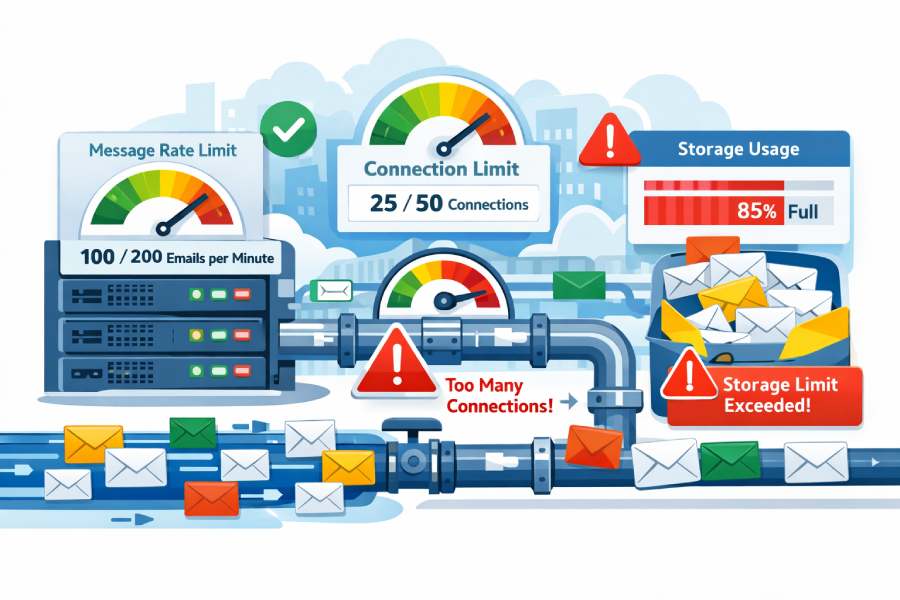
While email appears to be seamless and immediate for users, there’s a complex system in place that ensures performance, security, and trust in the inbox. A key component of this system, often misinterpreted, is SMTP throttling. Regardless of whether you’re dispatching transactional emails, marketing blasts, or bulk notifications, SMTP throttling regulates the speed, frequency, and volume of mail your server can transmit before restrictions take effect.
SMTP throttling isn’t merely about decelerating email flow; it serves as a regulatory tool for mailbox providers and mail servers. Its purpose is to deter misuse, manage server load, and ensure equitable usage among senders. These constraints usually manifest as limits on message rates, connection attempts, and storage space, all of which affect how emails are received, delayed, or outright rejected. If overlooked or misconstrued, throttling can result in postponed deliveries, temporary errors, or even long-lasting harm to a sender’s reputation.
In this piece, we will explain SMTP throttling in straightforward terms, detailing how rate limits function, the rationale behind connection restrictions, and how storage limitations influence email transmission. By grasping these principles, senders can refine their sending strategies, resolve delivery challenges effectively, and ensure reliable placement in inboxes across major email platforms.

What SMTP throttling is and why it exists: protecting infrastructure, curbing abuse, and safeguarding deliverability
SMTP throttling is the intentional application of limits on an SMTP connection, on message rate limits, and on storage/queue resources to regulate mail flow. A throttling policy defines how many emails can be sent, how many concurrent connections are allowed, and how quickly a server will accept or deliver mail. In Microsoft Exchange and other MTAs, SMTP throttling protects Mailbox servers and the Transport service from overload, curbs abuse (spam, malware, brute-force authentication), and improves long-term deliverability by preventing sudden spikes that look like botnet behavior to receiving systems.
At a practical level, SMTP throttling enforces guardrails across three surfaces:
- Throughput: message rate limits at the per-IP, per-domain, per-sender, or per-connector level
- Connections: connection rate caps and maximum concurrent connections per SMTP session or per endpoint
- Storage/queues: back pressure that slows or rejects mail when queues or disks are stressed
In Exchange Server, these controls are commonly enforced on the Receive connector, Send connector, and at the Transport service on each Mailbox server. Similar concepts exist on Edge Transport servers at the perimeter. Applied correctly, a throttling policy prevents message backlog from cascading into outages while keeping message processing rates predictable.

Message rate limits: per-IP/domain/sender caps, burst vs. sustained throughput, and common 4.x.x/5.x.x SMTP responses
Message rate limits define how quickly a given message rate source (IP, authenticated user, domain, or connector) can submit mail. Many organizations differentiate between burst and sustained throughput: short bursts are permitted within an overall rate limit, while sustained high volumes are shaped to a target submission rate.
Administrators often set static limits for:
- Per-IP or per-connector messages per minute
- Per-sender or per-domain messages per hour/day
- Maximum messages per connection to bound SMTP session length
- Recipient limits per message to deter snowshoe spam
- Maximum message size to control bandwidth and storage
When a sender exceeds message rate limits, servers typically respond with SMTP 4.x.x (transient) or 5.x.x (permanent) codes. Common throttling-related responses include 421/450/451/452 (try again later; throttled) and 550/552/554 (rejected; policy or size violation). The server may also defer with 4.7.x codes that explicitly cite throttling or policy, encouraging the sender to back off.

Common SMTP status codes for throttling
- 421 4.7.0 Service not available, connection will be closed (temporary backoff)
- 450/451/452 4.2.x or 4.3.x Insufficient system storage/processing (queue or resource pressure)
- 550 5.4.x Policy rejection (permanent) for recipient limits or rate violations
- 552 5.3.4 Message size exceeds maximum message size
- 554 5.7.1 Transaction failed (often policy-related)
Transient (4xx) vs. permanent (5xx) semantics
- 4xx signals “slow down or retry” and is integral to SMTP throttling to shape traffic.
- 5xx indicates “do not retry as-is,” commonly used when violating static limits like maximum messages per connection or recipient limits.
In Microsoft Exchange, these behaviors are tunable via Receive connector and Send connector properties, ThrottlingPolicy objects, and Transport service parameters.
Connection and session controls: concurrent connection limits, connection rate caps, pipelining/tarpitting/greylisting, and timeouts
SMTP connection management is central to SMTP throttling. Servers gate the connection rate (how many inbound connections per time window) and concurrent connections (how many live sessions at once).
Key knobs include:
- Connection rate per minute and connection rate caps per IP
- Maximum concurrent connections at the server and per-source level
- Maximum inbound connections versus maximum outbound connections
- Maximum messages per connection to bound session length
On Receive connector and Send connector configurations in Microsoft Exchange, you can specify maximum concurrent connections and the connection rate per minute to mitigate spikes. For outbound traffic, a throttling policy may limit delivery threads to avoid overwhelming remote hosts.
Protocol-level controls
- SMTP session pipelining: Enabled by RFC but often tempered; aggressive pipelining can be throttled if servers suspect abuse.
- Tarpit interval: Adds an artificial delay after certain SMTP commands (e.g., RCPT TO) to slow abusive senders.
- Greylisting: Temporarily defers first-time senders with a 4xx response to verify legitimate retry behavior.
- Authentication requirements: Tightening authentication on a Receive connector controls anonymous submission rate.
Timeouts and pipelining nuances
- Session timeout and connection timeout govern total session duration.
- Connection inactivity timeout ensures idle SMTP sessions are dropped to free resources.
These limit resource holding, reduce hogging of sockets, and complement connection rate shaping. In Exchange, configure these on Receive connector objects; on the outbound side, Send connector policies and Transport service settings determine how long to wait for remote replies, shaping mail flow under adverse network conditions.

Storage and queue backpressure: mailbox quotas, spool limits, retry schedules, and how full queues trigger throttling
Even with conservative message rate limits and connection controls, storage constraints can trigger back pressure. Back pressure is a resource monitoring mechanism in Exchange where the Transport service slows or rejects new mail when disk, memory, or processor thresholds are exceeded. When queues grow and message backlog increases, the server signals with 4.x.x responses or pauses acceptance, effectively applying SMTP throttling at the storage layer.
Core elements:
- Queue and spool storage: When queues on a Mailbox server near capacity, the Transport service defers mail. The PickUp directory and Replay directory also contribute to load; large drops there can throttle intake.
- Mailbox quotas: On-delivery storage limits can cause retries and add pressure to delivery threads.
- Retry schedules: Deferrals trigger exponential backoff; too-aggressive retry policies can worsen congestion.
- Delivery threads: The number of parallel deliveries affects message processing rates; tuning them interacts with throttling policy.
In multi-role Mailbox servers, the Mailbox Transport Service hands off to the Transport service; if either side experiences back pressure, inbound mail can be shaped or temporarily refused. Upstream gateways (for example, Trend Micro InterScan Messaging Security Virtual Appliance) can be configured to honor 4xx signals and slow submissions, keeping the entire pipeline stable.

Monitoring and mitigation: reading logs and SMTP codes, pacing with backoff/jitter, warming IPs/domains, and tuning MTA settings
Operational success with SMTP throttling requires visibility and disciplined pacing. Monitor protocol logs, queue lengths, and resource counters to understand when throttling policy is engaging and why.
Best practices:
- Parse SMTP logs for 4xx/5xx codes, including 4.7.x throttling notices, and correlate with connection rate, submission rate, and message processing rates.
- Implement client-side backoff with jitter; respect 4xx deferrals to prevent synchronized retries.
- Warm new IPs and domains gradually: Start with conservative message rate limits and increase daily, watching complaint and bounce metrics.
- Tune Receive connector and Send connector settings to balance acceptance rate, maximum inbound connections, and maximum outbound connections.
- Validate authentication paths to reduce anonymous load and align with security policies; consider layered protections such as email security.
For Microsoft Exchange, use Exchange Admin Center (EAC) for high-level changes and Exchange Management Shell for precision. Example tasks include adjusting connection rate per minute on a Receive connector via a cmdlet, editing maximum messages per connection, or updating a ThrottlingPolicy to allocate a higher budget for a specific application account. In Exchange Online, tenant-level controls and hosted policies apply; where limits are opaque, Microsoft Customer Service and Support can clarify effective thresholds.
Complement server-side controls with upstream rate shaping on Edge Transport servers or secure email gateways. Ensure that greylisting, tarpit interval, and static limits are consistent across the perimeter and internal Mailbox servers to prevent conflicting behavior.

Platform-specific considerations: Microsoft Exchange Server, Exchange Online, and perimeter roles
Microsoft Exchange provides rich, role-based levers for SMTP throttling:
- Receive connector: Governs inbound SMTP connection behavior on Mailbox servers and Edge Transport servers, including connection inactivity timeout, maximum concurrent connections, and recipient limits.
- Send connector: Controls outbound delivery behavior, including maximum outbound connections, delivery concurrency, and smart host routing.
- Transport service: Central to queueing, back pressure, and resource monitoring; it enforces connection rate shaping and queue thresholds that affect overall mail flow.
On-premises Exchange Server deployments often use Edge Transport server roles at the perimeter for policy enforcement and hygiene. Edge Transport servers can throttle at the network edge, shielding internal Mailbox servers from spikes. Within the organization, Mailbox servers host both the Transport service and the Mailbox Transport Service, and both participate in throttling outcomes when queues grow.
Exchange Online adds provider-level rate limit protections that you cannot fully override. You can still tune application behavior—pace SMTP session creation, obey deferrals, and manage maximum messages per connection—to align with the service’s connection rate expectations.

Interoperability notes:
- If you front-end Exchange with Trend Micro InterScan Messaging Security Virtual Appliance or similar gateways, align their SMTP connection policies, maximum message size limits, and greylisting behavior with Exchange. Mismatches can trigger unnecessary retries and inflate message backlog.
- Coordinate Send connectors and Receive connectors across sites so connection rate and concurrent connections limits are consistent, especially during failovers or maintenance.
- Use Exchange Management Shell to export and version-control connector settings and ThrottlingPolicy objects, ensuring reproducibility across Mailbox servers and Edge Transport servers.
By explicitly modeling connection rate, concurrent connections, and message rate limits across Send connector, Receive Connector, Transport service, and each Mailbox server, you create a coherent SMTP throttling posture that preserves capacity, deters abuse, and sustains deliverability at scale.