

What does a dangling DNS mean, and how to fix it
As you know, DNS is the foundation of your brand’s digital presence, so if anything goes wrong with the DNS or worse, if attackers manage to exploit its vulnerabilities, your entire online presence is put at stake.
The way it works is by translating human-readable domains like “yourcompany.com” into IP addresses that servers use to locate each other on the internet. So, every time a user types your domain in the browser, DNS translates that name into an IP address or a target resource behind the scenes.
It seems simple as long as this process is followed, but the real problem arises when the mapping of the domain name with the IP address is no longer accurate. For instance, if, for some reason, you remove or decommission the server it was pointing to and forget to update the DNS record. In such cases, the domain will continue to point to something that no longer exists or is no longer under your control. This is called dangling DNS.
Now, let’s dig deeper to understand what exactly DNS dangling is and how you can fix the problem.

What is a dangling DNS record?
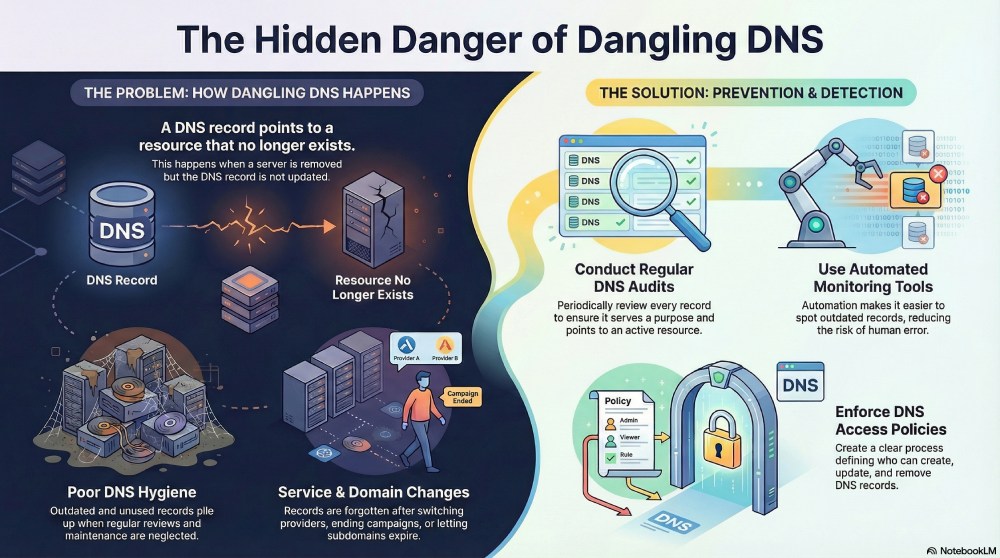
A dangling DNS record is a DNS entry that still exists even though the system it was created for is no longer active.
Let’s say you once created a DNS record to point a domain or subdomain to a server, a cloud resource, or a third-party service. At the time, everything worked as expected because the destination was active and under your control. Now, if you later delete the server or no longer use the service, but forget to remove or update the DNS record, the domain will continue to point to that old destination.
Nothing will break immediately, but over time, this becomes a huge problem, especially if it goes unnoticed.
Why does dangling DNS even happen?
The first step to fixing the problem of dangling DNS is to identify the reasons why it occurs in the first place. Unless you understand what goes wrong during routine changes, it’s easy to overlook these issues again and again.

Let’s look at some of the common reasons why dangling DNS records are created and why they often go unnoticed.
Third-party service changes
As an organization, you might use many tools or platforms to send emails, host landing pages, or run campaigns on your behalf. Everything works well as long as you keep using these services. But once you stop, switch to a different provider, or shut down a specific tool, the DNS records created for it are often forgotten.
The service may be gone, but the DNS record pointing to it is still there. Since DNS doesn’t automatically clean up unused entries or check whether the service is still active, these records remain in place and quietly turn into dangling DNS records.
Your domain or subdomain might have expired
Another reason why you might encounter the issue of dangling DNS is when you have an idle domain or subdomain that you no longer use. This usually happens when you create temporary domains for campaigns and eventually forget they ever existed.
Even though the domain or subdomain is no longer active, the DNS records linked to it may still remain in place. This becomes a golden opportunity for the attackers to misuse the existing DNS mapping.

Poor DNS hygiene
Your DNS is not a one-and-done setup. It is important that you keep your DNS updated, as your systems, services, and providers may change over time. Chances are, you might remember to add new records but rarely revisit the old ones.
Without regular reviews, outdated and unused records start piling up. Over time, it becomes difficult to tell which records are still needed and which ones are no longer relevant. This lack of maintenance becomes a serious problem and a core reason for dangling DNS.
Typos and minor mistakes
Some mistakes cost you more than you realise, and the case in point here is typos in your DNS. Whether it is a misspelled domain name or an extra character, it can cause the DNS record to point to the wrong place.
These mistakes don’t really lead to immediate failures, which is why they often go unnoticed. Over time, these incorrect records become detached from any real system or service.
How can you detect and prevent dangling DNS?
Clearly, if you don’t pay close attention to your DNS records or review them regularly, dangling DNS entries are easy to miss. So, it is very important that you stay on top of things to spot any gaps or inconsistencies between your DNS setup and the systems actually in use.
That’s only the starting point. Here are a few ways that you can detect and prevent dangling DNS before it becomes a bigger problem.
Conduct regular DNS audits
It is important that you regularly review your DNS records, especially if you have disabled or stopped using a tool or platform. Make sure that every DNS record serves a purpose and resolves the user to an active destination that is managed by you. Periodic audits help you spot records that are no longer needed and remove them before they turn into dangling DNS entries.
Use automated monitoring tools
Manually going through all the DNS records is not feasible, especially when your infrastructure is complex and keeps growing. And even with regular reviews, there is always a chance that something gets missed.
So, relying on automated checks not only makes things easier but also removes the risk of overlooking outdated or unused DNS records.

Enforce DNS access policies
Most DNS problems happen not because there are technical issues, but because there is no clear process in place. Enforcing DNS policies helps ensure that every DNS record is created, updated, and removed in a controlled way. These policies define who is allowed to make changes to the DNS, when records should be reviewed, and what should be done when new services are added or removed. This creates accountability and makes sure DNS updates don’t get overlooked. Strengthen email security with proper SPF, DKIM, and DMARC to prevent spoofing and protect your domain.
Need help keeping your DNS up-to-date and preventing the risk of dangling DNS? Get in touch with us!