

Email spoofing and phishing attacks continue to target businesses of all sizes, making domain protection more critical than ever. A DMARC spoofing visibility report helps organizations see who is sending emails on their behalf, identify unauthorized sources, and understand how their domain is being misused.
In this post, we’ll explain how the DMARC spoofing visibility report works and how it empowers you to detect, monitor, and block malicious email activity before it damages your brand or customer trust.
Why Email Spoofing and Phishing Persist: Threat Landscape, Business Impact, and Compliance Drivers
Email remains the most targeted channel in the modern email ecosystem, and adversaries keep innovating around spoofing and phishing because they scale, evade legacy controls, and exploit trust. These email threats thrive on inconsistent email authentication, gaps in domain authentication, and fragmented infrastructure across brands and their partners. Attackers capitalize on unfamiliar IP addresses and compromised infrastructure to impersonate domains, slipping past spam filtering and harming email deliverability.
The business impact is broad: reduced inbox placement, eroded sender reputation, blocked emails at major receiving servers, and direct financial loss from credential theft and invoice scams. Brand protection is at stake, as legitimate emails from your sending domain can be crowded out by malicious lookalikes, degrading deliverability and customer trust. In parallel, fraud prevention and compliance drivers are intensifying. Gmail and Yahoo increasingly expect robust email authentication and DMARC policy alignment for bulk email senders; regulators and auditors now ask for evidence of policy enforcement, report analysis, and ongoing email monitoring.
The operational antidote is layered: consistent SPF records and DKIM records, a well-tuned DMARC policy, and the continuous feedback loop of DMARC reports. Together, these controls deliver visibility into authentication results across the email ecosystem and provide actionable insights to guide policy actions. Investing in email security plus enforced DMARC is now table stakes for security and deliverability at scale.
DMARC Fundamentals: How SPF, DKIM, and Alignment Work Together to Stop Spoofing
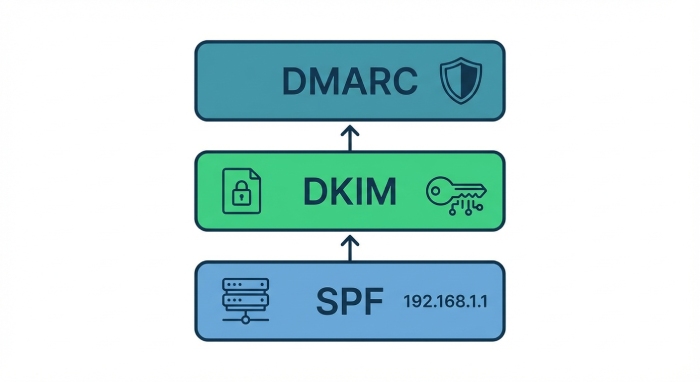
The sender policy framework and SPF records
The sender policy framework (SPF) authorizes which mail servers may send on behalf of a domain. Accurate SPF records published in DNS settings let receiving servers verify the source IP against your policy. Because multi-vendor stacks are common, SPF records must include all approved platforms to prevent misconfigured emails from failing authentication results and hurting email deliverability.
DKIM records and cryptographic signing
DKIM records publish public keys that let receivers validate cryptographic signatures added by your sending systems. Properly configured selectors across your Email Service Provider (ESP) and internal mail servers ensure that DKIM passes, even when messages are forwarded. DKIM’s domain authentication signal is central to DMARC alignment and is typically more resilient than SPF to forwarding.
Alignment and DMARC policy actions
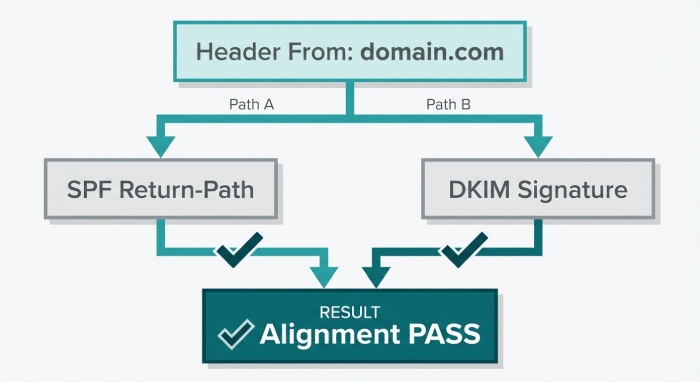
DMARC evaluates whether the domain in the visible From: header aligns with the domains authenticated by SPF and/or DKIM. Alignment plus valid authentication results allow receivers to trust your messages and to disfavor spoofing. A DMARC policy specifies how receivers should handle failures and is expressed as policy actions: monitor mode, a quarantine policy, or a reject policy.
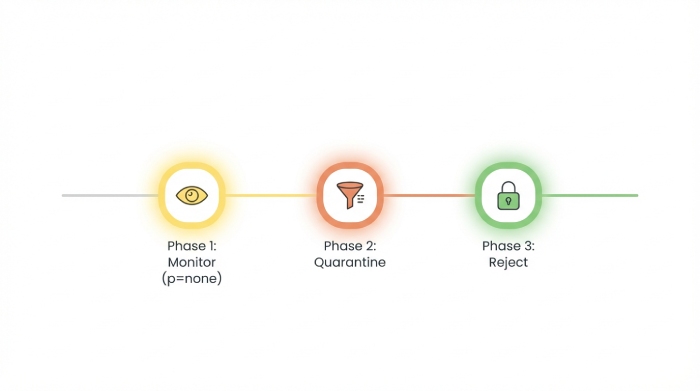
Staging: monitor mode (p=none), quarantine policy, reject policy
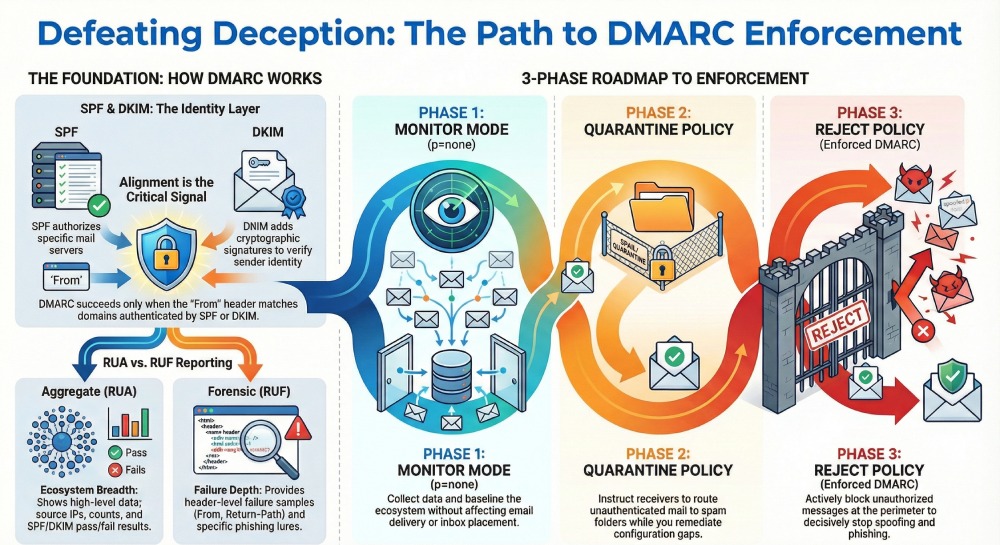
- p=none (monitor mode) collects DMARC reports without affecting delivery, surfacing policy weakness and unauthorized senders.
- Quarantine instructs receiving servers to route failing mail to spam, improving email protection while you complete configuration.
- Reject is enforced DMARC, directing receivers to block failing messages, decisively reducing phishing and spoofing at the perimeter.
Domain authentication and authentication results
With DMARC in place, receivers generate DMARC reports that summarize authentication results for SPF and DKIM. Consistent domain authentication across SPF records and DKIM records underpins both security and deliverability, allowing receivers to favor legitimate emails and penalize suspicious senders, thereby improving overall deliverability and inbox placement.
What a DMARC Spoofing Visibility Report Is: Data Sources (RUA/RUF), Scope, and Value
Aggregate reports (RUA): Breadth at scale
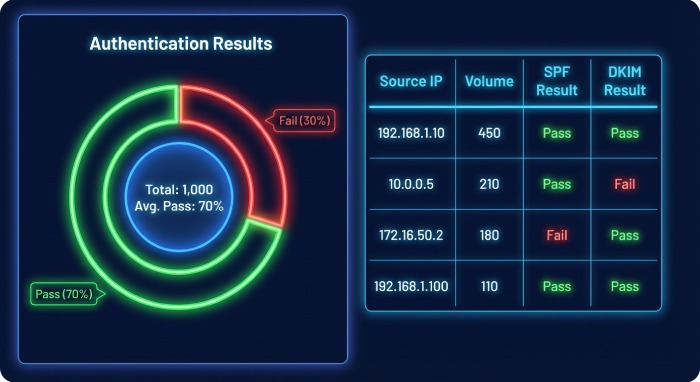
Aggregate reports are XML-based technical reports (often called RUA DMARC reports) sent by receivers daily. These aggregate reports summarize email activity by source IP and authentication results across SPF/DKIM for your sending domain. They deliver broad visibility across the email ecosystem, highlighting unfamiliar IP addresses, unauthorized senders, and misconfigured emails that could degrade email deliverability.
Forensic reports (RUF): Depth on failures
Forensic (RUF) DMARC reports provide header-level samples of individual failures. While volume is lower than aggregate reports, these snapshots can reveal patterns of spoofing, specific phishing lures, and detailed failure reasons. Many organizations use RUF sparingly for privacy reasons, but as targeted threat detection, RUF can accelerate triage and fraud prevention.
The value: Visibility, actionable insights, and threat detection
Combined, RUA and RUF create continuous visibility into email threats, supporting policy review, configuration refinement, and policy enforcement. Teams use these DMARC reports for data analysis, report analysis, and email monitoring, turning raw telemetry into actionable insights that strengthen security, raise deliverability, and support compliance documentation.
Getting Set Up: Publishing SPF/DKIM, Creating a DMARC Record, and Configuring rua/ruf for Visibility
DNS settings and configuration
- Publish SPF records that enumerate all approved sending sources; flatten or delegate includes as needed to avoid lookup limits.
- Publish DKIM records for each platform with unique selectors; rotate keys regularly.
- Create a DMARC record with p=none to start, and add rua= and ruf= mailboxes or third-party addresses to collect DMARC reports.
Orchestrating email setup across platforms and providers
Inventory every email platform touching your domain: Acoustic Campaign, Adobe Campaign Standard, Adobe Journey Optimizer, Adobe Marketo, Campaign Monitor, HubSpot, Klaviyo, Mailchimp, Oracle Eloqua, Oracle Responsys, Salesforce Marketing Cloud, and SAP Marketing Cloud, along with your primary Email Service Provider and internal gateways. Ensure each platform signs with DKIM and is covered in SPF. Test against major receiving servers like Gmail and Yahoo to validate authentication results before scaling.
Policy review and phased enforcement
Start in monitor mode (p=none) to baseline the email ecosystem, identify unauthorized senders, and fix configuration gaps. Move to a quarantine policy for partial policy enforcement while you remediate stragglers, then advance to a reject policy for enforced DMARC when aggregate reports confirm alignment. This phased configuration preserves email deliverability while reducing spoofing and phishing.
Mail flow guardrails with receivers
Coordinate with critical partners so their mail servers present aligned identities. Confirm that receiving servers properly interpret your DMARC policy and that bounce codes match expectations during enforcement.
Inside the Report: How to Read Aggregate (RUA) XML, Forensic (RUF) Samples, and Key Fields
Understanding RUA XML structure
RUA aggregate reports follow a consistent XML schema:
- Metadata: orgname, reportid, date_range
- Policy: the DMARC policy evaluated (adkim, aspf, p, sp), along with reporting URIs (rua/ruf)
- Records: grouped by source IP with counts, disposition (none/quarantine/reject), and authentication results
Key fields to prioritize
- Source IP and count: Identify high-volume sources and unfamiliar IP addresses sending for your domain.
- Disposition and policy evaluated: Confirm how receivers applied your DMARC policy and what policy actions were taken.
- Authentication results (SPF/DKIM): Look for alignment pass/fail. Failures often reveal misconfigured emails or a policy weakness.
Interpreting RUF samples
RUF forensic samples contain headers like From, Return-Path, Message-ID, DKIM-Signature, and Authentication-Results, plus failure details. Analysts compare the visible From against authenticated domains to spot spoofing. Headers help distinguish legitimate emails from unauthorized senders and suspicious senders attempting phishing.
Practical triage steps
- Map the sending domain and source IP to known systems, vendors, or email platforms.
- Whitelist truly legitimate infrastructure in SPF records and ensure DKIM records exist and sign correctly.
- Investigate blocked emails to confirm whether enforcement is correct or harming deliverability.
Data analysis workflows that raise security and deliverability
Turn DMARC reports into dashboards that track authentication results by vendor, campaign, and geography. Many teams leverage tools from vendors and communities such as Validity (whose benchmark report and guidance by experts like Guy Hanson often highlight sender reputation patterns), Litmus (useful for end-to-end testing impacting inbox placement), and utilities like Email Guardian to accelerate report analysis. Practitioners including Lindsey Hiner frequently emphasize cross-functional collaboration between security and email marketing to align on policy enforcement without sacrificing email deliverability.
- Benchmark report comparisons: Measure progress against peers and industry norms.
- Continuous policy review: Iterate DMARC policy, sender policy framework entries, and DKIM selectors as your stack evolves.
- Threat detection and fraud prevention: Use spikes in aggregate reports to flag new email threats quickly and block phishing before customer impact.
By operationalizing aggregate reports and forensic insights, organizations strengthen domain authentication, counter spoofing and phishing, and improve deliverability. Over time, consistent email authentication across SPF records and DKIM records raises trust signals to receiving servers, enhances inbox placement, and reinforces brand protection across the entire email ecosystem.
Detecting Spoofing Attempts: Interpreting Failures, Misalignment, Lookalike Domains, and Infrastructure Clues
Read Authentication Failures in Context
- When DMARC reports show SPF or DKIM “fail” alongside “fail” alignment, you’re likely seeing spoofing or phishing attempts rather than simple misconfiguration. Aggregate reports surface the authentication results per sending domain and source IP, allowing rapid triage.
- Inspect whether SPF records passed but failed alignment, or DKIM records failed due to an invalid signature. This distinction guides precise remediation across the email ecosystem.
Authentication Results and Alignment Signals
- SPF pass + alignment fail: Often forwarding or wrong envelope domain; confirm sender policy framework alignment.
- DKIM fail + alignment fail: Broken signing key, altered content, or unsigned stream; revalidate DKIM records and selectors.
- Both fail: High-likelihood spoofing from unauthorized senders or suspicious senders; move to stricter policy actions if persistent.
Spot Unfamiliar Infrastructure
- Flag unfamiliar IP addresses in aggregate reports; correlate source IP to ASN and geography.
- Check which mail servers and receiving servers logged the attempt and whether spam filtering already intervened.
Identify Misalignment vs. Malicious Use
- Misaligned DKIM on legitimate emails from known email senders may point to a policy weakness or misconfigured emails at the email service provider.
- Misaligned SPF from a recognized sending domain often indicates forwarding; prioritize DKIM alignment for continuity of email deliverability.

Lookalike and Cousin Domains
- DMARC reports can reveal near-miss domains (e.g., rn → m, l → I). Monitor for cousin domains used in phishing.
- Use brand protection watchlists to correlate lookalike domains with rising email threats and threat detection alerts.
Infrastructure Clues That Surface Abuse
- Repeated failures from the same source IP and envelope-from pair suggest automated spoofing runs.
- Technical reports should track PTR/domain reverses, TLS stats, and authentication results to generate actionable insights for fraud prevention and compliance.
Correlate Across Channels
- Cross-reference aggregate reports with web fraud logs and email monitoring outcomes. Spikes in failures often precede credential-harvest phishing campaigns.
From Visibility to Blocking: Moving Safely from p=none to quarantine/reject with a Phased Plan
Phase 1: Establish Monitor Mode (p=none)
- Start with p=none to build visibility and baseline email activity. Aggregate reports capture authentication results for data analysis without risking blocked emails.
- Perform a policy review weekly, identifying legitimate emails that fail SPF records or DKIM records due to configuration drift.
KPIs for Readiness
- ≥98% of volume aligned across sender policy framework and DKIM records.
- <0.5% of volume from unfamiliar IP addresses or unauthorized senders.
Pilot Control Groups
- Use limited domains or subdomains in monitor mode while you test enforcement thresholds and spam filtering impact.
Phase 2: Introduce a Quarantine Policy
- Move to a quarantine policy for subdomains or low-risk streams first. Monitor bounce codes and inbox placement to protect deliverability.
- Set pct=25/50/75 to gradually increase enforcement; watch receiving servers’ feedback loops and adjust DMARC policy as needed.
Policy Actions and Tuning
- Tighten alignment to strict (aspf=s/adkim=s) where feasible.
- Maintain daily report analysis; tune DNS settings and configuration to prevent accidental quarantines.
Business Safeguards
- Exempt critical workflows temporarily via subdomain delegation until alignment is confirmed across all email platforms.
Phase 3: Adopt a Reject Policy
- Once coverage is solid, move high-value domains to a reject policy for full policy enforcement. This is enforced DMARC.
- Track email deliverability and sender reputation closely post-change; legitimate emails should remain unaffected if alignment is complete.
Post-Enforcement Monitoring
- Confirm that blocked emails map to spoofing and phishing attempts. Use aggregate reports to verify that the email protection posture is working across the email ecosystem.
Managing Third-Party Senders: Alignment Strategies, Vendor Onboarding, and Ongoing Validation
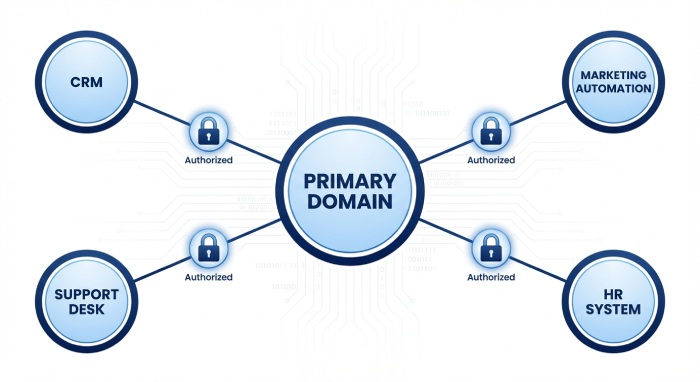
Inventory and Categorize Email Senders
- Catalog every sending domain and vendor: Acoustic Campaign, Adobe Campaign Standard, Adobe Journey Optimizer, Adobe Marketo, Campaign Monitor, HubSpot, Klaviyo, Mailchimp, Oracle Eloqua, Oracle Responsys, Salesforce Marketing Cloud, and SAP Marketing Cloud.
- For each Email Service Provider, document DKIM selectors, SPF includes, bounce domains, and IP pools.
Alignment Strategies by Channel
- Marketing and lifecycle: Prefer DKIM signing by the platform with alignment to the organizational domain.
- Transactional and system alerts: Ensure SPF alignment via dedicated subdomains and stable include mechanisms.
Vendor Onboarding Checklist
- Provision SPF records (include:vendor) and publish vendor-provided DKIM records before cutover.
- Validate domain authentication in a staging environment and confirm authentication results in DMARC reports during soft launch.
Ongoing Validation and Drift Control
- Quarterly attestations from vendors on key rotation, domain usage, and IP changes.
- Automated email monitoring to catch misconfigured emails before they affect inbox placement.
Handling Exceptions
- For legacy tools that cannot align, isolate on a subdomain and document risk until migration is complete.
Operationalizing DMARC: Dashboards, Alerting, KPIs, and Communicating Risk Reduction to Stakeholders
Build Dashboards that Matter
- Visualize aggregate reports by source IP, sending domain, and vendor to highlight email threats and spoofing attempts.
- Trend KPIs: aligned volume, failure rates, policy actions by disposition, and email deliverability outcomes.
Real-Time Alerting
- Alert on spikes in authentication results failures, new suspicious senders, or unexpected mail servers.
- Integrate with SIEM for unified security response and broader email security workflows.
Communicate Risk and Value
- Translate technical reports into business metrics: reduced phishing exposure, fewer support tickets, and improved brand protection.
- Align with executive goals around compliance and fraud prevention; show quarter-over-quarter risk reduction.
KPIs to Share Widely
- % of messages passing domain authentication and alignment.
- Reductions in spoofing domains observed and blocked emails at quarantine/reject.
- Improvements in email deliverability and inbox placement correlated to consistent alignment.
Troubleshooting and Best Practices: Common Pitfalls, Privacy Considerations, and Continuous Improvement
Common Pitfalls to Avoid
- Missing or stale SPF records leading to false fails when IP pools change.
- DKIM records not rotated, causing expired keys and alignment gaps.
- Overly broad includes in sender policy framework that leak trust to third parties.
Remediation Playbook
- Tighten SPF include scopes and remove deprecated vendors.
- Standardize DKIM selector naming and automate rotation.
- Validate configuration changes with canary traffic before full rollout.
Privacy and Data Considerations
- Aggregate reports can contain sender identifiers; apply least-privilege access and retention policies.
- Mask or tokenize sensitive identifiers when exporting report analysis for cross-team collaboration.
Continuous Improvement Loop
- Monthly policy review, quarterly tabletop exercises for incident response, and annual benchmark report comparisons (e.g., from Validity or Litmus) to track maturity.
- Feed lessons from threat detection back into DNS settings, email setup, and vendor governance.
Tooling and Integrations for Scale
Analytics and Testing Ecosystem
- Use Validity (Everest) and Litmus to connect deliverability testing with DMARC reports, correlating authentication results to rendering and engagement.
- Platforms like Email Guardian can streamline email monitoring, data analysis, and alerting across large portfolios.
ESP and Mailbox Provider Feedback
- Coordinate with Gmail and Yahoo guidance for alignment and policy enforcement readiness.
- Leverage feedback loops where available to validate that phishing attempts are suppressed without harming legitimate emails.
Governance and Change Management
- Embed DMARC policy updates into standard change control, with sign-off from SecOps and Marketing.
- Keep a living inventory of email platforms and their dependencies to prevent drift.
Brand and Revenue Alignment
- Tie email protection outcomes to revenue impacts via improved sender reputation and higher deliverability during peak email marketing periods.
Case Insights and Industry Benchmarks
What Leaders Watch
- Practitioners like Guy Hanson and Lindsey Hiner often highlight that domain authentication maturity correlates strongly with stable sender reputation.
- Track the ratio of aligned to misaligned mail per vendor and domain; rising misalignment is an early warning of policy weakness.
Benchmark-Driven Adjustments
- Compare your aggregate reports against industry benchmarks for alignment rates and phishing prevalence.
- Prioritize subdomains or streams with the largest gaps before advancing to a reject policy.
FAQs
What is the safest way to move from p=none to enforcement?
Begin in monitor mode (p=none) while you fix alignment across SPF records and DKIM records. Progress to a quarantine policy with partial pct enforcement, then graduate to a reject policy once aggregate reports show consistently high alignment.
How do DMARC reports help detect spoofing and phishing?
They consolidate authentication results from receiving servers, showing which source IP and sending domain combinations fail alignment. Patterns of repeated failures reveal spoofing attempts and guide targeted policy actions.
Do third-party platforms break email deliverability when DMARC is enforced?
No, if vendor alignment is configured correctly with DKIM signing and appropriate SPF includes, deliverability and inbox placement should improve. Issues arise mainly from misconfigured emails or outdated DNS settings.
Should I enforce strict alignment for both SPF and DKIM?
Where feasible, yes—strict alignment reduces abuse and strengthens email protection. However, ensure all legitimate emails can meet strict alignment before enabling it broadly.
How often should I review aggregate reports?
Weekly during rollout and at least monthly after enforcement. Frequent report analysis catches drift, unfamiliar IP addresses, and unauthorized senders before they impact sender reputation.
What KPIs best communicate progress to stakeholders?
Track aligned volume, failure rates by vendor, blocked emails at quarantine/reject, and improvements in email deliverability. Tie these to reductions in email threats to demonstrate tangible risk reduction.
Key Takeaways
- Use aggregate reports to separate misalignment from malicious spoofing and drive precise remediation across SPF and DKIM.
- Advance from p=none to quarantine and reject with staged pct increases, strict monitoring, and business safeguards.
- Require vendor alignment at onboarding; validate DKIM records and SPF records continuously to prevent drift.
- Operational dashboards and alerts translate authentication results into risk and deliverability KPIs stakeholders understand.
- Continuous policy review, privacy-aware data handling, and benchmark-driven tuning sustain strong domain authentication and email protection.