

Email authentication is critical to protecting your domain from spoofing, phishing, and delivery failures but even a small DNS misconfiguration can trigger frustrating errors. One of the most common issues businesses face is the SPF multiple records error, which occurs when more than one Sender Policy Framework (SPF) record is published for a single domain. Since SPF is designed to work with only one TXT record per domain, multiple entries can cause mail servers to reject or flag your emails as suspicious.
If you’re seeing authentication failures in tools like Google Workspace or Microsoft 365, duplicate SPF records may be the culprit. This error often appears after adding new email services such as marketing platforms or CRM systems without properly merging existing SPF entries.
Why “multiple SPF records” break authentication (and how to spot the symptoms)

Publishing multiple SPF records for the same hostname violates the sender policy framework (SPF) specification and often leads to a permanent SPF error. Receivers may treat that as an SPF failure or as indeterminate, which degrades email deliverability and can trigger false positives in anti-abuse systems. If your primary domain or any subdomain (for example, mail.yourdomain.com or news.yourdomain.com) has more than one SPF TXT record, you risk an SPF fail even when your IPs are correct.
Compounding the issue, the SPF standard enforces a strict DNS lookup limit of 10. Excessive DNS lookups caused by an overuse of the include mechanism, ptr, or mx can turn a syntactically valid SPF policy into an operational SPF failure. This is particularly important for Microsoft 365 and other third-party email services that require specific includes (such as spf.protection.outlook.com), because an overly complex SPF configuration can exceed the DNS lookup limit before you realize it.
SPF validation should be part of routine email authentication hygiene, alongside DMARC and DKIM. Use an SPF check to confirm you have only one SPF record per host, that your SPF syntax is correct, and that DNS lookups remain within limits.
The 9 proven fixes you can apply today
1. Inventory and canonicalize your SPF policy
a. Fix #1: Audit your DNS zone to find every v=spf1 entry per hostname
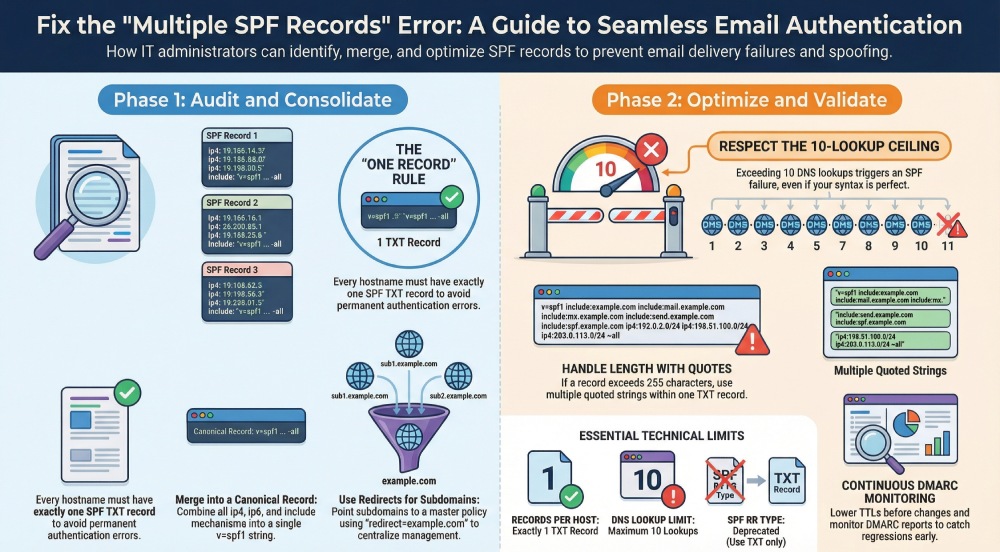
Enumerate all hostnames that send mail: the root of your primary domain (example.com), operational subdomains (mail.yourdomain.com for your MTA, news.yourdomain.com for your newsletter or marketing emails), and any parked or legacy hosts. For each, confirm there is exactly one SPF TXT record. Eliminate multiple SPF records immediately; even if they look equivalent, evaluators will see them as conflicting. This simple audit prevents accidental SPF failure from duplicate records left behind by migrations or control panels.
Tip: If you use alias addresses or forwarding, still ensure the envelope-from domain has exactly one SPF TXT record. Run an SPF check with dig or nslookup and document the findings.
b. Fix #2: Merge duplicate SPF policies into one canonical record
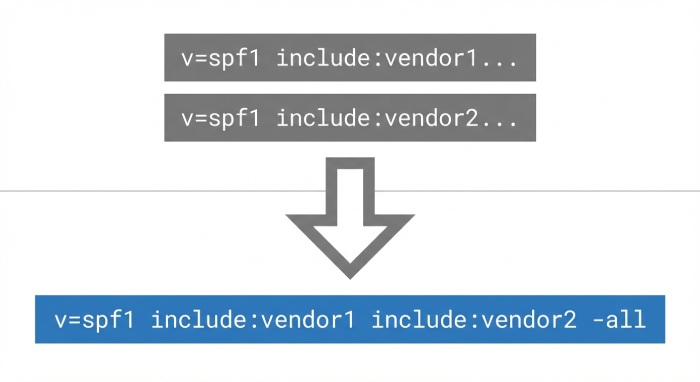
If you discover duplicates, consolidate into a single, authoritative SPF record. Combine the ip4, ip6, a, and mx mechanisms, and fold in every required include mechanism. End with a single qualifier (-all for hard fail or ~all for soft fail) per SPF best practices. Keep SPF syntax tight and readable.
Example for Microsoft 365 with vendors:
v=spf1 include:spf.protection.outlook.com include:thirdparty1.com include:thirdparty2.com ip4:203.0.113.0/24 ip6:2001:db8::/32 -all
Confirm each SPF include statement resolves to the vendor’s intended IP address range and that the total DNS lookups remain under the DNS lookup limit. This approach avoids an SPF split and maximizes the chance of an SPF pass at receivers like Outlook.
c. Fix #3: Use redirect= for subdomains or parked domains
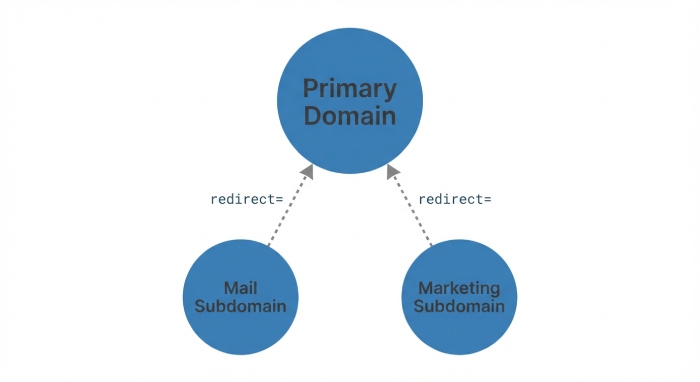
Instead of publishing full policies repeatedly, point subdomains to a master policy:
v=spf1 redirect=example.com
Use redirect= on domains that do not need distinct SPF mechanisms. This prevents multiple SPF records across related hosts, reduces DNS lookups, and centralizes policy management.
d. Fix #4: Consolidate third-party senders properly
Many third-party email services offer a ready-to-copy SPF TXT record. Do not publish separate vendor-provided records; remove those duplicates and use their include mechanism inside your single canonical SPF record. For instance, consolidate include:thirdparty1.com, include:thirdparty2.com, and include:thirdparty3.com into the one top-level policy for the domain that appears in your envelope-from for automated emails and newsletters.
e. Fix #5: Remove legacy or auto-generated entries
Old hosting panels and abandoned gateways often leave residual SPF records. Disable default templates that silently re-add SPF TXT records. Retire any SPF DNS RR type entries (deprecated) that may coexist with TXT and cause confusion. Cleaning this cruft prevents surprise SPF failure during provider changes.
2. Control lookups and length without splitting the record

a. Fix #6: Respect the 10-lookup ceiling—flatten with care
After merging, re-check the count of DNS lookups caused by each include mechanism, mx, and a. The DNS lookup limit is hard: exceeding it yields an SPF failure at evaluation time. If you approach the limit:
- Prefer vendor-managed aggregators (many third-party email services offer a consolidated include that reduces DNS lookups).
- Use targeted SPF flattening tools or managed services that expand includes into IPs while monitoring changes, so you don’t resort to an SPF split across multiple records (which will break SPF validation).
- Where feasible, replace includes with static ip4/ip6 for a known dedicated IP or stable IP address range, especially for in-house MTAs.
Revisit this step whenever you add a new service to your email system or migrate marketing emails to a new provider.
b. Fix #7: Keep a single TXT even if the line is long
The 255-character limit is per-string, not per SPF record. You can publish one SPF TXT record as multiple quoted strings that concatenate. Do not create multiple SPF records to work around length; doing so will cause an SPF error.
Formatting detail for long records
For long SPF record length scenarios:
“v=spf1 include:spf.protection.outlook.com include:thirdparty1.com “
“include:thirdparty2.com ip4:203.0.113.0/24 ip6:2001:db8::/32 -all”
This remains one SPF TXT record and preserves correct SPF validation.
c. Fix #8: Retire the deprecated SPF RR type
Only publish SPF as a TXT record. Remove any legacy SPF DNS RR type data to avoid “parallel” policies that produce multiple SPF records behavior during evaluation and risk an SPF fail at strict receivers. This step is frequently overlooked in older zones.
3. Validate, monitor, and align with Microsoft 365 guidance

a. Fix #9: Validate and monitor continuously
- Lower DNS TTLs before changes so you can roll back if SPF validation or DMARC alignment breaks.
- Verify exactly one SPF TXT record per hostname using dig/nslookup and multiple online validators. Confirm no more than 10 DNS lookups. Document your SPF configuration and each include mechanism’s purpose.
- Test end-to-end with Microsoft 365 and Outlook mailboxes, checking Authentication-Results headers for SPF pass or SPF fail. Ensure DMARC and DKIM also validate, since all three signals influence domain reputation and help prevent email spoofing.
- Align with Microsoft 365 guidance on learn.microsoft.com and the required include:spf.protection.outlook.com entry. If you use hybrid, add your on-premises dedicated IP ranges explicitly.
- Monitor DMARC reports for anomalies after changes. Sudden SPF failure for automated emails or newsletters from a subdomain often indicates a reintroduced duplicate, a broken include, or a new vendor that pushed you past the DNS lookup limit.
- Keep a change log for every addition of third-party email services, noting how each SPF include statement affects DNS lookups and SPF record length.
Field notes and community wisdom: Practitioners on Spiceworks Community, including voices like Rod-IT, DonWels, PatrickFarrell, and spoonman, often highlight two recurring pitfalls unnoticed multiple SPF records after migrations and silent control-panel templates that republish defaults. Cross-checking policies for news.yourdomain.com and mail.yourdomain.com, as well as parked hosts, prevents those regressions.
SPF mechanisms to remember in practice:
- ip4/ip6 for stable ranges (ideal for a dedicated IP you control)
- a and mx when your sending hosts are the same as published records
- include mechanism for third-party email services that rotate infrastructure
Security context: Strong email authentication SPF plus DKIM and DMARC supports better email deliverability and mitigates abuse. Treat it as part of your broader cybersecurity program and routinely re-validate after vendor changes.
Mini checklist before you finish:
- One SPF TXT record per hostname, no exceptions.
- Combined, canonical policy for the primary domain; redirect=example.com for aligned subdomains that don’t need unique rules.
- Under the DNS lookup limit, with flattening or aggregation where necessary.
- Correct syntax, a single terminal -all or ~all, and verified alignment with Microsoft 365 and any third-party email services.
- Ongoing SPF validation and DMARC monitoring so you catch issues before they become outages.
Resolving the issue of multiple SPF records is crucial for upholding effective email authentication, safeguarding your domain’s reputation, and ensuring reliable delivery to inboxes. By merging duplicate SPF entries into one valid record, reviewing your DNS settings, and adhering to best practices for SPF, DKIM, and DMARC, you can address authentication issues and minimize the chances of spoofing or message rejection. Applying these nine effective solutions will enable you to quickly regain compliance and maintain a secure, dependable, and optimized email system for successful delivery.