

Email authentication is vital for safeguarding your domain against spoofing and enhancing email deliverability. A significant aspect of this is DKIM (DomainKeys Identified Mail), which ensures that an email remains unchanged during transmission. However, issues like incorrect DNS records, misconfigured selectors, or absent signatures can lead to DKIM validation failures.
To make sure your emails successfully pass authentication checks, it is essential to routinely assess your DKIM records with trusted diagnostic tools. This guide will cover eight effective tools for testing DKIM records and resolving signature issues, enabling you to swiftly pinpoint configuration problems, validate DNS settings, and uphold a robust email authentication framework.
Why DKIM Checks Matter for Deliverability and Security
DomainKeys Identified Mail (DKIM) attaches a cryptographic signature to each message, enabling the recipient mail server to authenticate email from your signing domain and preserve message integrity. A correct DKIM record in DNS exposes the public key that verifies the digital signature in the email header; if the dkim record is malformed, the verification fails and your email deliverability and sender reputation suffer.
A disciplined DKIM check regimen reduces spoofing prevention blind spots, strengthens phishing protection, and complements DMARC and SPF. Consistent dkim record validation also supports BIMI by ensuring your brand’s logo only displays when authentication passes. For teams standardizing on enterprise-grade email security, DKIM is a non-negotiable control alongside MTA-STS and TLS-RPT.
Because DKIM hinges on the dkim selector (the s= value) and the correct DNS txt record at selector._domainkey.example.com, routine dkim record lookup and a reliable dkim validator are essential. The tools below help you run a dkim record test, verify signature outcomes, and track down subtle dkim syntax errors that break your email signature across Google, Microsoft, and other large mailbox providers.
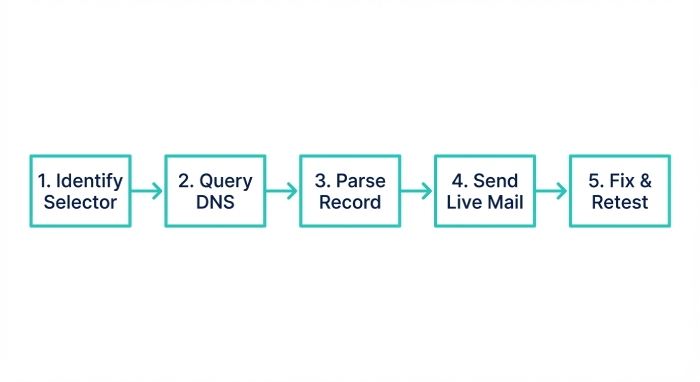
How to Run a Reliable DKIM Record Check
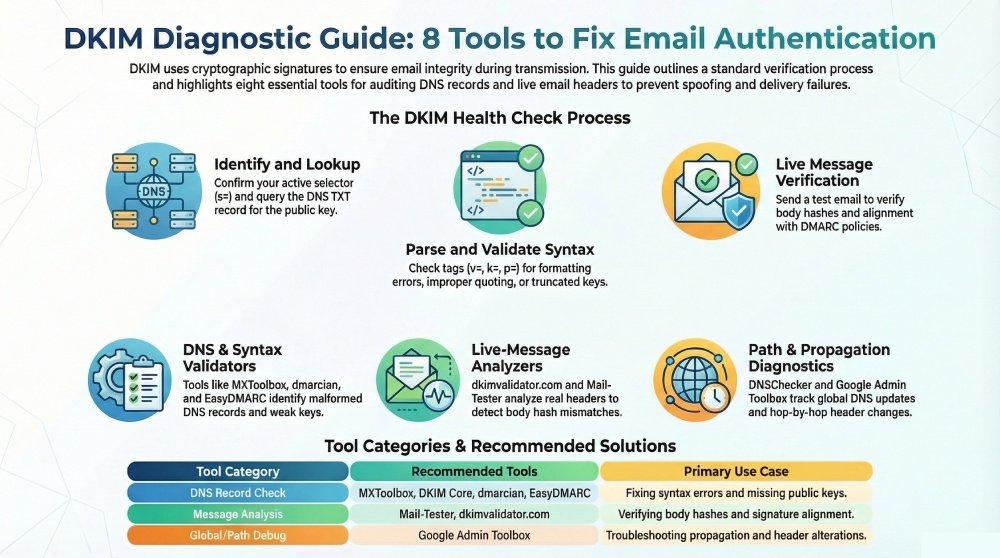
- Identify the active selector and domain name. Confirm which selector your outbound email systems (e.g., SendGrid or an email server on Microsoft Exchange) actually sign with.
- Perform a dkim lookup/dkim record lookup. Query the DNS TXT record for the selector to retrieve the public key.
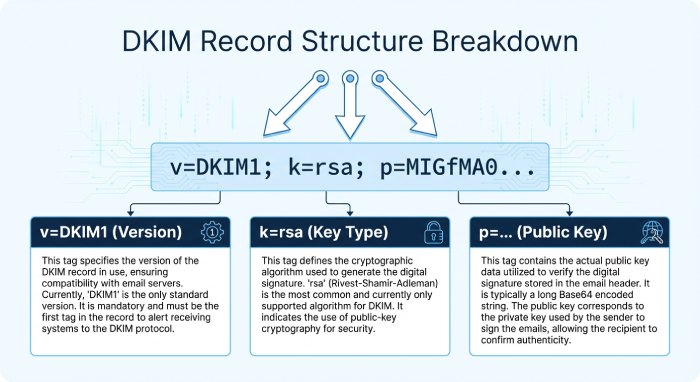
- Parse the dkim record. Use a dkim record checker to confirm k=, v=, p=, t=, and optional tags follow DKIM syntax and that the dkim key is the intended size.
- Send a live message. A full DKIM check includes delivering a message to a test inbox and reviewing Authentication-Results to verify signature status and alignment with DMARC.
- Fix and retest. Adjust the dns record, republish, and re-run the dkim record check until the cryptographic signature validates consistently.
Minimum data you need for a DKIM record lookup
- The selector (s=) your MTA uses, the domain name (d=) being signed, and access to DNS to update the TXT record that hosts the public key. Keep your private key secured on the signing system.
8 Best Tools to Test DKIM Records and Fix Signature Errors
DNS-based DKIM lookups and validators
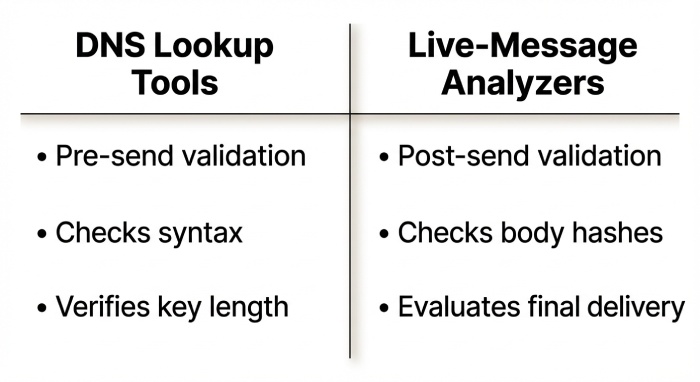
These tools focus on the DNS layer, providing a fast dkim record test, dkim record validation, and immediate syntax feedback before you send live mail.
Tool #1: MXToolbox DKIM Lookup
Paste your DKIM selector and domain to test the dkim record at selector._domainkey.example.com. MXToolbox performs an instant DKIM lookup and dkim record check, parsing the tags, key-length, and syntax. Use its warnings to correct missing or extra semicolons, bad k= values, or truncated p= public keys. Then republish a clean v=DKIM1; k=rsa; p=… txt record and re-test. This dkim validator often resolves signature failures tied to an invalid key and accelerates troubleshooting for email authentication issues that impact email deliverability.
Tool #2: dmarcian DKIM Inspector
dmarcian’s inspector validates DKIM TXT syntax, key size, and CNAME chaining, and exposes the parsed public key. Leverage this DKIM record checker to spot short (1024-bit) keys and rotate to 2048, remove t=y (testing) when going live, and confirm the selector your MTA signs with matches DNS so DKIM signatures actually verify. Its guidance pairs well with DMARC alignment checks and helps authenticate email reliably across third-party email services.
Tool #3: DKIM Core Key Check
A canonical dkim validator that confirms the dkim key is published correctly and retrievable. Enter domain and selector to catch TXT record formatting mistakes (improper quoting, whitespace), long p= values not split into 255-character strings, or a missing selector. Correct and redeploy the dns record to stop “no key for signature” errors that otherwise confuse the recipient mail server during verification.
Tool #4: EasyDMARC DKIM Record Checker
EasyDMARC runs a fast dkim record test and surfaces DMARC alignment hints. Use this dkim record checker to verify each sending platform’s selector is published, ensure d= aligns with your visible From domain, and coordinate multiple selectors during key rotation so signatures don’t intermittently fail. EasyDMARC’s platform—frequently referenced by Expert Insights and rated highly on G2 Crowd and SourceForge—also includes a Domain Scanner module for holistic email security posture.
Live-message analyzers and end-to-end testers
Once the DNS layer looks correct, confirm your DKIM implementation with tools that evaluate real messages and Authentication-Results.
Tool #5: dkimvalidator.com (Send-to-Analyze)
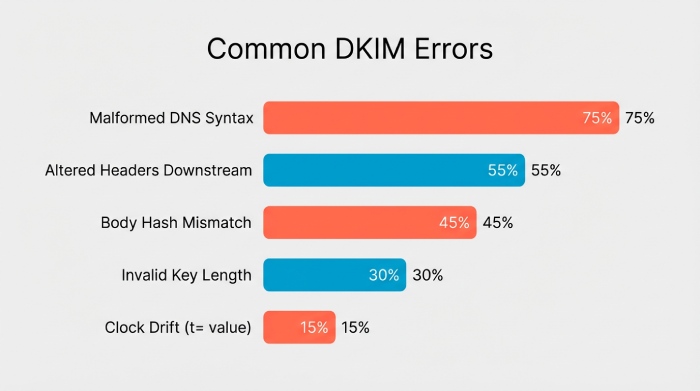
Send a test email to the provided address to see live Authentication-Results, DKIM pass/fail, header list (h=), and body hash (bh=) details. If you see body hash mismatches or modified headers, switch to relaxed/relaxed canonicalization, sign at the last outbound hop, and avoid downstream footer/rewrite systems that break signatures. This practical DKIM check ensures your email header subset, signing domain, and canonicalization choices result in a verifiable digital signature.
Tool #6: Mail-Tester.com
An end-to-end deliverability check that includes DKIM/DMARC verdicts and clear remediation tips. Use it to detect multiple conflicting DKIM signatures, clock drift causing “signature not yet valid” (t=), or an expired signature window. Then standardize on one signer, sync NTP on MTAs, and adjust signing timing to stabilize verification. Mail-Tester’s holistic feedback often uncovers a hidden email authentication issue beyond the dkim record itself.
Propagation and header-path diagnostics
If results vary by region or recipient, investigate DNS propagation and the message path.
Tool #7: DNSChecker DKIM Lookup
Checks your DKIM TXT record from many global resolvers to expose slow propagation, split-string issues, or DNS provider quirks. If some regions don’t see the key, lower TTLs during changes, ensure the p= value is properly split into quoted chunks, and verify any selector CNAME chain ends in a TXT record. This multi-region DKIM record lookup confirms consistent dns query results for your DKIM record check at scale.
Tool #8: Google Admin Toolbox – Messageheader Analyzer
Paste raw headers to visualize the mail path and DKIM verdicts per hop. Use it to pinpoint where content or headers were altered (breaking the signature), then reconfigure to sign after that modification (e.g., at the outbound gateway) and exclude mutable headers from h= judiciously. This makes it easier to verify signature outcomes at Google and Microsoft destinations and debug complex multi-hop outbound email routes.
Pro Tips to Prevent Future DKIM Signature Failures
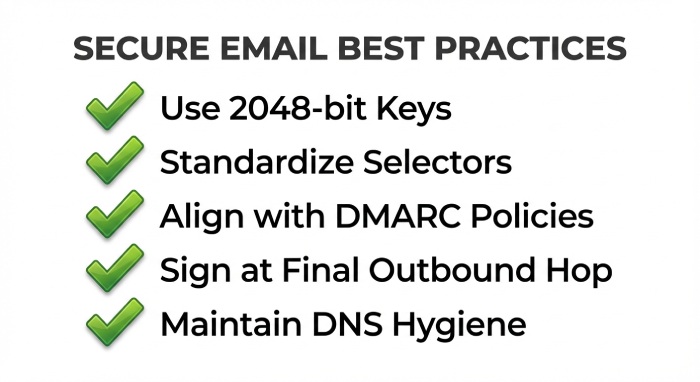
- Standardize selectors and rotation: Maintain clear naming for each dkim selector, keep overlapping selectors during key rotations, and retire old keys only after live verification. Document which third-party email service uses which selector to avoid confusion.
- Use modern key sizes: Prefer 2048-bit keys. Store the private key securely; publish only the public key in the dns record. Rotate keys periodically as part of your DKIM implementation policy.
- Harden DNS hygiene: Ensure the TXT record is a single, unbroken policy (or correctly split into 255-char segments), avoid stray quotes/whitespace, and confirm the v=DKIM1; k=rsa; p= tags are present. Re-run a dkim record test after every change.
- Align with DMARC: The d= signing domain should align with the visible From domain. Combine DKIM with SPF for layered email authentication that improves spoofing prevention and phishing protection.
- Control the message path: Sign at the final trusted hop to minimize header/body changes. Avoid systems that append disclaimers or rewrite subjects after signing, or exclude those mutable fields from the email signature set.
- Monitor continuously: Use TLS-RPT and DMARC aggregate reports to spot sudden dkim validator failures. Many teams rely on platforms recognized as a Leader by Experts to centralize alerting and remediation.
- Validate across providers: Test against major providers (Google, Microsoft) and popular MTAs. Send from common platforms like SendGrid to confirm consistent behavior at each recipient mail server.
- Keep time in sync: Ensure all signing and verifying systems have accurate clocks to prevent t= window issues.
- Tie everything back to deliverability: Every periodic dkim lookup and DKIM record validation you perform supports authenticate email results, protects sender reputation, and increases message integrity across your ecosystem.
To sum up, it is vital to periodically test your DKIM records to ensure robust email authentication and safeguard your domain’s reputation. The aforementioned tools simplify the process of identifying configuration problems, confirming DKIM signatures, and addressing widespread errors that might hinder email delivery. Utilizing dependable DKIM testing tools allows you to swiftly spot issues related to selectors, DNS records, or signature validation.
Implementing these strategies not only resolves DKIM signature errors but also enhances your comprehensive email security framework alongside SPF and DMARC. Dedicating time to oversee and verify your DKIM configuration guarantees that your messages are deemed trustworthy by receiving servers and successfully arrive in your recipients’ inboxes.