

Why these DKIM record examples matter
A well-formed DKIM record is the foundation of email authentication. It publishes a public key in DNS so receiving gateways can verify a DKIM signature (a digital signature in the DKIM-Signature email header) created with your private key.
The five DKIM example patterns below show you how selector naming, key length, and TXT formatting interact to help an email server verify email from your domain name, reduce email spoofing, and keep legitimate messages out of the spam folder.
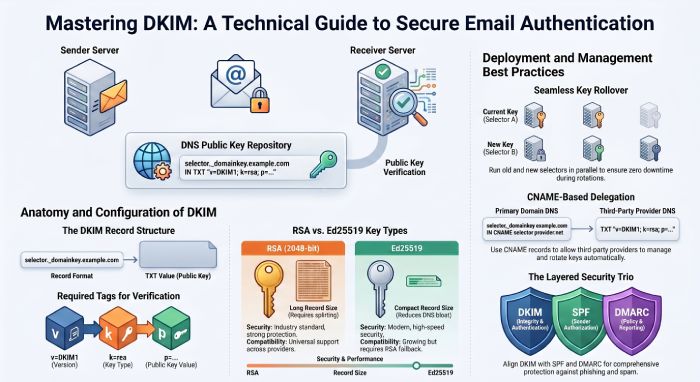
Quick refresher: parts of a DKIM record
- Record name: selector.domainkey.domain (for example, default.domainkey.example.com). The “domainkey” label is required.
- Record type: TXT (a dkim dns record is a DNS TXT record).
- Core tags in the value: v=DKIM1 (or v=dkim1), k=rsa, p= (public key value). Optional tags support policies and algorithms.
- The receiving email provider performs a DNS lookup for the selector at your domain name, retrieves the public key, and uses it to verify email by checking the DKIM header’s digital signature.
DKIM Example 1 – Basic 1024-bit RSA TXT record
This dkim example is the classic baseline most admins start with for DKIM setup. It is a single-string dns txt record containing a 1024-bit RSA public key.
Selector naming and the record name
- Use a clear selector such as default, mail, or app-specific labels.
- Complete record name format: selector._domainkey.example.com.
- The selector lets you rotate keys without touching your main domain name.
a. default.domainkey vs per-app selectors
- default.domainkey is simple and common.
- Per-app selectors (e.g., mktg.domainkey, billing.domainkey) let you scope cryptographic keys to the system that sends mail.
- This separation makes it easier to authenticate sender identities tied to a particular email service provider.
Host/Name vs Value fields in DNS tools
- Host/Name: default._domainkey (many DNS wizards append your domain automatically).
- Value: a TXT record format string with tags.
- TTL: choose a ttl like 3600s to balance propagation and agility. Short TTLs help during dkim setup and rollover.
Tag anatomy in the value
A minimal value might look like:
v=DKIM1; k=rsa; p=MIIBIjANBgkqhkiG9w0BAQEFAAOCAQ8A…
- v=dkim1 or v=DKIM1 is the version; case-insensitive by RFC 6376 (rfc6376).
- k=rsa is the key type.
- p= (public key value) holds the base64-encoded public key.
- Common optional tags you will see: s= (selector) is in the header not the DNS value; h= (headers field), d= (domain parameter), a= (algorithm), and bh= (body hash) appear in the DKIM-Signature header, not the DNS record. The DNS record only needs v, k, and p.
- The receiving system validates a= (algorithm) like rsa-sha256, parses h= (headers field), recomputes the body hash, and checks b= (dkim signature) against the public key.
a Required vs optional tags
- Required in DNS: v and p (k defaults to rsa in most implementations but include it).
- Optional in DNS: n= (notes), t= (testing). Avoid clutter.
b. Common formatting rules and TTL pitfalls
- End tags with semicolons; no trailing stray semicolon needed.
- No quotes inside the value unless your DNS UI automatically adds them.
- Case: v=dkim1 is equivalent to v=DKIM1.
- Watch the record type: ensure TXT, not CNAME. Wrong record type breaks verification.
- TTL too long slows down revocation or rotation.
DKIM Example 2 –
2048-bit RSA key with multi-string TXT formatting
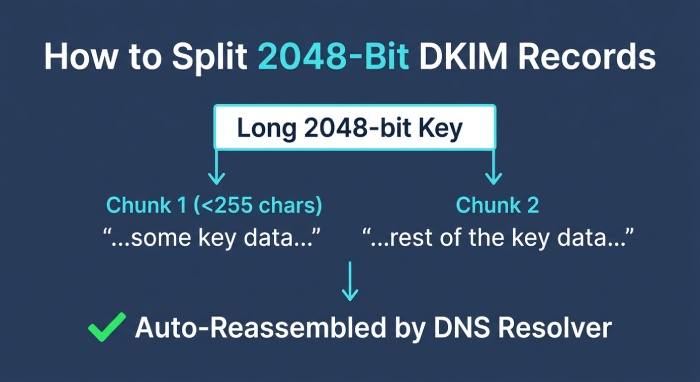
Modern guidance favors 2048-bit keys for stronger spoofing prevention. The longer p= value often exceeds 255 characters, so you split it across multiple quoted strings.
Splitting long p= values into 255-character chunks
DNS TXT records allow multiple strings; resolvers concatenate them during a dns query. Example (wrapped for readability):
v=DKIM1; k=rsa; p=”MIIBIjANBgkqhkiG9w0BAQEFAAOCAQ8A…” “AQAB1234…” “MoreBase64…”
- The dns txt record is still one dkim record; the multiple strings are joined automatically by DNS.
- The email server doing the dkim check reassembles the full public key transparently.
Avoiding stray spaces and line breaks
- Do not add spaces between the closing quote of one chunk and the opening quote of the next unless your provider requires it.
- No extra line breaks; some DNS UIs insert them—verify after publish.
- Confirm with a dns lookup that the p= value is continuous.
Record-size limits in various DNS providers
- Some control panels limit the total TXT size; check your provider’s docs.
- Cloudflare accepts long records and shows them as split strings; confirm with dig or nslookup.
- If your email provider suggests 4096-bit keys, verify email resolvers and DNS limits first, or you may create an unreachable dkim dns record.
DKIM Example 3 –
Key rollover with dual selectors
Run two selectors in parallel to rotate keys without downtime:
- New: 2024q4.domainkey.example.com (2048-bit).
- Old: 2024q2.domainkey.example.com (1024-bit, to be retired).
Process:
1) Publish the new public key dkim record.
2) Update your signer (MTA or ESP) to use the new selector.
3) Wait for caches to expire (respect TTL).
4) Remove the old record after all in-flight email headers have aged out.
This DKIM example preserves message integrity and keeps the digital signature tamper-proof during transition.
Ed25519 DKIM key (k=ed25519)
a. Why Ed25519 for compact, fast keys
In this DKIM example, the key type is Ed25519, which provides smaller cryptographic keys and speedy verification while preserving message integrity. The dkim record remains the same authentication method at its core: an email server signs with a private key, and receivers verify email using the matching public key, ensuring a tamper-proof digital signature. Ed25519 allows a compact public key in the dns txt record, reducing DNS bloat and helping large senders meet email authentication targets at scale.
b. Selector structure and publishing are identical to RSA
Operationally, the selector label and domainkey naming conventions do not change. You still publish a dkim dns record at:
- record name: s2024._domainkey.example.com
- record type: TXT (dns-txt-record)
- txt record format: v=dkim1; k=ed25519; p= (public key value)
The selector value (the s= tag in the dkim header) points to s2024._domainkey under your domain name. A verifier performs a dns lookup for that name, follows any necessary dns query chain, and reads the public key from the TXT to verify email.
c. Sample TXT values (Ed25519 + RSA fallback)
- s2024.domainkey.example.com TXT “v=dkim1; k=ed25519; p= (public key value)”
- s2024rsa.domainkey.example.com TXT “v=dkim1; k=rsa; p= (public key value)”
The dkim header on signed mail will typically contain a= (algorithm) ed25519-sha256 or rsa-sha256, d= (domain parameter) example.com, s= (selector) s2024, h= (headers field) that were signed, bh= (body hash), and b= (dkim signature). This digital signature spans chosen email headers and the email body (after canonicalization) to deliver spoofing prevention.
Compatibility, verifier support, and migration
While RFC 6376 (rfc6376) originally specified rsa-sha256 for DKIM, many major verifiers now understand k=ed25519 as well. However, support is not universal across every email provider, MTA, or legacy appliance. To avoid email spoofing risks during migration, sign with Ed25519 and keep an RSA selector in parallel. This dual-signing strategy preserves email authentication across ecosystems that have not yet enabled Ed25519 verification.
- Publish the Ed25519 dkim record first with an appropriate TTL (e.g., 3600–86400s) and confirm reachability with a dkim check.
- Sign outbound traffic with both keys for at least the longest TTL plus delivery-delay window.
- Monitor DMARC (Domain-based Message Authentication Reporting and Conformance) aggregate reports for pass/fail rates by a= (algorithm).
Operational notes: headers, hashing, and canonicalization
The hash function remains SHA-256, producing a body hash reflected in the bh= (body hash) field. Canonicalization (e.g., relaxed/relaxed) behaves the same irrespective of key type. The email server includes both dkim signatures if you enable parallel signing; receivers like Gmail and Big Email will validate either signature to authenticate sender identity and preserve message integrity.
If you manage DNS at Cloudflare, note that the selector structure and record type do not change; publish the TXT under _domainkey. Documentation on theNET has covered Ed25519 momentum, but test broadly.
DKIM Example 4 –
Subdomain-specific selector for tools
Marketing or CRM tools often send from a subdomain. Example:
- Selector: crm1._domainkey.mail.example.com
- Benefit: scoped cryptographic keys per subdomain align with DMARC domain matching and simplify dkim policies when multiple systems authenticate sender identities.
CNAME-based DKIM delegation to a sending provider
How CNAME delegation works
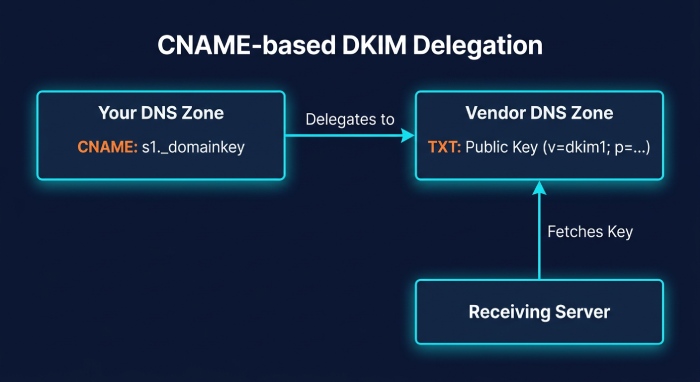
Many teams delegate their dkim record management to an email service provider using a dns-cname-record so that the vendor can rotate cryptographic keys without you changing your zone. In this DKIM example, you point your selector.domainkey to a vendor-managed hostname; the vendor hosts the dns txt record that contains the public key. Your record name remains the same (selector.domainkey.example.com), but the record type is CNAME pointing to, for instance:
- s1._domainkey.example.com CNAME s1.domainkey.bigemail.example.net
The vendor then publishes the TXT at s1.domainkey.bigemail.example.net with v=dkim1; p= (public key value). Verifiers follow the CNAME target during the dns lookup, fetch the TXT, and verify email using the public key.
a. Example chain and provider-driven rotation
- You publish: dns-cname-record s1._domainkey.example.com → s1.domainkey.bigemail.example.net
- Big Email publishes/rotates the TXT at the target. Your outbound signer uses selector s1, and receiving MTAs find the digital signature, then chase the CNAME to the hosted key. This model enables provider-driven rotation and strong spoofing prevention without zone edits.
Pitfalls and planning: TXT vs CNAME, TTL, propagation
- Never place a TXT and a CNAME at the same name. DNS forbids TXT+CNAME coexistence at selector._domainkey.
- Plan ttl carefully. Set a conservative ttl on your CNAME and ensure the provider’s TXT records also use sensible values. Account for propagation across recursive resolvers between the DNS Root Server and end receivers; Cloudflare (cloudflare) DNS is generally fast, but plan for caching.
- Avoid long CNAME chains, which increase dns query time. Be mindful of failover behavior at the email provider during rotations.
Be sure your overall dkim setup aligns with DMARC alignment rules alongside SPF (Sender Policy Framework). Publish related dns records for email such as dns-mx-record, dns-spf-record, dns-dmarc-record, and maintain hygiene on foundational records like dns-a-record, dns-aaaa-record, dns-ns-record, dns-soa-record, dns-srv-record, dns-ptr-record, and dnskey-ds-records where applicable.
a. Monitoring and troubleshooting
- Run a dkim check against the delegated selector regularly.
- Inspect live email headers to confirm d= (domain parameter) and s= (selector) match the expected domain name and selector.
- Watch for increases in email spam or messages routed to the spam folder during changes; tighten dkim policies if needed and ensure DMARC policy enforces authenticate sender requirements without causing false positives during transitions.
DKIM Example 5 –
Staging/test selector with t=y
For non-production testing, publish:
- test._domainkey.dev.example.com with v=DKIM1; k=rsa; p=…; t=y
- Use it to validate dkim setup, confirm canonicalization (relaxed/relaxed), and ensure the hash function rsa-sha256 is accepted by the receiving systems.
Selector rotation and flags
a. Running multiple selectors in parallel (2024a/2024b)
A safe rotation strategy is to run multiple selectors in parallel, such as 2024a and 2024b. Your email server can sign with both private keys, emitting two dkim signatures in the dkim header. Receivers then validate either digital signature against the corresponding dns txt record, maintaining email authentication without disruption.
b. Safe rollover steps
- Generate new cryptographic keys and publish 2024b._domainkey.example.com as a TXT with v=dkim1; p= (public key value).
- Keep 2024a published. Begin dual-signing (a= rsa-sha256 or ed25519-sha256) so both selectors appear in email headers.
- Wait at least the maximum ttl across your zones and any queueing delays.
- Stop signing with 2024a; continue to publish its TXT for an additional window, then remove the retired dkim record.
- Validate with DMARC feedback and spot-check with Gmail and other mailbox providers.
Flags and tags: t=y, t=s, s=email, n= notes
During introduction or testing, you may include t=y (testing) in the key record to signal cautious treatment to some receivers. For subdomain restrictions, t=s (strict) can indicate the key is valid only for exact d=. You can also publish s=email in the key record to indicate the service type, and use n= for human-readable notes. These tags live in the dns txt record alongside v=dkim1 and p= (public key value).
In a teaching scenario: Alice signs from example.com with selector 2024b; Bob at Gmail receives the message; Chuck attempts email spoofing with a fake domain name but fails DMARC. The legitimate message’s b= (dkim signature) and bh= (body hash) verify, thanks to accurate canonicalization and the correct hash function, while the attacker’s message cannot produce a valid signature.
a. Cleanup and auditing of retired keys
Once rollover completes, remove obsolete selectors to reduce attack surface. Audit that each dkim dns record corresponds to an active private key and that no stale keys linger. Use an Email Security DNS Wizard or tooling integrated with Edge Delivery Services to inventory selectors, automate dkim setup for new streams, and ensure consistent record name, record type, and ttl settings. Keep SPF and DMARC in sync with DKIM to guard against phishing attacks and maintain broad spoofing prevention.
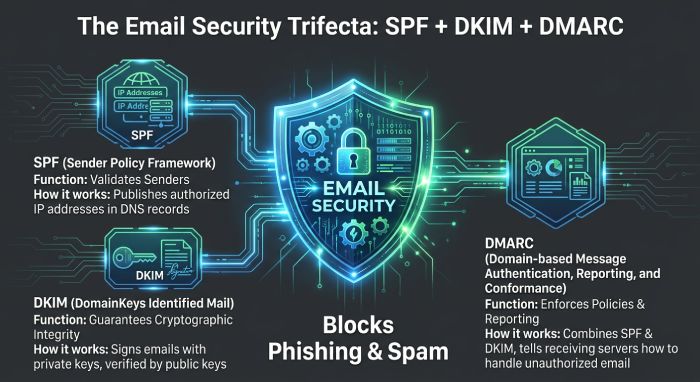
Finally, remember DKIM is one part of a layered control set with SPF and DMARC (Sender Policy Framework and Domain-based Message Authentication Reporting and Conformance). Together, these controls help verify email, preserve message integrity, and cut down on email spam abusing your brand.
Tying it together with SPF and DMARC
- SPF (Sender Policy Framework) authenticates the sending IP. DMARC (Domain-based Message Authentication Reporting and Conformance) aligns SPF and DKIM to strengthen spoofing prevention.
- A strong DKIM record plus SPF and DMARC reduces email spam and blocks phishing attacks.
- DMARC alignment checks that the d= (domain parameter) in the DKIM header matches the From domain name.
- Consider referencing guidance from RFC 6376 and large receivers like Gmail and Big Email when designing dkim policies.
Field-level anatomy in the DKIM-Signature header
While not part of the DNS record, understanding the header improves troubleshooting:
- d= (domain parameter): example.com
- s= (selector): e.g., default
- a= (algorithm): rsa-sha256
- h= (headers field): signed headers such as From, To, Subject
- bh= (body hash): hash of the email body after canonicalization
- b= (dkim signature): the base64 digital signature created with your private key
When a receiver performs a dns query for s=default at default._domainkey.example.com, it retrieves the public key from your dns txt record and verifies the digital signature to authenticate sender identity and verify email authenticity.
Practical publishing tips and provider notes
- DNS tools: Some UIs label the input as Host/Name and Value; others expect FQDN. Be precise with record name.
- Use diagnostics like dig, nslookup, and web-based dkim check tools to confirm the txt record format.
- Cloudflare, traditional DNS hosts, or managed services differ in how they display multi-string records—always validate via external DNS Root Server resolvers.
- Keep TTL moderate (e.g., 300–3600) during changes, then raise for stability.
- If your ESP or MTA supports Edge Delivery Services, ensure the signer uses the same selector you published.
End-to-end example scenario: Alice, Bob, and Chuck
- Alice sends from alice@example.com via an email service provider. The MTA signs with selector=mail and private key.
- Bob’s receiving email server at Gmail fetches the dkim record at mail._domainkey.example.com via DNS, gets the public key, and validates the DKIM-Signature header to verify email integrity.
- Chuck sees that SPF, DKIM, and DMARC all pass, so the message avoids the spam folder.
This DKIM example mirrors real flows: DNS records for email—dns-mx-record, dns-spf-record, dns-dmarc-record, and dns-txt-record—work together to support authentication method layers.
Troubleshooting checklist and guardrails
- Confirm record type is TXT and the value has v=DKIM1 (or v=dkim1), k=rsa, and a correct p= key.
- For 2048-bit records, ensure proper splitting and no stray spaces.
- Run a dkim check and a DNS lookup from outside your network.
- Verify canonicalization settings and that the body hash is computed as expected.
- Coordinate with your email provider if signatures intermittently fail—look for header rewrapping that changes email headers or email body content.
Related standards, tools, and references
- Standards: DKIM per RFC 6376; SPF and DMARC best practices.
- Tools and entities you may encounter: Email Security DNS Wizard, dnskey-ds-records, dns-a-record, dns-aaaa-record, dns-cname-record, dns-ns-record, dns-soa-record, dns-srv-record, dns-ptr-record, dns-dmarc-record.
- Learning resources from Cloudflare’s theNET often cover DNS and delivery nuances.
- Many control panels style themselves as a DNS wizard—always verify final wire data with a raw DNS query.
Security posture and operational recommendations
- Prefer 2048-bit keys; rotate via new selectors. Keep private key access restricted.
- Maintain a registry of selectors per system; document record name, TTL, and last rotation date.
- Treat DKIM as one layer: pair it with SPF and DMARC for comprehensive email security and durable spoofing prevention strategies.
- Periodically audit cryptographic keys, confirm message integrity at large receivers, and monitor DMARC reports for anomalies.
FAQs
Do Ed25519 DKIM keys work everywhere?
Support is growing but not universal. Maintain a parallel RSA selector and sign with both until you confirm all critical receivers validate the Ed25519 dkim signature via real-world DMARC reports.
Can I mix TXT and CNAME at selector._domainkey?
No. DNS rules disallow TXT and CNAME at the same name. If you delegate with a CNAME, host no TXT at that label; the provider must publish the TXT at the CNAME target.
How many DKIM selectors can I run at once?
You can run multiple selectors (for example, 2024a and 2024b) in parallel. This facilitates safe key rotation and phased rollouts without interrupting email authentication.
What TTL should I use for DKIM TXT records?
Common practice ranges from one hour to one day. Use shorter TTL during migrations to speed rollback, then lengthen once stable to reduce unnecessary dns query load.
Do DKIM flags like t=y and t=s affect verification?
Some receivers honor these hints, but not all. Use them conservatively during tests; rely on correct signatures and solid DMARC policy for enforcement.
How do DMARC and SPF relate to DKIM?
SPF and DKIM provide separate signals; DMARC ties them to your domain name and policy for enforcement and reporting. Implement all three to strengthen authentication and reduce phishing attacks.
What should I check in the DKIM header during troubleshooting?
Confirm d= matches your domain, s= matches the published selector, a= shows the intended algorithm, and that h= lists expected headers. Ensure bh= and b= validate against the published public key.
Key Takeaways
- Publish Ed25519 keys with the same selector._domainkey structure as RSA, but retain an RSA fallback until verifier support is confirmed.
- CNAME-based delegation lets your provider rotate keys without zone edits—never mix TXT+CNAME at the same name and plan ttl for propagation.
- Run multiple selectors (e.g., 2024a/2024b) to enable safe, staged key rollover; remove retired dkim records after the window elapses.
- Use DMARC plus SPF with DKIM to authenticate sender identity, verify email, and reduce email spam and phishing attacks.
- Monitor live email headers and DMARC reports to validate hash function, canonicalization, and overall dkim policies across providers like Gmail and Big Email.